

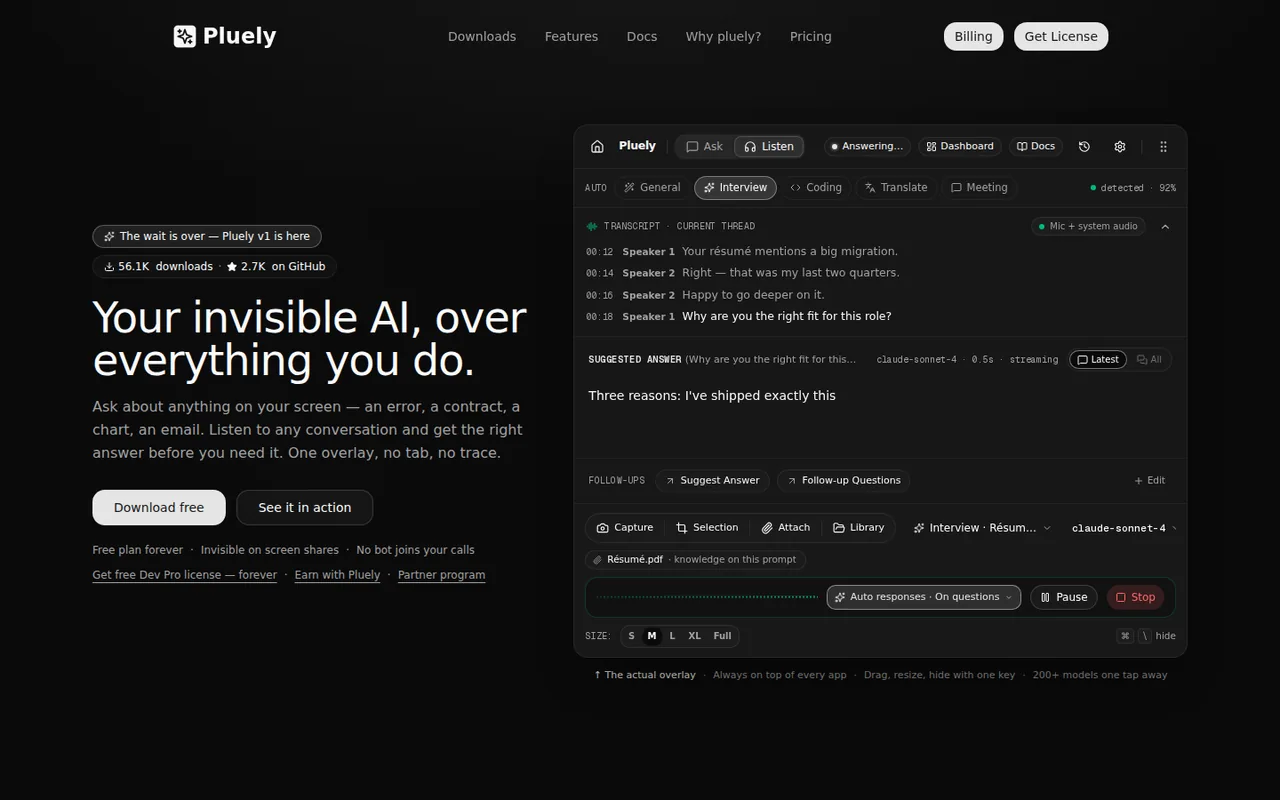
Pluely: free forever on your own AI keys, but bundled models start at $15 per month
Updated October 6, 2026 · By Elias Brandt · Documentation review, not tested hands-on
Pros
- Free plan has no time limit
- Your own keys or local CLIs
- Local storage of history
- Plan allowances are published
Cons
- Refund wording differs
- Billing period of the discounted price is unclear
- Model count is inconsistent
- Rules of use are yours to check
- Stealth is not independently shown
Bottom line
Full overlay, Ask mode with screenshots and unlimited use on your own AI and speech-to-text keys; no signup. Bundled Pluely models are not included.
You already pay for an AI provider or run a local CLI such as Ollama, because the free build works on your own keys with no signup and Pluely does not meter that use.
Your employer, school or interviewer bans live AI help, because the terms leave those rules to you and the overlay is built to stay hidden.
Best forPeople who already pay for AI API keysDevelopers who run a local CLIAnyone who needs a clear policy fit
Strengths, limits and who it suits, in full
Strengths
- Free plan has no time limit The pricing page lists Free at $0 forever with the full overlay and unlimited use on your own keys, with no signup.
- Your own keys or local CLIs You can connect any OpenAI-compatible endpoint or run Claude Code, Gemini CLI, Codex, Qwen Code or Ollama.
- Local storage of history The docs say chats, transcripts and files stay on your device.
- Plan allowances are published Requests, transcription hours, uploads and follow-ups are listed per plan.
Limits
- Refund wording differs The pricing page says purchases are final after activation; the terms say refund requests go through support.
- Billing period of the discounted price is unclear Paid plans show a struck-through price and a lower figure, with billing 'monthly or yearly', but no yearly total.
- Model count is inconsistent Official pages say 100+, 200+ and 280 bundled models.
- Rules of use are yours to check The terms make you responsible for recording laws and the rules of meetings, exams and interviews.
- Stealth is not independently shown The overlay's invisibility is the provider's claim; we did not test it against any specific tool.
Who it suits
- People who already pay for AI API keys Free and Dev Pro use your own keys, so the app adds an overlay and transcription layer to spend you already have.
- Developers who run a local CLI Claude Code, Gemini CLI, Codex, Qwen Code and Ollama connect directly, which keeps requests on your machine.
- Anyone who needs a clear policy fit if a workplace, school or interviewer bans live AI help, an overlay built to be hidden is a poor choice; use it only where assistance is allowed.
How much does Pluely cost?
Prices confirmed · checked
Regional prices: Prices are USD from the pricing page text read on 6 Oct 2026.
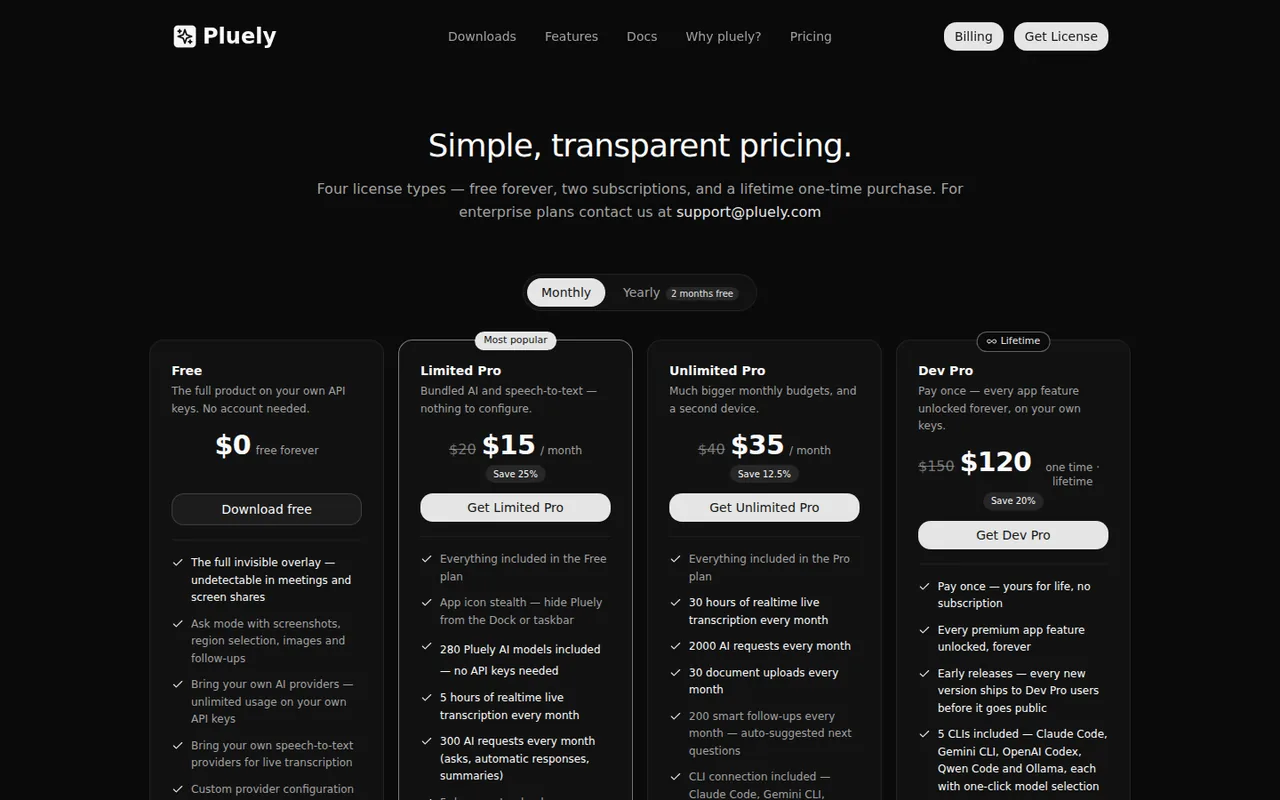
Each paid plan shows a struck-through higher price next to the discounted one; the comparison table says billing is monthly or yearly, but the text read does not say which period the discounted figure belongs to or give a yearly total, so none is quoted. Tax and regional pricing were not checked. Subscriptions renew automatically through LemonSqueezy. The pricing page says all purchases are final with no refunds after activation, while the terms say refund requests go through support; we do not resolve this. Dev Pro lists no bundled AI requests or transcription, and its document uploads show 'Coming soon'.
| Plan | Price | What you get |
|---|---|---|
| Free | $0 sourceFrom pluely.com/pricing, checked Oct 6, 2026 (opens in a new tab) | Full overlay, Ask mode with screenshots and unlimited use on your own AI and speech-to-text keys; no signup. Bundled Pluely models are not included. |
| Limited Pro | $15 per month as listed$20 struck through; billing monthly or yearly, period of the $15 not stated sourceFrom pluely.com/pricing, checked Oct 6, 2026 (opens in a new tab) | 300 AI requests, 5 hours of live transcription, 5 document uploads and 100 smart follow-ups a month; bundled models; 1 license, 1 device. |
| Unlimited Pro | $35 per month as listed$40 struck through; billing monthly or yearly, period of the $35 not stated sourceFrom pluely.com/pricing, checked Oct 6, 2026 (opens in a new tab) | 2,000 AI requests, 30 hours of transcription, 30 document uploads and 200 smart follow-ups a month; 2 licenses, 2 devices. |
| Dev Pro | $120 one time$150 struck through sourceFrom pluely.com/pricing, checked Oct 6, 2026 (opens in a new tab) | Lifetime license for 1 device; unlimited AI and speech-to-text on your own keys, early releases and a Deepgram speaker-labels option; no bundled requests listed. |
How far does it go?
- What a month of Limited Pro requests costsLimited Pro includes 300 AI requests for $15 a month as listed, so $15 / 300 is $0.05 per request if all are used; Unlimited Pro is $35 / 2,000, about $0.018. Each automatic response counts as one request, and no overage price is listed. Arithmetic on published allowances, not an observed cost; the billing period of the discounted prices is not stated.
Arithmetic from the published allowances above, not a usage test.
Taxes, currency and promotions can change the price you see at checkout.
Try Pluely free (opens in a new tab)
Key features
| Feature | What it does | Watch out |
|---|---|---|
| Ask mode: screenshot a screen region or the full screen and get a streamed answer over any app (homepage) | — | |
| Listen mode: mic and system audio transcribed locally with speaker labels, no bot in the call (homepage) | — | |
| Automatic responses on detected questions or after every pause (homepage) | Each automatic response uses one AI request; the default trigger is on detected questions, and 'every pause' spends requests fastest. | Allowances reset on the 1st and no overage price is listed. |
| Prompts with attached knowledge files such as a résumé or pricing sheet (homepage) | — | |
| Bring your own AI keys or local CLIs, or use bundled models on paid plans (pricing page) | — | |
| Public GPL-3.0 repository with releases (GitHub) | — | |
| Local-first handling | The docs say history, transcripts and prompts are stored on your device and only the question, screenshot or audio snippet you send leaves it; your own key or a local CLI keeps requests off Pluely's servers. | This is the provider's description; we did not inspect network traffic, and bundled models do route through Pluely. |
| Stealth overlay | The stealth page says the overlay is designed to stay out of the way on screen shares and recordings, and asks you to report anything that shows as a bug. | It is a design intent, not a guarantee for every conferencing or proctoring tool, and we did not test it. |
What Pluely costs
Pluely has a free plan that is not time-limited, but it runs on your own keys. The pricing page lists Free at $0, Limited Pro at $15 a month (a struck-through $20 sits beside it), Unlimited Pro at $35 a month (struck-through $40) and a lifetime Dev Pro at $120 once (struck-through $150). The comparison table says the subscriptions are billed monthly or yearly, but the text we read does not say which period the discounted figure belongs to or give a yearly total, so we do not state one.
Free covers the whole overlay, Ask mode with screenshots and unlimited use of the AI and speech-to-text providers you connect. Limited Pro adds bundled models with 300 AI requests, 5 hours of live transcription, 5 document uploads and 100 smart follow-ups a month on one device. Unlimited Pro raises those to 2,000 requests, 30 hours, 30 uploads and 200 follow-ups on two devices. Dev Pro unlocks the app features on your own keys; it lists no bundled requests or transcription.
What a month of included requests covers
The docs say each Ask, transform or suggestion that uses bundled AI is one request, and each automatic response in a meeting is also one. Divide the subscription price by the allowance: $15 / 300 is $0.05 per request on Limited Pro if you use all of them, and $35 / 2,000 is about $0.018 on Unlimited Pro. That is arithmetic on published allowances, not an observed cost. The same pages say the ‘every pause’ trigger spends requests fastest, and that when you hit a limit you wait for the reset on the 1st, upgrade or switch to your own key. No overage price is listed.
What to check before relying on it
Pluely says history and files stay on your device and that only the request you send leaves it; with your own key or a local CLI such as Ollama, requests do not pass through Pluely at all. That is the provider’s description of the app, not something we audited. Its terms make you responsible for recording laws and for the rules of any meeting, exam or interview, which matters because the product is marketed around an overlay that is invisible on screen shares. The official pages also disagree on two points: the pricing page says purchases are final while the terms route refunds through support, and the model count appears as 100+, 200+ and 280 on different pages.
Source code and releases
The GitHub repository is licensed GPL-3.0, and its latest listed release, app-v1.1.0, is dated 21 Sep 2026. The pages read do not say whether the paid app builds are the same as the public source.
How could you check Pluely before paying?
Proposed evaluation · not performed yet
Install the free build, connect one of your own AI keys and run one real task in each mode before buying a plan.
- Install the app, connect your own provider key and ask one question about a screenshot.
- Start Listen mode on a recorded talk and note whether the transcript and a suggested answer appear without you typing.
- Share your screen in the conferencing app you actually use and check whether the overlay appears for the other side.
- Open the plan and usage panel and compare the allowance shown with the pricing page.
- Ask support in writing how refunds work and which billing period the discounted monthly price needs.
Accept it if the free build does your task on your own key and the overlay stays hidden in your setup. Reject it if it appears on the shared screen, or if the plan allowances or refund answer differ from the pages you read. No result is recorded here.
Is Pluely worth it?
Documentation review plus dated public user reports. Documentation review, not tested hands-on. Not scored.
Worth it if
- You already pay for an AI provider or run a local CLI such as Ollama, because the free build works on your own keys with no signup and Pluely does not meter that use.
- You would rather pay once than subscribe, since Dev Pro is a lifetime license for one device, as long as you bring your own keys.
- You want bundled models and can estimate your volume, because each paid plan publishes its monthly request, transcription and upload allowance.
Probably not if
- Your employer, school or interviewer bans live AI help, because the terms leave those rules to you and the overlay is built to stay hidden.
- You need a clear refund promise before paying, because the pricing page and the terms describe refunds differently.
- You plan to answer on every pause through long meetings on Limited Pro, since each automatic response uses one of 300 monthly requests and no overage price is listed.
Pluely alternatives
Other audio & voice tools checked with the same method. Pick by the job, not by a score.

Browser cleanup and text editing of speech

Turning instrumental recordings into editable sheet music or MIDI

Free local voice conversion and voice model training

Producers, editors and developers who need stems, dialogue or lyric timing from existing audio

Royalty-free background music for videos and ads

Personal read-aloud for study and work documents

Original songs with vocals from prompts

Streamers who want chat to trigger AI voices, personas and images on screen
Used Pluely? Write the first review. Visitor opinions are moderated and kept separate from our source checks.
Frequently asked questions
Is Pluely free?
Partly yes. The Free plan is listed at $0, free forever, with the full overlay, screenshots and unlimited use, but only on your own AI and speech-to-text keys, so the provider bills you directly. Bundled Pluely AI models, 300 requests and 5 hours of transcription a month start with Limited Pro at $15 a month as listed.
Is Pluely safe to use?
The docs say history, transcripts and keys stay on your device, and that only the question, screenshot or audio snippet you send leaves it. Using your own key or a local CLI keeps even that off Pluely's servers. We have not audited the app or its network traffic, so treat this as the provider's description, and check your company's rules on recording tools.
Can I use Pluely in a job interview or exam?
Pluely markets an overlay that is invisible on screen shares, but its terms make you responsible for following the rules of any meeting, exam or interview, and for recording laws where you live. Many interviewers and schools forbid live AI help, so ask first. We did not test whether the overlay is visible in any specific conferencing or proctoring tool.
Does Pluely give refunds?
The pricing page says purchases are final and there are no refunds once a license key is activated. The terms say that if something is not working you should contact support and refund requests are handled with the payment provider. The two pages differ, so write to support before buying and keep the reply if you need it later.
Sources and method7 official sources · 13 details checked · Oct 6, 2026
How we checked this profile
13 details on this page were checked against Pluely's own pages and help documentation (Oct 6, 2026).
See the checks by section13 documented
| Section | Checks | Last checked | Sources |
|---|---|---|---|
| Article text | 1 documented | pluely.com | |
| Plans and prices | 7 documented | pluely.com/pricingpluely.com/termsdocs.pluely.com/plans-and-usage | |
| Features | 3 documented | docs.pluely.com/local-first-privacydocs.pluely.com/stealth-privacygithub.com/pluely | |
| Strengths and limits | 2 documented | pluely.com/termspluely.com |
Sources for this profile
- Pluely pricing, rendered page textpluely.com
- Pluely homepagepluely.com
- Pluely terms and conditions, last updated July 2026pluely.com
- Pluely docs: plans, usage and limitsdocs.pluely.com
All 7 sources
Official pages read on 6 Oct 2026: homepage, pricing (rendered text), terms (July 2026), three documentation pages and the GitHub repository. The pricing page's FAQ answers were not visible in the text read, so only the plan cards and comparison table were used. We did not install or test the app, check overlay visibility in any conferencing tool, or measure accuracy, latency or network traffic. Third-party reviews and directories were not used as sources. The proposed evaluation has not been performed.
Sources checked Oct 6, 2026. Found something out of date? See how we correct profiles.


