

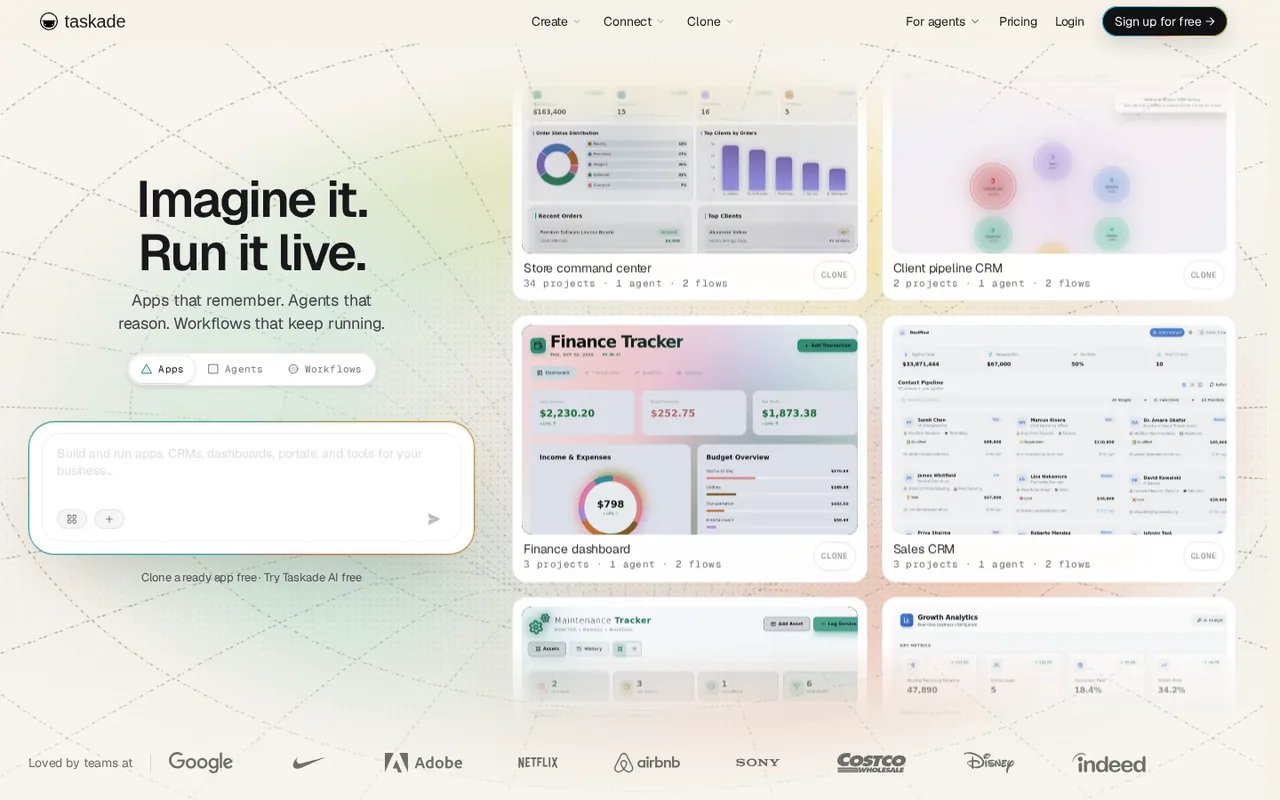
What is Taskade, in short?
Updated November 12, 2026 · By Elias Brandt · Documentation review, not tested hands-on
Pros
- Free plan with no time limit
- Apps are hosted for you
- Published apps keep running when credits run out
- Bring your own AI key
Cons
- Free has no monthly AI credits
- Monthly-billing prices are not shown
- Credit use varies by build
- Key features sit on higher plans
Best forSolo builders and small teams making internal toolsAgencies building client portalsPeople who want agents and automations in the same place as their tasksNot for buyers who need fixed, quoted AI costs
Strengths, limits and who it suits, in full
Strengths
- Free plan with no time limit The help page says the Free plan is not a trial, has no end date and needs no payment card to sign up.
- Apps are hosted for you The pricing page says Taskade hosts every app, with a database included, so you do not manage servers or security updates.
- Published apps keep running when credits run out The pricing FAQ says published apps, projects, sync and non-AI automations keep working; credits are only used when generating new AI content.
- Bring your own AI key The pricing page says Pro and up can connect their own OpenAI, Anthropic, Google Vertex AI or Google Gemini key.
Limits
- Free has no monthly AI credits The pricing page says Free has no monthly AI credits; you earn them by inviting people or sharing Taskade on social media.
- Monthly-billing prices are not shown The listed $6, $10, $25 and $100 are shown with yearly billing; the pricing FAQ says annual billing saves 50% on Pro, Business, Max and Enterprise but we could not read the monthly price for any plan.
- Credit use varies by build The pricing FAQ says the same prompt does not always cost the same and a long app build can use several times the credits of a short one, so a monthly allowance does not translate to a fixed number of apps.
- Key features sit on higher plans Starter has 3 agents and 350 runs a month; unlimited agents, custom domains and webhooks start at Pro, and SAML SSO at Business.
Who it suits
- Solo builders and small teams making internal tools The pricing page lists CRMs, dashboards, client portals and booking pages built from a prompt.
- Agencies building client portals Business adds unlimited custom domains, app branding settings and per-app analytics.
- People who want agents and automations in the same place as their tasks Projects, agents and automations share one workspace.
- Not for buyers who need fixed, quoted AI costs Credits are a hard ceiling and build cost varies, and credit-pack prices are shown only after signing in.
How much does Taskade cost?
Prices confirmed · checked
Regional prices: Prices were read from the pricing page text on 2026-11-12.
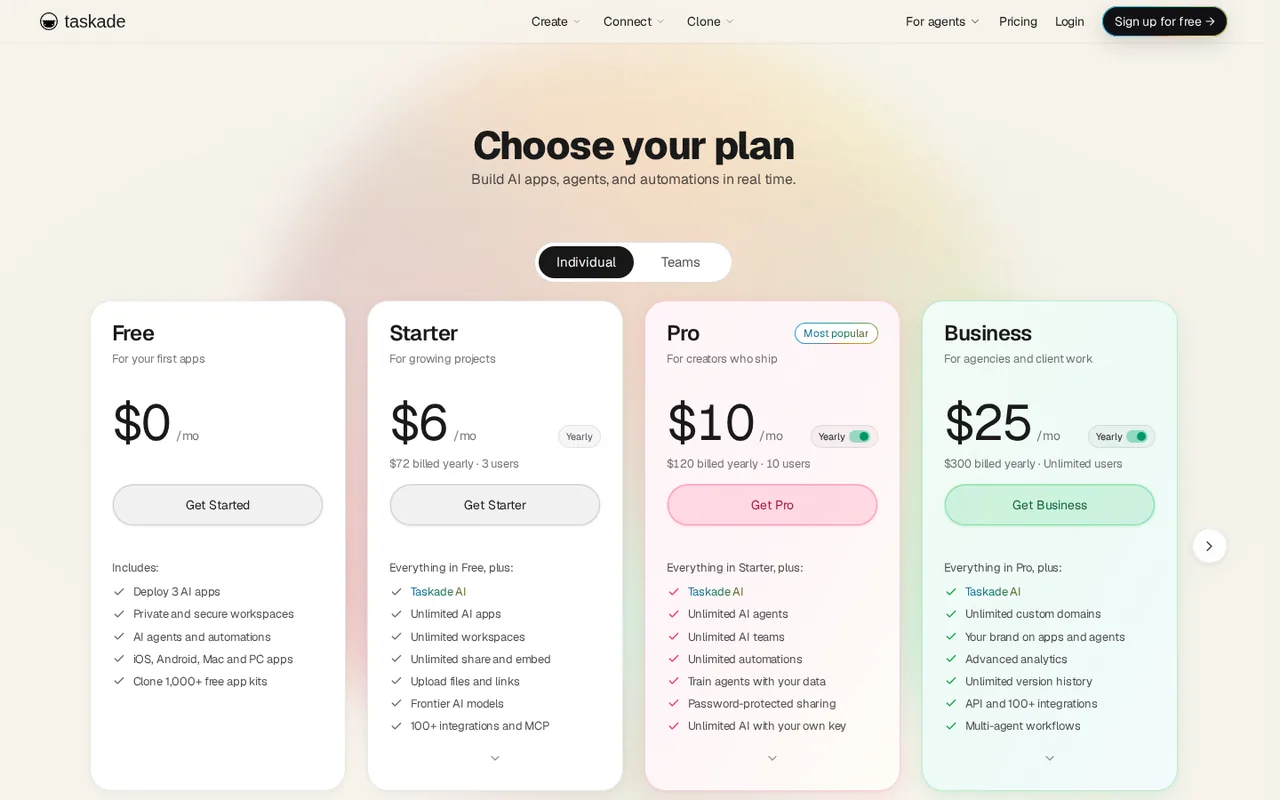
The page shows each paid plan with yearly billing (for example $6 per month, $72 billed yearly) and its llms.txt says paid plans start at $6 per month billed annually; we could not read a monthly-billing price for any plan, and the FAQ says annual billing saves 50% on Pro, Business, Max and Enterprise without naming Starter, so we do not derive a monthly figure. The listed amounts are yearly-billed monthly equivalents, not month-to-month prices. The Free plan's 2 workspace members, 1 agent and 7-day version history come from the help page, which the pricing page cards do not repeat. The pricing page says automation runs on Free are up to 10 a month while the help page says per billing period. Credit pack prices are shown only on the signed-in Credits page and are not listed here.
| Plan | Price | What you get |
|---|---|---|
| Free | $0 sourceFrom taskade.com/pricing, checked Nov 12, 2026 (opens in a new tab) | 3 Genesis apps, 1 agent with 1 knowledge source, 10 automation runs per billing period, no monthly AI credits (earn them through referrals and social actions), 250 MB storage per workspace, 7 days of version history, 2 workspace members, unlimited projects. |
| Starter | $6 per monthbilled yearly · $72 a year sourceFrom taskade.com/pricing, checked Nov 12, 2026 (opens in a new tab) | Everything in Free plus 10,000 AI credits a month, unlimited apps and workspaces, 3 users, 3 agents, 350 automation runs a month, 5 GB storage, public share and embed, no Taskade watermark, frontier models, 100+ integrations and MCP. |
| Pro | $10 per monthbilled yearly · $120 a year sourceFrom taskade.com/pricing, checked Nov 12, 2026 (opens in a new tab) | Everything in Starter plus 50,000 AI credits a month, 10 users, unlimited agents, AI teams and automations, 1,000 runs a month, 100 GB storage, your own AI key, password-protected sharing, webhooks and up to 10 custom domains. |
| Business | $25 per monthbilled yearly · $300 a year sourceFrom taskade.com/pricing, checked Nov 12, 2026 (opens in a new tab) | Everything in Pro plus 150,000 AI credits a month, unlimited users and custom domains, 10,000 runs a month, 1 TB storage, app branding and SEO settings, advanced app analytics, unlimited version history, API, multi-agent workflows, admin dashboard, priority support and SAML SSO. |
| Max | $100 per monthbilled yearly · $1,200 a year sourceFrom taskade.com/pricing, checked Nov 12, 2026 (opens in a new tab) | Everything in Business plus 400,000 AI credits a month and a daily AI request limit of 320,000 against 80,000 on Business. |
| Enterprise | Custom | Everything in Max plus 1.1 million AI credits a month, SCIM provisioning, SLA-backed premium support, onboarding and training, volume credit pricing and custom AI deployment. Contact sales. |
How far does it go?
- What a five-person team pays on ProPro is listed at $10 per month billed yearly, which is $120 over twelve months, and the plan includes 10 users who share 50,000 AI credits and 1,000 automation runs a month, so the price does not scale per seat. Starter at $72 a year includes only 3 users, so five people do not fit. This is arithmetic on the listed yearly-billed prices, not a quote: it covers the base fee and the included credits, while credit packs and auto top-up, which the FAQ says exist for overage, are not priced on the public page. Since a long build can use several times the credits of a short one, the included 50,000 may cover fewer apps than you expect.
Arithmetic from the published allowances above, not a usage test.
Taxes, currency and promotions can change the price you see at checkout.
Try Taskade free (opens in a new tab)
Key features
| Feature | What it does | Watch out |
|---|---|---|
| Taskade Genesis: describe an app and get a live, hosted app with a database, connected to your projects, agents and automations | The homepage and llms.txt describe Taskade Genesis as turning a plain-language prompt into a running business app, with Taskade hosting it and no separate backend or deployment step. The pricing page lists dashboards, client portals, booking pages and custom tools as examples. | Describe one real internal tool, such as a lead tracker, and check the result against your own spreadsheet before moving real data in. |
| AI agents with their own role, tools and knowledge sources, plus AI teams on Pro and up | — | |
| Automations with triggers, branching and 100+ integrations; run limits rise from 10 on Free to 10,000 on Business | — | |
| Model choice per agent, with your own OpenAI, Anthropic or Google key on Pro and up | — | |
| Custom domains for published apps from Pro; SAML single sign-on from Business | — | |
| Credits are a hard ceiling on building | The pricing FAQ says every AI build draws from the plan's monthly credits and generation stops when the balance is used up, while published apps, projects and non-AI automations keep running. It also says a long, complex build can cost several times a short one. | Run one small build first and watch the remaining-credits counter before planning many apps on Starter's 10,000 credits. |
| Free is for trying it, not building much | The help page lists 3 apps, 1 agent with 1 knowledge source, 10 automation runs per billing period and no monthly credits on Free; you earn credits through referrals (up to 3,500) and social actions. | Decide which limit you will hit first: apps, agents, runs or credits. That tells you whether Starter or Pro is the first upgrade. |
What does the free plan leave out?
The help page gives Free 3 apps, one agent with one knowledge source, 10 automation runs per billing period and 7 days of version history. The pricing page says Free has no monthly AI credits, so building with AI depends on credits you earn through referrals and social actions.
How do credits limit what you can build?
Per the pricing FAQ, every build draws on the plan’s monthly credits and stops when they run out, while published apps and non-AI automations keep running. Starter includes 10,000 credits, Pro 50,000 and Business 150,000. The page also says a long build can cost several times a short one, so the allowance is not a fixed number of apps.
What changes between Starter and Pro?
Starter covers 3 users, 3 agents and 350 runs a month. Pro raises that to 10 users, unlimited agents and AI teams, 1,000 runs, webhooks, up to 10 custom domains and your own AI key. Business adds unlimited users, SAML single sign-on and app analytics; SCIM stays on Enterprise.
How to test it in an afternoon
Proposed evaluation · not performed yet
Sign up on Free, earn a few credits, and ask Taskade Genesis for one small tool you already run in a spreadsheet. Watch how many credits the build uses, then check whether you hit the 3-app, 1-agent or 10-run limit first before paying.
Taskade alternatives
Other automation tools checked with the same method. Pick by the job, not by a score.

Teams that want Zapier-style flows and AI agents with the option to self-host the open source core

Building and enriching lead lists from websites

Developers and teams building inbound or outbound phone agents who want one per-minute rate for the AI stack instead of separate model, speech and voice bills

Meeting owners who verify commitments

Delegating multi-step research and file tasks to an AI agent

Self-hostable workflow and AI-agent automation

Live calls where AI help is permitted

US consumers and small teams who want an assistant to make support calls, cancel subscriptions and negotiate bills, and who will check how credits and the 25% savings fee apply to their plan
Used Taskade? Write the first review. Visitor opinions are moderated and kept separate from our source checks.
Frequently asked questions
Is Taskade free?
Yes. The Free plan costs $0 with no time limit and no payment card is needed to sign up. It is limited to 3 apps, 1 agent with 1 knowledge source and 10 automation runs, and it has no monthly AI credits; you earn credits through referrals and social actions.
How much does Taskade cost?
The pricing page lists Starter at $6, Pro at $10, Business at $25 and Max at $100 per month, each billed yearly, with Enterprise on custom pricing. We could not read a monthly-billing price, so check the page for what a month-to-month plan costs.
What happens when I run out of Taskade credits?
The pricing FAQ says generation stops once your plan's monthly credits are used. Published apps, projects and non-AI automations keep working. Paid plans can buy credit packs or turn on auto top-up; pack prices appear after sign-in.
Can I use my own AI key in Taskade?
Yes, on Pro and up. The pricing page says you can connect your own OpenAI, Anthropic, Google Vertex AI or Google Gemini key, and that agent steps above the included amount and every Taskade EVE and automation AI step on your key pay a step fee in Taskade credits.
Sources and method4 official sources · 7 details checked · Nov 12, 2026
How we checked this profile
7 details on this page were checked against Taskade's own pages and help documentation (Nov 12, 2026).
See the checks by section7 documented
| Section | Checks | Last checked | Sources |
|---|---|---|---|
| Article text | 1 documented | taskade.com | |
| Plans and prices | 4 documented | taskade.com/free-plantaskade.com/pricing | |
| Questions | 2 documented | taskade.com/pricing |
Sources for this profile
- Pricing page, plan cards and FAQtaskade.com
- Homepagetaskade.com
- Is Taskade Free? help page, updated 2026-11-09taskade.com
- llms.txt site guidetaskade.com
Official pages read on 2026-11-12: homepage, pricing page with plan cards and FAQ, the Is Taskade Free? help page (updated 2026-11-09) and llms.txt. The Terms of Service and Privacy Policy were not read, so we make no statement about data handling or model training. We did not create a Taskade account or build an app, so app quality, build speed, credit use per build and agent behavior were not observed. Statements such as 100+ integrations, 1,000+ free app kits and hosting of every app are the provider's own descriptions. The questions below are taken from the provider's own FAQ and plan pages, not from search data. Third-party listings and reviews were not used.
Sources checked Nov 12, 2026. Found something out of date? See how we correct profiles.