


MuleRun: an AI agent on daily credits, free up to 2,000 a month, with scheduled tasks from Plus at $20
Updated September 29, 2026 · By Elias Brandt · Documentation review, not tested hands-on
Pros
- Free credits without a card
- Failed requests are not billed
- Always-on machine on paid plans
Cons
- Unpredictable cost per task
- Broad content license
- Rigid billing changes
Bottom line
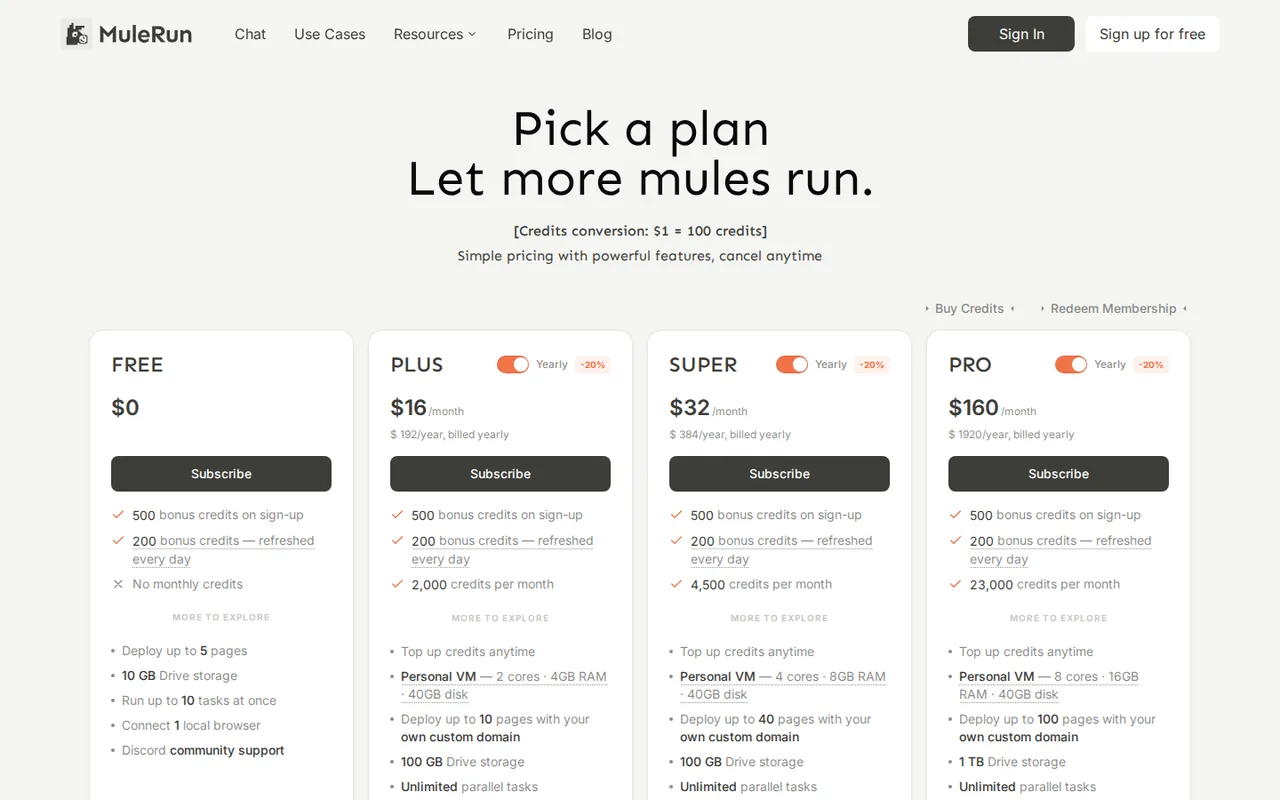
500 sign-up bonus credits; 200 daily credits that expire each day, capped at 2,000 free credits a month; no monthly credits; 5 pages; 10 GB Drive; 10 tasks at once; 1 local browser; no virtual machine.
You want to try an AI agent on small tasks, because Free gives 500 sign-up credits and 200 daily credits without a card.
You need a predictable cost per task, because credits depend on steps and resources and no per-task rate is published.
Best forPeople testing AI agentsSolo operators with recurring reportsSmall teams publishing quick sitesTeams handling confidential data
Strengths, limits and who it suits, in full
Strengths
- Free credits without a card Sign-up and daily credits let you try real tasks before paying.
- Failed requests are not billed The credits FAQ says a failed request is not charged, and Settings > Usage explains each deduction.
- Always-on machine on paid plans Scheduled and overnight work runs on a persistent cloud computer with daily backups.
Limits
- Unpredictable cost per task Credits depend on steps and resources; background tasks or open sessions can keep consuming.
- Broad content license The terms let the company use inputs and outputs for internal research, service improvement and brand promotion.
- Rigid billing changes No self-service downgrade or monthly-yearly switch, upgrades do not refund the old plan, and fees are non-refundable.
Who it suits
- People testing AI agents the 200 daily credits suit short trial tasks, as long as unused credits are expected to expire each night.
- Solo operators with recurring reports Plus is the entry point for scheduled tasks and the cloud computer that runs them.
- Small teams publishing quick sites hosted Pages with custom domains start on Plus; Free is limited to 5 pages.
- Teams handling confidential data check the content license and model-provider sharing first; use test data until legal review is done.
How much does MuleRun cost?
Prices confirmed · checked
- $20Plus
- $40Super
- $200Pro
Regional prices: Prices are in USD and exclude taxes, which are added at checkout.
The yearly toggle is labelled 20% off and is charged in one payment. Credit top-ups are for paid subscribers only, from $10 for 1,000 credits, valid for 1 year. The terms say fees are non-refundable except where law requires and that a plan must be cancelled at least 24 hours before renewal.
| Plan | Price | What you get |
|---|---|---|
| Free | $0 sourceFrom mulerun.com/pricing, checked Sep 29, 2026 (opens in a new tab) | 500 sign-up bonus credits; 200 daily credits that expire each day, capped at 2,000 free credits a month; no monthly credits; 5 pages; 10 GB Drive; 10 tasks at once; 1 local browser; no virtual machine. |
| Plus | $20 per monthbilled monthly · or $16 per month, $192 billed yearly sourceFrom mulerun.com/pricing, checked Sep 29, 2026 (opens in a new tab) | 2,000 credits a month plus daily credits without the monthly cap; personal VM with 2 cores, 4 GB RAM and 40 GB disk; 10 pages with custom domain; 100 GB Drive; unlimited parallel tasks and local browsers; top-ups. |
| Super | $40 per monthbilled monthly · or $32 per month, $384 billed yearly sourceFrom mulerun.com/pricing, checked Sep 29, 2026 (opens in a new tab) | 4,500 credits a month; VM with 4 cores and 8 GB RAM; 40 pages with custom domain; 100 GB Drive; email support within 72 business hours. |
| Pro | $200 per monthbilled monthly · or $160 per month, $1,920 billed yearly sourceFrom mulerun.com/pricing, checked Sep 29, 2026 (opens in a new tab) | 23,000 credits a month; VM with 8 cores and 16 GB RAM; 100 pages; 1 TB Drive; email support within 36 business hours; early feature access. |
| Team and Enterprise | Custom pricing | Team plan and enterprise plan through sales; each member gets an isolated Computer under the team subscription. |
Which plan fits?
Smallest plan whose monthly credits cover your number with 15% spare for regenerations. Arithmetic from the plan table above, not a usage test.
How far does it go?
- What the free cap and Plus credits are worthAt $1 = 100 credits, the 2,000-credit monthly free cap equals $20 of credit, the same face value as the 2,000 plan credits in Plus at $20 a month. On a paid plan, daily credits are not capped monthly: 200 x 30 = 6,000 extra credits in a 30-day month, but only if used every day. No per-task rate is published, so this is not a task count.
Arithmetic from the published allowances above, not a usage test.
Taxes, currency and promotions can change the price you see at checkout.
Try MuleRun free (opens in a new tab)
Key features
| Feature | What it does | Watch out |
|---|---|---|
| Plain-language agent tasks with tool use and file output | — | |
| Personal cloud computer with daily disk backups (paid plans) | A persistent machine with its own disk and workspace, backed up daily and able to run tasks while you are offline. | The pricing FAQ says virtual machines need a paid plan; sizes run from 2 cores and 4 GB on Plus to 8 cores and 16 GB on Pro. |
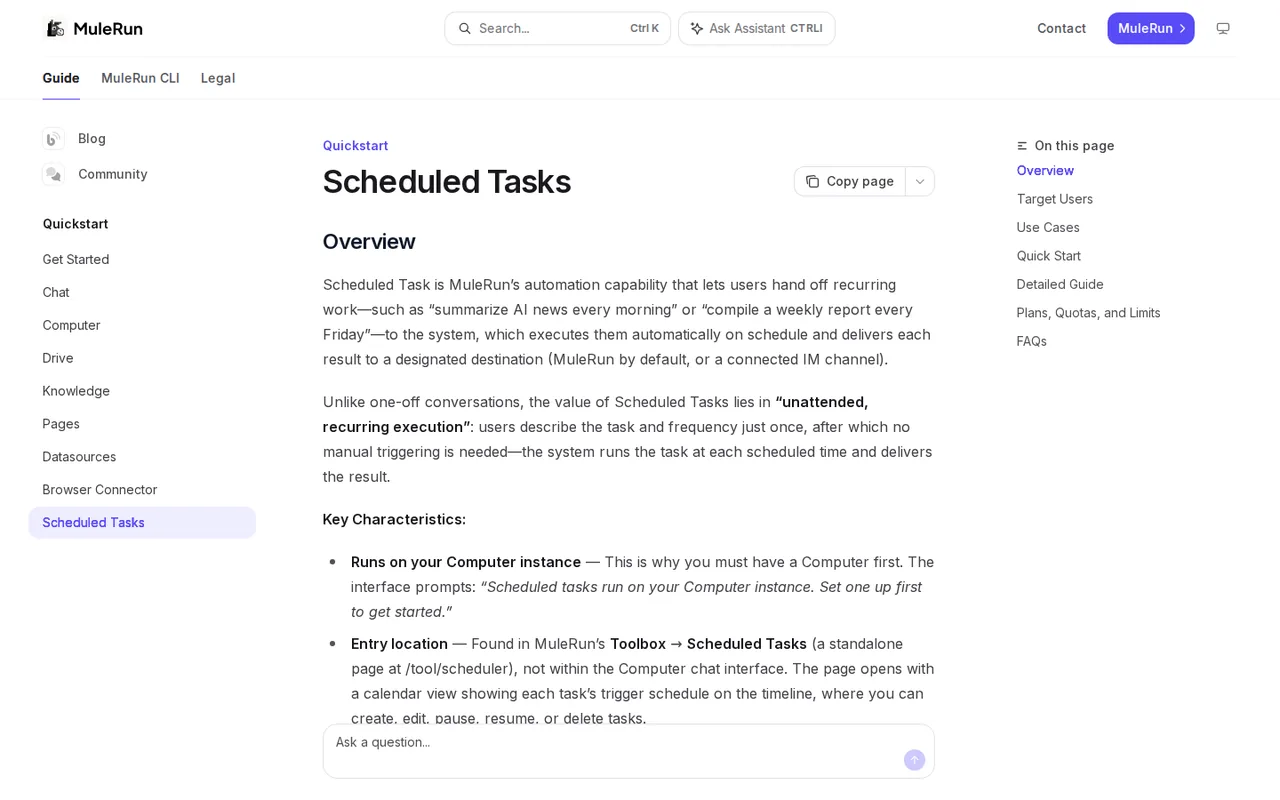
| Scheduled tasks that run on the cloud computer (Plus and above) | — | |
| Chrome Browser Connector that works in your signed-in sessions | A Chrome extension lets the agent open tabs in your own browser and act in sites where you are already signed in. | Installed as an unpacked developer-mode extension, desktop Chrome only; Free allows one enabled browser. |
| Hosted Pages with custom domains | — | |
| Drive cloud storage shared across tasks | — | |
| Messaging channels such as Telegram, Discord and Lark | — | |
| Command-line interface for sessions, Drive and Pages | — | |
| Credit metering | Every task draws credits at $1 = 100 credits, charged by actual steps, tools and resources used. | No per-task price is published, so the same request can cost different amounts; the usage log is the only record. |
How far do the free daily credits go?
Every account gets 500 bonus credits at sign-up and 200 credits a day, issued in batches after 01:00 UTC. Daily credits expire at the end of the day and are spent before any other balance. On Free there is also a monthly cap: once 2,000 free credits have been issued in a month, the daily grant stops until the next month.
Sign-up and referral bonuses are valid for a month and are cleared when they expire. Free adds no monthly plan credits and cannot buy top-ups, so the practical budget is one day’s 200 credits at a time. Plan a trial as small tasks spread across several days rather than one large job.
Why is the cost of one task impossible to quote?
The pricing page converts $1 to 100 credits but publishes no rate per task. The credits FAQ says consumption depends on the number of tasks, their complexity, processing steps and resources used, so a simple lookup and a multi-step report can differ widely. Any figure such as “X tasks per plan” would be a guess.
Two rules help control spending. Failed requests are not billed, and Settings > Usage lists the reason for every deduction. Background tasks or sessions left open can keep consuming credits, so close finished sessions and check the usage log after the first few runs to learn your own rate.
What does a paid plan unlock besides credits?
Paid plans add a personal cloud computer with its own disk, which stays online, keeps files between tasks and is backed up daily. Scheduled tasks, such as a daily news summary or a weekly report, run on that computer and are listed as Plus and above; Free users are sent to an upgrade prompt.
The main differences between paid tiers are machine size, pages and storage, plus the monthly credit pool:
- Plus: 2 cores, 4 GB RAM, 10 hosted pages, 100 GB Drive, 2,000 credits.
- Super: 4 cores, 8 GB RAM, 40 pages, 100 GB Drive, 4,500 credits.
- Pro: 8 cores, 16 GB RAM, 100 pages, 1 TB Drive, 23,000 credits.
What should you check before letting the agent use your browser?
The Browser Connector is a Chrome extension that lets the agent open tabs in your local browser and use accounts where you are already signed in, to read pages, fill forms, click buttons and collect data. It works only in desktop Chrome and is installed as an unpacked extension in developer mode, which Chrome flags at every start.
An option called Auto-approve authorization skips the confirmation card before the agent acts. Leave it off, use a separate Chrome profile with only the accounts the task needs, and keep banking, email and admin consoles out of that profile. You can take over any tab the agent is running from the tab group.
Where do your prompts, files and outputs go?
The terms describe MuleRun as an application layer over third-party AI models that it does not train or host. The privacy policy says requests, messages and files may be sent to model providers such as Google Gemini or Alibaba Qwen, and that data is generally stored on servers in Singapore, with transfers abroad possible.
You keep ownership of inputs and outputs, but you grant the company and its affiliates a worldwide license to use them to operate and improve the service, including internal research and brand promotion. Keep client data, credentials and unreleased material out of tasks unless that license is acceptable.
Is the yearly price worth locking in?
Yearly billing lowers Plus from $20 to $16 a month, charged as $192 up front. The billing FAQ says there is no self-service downgrade and no switch between monthly and yearly: you cancel, wait for the period to end, then subscribe again. Upgrades take effect immediately without refunding the rest of the old plan.
Fees are non-refundable except where law requires, and a plan must be cancelled at least 24 hours before renewal. A cautious path is Free for a week, then one monthly Plus cycle to learn your credit use, and a yearly plan only after the usage log shows a steady monthly need.
Can a free account turn a spreadsheet into a short slide deck?
Proposed evaluation · not performed yet
On a Free account, upload a fictional 50-row sales CSV with known totals by region and ask for a two-slide PPTX summary with one chart. Use no connected browser, no personal data and stay within one day’s 200 credits; stop if the task asks for a paid feature.
- Record the credit balance and the time before starting.
- Upload the CSV and request two slides: regional totals and one chart.
- Download the PPTX and open it outside MuleRun.
- Compare every figure with the known totals from the file.
- Read Settings > Usage and note the credits charged and the listed reasons.
Accept a PPTX that opens, shows totals matching the CSV and cost no more than the daily grant. Reject invented numbers, a deck that will not open or charges with no usage explanation. No credit figure or output quality is reported until the task is run.
For rule-based automations with fixed steps and per-task pricing, compare Zapier, Make and n8n. For AI agents built around business workflows, see Lindy or Gumloop.
Is MuleRun worth it?
Documentation review plus dated public user reports. Documentation review, not tested hands-on. Not scored.
Worth it if
- You want to try an AI agent on small tasks, because Free gives 500 sign-up credits and 200 daily credits without a card.
- You need scheduled tasks or an always-on machine, since those start on the Plus plan at $20 per month.
Probably not if
- You need a predictable cost per task, because credits depend on steps and resources and no per-task rate is published.
- You handle confidential client data, because the terms grant the company a license to use inputs and outputs.
- You want flexible billing, because there is no self-service downgrade or monthly-yearly switch.
MuleRun alternatives
Other automation tools checked with the same method. Pick by the job, not by a score.

Teams that want Zapier-style flows and AI agents with the option to self-host the open source core

Building and enriching lead lists from websites

Meeting owners who verify commitments

Agent tasks that need an inspectable file handoff

Organisations on Microsoft 365 that want to automate Teams, SharePoint, Outlook and Excel work, with RPA for desktop apps

Sales, support and operations teams that want AI agents acting in their CRM and inbox with per-tool approvals

Browser tasks and research handed to an AI agent

Connecting web apps without code
Used MuleRun? Write the first review. Visitor opinions are moderated and kept separate from our source checks.
Frequently asked questions
Does the Pro plan give unlimited usage?
No. The pricing FAQ says a Pro membership provides a fixed number of credits each billing cycle, 23,000 on current pricing, deducted by actual use. Heavy agent runs can use them up early, and top-ups start at $10 for 1,000 credits. Watch the usage log in the first month before assuming Pro covers a whole team.
When do monthly plan credits arrive on a yearly subscription?
Subscription credits are issued monthly even on yearly billing, on the monthly date tied to your account rather than the 1st. That date may not match the renewal charge date. You do not need to claim them. If the balance runs out before the next issue date, a paid account can buy a top-up.
Is there a student or education discount?
Not at present. The pricing FAQ says there is no student discount or separate education plan and points to promotions shown on the subscription page. Redemption codes and gift cards exist; a code can be passed to a friend, but it works only once and must be entered by hand under Settings > My Gift Cards.
Can I get an invoice for company expenses?
After each payment a receipt is emailed to the registered address, and billing history can be downloaded from the Stripe page reached through Profile > Manage. The billing FAQ says invoices are issued in USD only, and mainland China VAT invoices are not supported. Check that the receipt format meets your accounting rules.
How do I delete my MuleRun account?
The terms say you can close the account from the settings page or by emailing contact@mulerun.com. Once closed it cannot be reactivated, and content tied to it cannot be recovered. Download files from Drive and the cloud computer first, and cancel any subscription so it does not renew.
Sources and method7 official sources · 7 details checked · Sep 29, 2026
How we checked this profile
7 details on this page were checked against MuleRun's own pages and help documentation (Sep 29, 2026).
See the checks by section7 documented
| Section | Checks | Last checked | Sources |
|---|---|---|---|
| Plans and prices | 3 documented | mulerun.com/pricingmulerun.com/terms-of-use | |
| Features | 2 documented | mulerun.com/pricingmulerun.com/scheduled-tasks | |
| Strengths and limits | 1 documented | mulerun.com/terms-of-use | |
| Other details | 1 documented | mulerun.com/terms-of-use |
Sources for this profile
- Plans, credits and billing FAQmulerun.com
- Product overview and FAQmulerun.com
- Terms of usemulerun.com
- Privacy policy (last updated May 9, 2026)mulerun.com
All 7 sources
The terms and privacy policy name Intelligent Cloud Computing (Singapore) Private Limited; the privacy policy was last updated May 9, 2026 and the terms page shows no update date. The pricing FAQ says free users cannot use virtual machines, while the Computer guide says free users can partly try Computer; scheduled tasks are paid-only in both. The payment FAQ lists Alipay as the subscription method while checkout runs through Stripe; confirm available methods at checkout.
Sources checked Sep 29, 2026. Found something out of date? See how we correct profiles.