

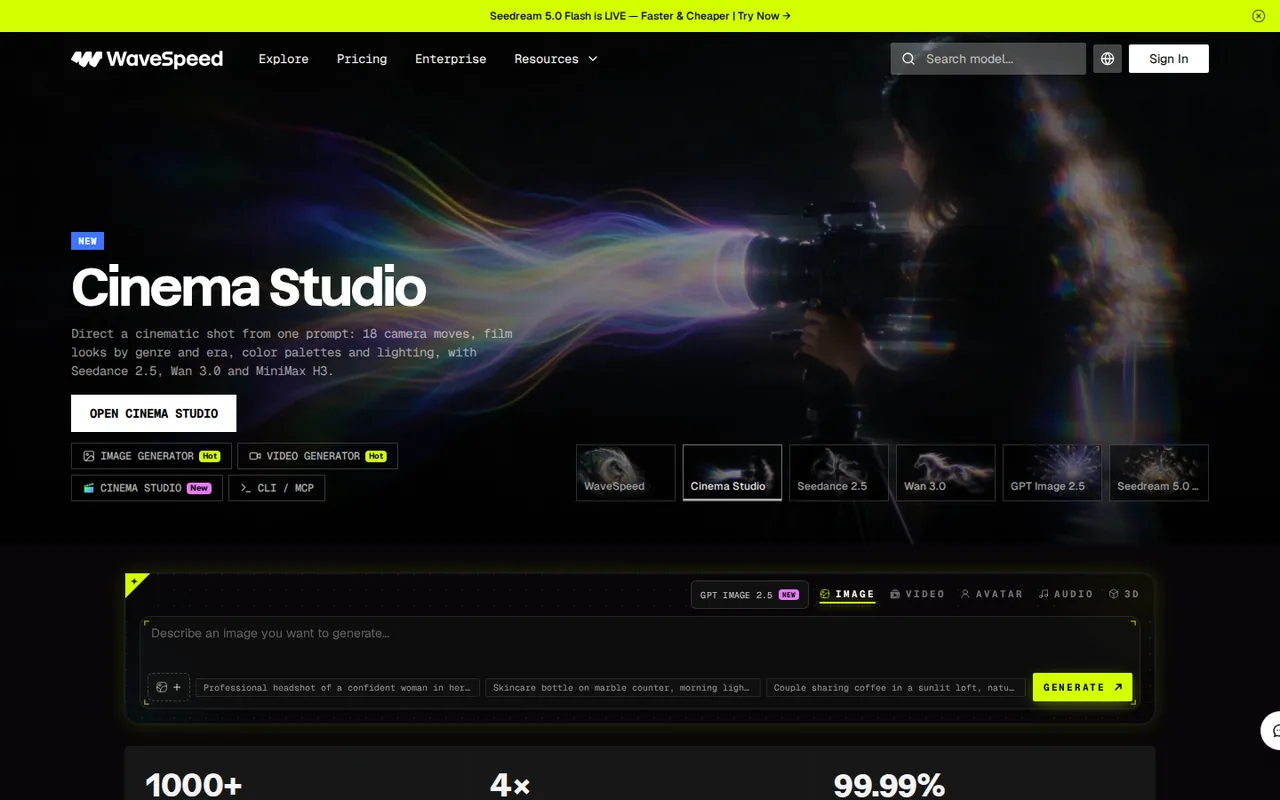
WaveSpeedAI: $1 trial credit, then pay per output with no subscription, but new accounts run only 2 tasks at once
Updated October 6, 2026 · By Elias Brandt · Documentation review, not tested hands-on
Pros
- No subscription
- Prices readable before you sign up
- Automatic refunds for failures
- Limits are published
Cons
- Free trial is only $1
- New accounts are heavily limited
- Generated files expire in 7 days
- Commercial and training terms are not settled in one place
- Card prices are not final quotes
Bottom line
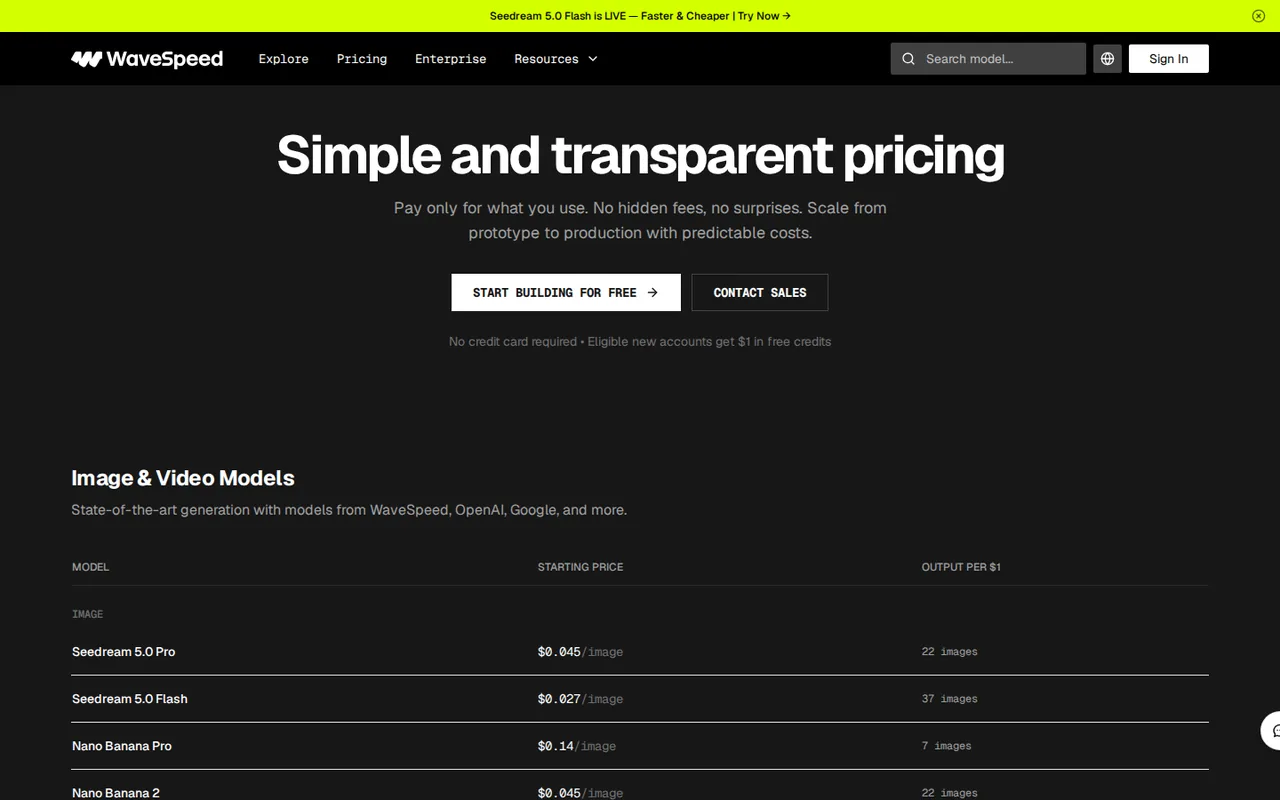
The pricing page says eligible new accounts get $1 and that some premium models may not be available with trial credits. The docs limit it to supported models and say a new email address alone does not guarantee eligibility. No expiry or watermark rule is stated for the trial credit.
You want to compare several image or video models without opening an account with each provider, because one prepaid balance and API key reach all of them.
You need many parallel requests from day one without topping up first, because a new account at Bronze is held to 2 concurrent tasks.
Best forDevelopers adding image or video generation to a productCreators comparing models in a browserTeams producing client or ad work
Strengths, limits and who it suits, in full
Strengths
- No subscription The pricing page and docs describe usage-based billing from prepaid credits, with no monthly fee or commitment.
- Prices readable before you sign up The pricing page lists starting prices per image and per second of video for named models and per 1M tokens for language models without an account.
- Automatic refunds for failures The refund policy credits back failed requests, system errors and system timeouts, and says credits never expire.
- Limits are published The account-levels doc gives predictions a minute and concurrent tasks for all four levels.
Limits
- Free trial is only $1 The trial credit is $1 for eligible accounts on supported models; it is not a free plan, and eligibility is not guaranteed.
- New accounts are heavily limited Bronze allows 5 predictions a minute and 2 concurrent tasks, and the next level needs a top-up whose minimum is not published.
- Generated files expire in 7 days The Data Retention Policy says media files are temporary and generally expire within 7 days, so outputs must be downloaded.
- Commercial and training terms are not settled in one place Commercial use depends on each model's terms, and the Terms and Privacy Policy do not say whether inputs or outputs are used to train models.
- Card prices are not final quotes List prices are for the lowest resolution or quality, discounts vary, and the server recalculates the charge on submission.
Who it suits
- Developers adding image or video generation to a product one API key and published per-model prices let you try several models without separate provider accounts, though the Bronze limits mean you should plan a top-up first.
- Creators comparing models in a browser the generator and desktop app avoid code, and the estimate on the Run button helps keep a test within a small budget.
- Teams producing client or ad work model-by-model commercial terms and the unresolved training question mean written confirmation from support is worth getting before paid work.
How much does WaveSpeedAI cost?
Some prices not published · checked
Regional prices: Prices are USD list prices read from the pricing page and docs on 6 Oct 2026.
They are starting prices at the lowest resolution or quality; the page says discounts may apply, and the homepage shows some featured cards with a struck-through and a lower price without stating the unit. Tax and regional pricing were not checked. The minimum top-up is not published and varies by payment method. The docs say credits never expire; the Terms say purchased credits are non-refundable, non-transferable and cannot be exchanged for cash. Failed requests, system errors and system timeouts are refunded automatically; a client-side Sync Mode timeout is not. The docs also describe monthly credit lines for AWS login users, reviewed case by case, which are not a plan.
| Plan | Price | What you get |
|---|---|---|
| Free trial credit | $1 in free credits for eligible new accounts; no credit card sourceFrom wavespeed.ai/pricing, checked Oct 6, 2026 (opens in a new tab) | The pricing page says eligible new accounts get $1 and that some premium models may not be available with trial credits. The docs limit it to supported models and say a new email address alone does not guarantee eligibility. No expiry or watermark rule is stated for the trial credit. |
| Pay as you go (Bronze) | No subscription; prepaid credits charged per outputpriced per model | Starting list prices at the lowest resolution or quality: images $0.005 (Z-Image Turbo), $0.01 (GPT Image 2.5), $0.027 (Seedream 5.0 Flash), $0.045 (Seedream 5.0 Pro), $0.14 (Nano Banana Pro); video per second $0.05 (Wan 3.0), $0.10 (Veo 3.1 Fast), $0.12 (Seedance 2.0), $0.18 (Seedance 2.5). Default level for new accounts: 5 predictions a minute and 2 concurrent tasks. |
| Silver | Automatic after any successful single top-up below $1,000 sourceFrom wavespeed.ai/pricing, checked Oct 6, 2026 (opens in a new tab) | 500 predictions a minute and 300 concurrent tasks. Same per-model prices; no fee is listed for the level, and no minimum top-up amount is published. |
| Gold | Automatic after a single successful top-up of $1,000 to $4,999 sourceFrom wavespeed.ai/pricing, checked Oct 6, 2026 (opens in a new tab) | 3,000 predictions a minute and 3,000 concurrent tasks. The level follows one top-up, not a running total. |
| Ultra | Automatic after a single successful top-up of $5,000 or more sourceFrom wavespeed.ai/pricing, checked Oct 6, 2026 (opens in a new tab) | 5,000 predictions a minute and 10,000 concurrent tasks. Limits above Ultra are by arrangement with support. |
| Enterprise | Custom pricing; contact sales | Volume discounts, dedicated support, performance SLAs and custom model deployment, according to the pricing page. No prices are published. |
How far does it go?
- What $20 of credits buys at starting pricesThere is no subscription or base fee, so cost is only the per-output price. At the pricing page's starting list prices, $20 buys about 444 Seedream 5.0 Pro images at $0.045 (the page says 22 per $1), about 166 seconds of Seedance 2.0 video at $0.12 a second (8.3 seconds per $1), or about 400 seconds of Wan 3.0 at $0.05 a second (20 per $1). These are lowest-resolution list prices: higher resolution, longer duration or more outputs cost more, and the server recalculates the charge on submission. A single $20 top-up would also move a new account from Bronze to Silver, which raises the limits from 5 to 500 predictions a minute. Arithmetic on published list prices only; no output was generated.
Arithmetic from the published allowances above, not a usage test.
Taxes, currency and promotions can change the price you see at checkout.
Try WaveSpeedAI free (opens in a new tab)
Key features
| Feature | What it does | Watch out |
|---|---|---|
| One API key and account for 1,000+ image, video, audio, 3D and language models (homepage, about page) | The homepage and about page describe 1,000+ image, video, audio, 3D and language models reached through one API key, a browser generator or a desktop app. | The count and model list are the provider's own; quality, speed and output are not compared here with the same model on its original provider. |
| Browser image and video generators, a desktop app, a REST API with Python and JavaScript SDKs, ComfyUI and n8n integrations (docs) | — | |
| Estimated price shown on the Run button before generation, and a price API that returns the base price and discount (pricing doc) | The docs say the estimated price appears on the Run button and that a price API returns the base price and discount before you submit. | The docs warn that a base price is not a quote for a finished request; the server recalculates the charge on submission, so a result can cost more than a card price. |
| Language-model access priced per 1M tokens, for example Claude Opus 5.5 at $4 input and $20 output (pricing page) | — | |
| Automatic credit refunds for failed requests, system errors and system timeouts (refund policy) | — | |
| Rate and concurrency limits by level | Level is set by one successful top-up: Bronze 5 predictions a minute and 2 concurrent tasks, up to Ultra at 5,000 and 10,000. | The limits matter for batch work; the pages do not publish the minimum top-up, and the level does not change the per-model price. |
| Credits, refunds and file retention | Credits never expire and failed or system-timeout requests are refunded automatically, but purchased credits are non-refundable and generated files expire within 7 days. | A client-side timeout in Sync Mode is not automatically refundable if the task finishes, so retrieve the result by prediction ID. |
| Commercial rights follow the model | Most models allow commercial use, but each model has its own terms and some are research-only. | The pages do not give one commercial answer for the whole platform; read the terms shown for the model you use. |
What WaveSpeedAI charges
WaveSpeedAI does not sell plans. The pricing page says you add credits and pay per output, with no monthly fee or commitment, and each model has its own price. At the lowest resolution or quality, starting prices run from $0.005 an image (Z-Image Turbo) to $0.14 (Nano Banana Pro), and from $0.05 a second of video (Wan 3.0) to $0.18 (Seedance 2.5). Language models are priced per 1M tokens, for example Claude Opus 5.5 at $4 input and $20 output. The page says discounts may apply: the homepage shows some featured models with a struck-through price and a lower one, such as 10% off a Seedance 2.5 card, without saying which resolution or length the card price is for.
What a top-up buys, and what it unlocks
Because there is no subscription, the arithmetic is simple. At starting list prices, $20 buys about 444 Seedream 5.0 Pro images, about 166 seconds of Seedance 2.0, or about 400 seconds of Wan 3.0. Those figures assume the lowest settings; the pricing doc says resolution, duration and batch size raise the cost, and that the server recalculates the charge on submission, so the estimate on the Run button is the number to trust.
The other thing a top-up changes is your limit. New accounts start at Bronze, which the account-levels doc limits to 5 predictions a minute and 2 concurrent tasks. Any successful top-up below $1,000 makes the account Silver (500 a minute, 300 concurrent), one of $1,000 to $4,999 makes it Gold, and one of $5,000 or more makes it Ultra. The level follows a single top-up, not total spend, and the pages do not publish a minimum top-up. For a product that sends parallel requests, Bronze is a testing tier, not a production one.
What to check before client work
Three terms decide whether the platform fits paid work. First, commercial use: the Commercial Use Policy says most models allow it, each model has its own terms, and research-only models should not be used commercially. Second, retention: generated files generally expire within 7 days, so download or collect them by webhook. Third, data: the Terms of Service, updated Sep 28, 2026, say you own your inputs and outputs and license them for providing the service, and let WaveSpeedAI use aggregated, anonymized usage data to improve it. Neither the Terms nor the Privacy Policy says whether inputs or outputs train models, so ask support for that in writing if it matters.
Refunds are narrower than they sound. Failed requests, system errors and system timeouts are credited back automatically, and unused credits never expire, but the Terms call purchased credits non-refundable. If your own client or proxy times out in Sync Mode while the task finishes, the charge stands; fetch the result by prediction ID.
How could you check WaveSpeedAI before paying?
Proposed evaluation · not performed yet
Spend the trial credit on one task that mirrors your real use before topping up.
- Sign up and note whether the $1 trial credit appears and which models it can run.
- Pick one model you plan to use, read the estimate on the Run button, and run one short job at the lowest setting.
- Compare the credits charged with the estimate and with the pricing page’s starting price.
- Open the terms shown for that model and note whether commercial use is stated.
- Download the output, then check the History page after 7 days to see what remains.
Accept it if the charge matches the estimate, the trial covers a real test and the model’s terms allow your use. Reject it if the trial cannot run your model or the charge differs from the estimate without explanation. No quality, speed or cost result is recorded here.
Is WaveSpeedAI worth it?
Documentation review plus dated public user reports. Documentation review, not tested hands-on. Not scored.
Worth it if
- You want to compare several image or video models without opening an account with each provider, because one prepaid balance and API key reach all of them.
- You generate in bursts rather than every month, since there is no monthly fee and unused credits do not expire between projects.
- Your product needs a cost estimate before each call, because the docs expose the base price and discount through an API before you submit.
Probably not if
- You need many parallel requests from day one without topping up first, because a new account at Bronze is held to 2 concurrent tasks.
- You need one platform-wide answer on commercial rights or model training, because commercial terms are set model by model and the policies are silent on training.
- You want the platform to keep your outputs, since generated files generally expire within 7 days and have to be downloaded.
WaveSpeedAI alternatives
Other images & design tools checked with the same method. Pick by the job, not by a score.

AI images, video and audio inside an Adobe workflow

Rigged 3D avatars from a selfie for games and apps

AI images placed straight into templated designs

Turning a written story into a character-consistent comic series, and optionally a short film

Turning photos or video of a real scene into a 3D splat

Finding prompts for a specific image model before generating

Designers and sellers who need editable vector or brand-style image output

One-off lettering for posters, cards and social graphics
Used WaveSpeedAI? Write the first review. Visitor opinions are moderated and kept separate from our source checks.
Frequently asked questions
Is WaveSpeedAI free?
Only as a small trial. The pricing page says eligible new accounts get $1 in free credits with no credit card, and the docs add that it applies to supported models and that a new email address alone is not enough to qualify. After that you top up credits and pay per output, with no free plan or subscription. Check which models your $1 covers before planning a test.
Can I use WaveSpeedAI outputs commercially?
Often, but model by model. The Commercial Use Policy says most models support commercial use while each model has its own terms, and research-only or non-commercial models should not be used commercially without authorization. The Terms of Service say you own your inputs and outputs, yet also place third-party model terms on you. For client work, read the terms shown for the specific model, or email support for written confirmation.
How long does WaveSpeedAI keep my generated files?
Generated images, videos and audio are temporary and generally expire within 7 days, according to the Data Retention Policy; prediction metadata can stay longer. Download what you want to keep right away, or use webhooks to collect results automatically through the API. Paid credits are different: the docs say your balance never expires.
Why are my requests slow or rejected with a 429 error?
New accounts start at Bronze, which allows 5 predictions a minute and 2 concurrent tasks, so a third simultaneous task waits and bursts above the limit return 429. One successful top-up moves you up: below $1,000 gives Silver (500 a minute, 300 concurrent), $1,000 to $4,999 gives Gold, and $5,000 or more gives Ultra. The upgrade follows a single top-up, not your total spending.
How much does WaveSpeedAI cost per month?
WaveSpeedAI has no monthly fee. The pricing page says you add credits and pay per output, with no subscription or commitment, so a month costs only what you generate. At starting list prices, $20 buys about 444 Seedream 5.0 Pro images at $0.045 each or about 400 seconds of Wan 3.0 video at $0.05 a second. Higher resolution or longer clips cost more, because the server recalculates the charge on submission.
Sources and method10 official sources · 16 details checked · Oct 6, 2026
How we checked this profile
16 details on this page were checked against WaveSpeedAI's own pages and help documentation (Oct 6, 2026).
See the checks by section16 documented
| Section | Checks | Last checked | Sources |
|---|---|---|---|
| Article text | 2 documented | wavespeed.aiwavespeed.ai/about | |
| Plans and prices | 9 documented | wavespeed.ai/pricingwavespeed.ai/account-levelswavespeed.ai/how-pricing-workswavespeed.ai/refund-policywavespeed.ai | |
| Strengths and limits | 3 documented | wavespeed.ai/data-retention-policywavespeed.ai/commercial-use-policywavespeed.ai/terms | |
| Features | 2 documented | wavespeed.ai/pricingwavespeed.ai/how-pricing-works |
Sources for this profile
- WaveSpeedAI pricing page, including FAQwavespeed.ai
- WaveSpeedAI homepagewavespeed.ai
- WaveSpeedAI about pagewavespeed.ai
- WaveSpeedAI docs: Account Levels & Rate Limitswavespeed.ai
All 10 sources
- WaveSpeedAI docs: How Pricing Workswavespeed.ai
- WaveSpeedAI docs: Refund Policywavespeed.ai
- WaveSpeedAI docs: Commercial Use Policywavespeed.ai
- WaveSpeedAI docs: Data Retention Policywavespeed.ai
- WaveSpeedAI Terms of Service, last updated Sep 28, 2026wavespeed.ai
- WaveSpeedAI Privacy Policy, last updated Sep 25, 2026wavespeed.ai
Official WaveSpeedAI pages, docs, Terms (Sep 28, 2026) and Privacy Policy (Sep 25, 2026) were read on 6 Oct 2026; the pricing page and docs were read as rendered text. Not tested or not found: output quality and speed of any model, the exact models covered by the $1 trial, the minimum top-up, credit costs above the lowest resolution, whether inputs or outputs are used to train models, and per-model commercial terms. Third-party reviews and directories were not used as sources. The proposed evaluation has not been performed.
Sources checked Oct 6, 2026. Found something out of date? See how we correct profiles.