

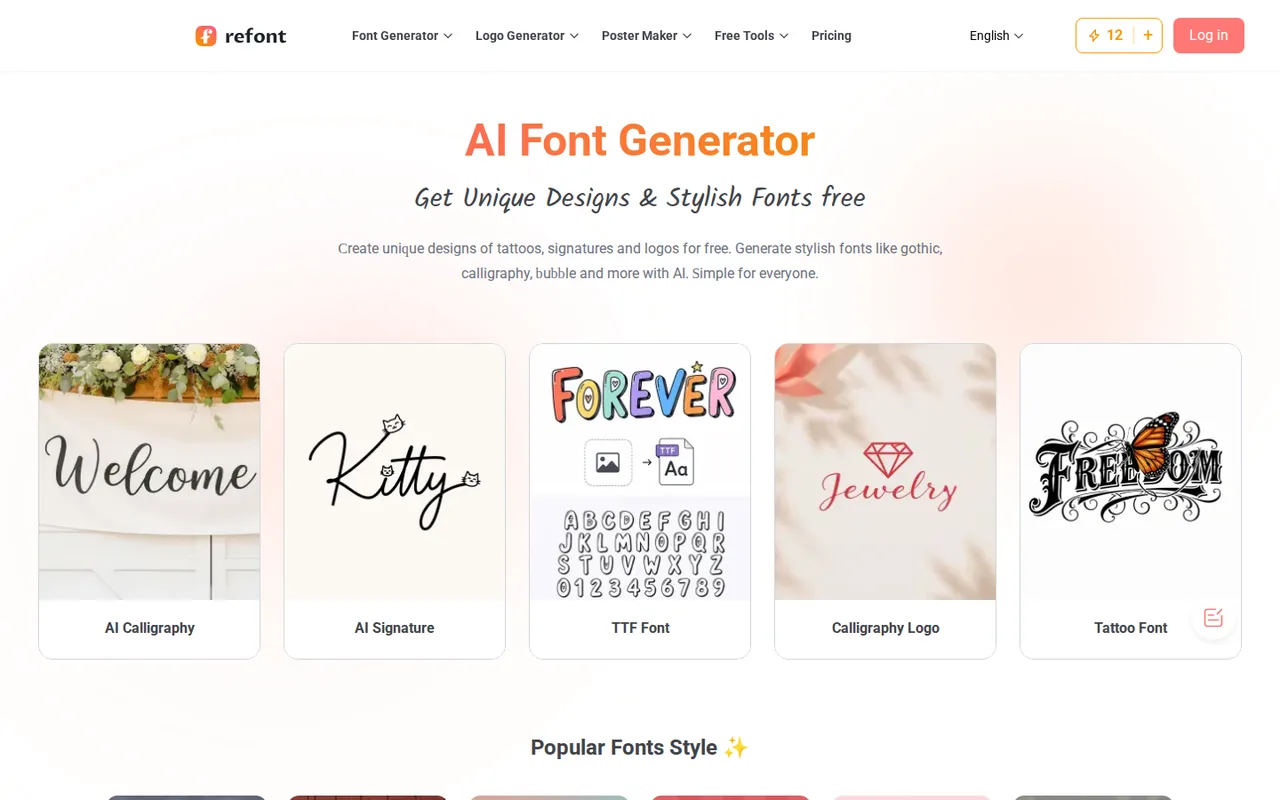
Refont: lettering as PNG or JPG images, not fonts, with 12 credits a day free and one-time packs from $4.99
Updated September 28, 2026 · By Elias Brandt · Documentation review, not tested hands-on
Pros
- Credits that do not expire
- No subscription
- Low-effort styling
Cons
- Operator not identified
- No refunds
- Image output, not a font
Bottom line
About 3 image generations a day; free credits can be cleared or changed at the discretion of the provider.
You need a handful of lettering images for invitations, cards or social posts: about 3 free generations a day are enough to try a style, and a $4.99 pack adds 100 credits with no renewal.
You need an installable typeface or text you can retype: standard downloads are flat images, and the TTF converter has an unpublished licence price and conflicting provider pages.
Best forSocial media creatorsInvitation and card makersSmall brands drafting logo letteringDesigners needing a full typeface
Strengths, limits and who it suits, in full
Strengths
- Credits that do not expire Purchased credits stay in the account permanently while it remains open.
- No subscription Standard and Pro packs are one-time payments with no automatic renewal.
- Low-effort styling Style presets produce finished lettering without typography software.
Limits
- Operator not identified The terms name only refont.ai, give no company or jurisdiction and list a Gmail contact address.
- No refunds All purchases are final once credits are used, even when results disappoint.
- Image output, not a font Standard tools export JPG or PNG, so the lettering cannot be retyped as text.
Who it suits
- Social media creators fine for headline graphics and bios where a one-off image is enough.
- Invitation and card makers calligraphy names for invitations suit the image-only output.
- Small brands drafting logo lettering treat results as drafts until the commercial licence wording is settled.
- Designers needing a full typeface image output does not replace a licensed font family with complete character sets.
How much does Refont cost?
Some prices not published · checked
Regional prices: Prices are shown in USD on the pricing page; tax or currency conversion at checkout is not described.
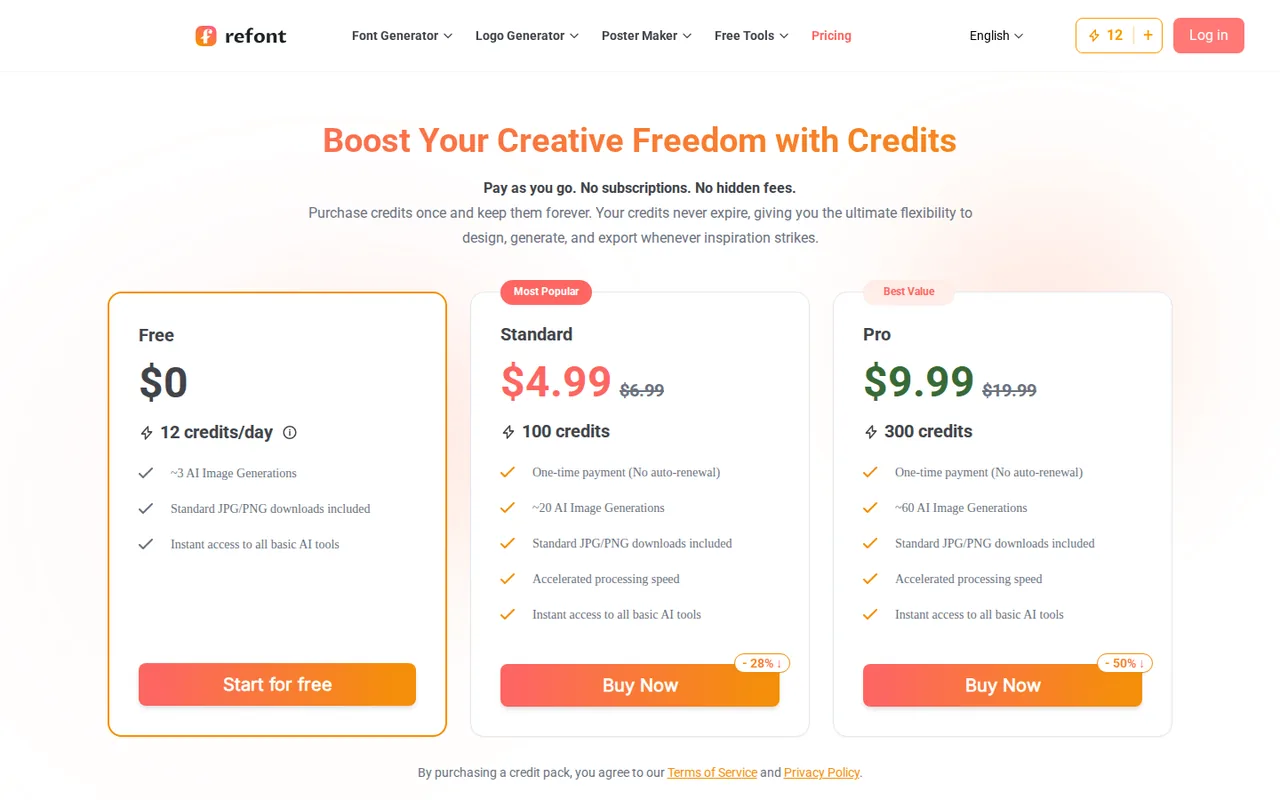
Standard and Pro are one-time payments that add all credits at once, and packs can be combined. Free credits are spent before paid credits. Credits used by a generation that fails through a system error are returned automatically; otherwise all sales are final. The charge per generation varies by tool and model, so the generation counts are approximations published by the provider.
| Plan | Price | What you get |
|---|---|---|
| Free | $0, 12 credits per day sourceFrom refont.ai/pricing, checked Sep 28, 2026 (opens in a new tab) | About 3 image generations a day; free credits can be cleared or changed at the discretion of the provider. |
| Standard | $4.99 one-time, 100 creditsno auto-renewal sourceFrom refont.ai/pricing, checked Sep 28, 2026 (opens in a new tab) | About 20 generations; credits never expire while the account is open. Shown against a $6.99 reference price. |
| Pro | $9.99 one-time, 300 creditsno auto-renewal sourceFrom refont.ai/pricing, checked Sep 28, 2026 (opens in a new tab) | About 60 generations; shown against a $19.99 reference price. |
| TTF font licence | Price not published | Personal, commercial or enterprise licence chosen at checkout in the image-to-TTF converter. |
How far does it go?
- Cost per generation, from approximations published by the providerStandard: $4.99 ÷ about 20 generations ≈ $0.25 each. Pro: $9.99 ÷ about 60 ≈ $0.17 each. Free: 12 daily credits ≈ 3 generations, so about 4 credits each. Advanced models consume more credits, so treat these as upper-bound counts rather than measured costs.
Arithmetic from the published allowances above, not a usage test.
Taxes, currency and promotions can change the price you see at checkout.
Try Refont free (opens in a new tab)
Key features
| Feature | What it does | Watch out |
|---|---|---|
| AI calligraphy from typed names and short text | — | |
| Signature styles exported as transparent PNG | — | |
| Tattoo, gothic, bubble and other style generators | — | |
| Calligraphy logo and poster generators | — | |
| Text replacement inside an existing image | Replace or remove words in an uploaded image while matching the existing text effect. | Upload only images you have the right to alter. |
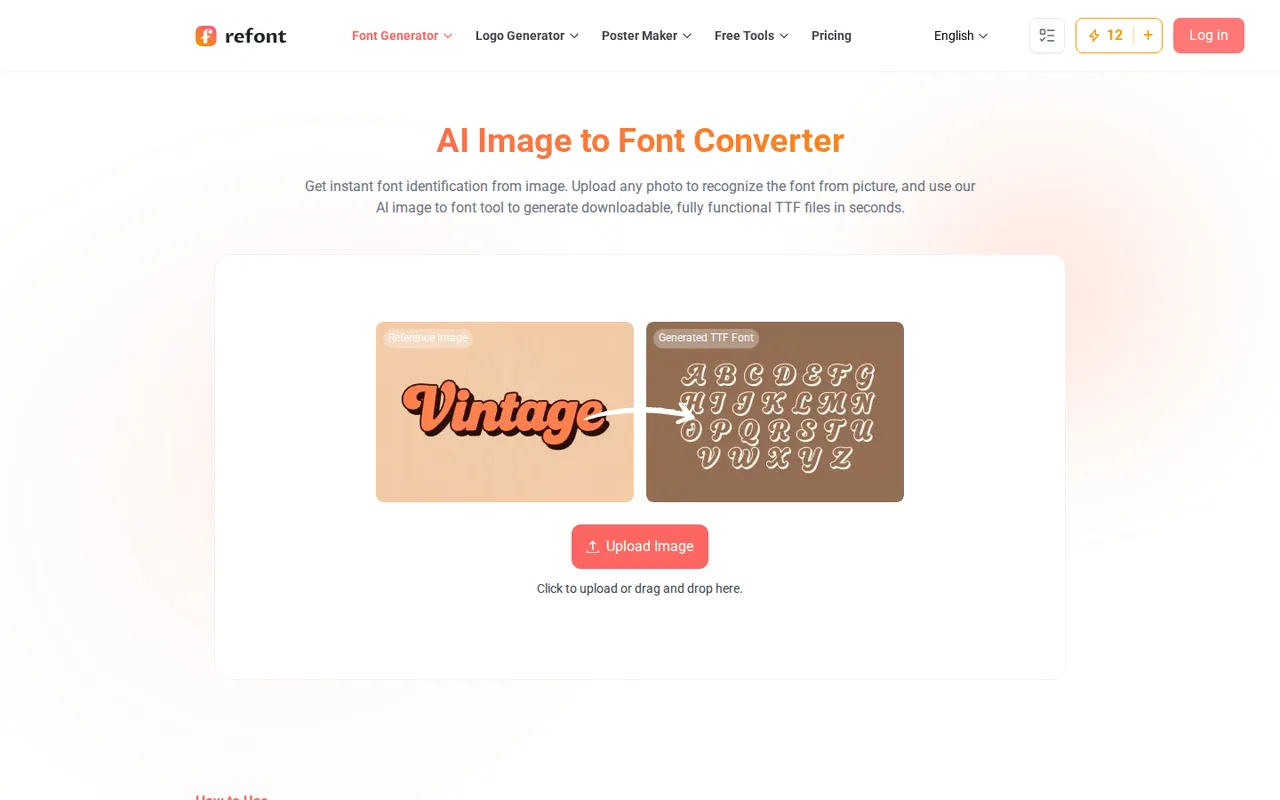
| Image-to-TTF converter with a separate licence payment | Upload a photo of lettering and receive a generated TTF typeface after choosing a licence. | Licence prices are not published, and the homepage FAQ says font files are not offered. |
| Lettering generators | Type a word or name, pick a style and generate an image of the lettering. | The result is a picture of the text, so each new word needs a new generation. |
What does Refont actually produce?
Most Refont tools take a word, name or short phrase and return an image of that text in a chosen style: calligraphy, a signature, tattoo lettering, gothic, bubble or a logo treatment. The pricing page lists standard JPG and PNG downloads, and the signature generator exports a PNG with a transparent background. The output is a picture, so changing one letter means generating again.
The homepage FAQ states that Refont does not offer .ttf or .otf font files and focuses on image-based output. A separate image-to-TTF converter page, however, describes uploading a reference photo and paying for a licence to download a TTF typeface. Treat them as different products: daily credits cover lettering images, and the TTF route has its own, unpublished price.
How far do the free daily credits go?
A Free account receives 12 credits a day, which the pricing page approximates as three AI image generations. Tools and models consume different amounts, and advanced models cost more per generation. Free credits are used first, may expire or be cleared at the discretion of the provider, and are meant to be spent soon rather than saved up.
Three generations a day is enough to try a style on one name or headline, not to explore many variants. If a design needs several rounds, a one-time pack avoids waiting for the next daily reset. The homepage says the tools work without logging in, and the header shows a credit counter either way, so check the balance before starting a batch of variations.
Are paid credits really one-time?
Yes. Standard costs $4.99 for 100 credits and Pro $9.99 for 300, each a one-time payment without automatic renewal; the full balance arrives at checkout. The pricing FAQ says Refont does not store payment details for recurring billing. Purchased credits never expire while the account stays open, and several packs can be stacked.
The crossed-out $6.99 and $19.99 figures are reference prices presented as discounts, not amounts anyone is billed. Editorial assessment: Standard fits a one-off project such as a set of invitation names, and Pro pays off only if you expect more than about 20 designs, because the cost per generation falls from roughly $0.25 to $0.17. Nothing is refundable once credits are used.
Can you use the lettering commercially?
The pricing FAQ grants a full commercial licence to assets generated with purchased credits, provided your prompts and uploads do not infringe third-party rights, and names celebrities and copyrighted characters as examples to avoid. The homepage FAQ allows personal and commercial use of font artworks under fair-use terms, a looser phrase. Outputs made only with free credits are not addressed directly by that paid-credit licence.
The terms name no company, address or jurisdiction; the governing-law clause refers only to “the laws of us”. If a logo or product label depends on the rights, keep the pricing wording and your receipt. The TTF page calls its fonts copyright-free even when rebuilt from lettering in a photo; that is the provider’s claim, and copying the design of a commercial typeface can still raise licensing questions.
Where does the signature generator become risky?
The signature tool turns a typed name into cursive, modern or artistic signatures and suggests using them on PDFs, contracts and invoices. A generated image of a name is not a signing method in itself, and creating a signature for another person can amount to forgery. Use it only for your own name, and for binding documents rely on an e-signature service that records consent.
The privacy policy reads as a general analytics and advertising template: it covers cookies, retargeting and log data, but not how uploaded images, names or prompts are stored. The homepage separately says inputs are not stored or used for training without permission. Avoid uploading identity documents or handwritten signatures you would not want retained.
Can the free credits produce a usable wedding name card?
Proposed evaluation · not performed yet
Sign in to a Free account on a day with the full 12 credits. Use the AI Calligraphy generator with the fictional names “Mara & Theo”, one script style and no uploaded images, so no third-party rights are involved.
- Record the starting credit balance and the chosen style.
- Generate once and check spelling, the ampersand and letter spacing at full size.
- Generate a second variant in a different style and record the credits used.
- Download both images and note format, pixel size and any watermark.
- Place one image on a 5 × 7 inch card layout in another editor and check edge sharpness at print size.
Accept a correctly spelled, legible image that stays sharp at card size. Reject misspelling, cropped letters or a download smaller than the preview. Credit use and output quality stay unrecorded until the task is run.
For lettering inside a full layout with editable text, compare Canva. Adobe Firefly covers generative images under Adobe terms, and Midjourney suits broader image styles. Match the output format before comparing price.
Is Refont worth it?
Documentation review plus dated public user reports. Documentation review, not tested hands-on. Not scored.
Worth it if
- You need a handful of lettering images for invitations, cards or social posts: about 3 free generations a day are enough to try a style, and a $4.99 pack adds 100 credits with no renewal.
- You create lettering in occasional bursts rather than every week: purchased credits stay in the account while it is open, so a pack does not lapse between projects.
- You want a cursive version of your own name to place over a design: the signature tool exports a transparent PNG that can be recoloured or resized afterwards.
Probably not if
- You need an installable typeface or text you can retype: standard downloads are flat images, and the TTF converter has an unpublished licence price and conflicting provider pages.
- You expect a refund when a style disappoints: sales are final once credits are used, and only credits from generations that fail through a system error come back.
- A logo or product label depends on clear licence terms: the terms name no company or jurisdiction, and the only listed contact is a Gmail address.
Refont alternatives
Other images & design tools checked with the same method. Pick by the job, not by a score.

AI images, video and audio inside an Adobe workflow

Rigged 3D avatars from a selfie for games and apps

AI images placed straight into templated designs

Turning a written story into a character-consistent comic series, and optionally a short film

Small businesses making on-brand product photos and social posts

Turning photos or video of a real scene into a 3D splat

Finding prompts for a specific image model before generating

Designers and sellers who need editable vector or brand-style image output
Used Refont? Write the first review. Visitor opinions are moderated and kept separate from our source checks.
Frequently asked questions
Which languages can Refont letter?
The homepage FAQ says Refont supports alphabet-based languages such as English, Spanish, French and Italian. Character-based scripts like Chinese, Japanese and Korean are described as coming gradually. A dedicated Malayalam font generator also appears among the free tools, so check the specific generator for your script before buying credits.
What models does Refont use?
The homepage lists Nano Banana, Imagen 4, Flux Kontext Pro and in-house models, among others. Model choice affects the credit charge per generation, which is why the pricing page gives only approximate generation counts. Refont does not say which model each style uses, so compare the credit deduction shown for your chosen tool.
Can I get credits back if a generation fails?
Only when a generation fails entirely because of a technical error on Refont’s side; the credits for that task are then returned automatically. Unsatisfying results, unused packs and a change of mind are not refunded. Look at the first result before spending more credits on variations of a style you already dislike.
Who do I contact about billing or rights?
Refont lists only refont.official@gmail.com for custom plans, API access and support. The terms do not name a company, address or jurisdiction. Keep your checkout receipt and a copy of the pricing wording on commercial use, because those are the only records connecting a purchase to the licence terms.
Can I edit a generated signature later?
The download is a flat image, so the text itself cannot be retyped. You can recolour, resize or crop it in an image editor, and the edit-text-in-image tool can replace words in an uploaded picture for further credits. A transparent PNG from the signature tool is easiest to place over documents or designs.
Sources and method6 official sources · 6 details checked · Sep 28, 2026
How we checked this profile
6 details on this page were checked against Refont's own pages and help documentation (Sep 28, 2026). 1 is still open and listed below.
See the checks by section5 documented1 open
| Section | Checks | Last checked | Sources |
|---|---|---|---|
| Plans and prices | 2 documented | refont.ai/pricing | |
| Strengths and limits | 2 documented | refont.ai/terms | |
| Article text | 1 documented | refont.ai/pricing | |
| Other details | 1 open | refont.ai/ai-ttf-font |
Still open
- Font file downloads: the homepage FAQ says .ttf/.otf files are not offered, while the image-to-TTF page sells a TTF licence.Not confirmed · checked · Source (opens in a new tab)
Sources for this profile
- Pricing and credit FAQrefont.ai
- Home and FAQrefont.ai
- Terms and conditionsrefont.ai
- Privacy and cookies policyrefont.ai
Pricing, credit and refund rules come from the pricing page FAQ and the terms, which agree. The homepage FAQ says .ttf and .otf downloads are not offered, while the image-to-TTF page sells a TTF file with a licence; both pages were live at the same time. The homepage mentions subscriptions for advanced features although the pricing page lists none. The privacy policy is generic and does not describe how uploaded images or prompts are handled.
Sources checked Sep 28, 2026. Found something out of date? See how we correct profiles.