Codex Alternatives: Five Coding Agents and What Your Codex Setup Keeps
OpenAI Codex is the coding agent included with ChatGPT plans. This guide covers five alternatives: Cursor, GitHub Copilot, Claude Code, JetBrains AI Assistant and Replit. Pick by where you used Codex, then check which parts of your setup survive the move and how each tool counts usage.
By Elias Brandt · Updated 8 Oct 2026 · About 18 min read · Plan terms taken from each tool profile
The short answer
Worked in an editor? Cursor keeps the agent, the diff and the terminal in one editor app. GitHub Copilot adds an agent to VS Code, Visual Studio or a JetBrains IDE you already use.
Worked from the terminal? Claude Code comes with Claude Pro and runs in the terminal, VS Code, Cursor and JetBrains IDEs.
Want a hosted app, or Codex inside your IDE? Replit builds and publishes in one browser workspace. JetBrains AI Assistant can run Codex itself as one of its agents.
Which Codex alternative fits how you work?
The five tools at a glance
In shortFind the row that matches where you used Codex. The last column is the catch to check before you pay.
Who each tool is for, what you get without paying, the first paid plan as the vendor lists it, the unit usage is counted in, and the main catch. Details and sources follow below.
| Tool | Best for | Free access | First paid plan | Usage counted in | Catch to check |
|---|---|---|---|---|---|
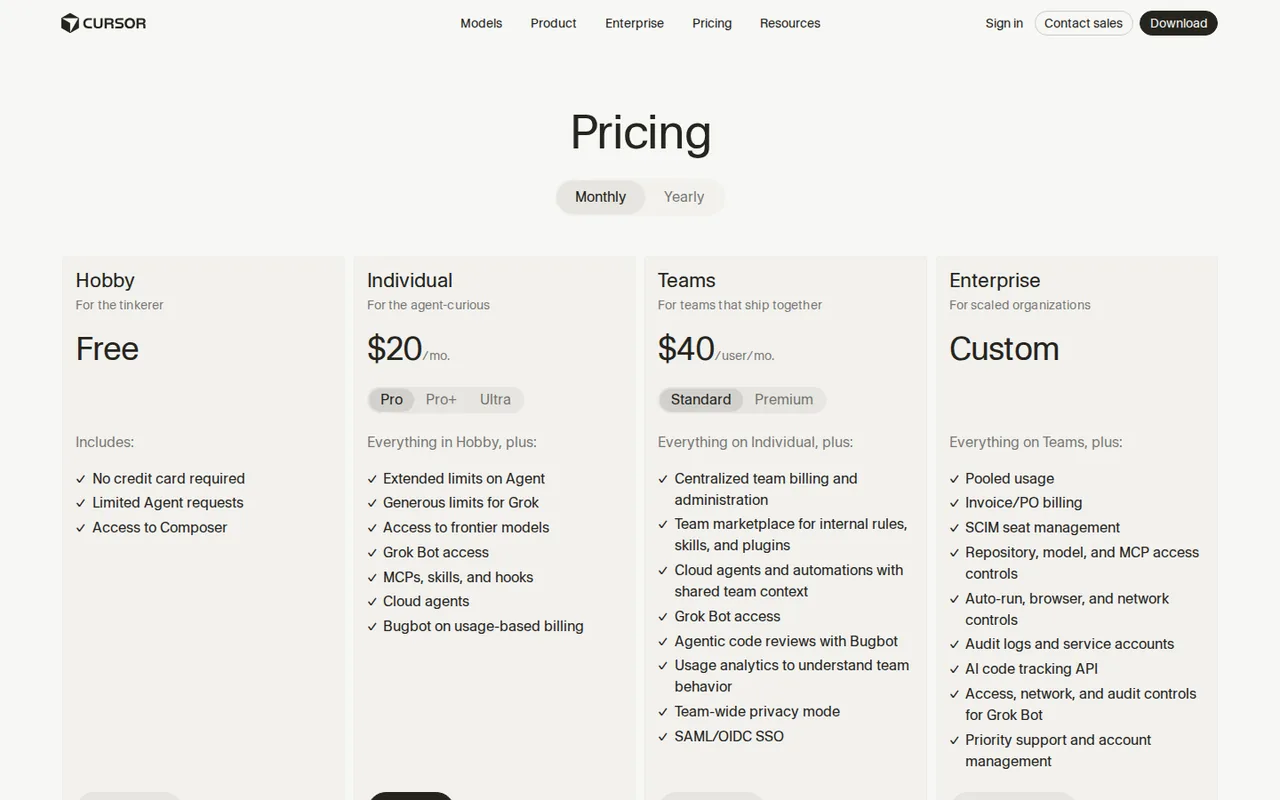
 Cursor Cursor | An agent, diffs and a terminal in one editor app | Hobby: limited Agent access, no credit card | USD 20 / month (Pro, billed monthly) | Model usage pools | Teams adds a per-token rate on third-party models |
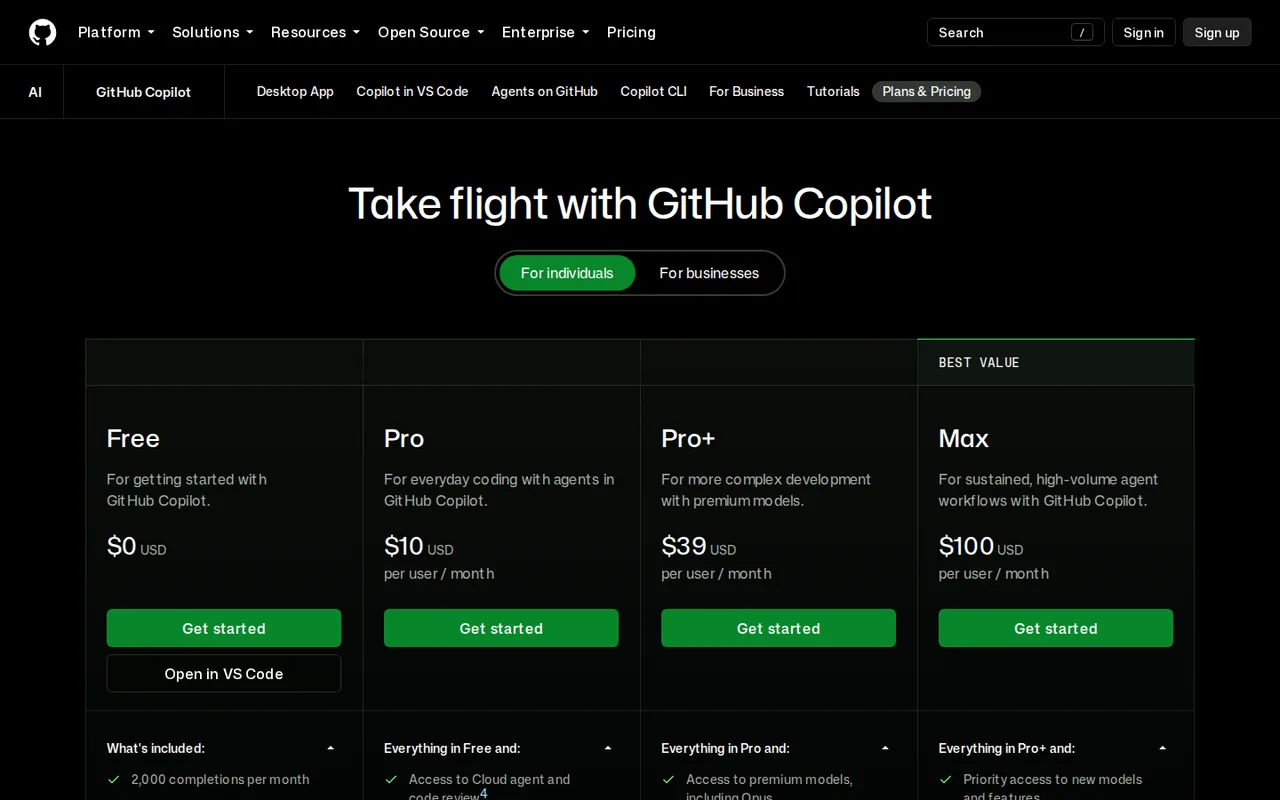
 GitHub Copilot GitHub Copilot | Adding an agent to the editor you already use, and pull request work on GitHub | Limited chat and agent use; 2,000 completions a month | USD 10 / month (Pro) | AI Credits at USD 0.01 each | Cloud agent needs a paid plan and a GitHub-hosted repository |
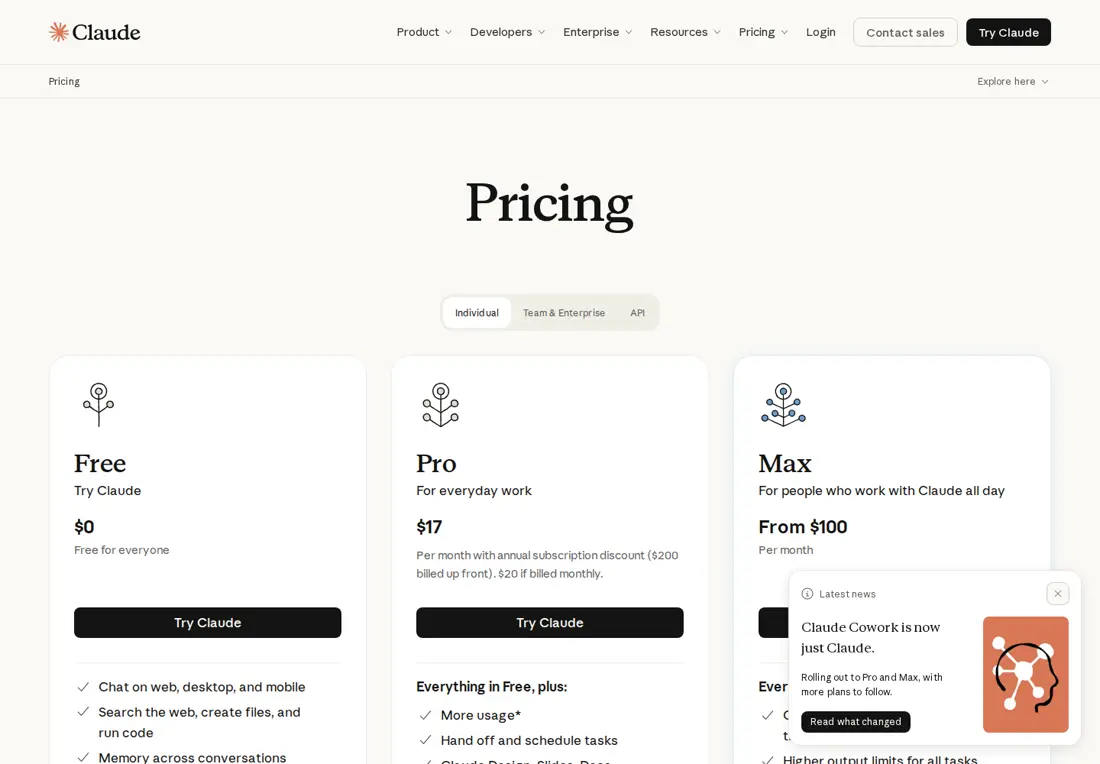
 Claude Code Claude Code | Terminal-first agent work on the same login as Claude chat | None: Claude Code starts on Pro | USD 20 / month (Pro, billed monthly) | A five-hour session allowance plus a weekly cap, shared with chat | A CLAUDE.md in the folder stops AGENTS.md loading by default |
 JetBrains AI Assistant JetBrains AI Assistant | Teams in IntelliJ-based IDEs, including running Codex itself | AI Free: 3 AI Credits per 30 days, eligible IDEs only | EUR 10 / month (AI Pro) | AI Credits per 30 days | The IDE licence is separate from the AI plan |
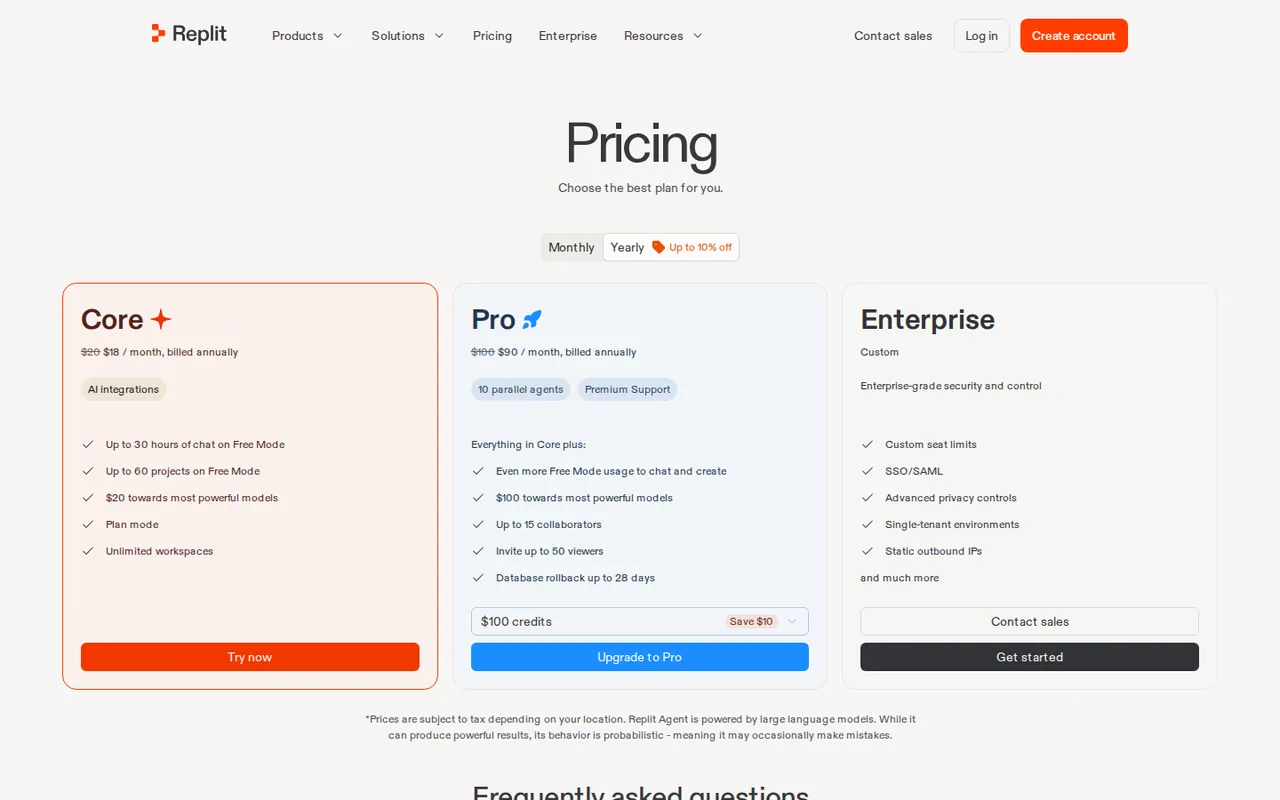
 Replit Replit | Taking a prototype from code to a hosted app in the browser | Starter: limited daily Agent credits; the published app goes down after 30 days | $20/month (Core) | Included credits, plus usage billing for hosting and databases | The pricing page and the Starter guide disagree on the free plan |
Plan names and amounts from each tool’s profile, which shows the date its plan terms were checked. Codex itself is included with ChatGPT plans; its limits are covered in the next section.
What makes a good Codex alternative
In shortFive questions that decide whether a switch is worth it. Model quality is not one of them here, because nothing in the sources lets us compare it.
- It works where you workedCodex runs from the terminal, IDE extensions, the desktop app, cloud chats and GitHub. A replacement that lives somewhere else changes your daily routine, not just the model.
- It reads your instruction filesMost tools here read AGENTS.md, but each finds nested files differently and some prefer their own file first. See the instruction-file table.
- Its usage unit fits your weekCodex counts messages per five-hour window; the others count credits, usage pools or session allowances. Compare a normal week of work, not the monthly price.
- Its data controls match your policyPrivacy Mode, content exclusion and prompt logs exist in different tools; Copilot’s content exclusion, for one, does not cover Edit or Agent modes.
- You can go backCodex can import a setup from Claude Code and Cursor. For the other tools, the way back is the configuration you did not delete.
Do you need to leave Codex at all?
A model change is a settings job
In shortIf a saved model name is your only problem, update the setting and stay. Usage, editor or hosting needs are real reasons to move.
This page is about OpenAI Codex, the coding agent included with ChatGPT plans, not Codédex, the site that teaches beginners to code.
OpenAI’s Codex documentation announces that GPT-5.5 leaves ChatGPT, ChatGPT Work and Codex on all plans, and that the OpenAI API is not affected. The migration note names GPT-6 Sol as the replacement on Plus, Pro, Business, Enterprise and Edu when available, and GPT-6 Luna in the desktop app on Free and Go. Update workspace defaults, saved model settings, custom agents, scheduled tasks and scripts that name gpt-5.5; that keeps Codex working without a new tool.
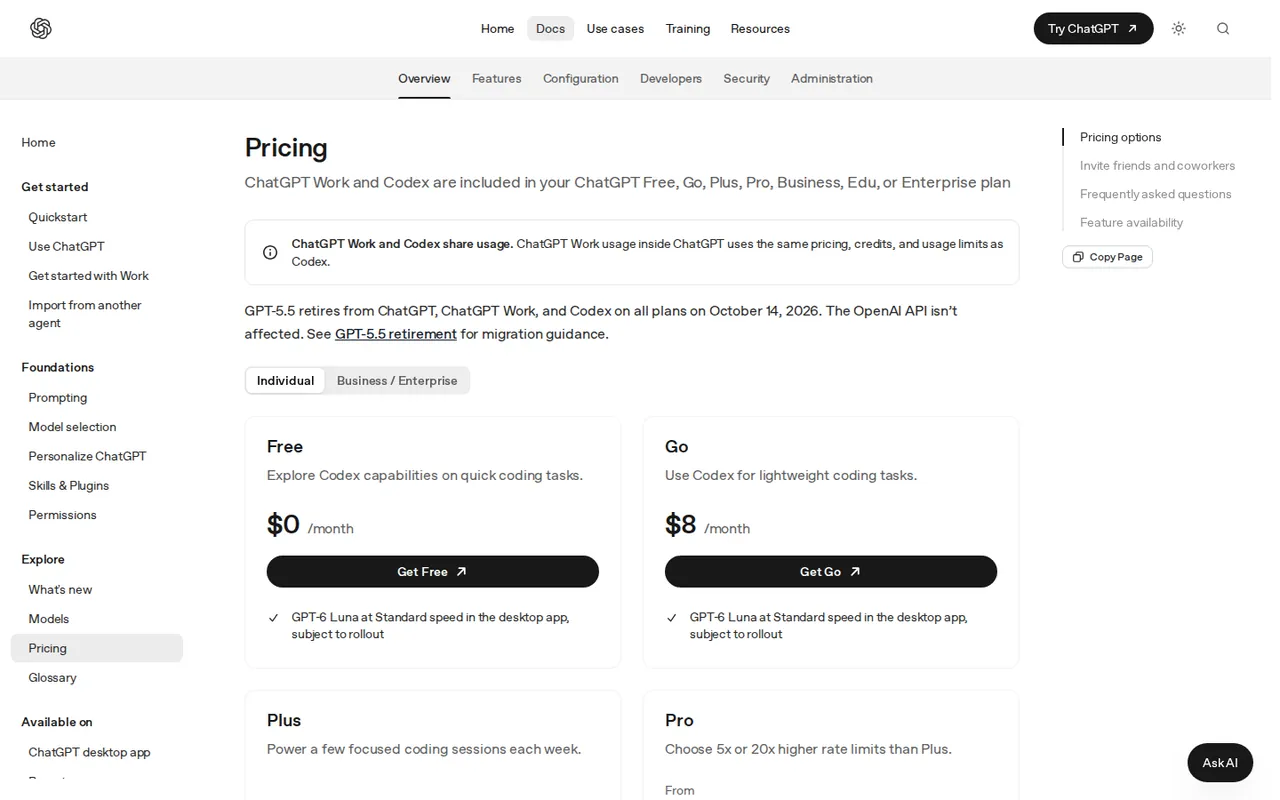
Sources: Codex pricing and usage limits, Codex models.
Reasons that do call for another tool
In shortName your reason first; it points to one tool.
| Your reason | Where to look | Why |
|---|---|---|
| Codex usage runs out mid-week | Any tool here, after counting a normal week | Codex usage is shared with ChatGPT Work and counted in messages per five-hour window that vary by model and task; the others meter in their own units |
| You want the agent, diff review and terminal in one editor | Cursor | Its Agent edits across files and runs terminal commands, with local checkpoints |
| Your team already pays for an editor assistant | GitHub Copilot | It adds to VS Code, Visual Studio and JetBrains IDEs instead of replacing them |
| You want the agent inside GitHub pull requests | GitHub Copilot | Its cloud agent prepares changes on a branch and opens a pull request, on paid plans |
| You drove Codex from the terminal | Claude Code | It runs in the terminal and in IDEs on a Claude Pro or Max login |
| Work has to stay inside a JetBrains IDE | JetBrains AI Assistant | It can run Codex as one of its agents, signed in with your ChatGPT account |
| The result has to be a hosted app, not a patch | Replit | Development and publishing sit in one workspace |
Sources: Codex pricing and usage limits, JetBrains Codex agent.
If you need a different way of working: one tool each
In shortEach tool has the same layout: what it does, what it takes over from Codex, what you leave behind, and what carries over.
If you want one editor app: Cursor
Best for an agent, diffs and terminal in one editor
Best when you used Codex mostly from an IDE and want to review every change as a diff.
- Free Hobby, limited Agent access
- Entry from USD 20 / month Pro, billed monthly
Cursor is an AI code editor for Windows, macOS and Linux. Its Agent inspects files, edits across a repository and runs terminal commands, so inspection, editing and command runs stay in one workspace.
What it does
- Edit across files
- Carries a requested change through related files and commands. You set the scope and check the behaviour.
- Project rules
- Reusable repository instructions kept with the code; structured rules can target file patterns.
- Checkpoints
- Restore agent file changes during a session. Git stays the durable history.
- Privacy Mode
- Privacy Mode settings are listed among its features; review them before attaching a private repository.
Takes over from Codex
Editor-based Codex work: agent, diff review and terminal in one application, with rules that can apply to some file patterns and not others.
You leave behind
Codex approval rules, sandbox mode and cloud environments; recreate permissions in Cursor. A plain .md file placed in .cursor/rules is ignored: project rules there need the .mdc extension and frontmatter.
What carries over
AGENTS.md in the project root and in subfolders. If the trial fails, Codex can import the Cursor setup back.
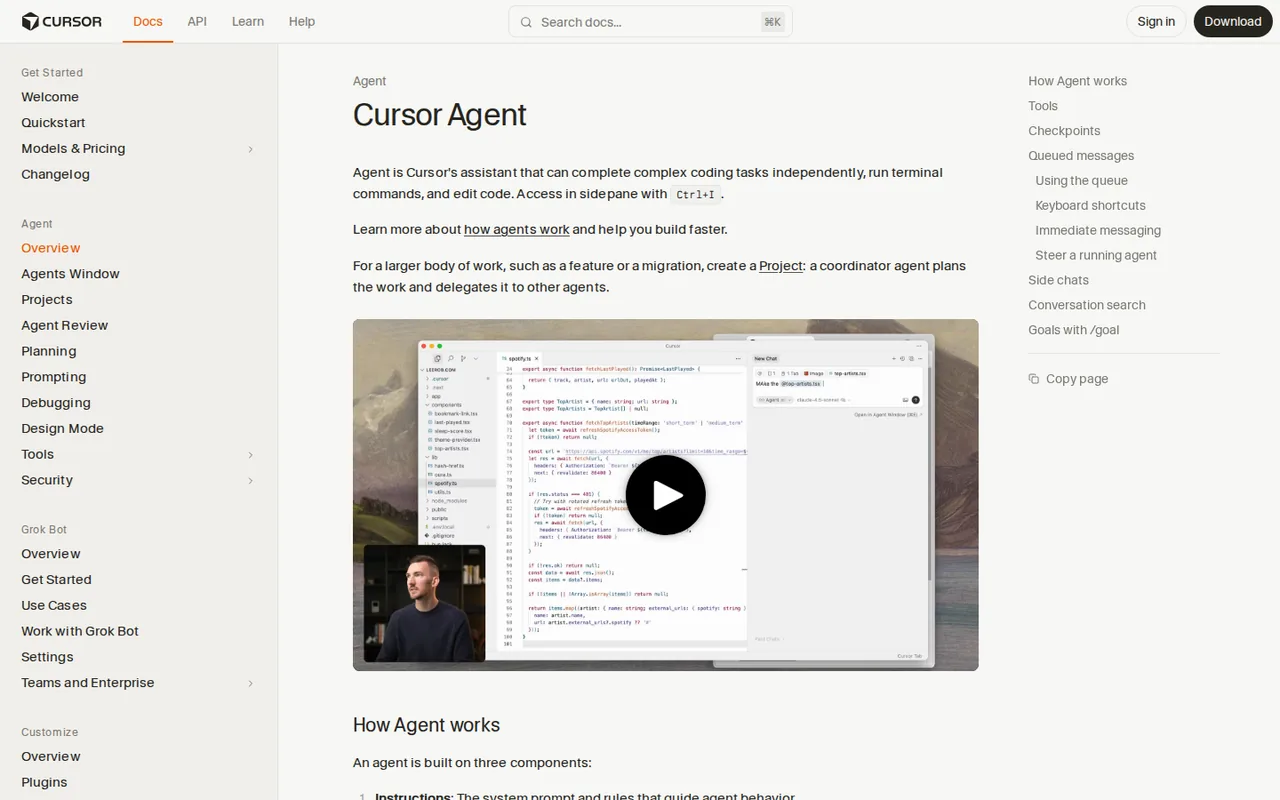
See the Cursor profile for plans, limits and sources.
Visit Cursor (opens in a new tab)
Sources: Cursor Agent overview, Cursor rules, Cursor pricing.
If you live in GitHub pull requests: GitHub Copilot
Best for keeping your editor and working through pull requests
Best when Codex work centred on GitHub reviews and branches, or when the team will not change editors.
- Free 2,000 completions a month
- Entry from USD 10 / month Pro, per person
Copilot works in VS Code, Visual Studio, JetBrains IDEs, GitHub on the web and the terminal. Chat, local agent mode and a separate cloud agent cover different levels of repository work.
What it does
- Completions and chat
- Inline suggestions and chat in supported editors; completions are unlimited on Pro.
- Local agent mode
- Edits code in your local development environment.
- Cloud agent
- Researches a GitHub repository and prepares changes on a branch before opening a pull request. Paid plans only.
- Code review
- Pull request reviews and file diff reviews in supported editors, on paid plans.
Takes over from Codex
Codex reviews and the Codex GitHub Action: the cloud agent and code review run inside GitHub.
You leave behind
Repositories hosted outside GitHub or owned by managed user accounts: the cloud agent cannot work on them. Content exclusion does not apply in Edit or Agent modes.
What carries over
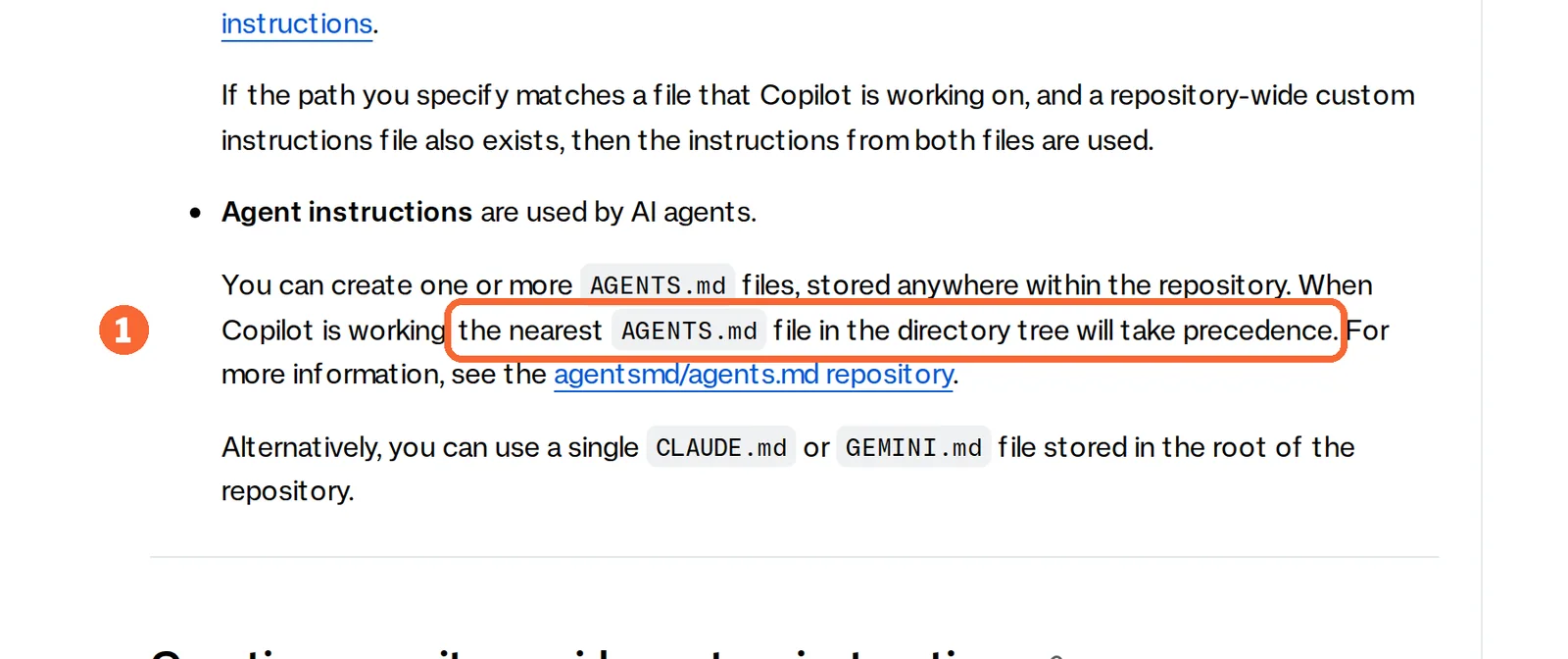
AGENTS.md files anywhere in the repository, with the nearest one taking precedence. A single root CLAUDE.md or GEMINI.md also works, and .github/copilot-instructions.md applies to every request.
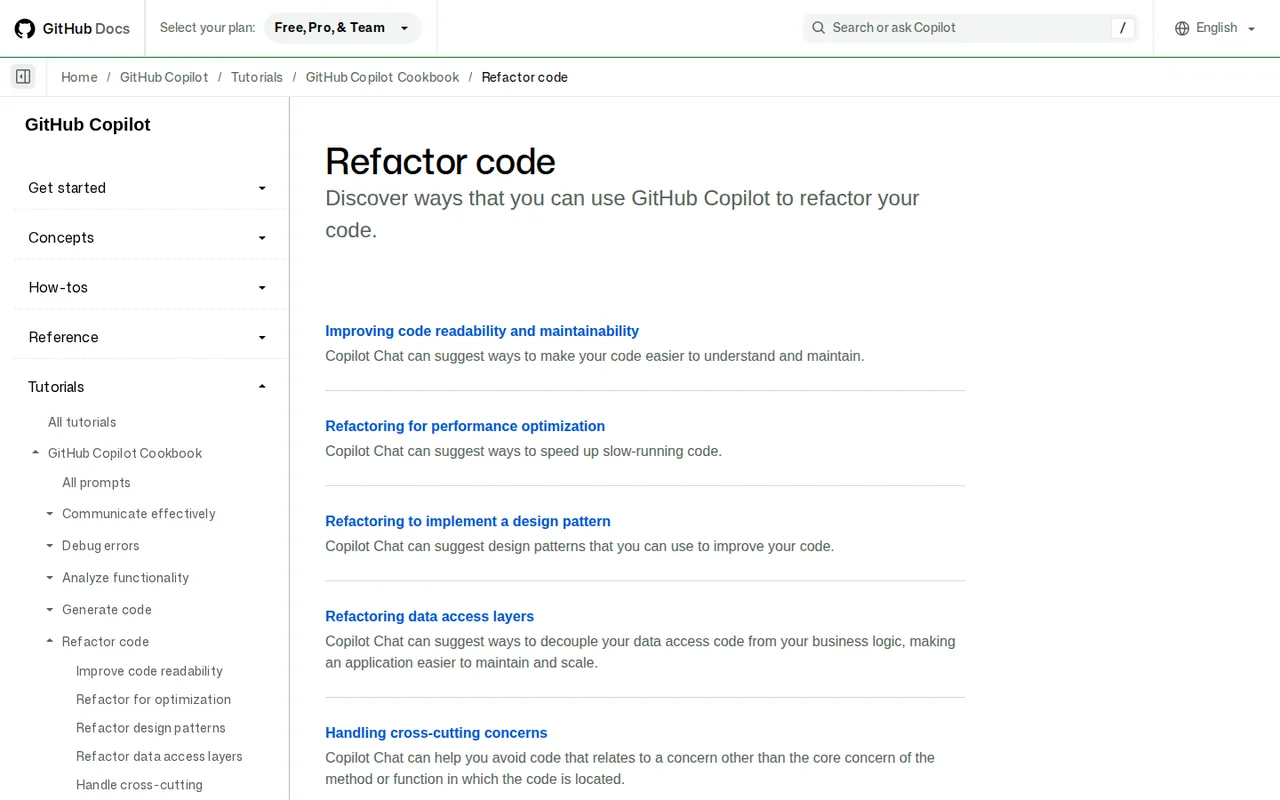
See the GitHub Copilot profile for plans, limits and sources.
Visit GitHub Copilot (opens in a new tab)
Sources: Copilot cloud agent, Copilot repository instructions, Copilot content exclusion.
If you drove Codex from the terminal: Claude Code
Best for terminal-first agent work
Best when one subscription should cover chat and coding, and the terminal is where you work.
- Free Not on Free
- Entry from USD 20 / month Pro, billed monthly; USD 200 billed yearly
Claude Code is Anthropic’s coding tool for the terminal and for VS Code, Cursor and JetBrains IDEs. It comes with Claude Pro and Max and uses the same login as the Claude chat apps.
What it does
- Delegate coding tasks
- In the terminal or an IDE, with the same Pro or Max login as chat.
- Room for long material
- Paid plans reach a context window of up to 1M tokens on the newest models.
- Usage levels
- Pro, Max 5x and Max 20x raise per-session usage for one person without a team plan.
- Team plans
- Shared projects, single sign-on and central billing, with no model training on your content by default.
Takes over from Codex
Codex CLI work from the terminal, plus IDE use inside VS Code, Cursor or JetBrains on the same login.
You leave behind
A free coding tier: Claude Code starts on Pro. Its use counts against the same limits as chat, and an ANTHROPIC_API_KEY variable on your system switches billing to API rates.
What carries over
AGENTS.md, but by default only when no CLAUDE.md or CLAUDE.local.md exists in the working folder or above it; direct reading needs version 2.1.277 or later. Codex can import a Claude Code setup back.
See the Claude profile for plans, limits and sources.
Visit Claude (opens in a new tab)
Sources: Claude Code with Pro or Max, Claude Code memory, Claude usage limits.
If you work in a JetBrains IDE: JetBrains AI Assistant
Best for IntelliJ-based teams, with Codex as one agent
Best when the IDE stays fixed and you want to choose the agent inside it.
- Free 3 AI Credits per 30 days
- Entry from EUR 10 / month AI Pro, billed monthly
AI Assistant adds chat, code explanations, suggested refactors and coding agents to supported JetBrains IDEs, including IntelliJ IDEA, PyCharm, WebStorm, PhpStorm, Rider, GoLand and CLion.
What it does
- Chat or agents
- Chat returns suggestions to review by hand; agents carry out multi-step changes across files.
- Several agents
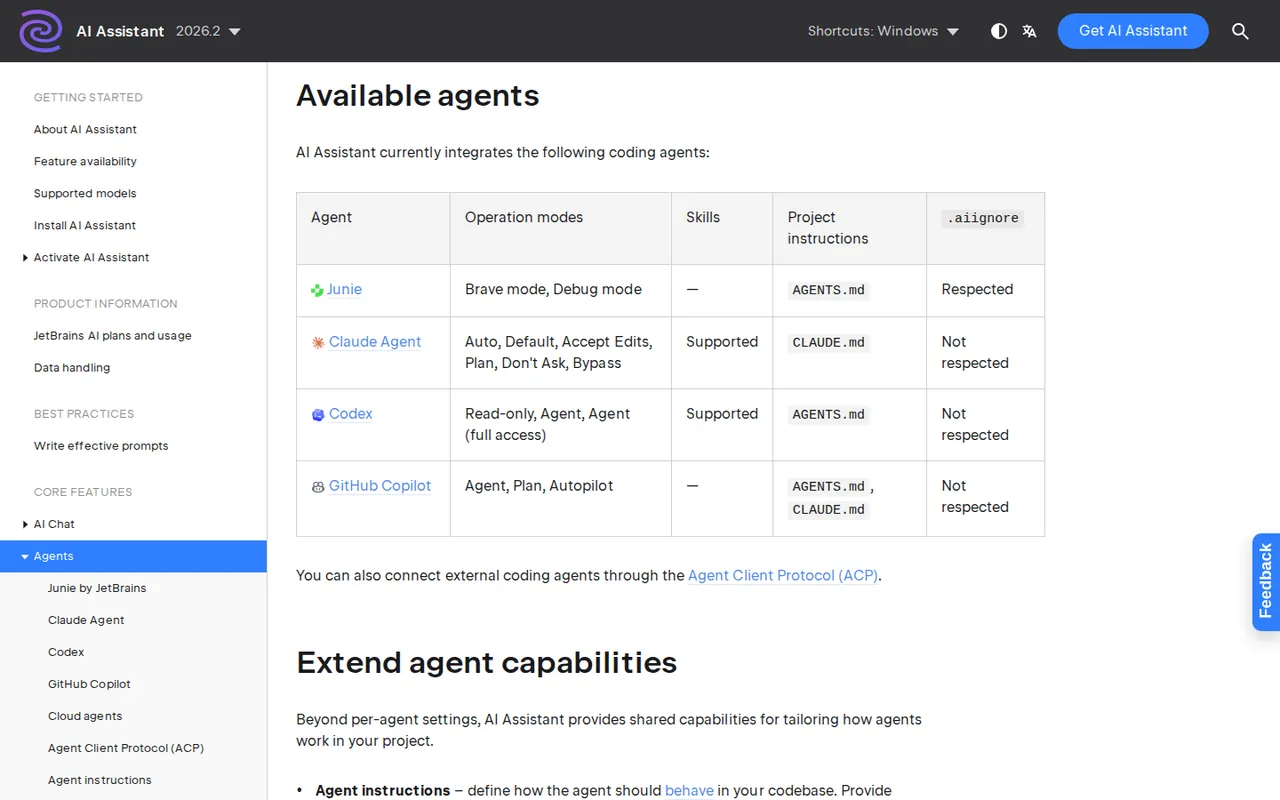
- Junie, Codex, GitHub Copilot and Claude Agent can be picked inside the IDE.
- Model choice
- The JetBrains service, supported provider access or configured local models.
- Data controls
- Code-data collection settings and a log of prompts sent to external services.
Takes over from Codex
Codex itself: sign in with a ChatGPT account and keep your Codex access inside the IDE, or use a JetBrains AI subscription. A bring-your-own-key setup needs a key issued directly by OpenAI.
You leave behind
Exclusions: the Codex agent does not respect .aiignore; only Junie does. AI Free is not available in Android Studio or some free and community IDE editions, and the IDE licence is separate.
What carries over
AGENTS.md for the Junie, Codex and GitHub Copilot agents; CLAUDE.md for Claude Agent. Chat-mode project rules live separately in .aiassistant/rules.
See the JetBrains AI Assistant profile for plans, limits and sources.
Visit JetBrains AI Assistant (opens in a new tab)
Sources: JetBrains agents, JetBrains Codex agent, JetBrains project rules.
If you need a running app, not a patch: Replit
Best for a prototype that has to be hosted
Best when the job ends with a deployed app other people can open, without moving it to a separate host.
- Free Starter, limited daily Agent credits
- Entry from $20/month Core; $18/month billed annually
Replit combines development, agent assistance and publishing in one web workspace. Agent modes depend on the plan: Starter has Lite build only, Core and Pro have Full build.
What it does
- Develop and publish
- Build an app and publish it from the same workspace.
- Collaborators
- Up to five on Core and 15 on Pro.
- Parallel agents
- Ten on Pro.
- Database rollback
- Back up to 28 days, on Pro.
Takes over from Codex
Codex tasks that end in a running app: hosting, a database and a public link from one place.
You leave behind
A fixed monthly total: published-app transfer, Autoscale compute, requests and production databases are billed by usage beyond included credits. The Starter app goes down after 30 days.
What carries over
Instruction-file support is not covered in the sources checked. Keep AGENTS.md in the repository and give its rules to the Agent in your first prompt.
See the Replit profile for plans, limits and sources.
Visit Replit (opens in a new tab)
Sources: Replit Starter plan, Replit usage-based billing, Replit pricing.
Feature matrix: what each tool covers
In shortFourteen capabilities marked from the five profiles and this guide’s sources. A dash means the sources checked do not cover it, not that the tool lacks it.
| Capability | Cursor | Copilot | Claude Code | JetBrains AI | Replit |
|---|---|---|---|---|---|
| Where you work | |||||
| In the terminal | OfferedAgent runs commands | Offeredterminal listed | Offeredterminal tool | Not listednot covered in the sources checked | Not listednot covered in the sources checked |
| Inside an existing IDE | Not listedis its own editor | OfferedVS Code, Visual Studio, JetBrains | OfferedVS Code, Cursor, JetBrains | PartlyJetBrains IDEs only | Not listednot covered in the sources checked |
| In the browser | Not listednot covered in the sources checked | OfferedGitHub web | Not listednot covered in the sources checked | Not listednot covered in the sources checked | Offeredweb app |
| Agent work | |||||
| Changes across several files | OfferedAgent edits | Offeredlocal agent mode | Offereddelegated tasks | Offeredcoding agents | PartlyAgent; mode depends on plan |
| Cloud agent that opens a pull request | Not listednot covered in the sources checked | Offeredpaid plans, GitHub repos | Not listednot covered in the sources checked | Not listednot covered in the sources checked | Not listednot covered in the sources checked |
| Pull request review | Not listednot covered in the sources checked | Offeredpaid plans | Not listednot covered in the sources checked | Not listednot covered in the sources checked | Not listednot covered in the sources checked |
| Agents in parallel | Not listednot covered in the sources checked | Not listednot covered in the sources checked | Not listednot covered in the sources checked | Not listednot covered in the sources checked | Offered10 on Pro |
| Undo agent changes | Offeredlocal checkpoints | Not listednot covered in the sources checked | Not listednot covered in the sources checked | Not listednot covered in the sources checked | Partlydatabase rollback, Pro |
| Setup and control | |||||
| Reads AGENTS.md | Offeredroot and subfolders | Offerednearest file wins | Partlyonly without CLAUDE.md | PartlyJunie, Codex, Copilot agents | Not listednot covered in the sources checked |
| MCP servers | Offeredlisted integration | Offeredagent workflows | Not listednot covered in the sources checked | Not listednot covered in the sources checked | Not listednot covered in the sources checked |
| Pick the model provider | Partlythird-party models, token rate on Teams | Partlymodel choice changes credit use | Not listednot covered in the sources checked | Offeredprovider access or local models | Not listednot covered in the sources checked |
| Run Codex inside it | Not listednot covered in the sources checked | Not listednot covered in the sources checked | Not listednot covered in the sources checked | OfferedCodex agent | Not listednot covered in the sources checked |
| Code data controls | OfferedPrivacy Mode | Partlyexclusion not in Edit or Agent | PartlyTeam: no training by default | Offeredsettings and prompt log | PartlyEnterprise privacy controls |
| Publish and host the app | Not listednot covered in the sources checked | Not listednot covered in the sources checked | Not listednot covered in the sources checked | Not listednot covered in the sources checked | Offeredpublishing in the workspace |
offered partly or with limits not listed on the profile.
Claude Code cells come from the Claude profile and the Claude Code memory documentation; JetBrains agent cells from the JetBrains agents and Codex agent pages.
What moves from Codex, and what do you rebuild?
Inventory your Codex setup
In shortList what you built around Codex before comparing features. Rows you never configured can be skipped.
| Codex item | Does it move? | What to do |
|---|---|---|
| AGENTS.md files, global and per folder | Mostly, as the same file | Keep them in the repository; check how the new tool finds nested files and whether it needs a setting |
| AGENTS.override.md and fallback file names | No | These are Codex discovery rules; merge overrides into the main file before switching |
| config.toml, approval rules, sandbox mode | No | Recreate permissions in the new tool; approval models differ |
| Skills and slash-command prompts | Partly, as text | Copy the instructions and rebuild them in the target’s skill or rule format |
| MCP server definitions | No, as configuration | Re-enter servers and sign in again; keep a list of endpoints and required secrets |
| Cloud environments and setup scripts | No | Save dependency and setup steps as scripts in the repository so any agent can run them |
| GitHub reviews and the Codex GitHub Action | No | Switch off Codex reviews and remove the workflow and its OPENAI_API_KEY secret once the replacement is live |
Codex cloud chats run in environments you configure with dependencies, variables and secrets, and the GitHub Action runs codex exec with an OpenAI key stored as a repository secret. Both keep running without anyone opening Codex, so they are the easiest items to miss.
Sources: Codex cloud, Codex GitHub Action.
Where your AGENTS.md keeps working
In shortOne shared AGENTS.md travels furthest. Where a tool prefers its own file, keep that file short and point it at the shared one.
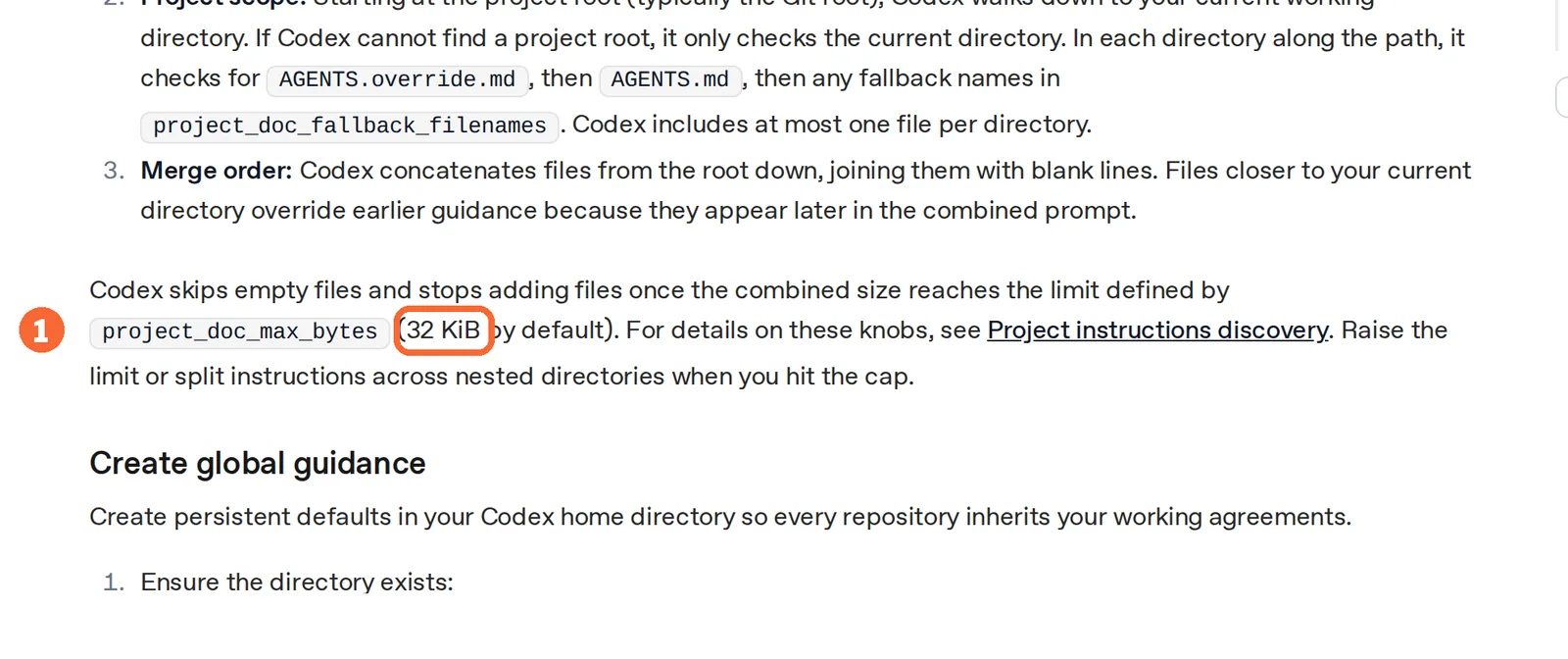
Codex reads a global file from its home folder, then one file per directory from the repository root down to the working folder, and stops adding files once the combined size reaches 32 KiB by default. The other tools apply their own rules:
| Tool | Reads AGENTS.md | Its own file | Watch for |
|---|---|---|---|
| Cursor | Root and subfolders | .cursor/rules as .mdc with frontmatter | Plain .md files in .cursor/rules are ignored |
| GitHub Copilot | Anywhere; the nearest file wins | .github/copilot-instructions.md; a root CLAUDE.md or GEMINI.md also works | The repository-wide file applies to every request |
| Claude Code | Only when no CLAUDE.md is present | CLAUDE.md, CLAUDE.local.md | Set Project instructions to load both, or import AGENTS.md from CLAUDE.md |
| JetBrains AI Assistant | For Junie, Codex and Copilot agents | CLAUDE.md for Claude Agent; .aiassistant/rules for chat | Which agent is selected decides the file |
| Replit | Not covered in the sources checked | Not covered in the sources checked | Give the rules in the first prompt |
Sources: Codex AGENTS.md guide, Cursor rules, Copilot repository instructions, Claude Code memory, JetBrains agents.
Keep a way back
In shortOpenAI documents an import into Codex, not an export out of it. That makes Cursor and Claude Code the easiest trials to undo.
- The ChatGPT desktop app imports from Claude Code, Claude Cowork or Cursor; Codex CLI imports from Claude Code or Cursor with /import.
- Instruction files map to AGENTS.md, settings.json to config.toml, and skills, MCP servers, hooks, subagents and slash commands to their Codex equivalents.
- The CLI brings over up to 50 chats from the last 30 days, and importing leaves the original setup unchanged.
- For Copilot, JetBrains AI Assistant or Replit, the way back is the unchanged AGENTS.md plus the Codex configuration you kept. Leave the Codex GitHub integration on until the replacement has handled real pull requests.
Sources: Codex import from another agent.
What does each alternative cost, and in what unit?
Usage units side by side
In shortEach tool counts usage in its own unit, so two plans at the same monthly price can last very different amounts of work.
| Tool | First paid plan | Usage is counted as | Billed on top |
|---|---|---|---|
| Codex | Included with ChatGPT plans | Messages per five-hour window, varying by model and task; shared with ChatGPT Work | An API key option for the CLI, SDK and IDE extension is billed at API rates |
| Cursor | Pro, USD 20 per month | Model usage pools; the model and task decide how far they last | Optional on-demand usage; on Teams and Enterprise, USD 0.25 per million tokens on third-party models |
| GitHub Copilot | Pro, USD 10 per month | 1,000 base AI Credits plus a variable 500-credit flex allotment; credits reset on the first day of the month, UTC | Cloud agent also uses GitHub Actions minutes; extra usage needs its own budget |
| Claude Code | Pro, USD 20 billed monthly | A five-hour session allowance and a weekly cap, shared with chat | An ANTHROPIC_API_KEY variable moves billing to API rates |
| JetBrains AI Assistant | AI Pro, EUR 10 per month | 10 AI Credits per 30 days (35 on AI Ultimate) | Top-ups on paid plans; the IDE licence; provider charges when you use your own access |
| Replit | Core, $20/month | $20 of included credits | Published-app transfer, Autoscale compute, requests and production databases, by usage |
Sources: Codex pricing and usage limits, Cursor models and pricing, Copilot AI Credits, JetBrains AI licences and quotas.
How each plan steps up
In shortRead live from each profile. Each chart compares one tool’s own plans; currencies are never mixed.

Price per month on monthly billing, from the Cursor profile. Bars compare plans of this tool only.

Price per month, as each plan is first listed, from the Claude profile. Bars compare plans of this tool only.

Price per month on monthly billing, from the JetBrains AI Assistant profile. Bars compare plans of this tool only.
| Tool | Plan | Price | Included |
|---|---|---|---|
| GitHub Copilot | Free | USD 0 | Limited chat and agent use; 2,000 completions a month |
| GitHub Copilot | Pro | USD 10 per person per month | 1,000 base AI Credits plus 500 flex |
| GitHub Copilot | Pro+ | USD 39 per person per month | 3,900 base AI Credits plus 3,100 flex |
| GitHub Copilot | Max | USD 100 per person per month | 10,000 base AI Credits plus 10,000 flex |
| Replit | Starter | Free | Limited daily Agent credits; Lite build |
| Replit | Core | $20/month; $18/month billed annually | $20 of credits; up to five collaborators |
| Replit | Pro | $100/month; $90/month billed annually | $100 of credits; 15 collaborators, 10 parallel agents |
| Replit | Enterprise | Custom quote | SSO/SAML and single-tenant options |
Claude’s Pro bar shows the yearly-billed monthly price (USD 200 a year); billed monthly it is USD 20. Flex allotments on Copilot are variable and may change.
The arithmetic each profile works out
In shortSums on published rates, not observed usage.
| Tool | Case | Result |
|---|---|---|
| Cursor | Two Teams Standard seats | 2 × USD 40 = USD 80 a month in seat fees, before tax and token charges |
| GitHub Copilot | Pro credit conversion | USD 10 ÷ USD 0.01 = 1,000 base credits; the flex allotment is extra and variable |
| Claude | Annual against monthly Pro | 12 × USD 20 = USD 240 against USD 200 a year: about USD 40 less for a one-year commitment |
| JetBrains AI Assistant | AI Ultimate against AI Pro | 35 − 10 = 25 more AI Credits per 30-day cycle |
| Replit | Annual against monthly Core | $20 x 12 = $240 versus $18 x 12 = $216, a $24 yearly difference |

Sources: Cursor pricing, Copilot plans, Claude pricing, JetBrains AI pricing, Replit pricing.
Questions, and what this guide does not judge
Common questions
What are some free alternatives to Codex?
GitHub Copilot Free gives limited chat and agent use and 2,000 inline completions a month, without the cloud agent. Cursor Hobby offers limited Agent access with no credit card. JetBrains AI Free has 3 AI Credits per 30 days in eligible IDEs. Replit Starter has limited daily Agent credits, but its published app goes down after 30 days. Claude Code needs a paid Claude plan.
Is there a Google alternative to Codex?
Google's Gemini CLI and Jules appear in other Codex lists, but this guide does not cover them yet because neither has a profile here with checked plan terms. Among the tools covered, JetBrains AI Assistant lets you choose between its own service, supported provider access and local models, and Cursor can route work to third-party models.
Can I keep using Codex inside another tool?
Yes, in JetBrains AI Assistant, which offers Codex as one of its agents. You can sign in with a ChatGPT account, use a JetBrains AI subscription, or bring your own key, provided OpenAI issued it directly; keys from third-party providers are not supported. The Codex agent there ignores .aiignore, so files listed in it can still be processed.
Does Claude Code read my AGENTS.md file?
Not by default if a CLAUDE.md exists in the working folder or above it; Claude Code then loads that file instead. Set Project instructions to claude-md-and-agents-md in /config to load both, or add an @AGENTS.md import line inside CLAUDE.md so the shared file stays the single place you edit.
Do my Codex usage limits carry over to another tool?
No. Codex limits belong to each ChatGPT plan or workspace and are estimated as messages per five-hour window that vary by model. Cursor meters model usage pools, Copilot and JetBrains count AI Credits, Claude uses session and weekly allowances, and Replit counts included credits, so compare a real week of work instead of converting one figure into another.
Can I go back to Codex if the switch fails?
From Cursor or Claude Code, yes: the ChatGPT desktop app and Codex CLI can import their instruction files, settings, skills, MCP servers, hooks, subagents and slash commands, and the CLI brings over up to 50 recent chats. From the other tools, keep your AGENTS.md and Codex configuration untouched until the trial is over.
What this guide does not judge
Which agent writes better code, which model reasons better, how fast each one finishes a task and how they score on benchmarks are the questions most Codex lists rank on. None of the vendor pages behind this guide document them in a way we can check, so they are not judged here. The same goes for running many agents against shared infrastructure, which some lists cover.
Open-source command-line agents such as Aider and Google’s Gemini CLI and Jules appear in other Codex lists. They are left out until each has a profile with checked plan terms. For a small, behaviour-preserving task to try any of these tools on, see code refactoring; more tools sit in the coding category.
Pick one repository with an AGENTS.md, a test command and a small bug with a known fix. Give Codex and one alternative the same prompt on the plan you would pay for. Record the tool, version, plan, model and the instruction file the session reports as loaded; ask each agent to fix the bug, run the tests and summarise the diff without committing; then repeat once with a nested AGENTS.md in a subfolder.
How this guide was made
Plans, units and features come from the Cursor, GitHub Copilot, Claude, JetBrains AI Assistant and Replit profiles on this site, which cite the vendors’ pricing, help and documentation pages and carry their own check dates. Codex details and the instruction-file rules come from the OpenAI, Cursor, GitHub, Anthropic and JetBrains documentation linked in each section. Plan charts are read live from the profiles. Sections follow the topics the top-ranking Codex alternative pages cover, limited to what the vendors document. No rating is given. See our editorial policy.