JetBrains AI Assistant: IDE-native chat and agents, but Free is 3 credits per 30 days and edition-restricted
Updated September 27, 2026 · By Elias Brandt · Documentation review, not tested hands-on
Pros
- Work in a familiar IDE
- Inspect suggestions before applying
- Choose the context
- Visible quota and request logs
Cons
- Free-tier IDE restrictions
- Cloud budget varies by task
- AI and IDE licenses differ
- Code leaves the editor with cloud models
Bottom line
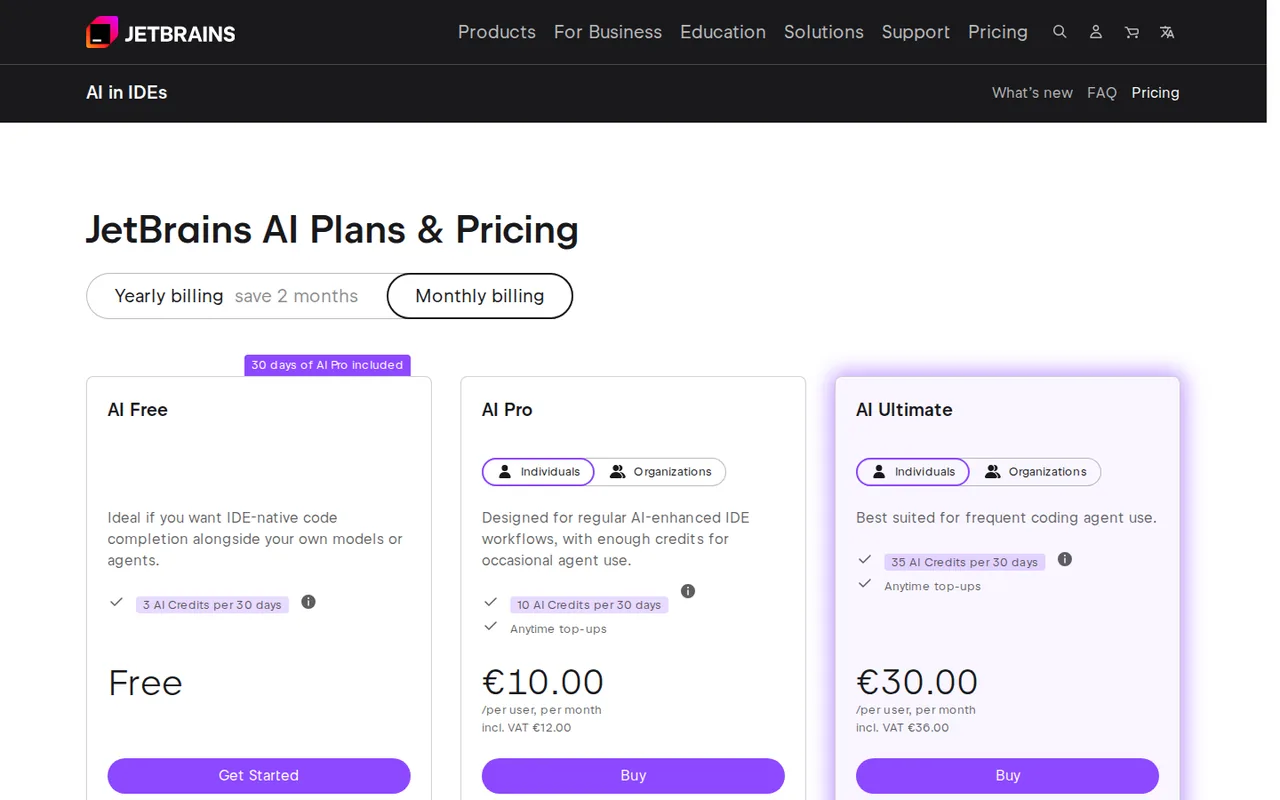
3 AI Credits per 30 days; IDE and license eligibility restrictions apply; no credit top-ups on Free.
You already work in a supported JetBrains IDE and want to review chat suggestions as diffs next to the IDE's own inspections and refactoring tools.
You use Android Studio or a Community edition and expect the Free tier to apply; the documentation lists those as excluded.
Best forJetBrains developersJava maintainersTeams with code-sharing policiesOccasional cloud users
Strengths, limits and who it suits, in full
Strengths
- Work in a familiar IDE The assistant is integrated with supported JetBrains products rather than requiring a separate coding editor.
- Inspect suggestions before applying Chat mode supports a deliberate review step for generated code.
- Choose the context Files and symbols can be attached to focus a question on a specific change.
- Visible quota and request logs The IDE provides tools for checking cloud usage and reviewing sent prompts.
Limits
- Free-tier IDE restrictions AI Free is unavailable in Android Studio and specified free/community IDE editions; check the exact product and license.
- Cloud budget varies by task A long conversation or agent run can use more credits than a short code explanation.
- AI and IDE licenses differ An AI subscription does not replace the required IDE license; bundled entitlements depend on the product.
- Code leaves the editor with cloud models Requests include code context sent to the model provider; optional telemetry is a separate setting.
Who it suits
- JetBrains developers a good candidate when the team already relies on the IDE navigation, inspections and refactoring tools.
- Java maintainers inspect AI simplifications while keeping public method names and serialized field contracts stable.
- Teams with code-sharing policies review both the active model route and the data controls before attaching project context.
- Occasional cloud users check an eligible Free tier or existing bundled Pro entitlement before buying another subscription.
How much does JetBrains AI Assistant cost?
Prices confirmed · checked
Regional prices: The personal monthly selector displayed EUR prices before tax.
The provider says tax depends on country, tax identification and purchase method; confirm checkout. Organization plans and JetBrains Central pools differ. Existing All Products Pack or dotUltimate subscriptions may already include AI Pro. Model-provider charges can be separate when using your own access.
| Plan | Price | What you get |
|---|---|---|
| AI Free | EUR 0 sourceFrom jetbrains.com/ai-ides/buy, checked Sep 27, 2026 (opens in a new tab) | 3 AI Credits per 30 days; IDE and license eligibility restrictions apply; no credit top-ups on Free. |
| AI Pro, individual | EUR 10 per user per monthbilled monthly sourceFrom jetbrains.com/ai-ides/buy, checked Sep 27, 2026 (opens in a new tab) | 10 AI Credits per 30 days; top-ups available; IDE license is separate unless bundled. |
| AI Ultimate, individual | EUR 30 per user per monthbilled monthly sourceFrom jetbrains.com/ai-ides/buy, checked Sep 27, 2026 (opens in a new tab) | 35 AI Credits per 30 days; top-ups available; intended for more frequent cloud and agent use. |
How far does it go?
- Personal plan quota difference35 AI Credits on Ultimate - 10 AI Credits on Pro = 25 additional credits per 30-day cycle. This is an allowance difference, not 25 requests or a measured productivity gain.
Arithmetic from the published allowances above, not a usage test.
Taxes, currency and promotions can change the price you see at checkout.
Try JetBrains AI Assistant free (opens in a new tab)
Key features
| Feature | What it does | Watch out |
|---|---|---|
| Project-aware chat | Attach code and ask questions inside the IDE. | — |
| Refactoring suggestions | Request structural improvements and inspect suggested code before applying it. | — |
| Code explanations | Ask for the purpose and behavior of a selected fragment. | — |
| In-editor assistance | Generate or update code and receive completion or next-edit suggestions. | — |
| Coding agents | Choose supported agents for changes that span multiple files. | — |
| Flexible model configuration | Use the JetBrains service, supported provider access or configured local models. | — |
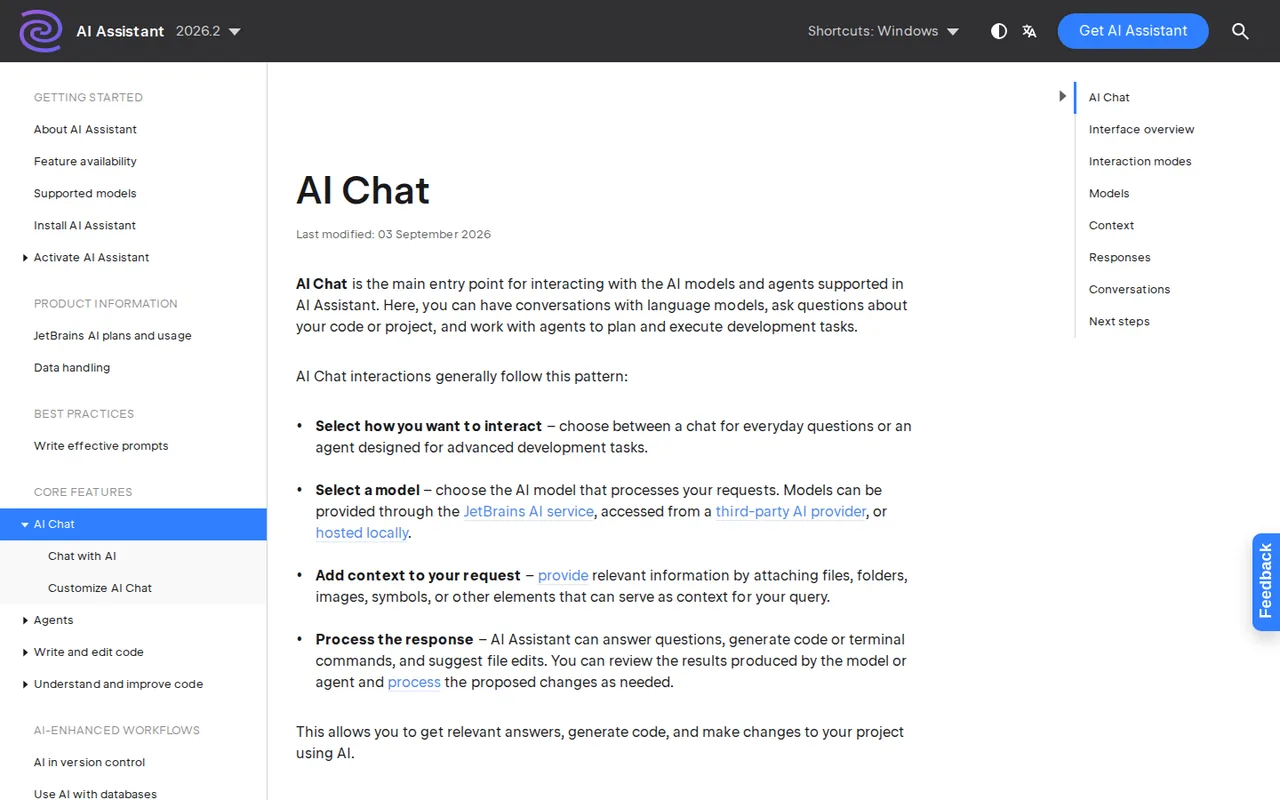
| Chat versus agents | Chat returns explanations and code suggestions for manual review; agents can execute multi-step project changes. | Select the mode deliberately; a suggestion-only exercise should not silently become an agent run. |
| Refactoring review | The official refactoring guide demonstrates iterating on a suggestion and viewing the diff before applying it. | AI suggestions may change behavior or public names; use regression checks and native IDE refactor tools when appropriate. |
| AI quota | Cloud-model interactions draw from the current license allowance and the IDE shows usage. | Token use, context and model choice vary, so credits are not a fixed number of completed tasks. |
| Data controls | The IDE exposes detailed code-data collection settings and a log of prompts sent to external services. | Disabling optional collection does not make a cloud-model request remain on the machine. |
Do you need a suggestion or an agent that changes files?
Start by selecting the interaction mode. Current documentation distinguishes Chat, which returns code for you to review and apply, from agents that can carry out multi-step changes. For a sensitive refactor, begin with a question about the existing behavior and an explicit request for a proposal; the desired deliverable is a small change you understand before it reaches the repository.
When should the IDE handle a rename instead?
An AI suggestion can make a local method look cleaner while missing callers, configuration strings or a serialized contract. JetBrains distinguishes generated suggestions from native IDE rename operations that update references. Use the IDE’s symbol-aware tools for the reference operation, then inspect externally visible names separately; a compiler cannot tell you whether a customer expects a particular JSON key.
Can the Free tier run your proposed task?
Installation support is not enough to answer that question. Free access depends on the IDE edition, version and license route, and the small cloud quota must still be available. If you use a restricted free edition, check an eligible trial or paid entitlement rather than assuming a zero-price plan card overrides the documented exclusions. A configured provider account is another route, but its charges and feature availability need their own check.
Which upgrade addresses your actual bottleneck?
Editorial assessment
Choose Pro when an eligible existing entitlement is insufficient for regular, limited cloud assistance; consider Ultimate only when recorded usage makes the larger allowance useful. Before subscribing, check whether an IDE bundle already provides Pro. For a team, ask whether access is managed by an organization pool, because the personal allowance and billing display do not describe every managed setup.
What does the data-sharing switch actually change?
Cloud features need to send the request and relevant code context to a model provider. The optional detailed data-collection setting is a separate control and is disabled by default in the documented configuration. Inspect both the selected provider route and that setting; for a restricted repository, a local model configuration requires its own capability check rather than an assumption that all cloud features work unchanged.
A task to evaluate before choosing
Proposed evaluation · not performed yet
Use an eligible JetBrains IDE with AI Assistant and a confirmed cloud allowance, or a separately authorized model route. Create a disposable Java class that formats a display label from firstName and lastName. Preserve the public method name and the order of arguments; existing callers expect an empty string when both inputs are blank. Keep all real customer data outside the fixture.
- Record outputs for Ana/Li, Ana/empty, empty/Li and empty/empty; expected labels are Ana Li, Ana, Li and an empty string.
- In Chat mode, attach only the class and request a simpler implementation with unchanged public names and no new libraries.
- Ask the assistant to identify the contract it is preserving before showing the revised code.
- Review the suggested diff, run the four assertions, and inspect the callers through the IDE.
- Record the model, access route, allowance change and accepted diff so another developer can repeat the check.
Accept the change only if all four results and the public signature remain intact. Reject it if it renames an externally used method, produces the string null, adds an unwanted space, or changes unrelated files. If the account cannot access the selected model, the result is an access limitation rather than a failed code transformation. For broader explanation work, compare the Claude and ChatGPT profiles, using the same evidence standard.
Is JetBrains AI Assistant worth it?
Documentation review plus dated public user reports. Documentation review, not tested hands-on. Not scored.
Worth it if
- you already work in a supported JetBrains IDE and want to review chat suggestions as diffs next to the IDE's own inspections and refactoring tools.
- your IDE edition is eligible for AI Free and you only need a small cloud allowance, such as 3 credits per 30 days, for occasional questions.
- you want to look at the log of prompts sent out before deciding whether project context may go to a cloud model.
Probably not if
- you use Android Studio or a Community edition and expect the Free tier to apply; the documentation lists those as excluded.
- you need predictable task counts, because credits are consumed differently by long chats and agent runs.
- your repository rules forbid sending code context to a model provider, unless a local model route has been verified for the features you need.
JetBrains AI Assistant alternatives
Other coding tools checked with the same method. Pick by the job, not by a score.

Developers evaluating controlled repository edits with their own test suite

Reviewing small code changes in an existing editor

Developers who want an approval-based coding agent and choose and pay for their own models

Developers reviewing small repository changes

Agentic coding in a desktop IDE on a metered budget

Developers who work in the terminal and want an agent there, paid per use or through their own API key

Running an open model locally for code and text work

Developers who want spec-driven agent work in a VS Code-style IDE with a fixed monthly credit cap
Used JetBrains AI Assistant? Write the first review. Visitor opinions are moderated and kept separate from our source checks.
Frequently asked questions
Can I use AI Free with every free JetBrains IDE?
No. The documentation excludes Android Studio, Community Editions of PyCharm and IntelliJ IDEA, and PyCharm Unified used for free. The tier also needs a supported IDE version. Check your actual edition and license in the IDE before planning a no-cost cloud task; the product being installable is not the same as free-tier eligibility.
When does the cloud allowance renew?
The documented personal quota resets every thirty days from the first use of the AI license. That timing differs from a calendar-month assumption. Look at the reset date in the IDE widget before starting a longer session, particularly if you are comparing it with a service that renews on the first day of each month.
Do purchased top-ups expire?
Purchased top-up credits normally remain valid for twelve months and are consumed after the included allowance is exhausted. Eligibility and account ownership matter: Free does not allow top-ups, and personally purchased credits are tied to licenses under that customer account. Organization pooling and renewal rules should be checked separately with the administrator.
Can I see which prompts were sent outside the IDE?
JetBrains documents an AI Assistant requests log that can be opened through Search Everywhere. It records prompts during the current session, and cleanup actions are available. Reviewing that log helps you understand the context sent to a provider; it does not convert a cloud interaction into local processing or establish provider retention terms.
Should I buy Pro if I already have an IDE bundle?
First check your entitlements. JetBrains lists AI Pro as included with All Products Pack and dotUltimate, with additional license-delivery restrictions described in its documentation. A second subscription may be unnecessary for the same workflow. Organization access managed through JetBrains Central can follow a shared-pool model rather than a separate personal license.
How much does JetBrains AI Assistant cost?
JetBrains AI Assistant costs EUR 0 on the Free tier, EUR 10 per user per month for individual AI Pro and EUR 30 per user per month for AI Ultimate, billed monthly and shown before tax. The included allowance is 3 credits per 30 days on Free, 10 on Pro and 35 on Ultimate. The IDE license is separate unless bundled, and organization plans differ.
Sources and method7 official sources · 8 details checked · Sep 27, 2026
How we checked this profile
8 details on this page were checked against JetBrains AI Assistant's own pages and help documentation (Sep 27, 2026).
See the checks by section6 documented2 editorial assessment
| Section | Checks | Last checked | Sources |
|---|---|---|---|
| Features | 2 documented | jetbrains.com/about-ai-assistant.htmljetbrains.com/ai-chat.html | |
| Plans and prices | 3 documented | jetbrains.com/buyjetbrains.com/licensing-and-subscription… | |
| Strengths and limits | 1 documented | jetbrains.com/how-we-handle-your-code-an… | |
| Article text | 2 editorial | blog.jetbrains.com/ai-refactorings-in-intelli…jetbrains.com/refactor-code |
Sources for this profile
- Personal monthly pricingjetbrains.com
- AI licenses and quotasjetbrains.com
- Assistant capabilities and IDEsjetbrains.com
- Chat and agent modesjetbrains.com
All 7 sources
Current pricing and AI Assistant documentation were read alongside the provider refactoring guides. Older guide screenshots establish the review concept, not a guarantee of identical menus in every IDE version. The monthly price selector was inspected in a browser; AI tier, IDE license and provider billing remain separate conditions.
Sources checked Sep 27, 2026. Found something out of date? Our editorial policy explains how we correct profiles.