Kling AI: credits per second for audio-ready clips, but watermark-free commercial output starts at USD 79.20 a year
Updated September 26, 2026 · By Elias Brandt · Documentation review, not tested hands-on
Pros
- Published per-second rates
- Audio in one pass
- Up to 15 seconds with multi-shot control
- Low entry price
Cons
- Free output is limited
- Monthly credits do not roll over
- Retakes are billed in full
- Some prices need an account
Bottom line
Free monthly credits claimed at login, valid 31 days (amount not listed); one video per generation; no 1080p or 4K, watermark removal or commercial use.
Consider it if you make short social or ad clips and a paid plan with watermark removal and commercial use is acceptable, since Standard covers that at a low yearly price.
It is a weak fit if you plan to deliver much native 4K, because 30 credits per second uses up the smaller monthly allowances quickly.
Best forSocial video creatorsFilmmakers building multi-shot scenesAdvertising and production teamsDevelopers adding video generation to a productSmall studios sharing assets
Strengths, limits and who it suits, in full
Strengths
- Published per-second rates The VIDEO 3.0 guides list credits per second for each mode and resolution, so a clip's cost can be worked out before generating.
- Audio in one pass Dialogue, sound effects and lip sync come out of the same generation, with speaker assignment in multi-character scenes.
- Up to 15 seconds with multi-shot control One generation can hold several shots with set durations instead of a single short take.
- Low entry price Standard starts at USD 79.20 a year for 660 monthly credits with watermark removal and commercial use.
Limits
- Free output is limited Basic has no 1080p or 4K generation, no watermark removal and no commercial-use right; those need a paid subscription.
- Monthly credits do not roll over Subscription credits expire 31 days after issue, and unused ones are lost when the subscription ends.
- Retakes are billed in full Every attempt costs its full per-second rate, and a 15-second 4K take uses 450 credits whether or not you keep it.
- Some prices need an account The size of the free monthly allowance, credit pack prices and the Business tab were not shown to signed-out visitors.
Who it suits
- Social video creators consider Standard when under a minute of 1080p footage a month is enough and posts need to be watermark-free and cleared for commercial use.
- Filmmakers building multi-shot scenes consider Pro or Premier when 15-second multi-shot sequences, recurring characters and frequent retakes are part of the workflow.
- Advertising and production teams consider Premier or Ultra when deliverables need native 4K, because 30 credits per second drains the smaller allowances quickly.
- Developers adding video generation to a product consider the separate Kling API, which is sold as prepaid unit packages rather than through the app plans.
- Small studios sharing assets consider a team workspace when several people need shared assets, role permissions and a common credit pool.
How much does Kling AI cost?
Prices confirmed · checked
- $8.8Standard
- $32.56Pro
- $80.96Premier
- $159.99Ultra
Regional prices: The Kling membership page showed prices in USD from a server in Germany.
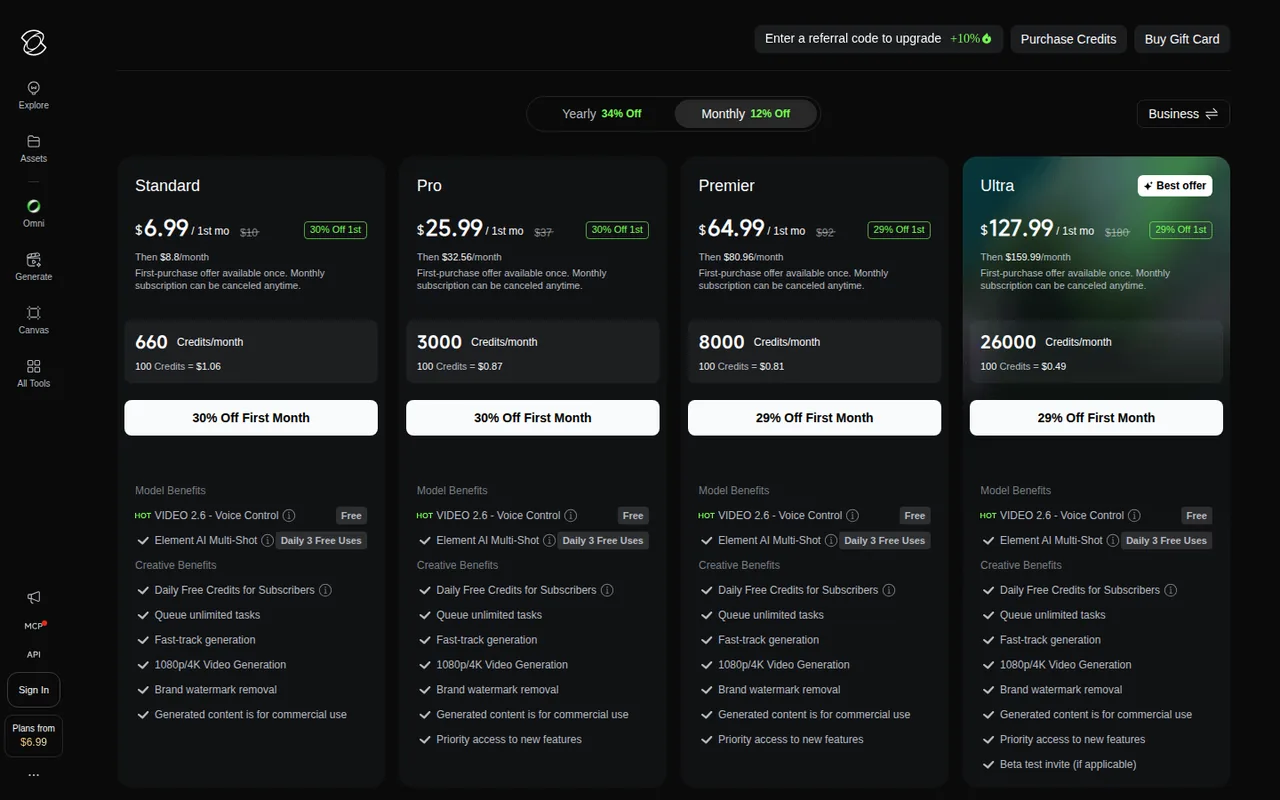
Yearly billing is charged once a year at 34% off list, while monthly billing showed 12% off list plus a one-time first-month offer. Credits are issued monthly on both billing cycles: 660 on Standard, 3,000 on Pro, 8,000 on Premier and 26,000 on Ultra, with the price per 100 credits falling from USD 1.00 to USD 0.46 on yearly billing. A Business tab and separate credit purchases are offered, but their prices appear only after signing in.
| Plan | Price | What you get |
|---|---|---|
| Basic | USD 0 sourceFrom kling.ai/app/membership/membership-plan, checked Sep 26, 2026 (opens in a new tab) | Free monthly credits claimed at login, valid 31 days (amount not listed); one video per generation; no 1080p or 4K, watermark removal or commercial use. |
| Standard | USD 6.60 per monthbilled yearly as USD 79.20 · USD 8.80 billed monthly sourceFrom kling.ai/app/membership/membership-plan, checked Sep 26, 2026 (opens in a new tab) | 660 credits a month; 1080p and 4K generation, watermark removal, commercial use; up to 4 videos per generation. First month on monthly billing shown at USD 6.99. |
| Pro | USD 24.42 per monthbilled yearly as USD 293.04 · USD 32.56 billed monthly sourceFrom kling.ai/app/membership/membership-plan, checked Sep 26, 2026 (opens in a new tab) | 3,000 credits a month; 150 elements; priority access to new features. First month on monthly billing shown at USD 25.99. |
| Premier | USD 60.72 per monthbilled yearly as USD 728.64 · USD 80.96 billed monthly sourceFrom kling.ai/app/membership/membership-plan, checked Sep 26, 2026 (opens in a new tab) | 8,000 credits a month; 150 elements. First month on monthly billing shown at USD 64.99. |
| Ultra | About USD 119.17 per monthbilled yearly as USD 1,429.99 · USD 159.99 billed monthly sourceFrom kling.ai/app/membership/membership-plan, checked Sep 26, 2026 (opens in a new tab) | 26,000 credits a month; 500 elements; beta test invites where applicable. First month on monthly billing shown at USD 127.99. |
Which plan fits?
Smallest plan whose monthly credits cover your number with 15% spare for regenerations. Arithmetic from the plan table above, not a usage test.
How far does it go?
- Standard at 720p without audioAt 6 credits per second, 660 monthly credits cover 110 seconds of silent 720p video (660 / 6), or 22 five-second clips if every take is usable.
- Pro in native 4KAt 30 credits per second, Pro's 3,000 monthly credits cover 100 seconds of 4K (3,000 / 30), about six 15-second clips at 450 credits each.
- With retakesAssuming three takes per usable 5-second clip at 1080p with audio (3 x 60 = 180 credits), Standard yields about three finished clips a month and Premier about 44 (8,000 / 180).
Arithmetic from the published allowances above, not a usage test.
Taxes, currency and promotions can change the price you see at checkout.
Try Kling AI free (opens in a new tab)
Key features
| Feature | What it does | Watch out |
|---|---|---|
| VIDEO 3.0 generation | Create clips of 3 to 15 seconds from text or images at 720p or 1080p, with or without native audio. | — |
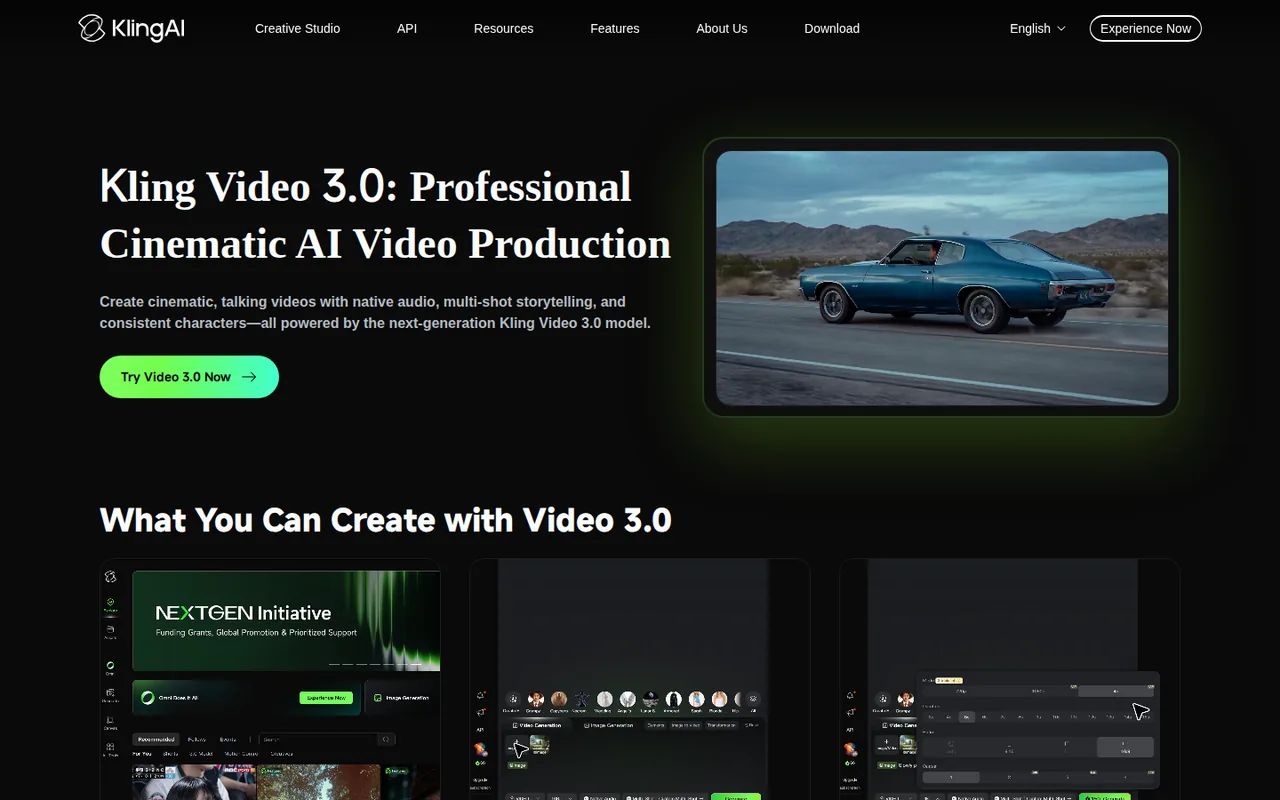
| Native audio and lip sync | Generate dialogue and sound with the picture, choose which character speaks and use several languages and accents.Produces speech and sound in the same generation as the picture, assigns lines to specific characters in multi-character scenes and supports multiple languages, dialects and accents. | It raises the 1080p rate from 8 to 12 credits per second, and voice tone control adds 2 more per second. |
| Multi-shot storyboards | Use Custom Multi-Shot to set the number of shots and the length of each one inside a single generation. | — |
| VIDEO 3.0 Omni | Combine up to 7 reference images or elements, or a reference video, to guide or edit a generation.Uses an uploaded clip as a motion or editing reference, and since the June 2026 update edits inputs of 3 to 15 seconds, including 4K footage. | With a video input the rate rises to 16 credits per second at 1080p and native audio is not supported yet. |
| Native 4K mode | Generate 4K video directly on the VIDEO 3.0 series instead of upscaling a lower-resolution clip.Generates true 4K clips on VIDEO 3.0 and VIDEO 3.0 Omni for large-screen and production use. | At 30 credits per second it costs 2.5 times the 1080p native-audio rate, and it requires an active subscription. |
| Motion Control | Recreate complex body movement and facial expression from a reference performance. | — |
| IMAGE 3.0 | Generate images with direct 2K or 4K output, including Image Series Mode for sets of related images. | — |
| Team workspaces | Share assets, assign Owner, Admin or Collaborator roles and move credits from a personal to a team workspace. | — |
| Elements for consistency | Builds a reusable subject from up to 4 multi-angle images or a 3 to 8 second video, and can bind a voice from 5 to 30 seconds of speech. | The number of elements you can create is capped by plan, from 30 on Basic to 500 on Ultra. |
Which Kling plan fits the footage you need each month?
Editorial assessment
Count the seconds of finished video you need, then multiply by the takes you expect to throw away. At the VIDEO 3.0 rate for 1080p with native audio, 12 credits per second, each plan’s monthly credits buy a fixed number of generated seconds, and the thresholds below follow from that.
- BasicUSD 0
is for testing prompts. 1080p, 4K, watermark removal and commercial use all need a subscription, and each generation returns a single video.
- StandardUSD 6.60 per month
fits under a minute a month: 660 credits buy 55 seconds of 1080p video with audio before any retakes.
- ProUSD 24.42 per month
fits roughly four minutes a month (3,000 credits, 250 seconds at that rate) and raises the element limit to 150.
- PremierUSD 60.72 per month
covers about eleven minutes a month with 8,000 credits, the level where regular 4K work starts to fit.
- UltraAbout USD 119.17 per month
is for production volume: 26,000 credits, about 36 minutes of 1080p audio video, 500 elements and the lowest listed price per 100 credits.
Monthly billing suits a trial of a month or two, helped by the first-month offer; after that, yearly billing is cheaper on every tier. On Standard the gap is USD 8.80 a month against USD 6.60, and yearly plans still issue credits month by month, so a heavy month cannot borrow from the next one.
How do per-second credits add up for a Kling clip?
VIDEO 3.0 bills every second of output, and the rate depends on resolution and on whether native audio is switched on. A single generation can run anywhere from 3 to 15 seconds.
- Native audio: 12 credits per second at 1080p, 9 at 720p.
- No native audio: 8 credits per second at 1080p, 6 at 720p.
- Voice tone control: 2 more credits per second at either resolution.
- Native 4K mode, added on April 23, 2026: 30 credits per second.
Kling’s own examples put a 5-second 1080p clip with native audio at 60 credits, the same clip with voice tone control at 70, and a silent 5-second 720p clip at 30. VIDEO 3.0 Omni uses the same rates when you supply no video. With an input video, silent output costs 16 credits per second at 1080p or 12 at 720p, and native audio is not yet supported in that mode.
What does the free Basic plan leave out?
Basic costs nothing, and non-subscribers can claim free credits at login each month that stay valid for 31 days; the plans page does not say how many. Holding credits does not unlock subscriber features: watermark removal and 4K generation require an active subscription, and the right to use output commercially is granted to paid subscribers.
The plan comparison also caps Basic at one video per generation, against up to four on every paid plan, and at 30 elements, the reusable characters or objects that keep a subject consistent across clips. Standard allows 50.
When do Kling credits expire, and which are spent first?
Each credit source has its own clock, and Kling always spends the credits closest to expiry first.
- Monthly subscription credits are valid for 31 days from issue, so they do not build up across months, and any left over expire when the subscription ends.
- Purchased credits are valid for 2 years and stay usable after a subscription lapses.
- Daily bonus credits for subscribers arrive at the first login of the day and expire at midnight local time.
Upgrading to a higher tier, or from monthly to yearly billing on the same tier, applies the new credits and benefits immediately. Buying the same tier again or a lower tier queues it until the current subscription ends.
What should a first Kling test generation check?
Proposed evaluation · not performed yet
On Standard, generate one 10-second, two-character scene at 1080p with native audio, which costs 120 credits at the documented rate.
“Two friends at a cafe table, medium shot, static camera. The woman asks in English: ‘Did you bring the tickets?’ The man answers in Spanish: ‘They are in my jacket.’ Quiet background chatter, no music, no on-screen text.”
Accept the take only if each line comes from the right character with matching lip movement, the camera stays still and no text appears in the frame. Count how many attempts it took; three attempts at this shot use more than half of a Standard month, so the retake rate matters more than the list price.
Is Kling the right tool for presenters or longer edits?
Kling generates new footage, and each generation tops out at 15 seconds, so a longer piece is assembled from several clips. If the job is a presenter reading a script, the HeyGen profile covers avatar video, and Runway is the closest alternative for generative clips. The AI video tools category lists the other options.
For a small studio, the workspace model matters as much as the plan. Team workspaces, added on March 16, 2026, share an asset library, give Owners, Admins and Collaborators different permissions and let members move credits from a personal workspace into the team pool.
Is Kling AI worth it?
Documentation review plus dated public user reports. Documentation review, not tested hands-on. Not scored.
Worth it if
- Consider it if you make short social or ad clips and a paid plan with watermark removal and commercial use is acceptable, since Standard covers that at a low yearly price.
- Consider it if you want to work out a clip's cost before generating, because the guides list credits per second for each mode and resolution.
- Consider it if you need several shots with set lengths in one generation, which Custom Multi-Shot supports for up to 15 seconds.
Probably not if
- It is a weak fit if you plan to deliver much native 4K, because 30 credits per second uses up the smaller monthly allowances quickly.
- It is a weak fit if your workflow relies on many retakes, since every attempt is billed at its full rate and unused credits expire after 31 days.
Kling AI alternatives
Other video & editing tools checked with the same method. Pick by the job, not by a score.

Developers and small teams who want a conversational video avatar for support, sales or tutoring and need to budget by minutes

Short animated stories from a script or prompt

Teachers, students and math YouTubers who want 3Blue1Brown-style explainer clips from a description, with an editable Manim code playground when they want control

Relighting or changing the background of short video clips

Avatar-presented videos and lip-synced video translation

Teams assembling short explainers

Creators who post faceless short-form video at volume and want a template, script, voiceover and render in one place

Storyboarding and producing short AI videos from a script
Used Kling AI? Write the first review. Visitor opinions are moderated and kept separate from our source checks.
Frequently asked questions
Can I use Kling videos in paid client work?
Yes, on a paid subscription. Kling's terms let paid subscribers use, modify and distribute generated content commercially, provided it is not used to build a product that competes with Kling. You remain responsible for portrait and name rights, copyright, trademarks, advertising rules and any legal requirement to label AI-generated content in your market.
Is the Kling API included in an app subscription?
No. The API is billed separately through prepaid packages on the developer platform. The smallest standard package listed USD 700 for 5,000 units at USD 0.14 each, valid for 180 days without rollover and with 20 concurrent tasks. Kling 3.0 with native audio at 1080p is listed at 1.2 units per second.
How do I cancel a Kling subscription?
It depends on where you bought it. App Store purchases are cancelled in the Apple ID subscription settings, Google Play purchases under Payments and subscriptions in the Play Store, and web purchases under Profile, Manage Plan, Cancel Subscription. Monthly subscriptions can be cancelled at any time; yearly plans renew automatically until auto-renewal is switched off.
Can I get an invoice for a Kling purchase?
Only from the website. Sign in, open Subscription Management in the upper-right corner, go to the Purchase History tab and select Request Invoice. Kling says the invoice is issued within 10 business days and can then be downloaded as a PDF from the same page. The mobile apps do not currently support invoice requests.
What happens if I buy two Kling subscriptions?
Only one subscription is active at a time, and the others wait their turn. Kling applies them in priority order: a higher tier first (Ultra, then Premier, Pro and Gold), then recurring before one-time passes such as the 7-Day Pass, then annual before monthly within the same tier. Credits from a queued plan arrive when it starts.
What is Kling 3.0 Turbo?
Kling 3.0 Turbo is a faster option in the 3.0 series, released on June 17, 2026, with multi-shot storyboard support and synchronized lip sync. Kling's app guides did not list its credit rate. On the API price list it costs 1.0 unit per second at 1080p with native audio, against 1.2 units for standard Kling 3.0.
Sources and method9 official sources · 47 details checked · Sep 26, 2026
How we checked this profile
47 details on this page were checked against Kling AI's own pages and help documentation (Sep 26, 2026). 4 are still open and listed below.
See the checks by section38 documented5 editorial assessment4 open
| Section | Checks | Last checked | Sources |
|---|---|---|---|
| Article text | 8 documented 3 editorial | kling.ai/klingai-video-3-model-user…kling.ai/membership-plankling.ai/klingai-video-3-omni-model…kling.ai/z8zeqsxwol | |
| Other details | 1 documented | kling.ai | |
| Platforms and integrations | 2 documented | kling.aikling.ai/v3c5osl0fp | |
| Plans and prices | 11 documented 1 editorial 3 open | kling.ai/membership-plankling.ai/klingai-video-3-model-user… | |
| Features | 7 documented | kling.ai/membership-plankling.ai/klingai-video-3-model-user…kling.aikling.ai/klingai-video-3-omni-model…kling.ai/Kling_3_Turbokling.ai/v3c5osl0fp | |
| Questions | 7 documented 1 open | kling.ai/Kling_3_Turbokling.ai/membership-plankling.ai/pricing | |
| Strengths and limits | 1 documented | kling.ai/membership-plan | |
| Who it suits | 1 editorial | kling.ai/membership-plan | |
| Official channels and media | 1 documented | kling.ai |
Still open
- The number of free monthly credits on Basic is not stated on the public plans page.Not confirmed · checked · Source (opens in a new tab)
- Business plan pricing is not shown on the public plans page.Not confirmed · checked · Source (opens in a new tab)
- Prices for separately purchased credit packs are not shown to signed-out visitors.Not confirmed · checked · Source (opens in a new tab)
- The credit rate for Kling 3.0 Turbo in the app is not published in the user guides.Not confirmed · checked · Source (opens in a new tab)
Sources for this profile
- Kling AI membership planskling.ai
- Kling VIDEO 3.0 model user guidekling.ai
- Kling VIDEO 3.0 Omni model user guidekling.ai
- Kling native 4K release notekling.ai
All 9 sources
Kling's membership page, VIDEO 3.0 and VIDEO 3.0 Omni guides, release notes and API price list were used. Prices were shown in USD to a visitor in Germany. The free Basic allowance, credit pack prices and Business pricing appear only to signed-in users.
Sources checked Sep 26, 2026. Found something out of date? See how we correct profiles.