BlipCut: credit-based dubbing where Free covers one minute and refunds stop after 10 credits of translation
Updated September 29, 2026 · By Elias Brandt · Documentation review, not tested hands-on
Pros
- Published per-task credit rates
- Credits that do not expire
- Editing does not add cost
Cons
- Very small free allowance
- Restrictive refunds
- Subscription credits lapse
Bottom line
2 credits; translates only the first minute; exports carry a BlipCut logo; no batch processing, premium voices, AI Voiceover export or custom voice cloning.
You translate finished videos into a few languages and can budget stock-voice dubbing by the minute, because the credit list prices each task separately.
You need to judge the product on a full video before paying, because Free translates only the first minute and exports with a logo.
Best forCreators localizing videosEducators and course makersMarketers dubbing presenter videosOccasional users
Strengths, limits and who it suits, in full
Strengths
- Published per-task credit rates The pricing FAQ lists credits per minute or per 1,000 characters for each feature.
- Credits that do not expire Pay As You Go credits stay valid indefinitely and do not auto-renew.
- Editing does not add cost The translator page says all transcript and translation editing functions are free to use.
Limits
- Very small free allowance Two credits, one translated minute and a logo on exports only show the workflow.
- Restrictive refunds Refunds are refused once more than 10 credits of video translation have been used.
- Subscription credits lapse Plan credits and top-up packs expire when the weekly, monthly or yearly membership ends.
Who it suits
- Creators localizing videos stock-voice dubbing at 1 credit a minute suits channels translating finished videos into a few languages.
- Educators and course makers subtitle-only localization costs 0.25 credits a minute, far less than dubbing.
- Marketers dubbing presenter videos cloned voices plus lip-sync cost up to 7 credits a minute, so budget ads separately.
- Occasional users Pay As You Go credits do not expire, which suits irregular projects better than a subscription.
How much does BlipCut cost?
Prices confirmed · checked
Regional prices: Prices are shown in USD.
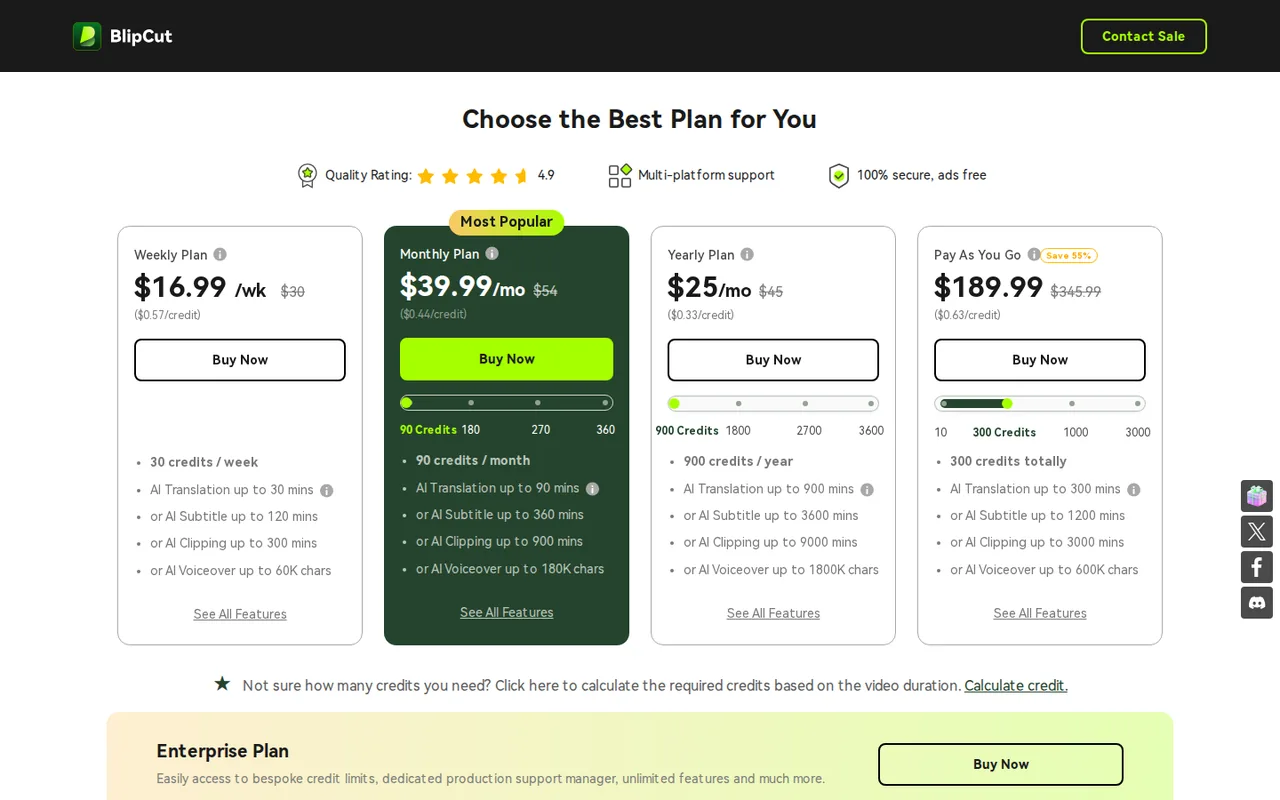
The pricing page lists per-credit prices of $0.57 weekly, $0.44 monthly, $0.33 yearly and $0.63 Pay As You Go, next to higher crossed-out list prices. Weekly, monthly and yearly plans renew automatically, and their credits, including top-up packs bought during the membership, expire when it ends. The 30-day money-back guarantee applies only in listed cases and excludes accounts that used more than 10 credits of video translation.
| Plan | Price | What you get |
|---|---|---|
| Free | $0 sourceFrom videotranslator.blipcut.com/pricing.html, checked Oct 4, 2026 (opens in a new tab) | 2 credits; translates only the first minute; exports carry a BlipCut logo; no batch processing, premium voices, AI Voiceover export or custom voice cloning. |
| Weekly | $16.99 per week sourceFrom videotranslator.blipcut.com/pricing.html, checked Oct 4, 2026 (opens in a new tab) | 30 credits a week: up to 30 minutes of stock-voice translation, 120 of subtitles, 300 of AI clipping or 60,000 voiceover characters. |
| Monthly | $39.99 per month sourceFrom videotranslator.blipcut.com/pricing.html, checked Oct 4, 2026 (opens in a new tab) | 90 credits a month: up to 90 minutes of stock-voice translation or 360 of subtitles. Larger tiers: $77 for 180 credits, $113 for 270 and $147 for 360 a month. |
| Yearly | $299.99 per year$25 per month sourceFrom videotranslator.blipcut.com/pricing.html, checked Oct 4, 2026 (opens in a new tab) | 900 credits for the year: up to 900 minutes of stock-voice translation or 3,600 of subtitles. |
| Pay As You Go | $189.99 one-time sourceFrom videotranslator.blipcut.com/pricing.html, checked Oct 4, 2026 (opens in a new tab) | 300 credits that do not expire and do not auto-renew; smaller and larger packs are offered. |
| Enterprise | Custom pricing | Custom credit limits and a dedicated production support manager. |
How far does it go?
- Credits for a 10-minute videoStock-voice translation: 10 × 1 = 10 credits; cloned-voice translation: 10 × 2 = 20 credits; lip-sync is listed separately at 10 × 5 = 50 credits, so a cloned-voice dub with lip-sync can reach 70. Subtitles only: 10 × 0.25 = 2.5 credits. The weekly plan's 30 credits cover the stock-voice dub three times but not the lip-synced version.
Arithmetic from the published allowances above, not a usage test.
Taxes, currency and promotions can change the price you see at checkout.
Try BlipCut free (opens in a new tab)
Key features
| Feature | What it does | Watch out |
|---|---|---|
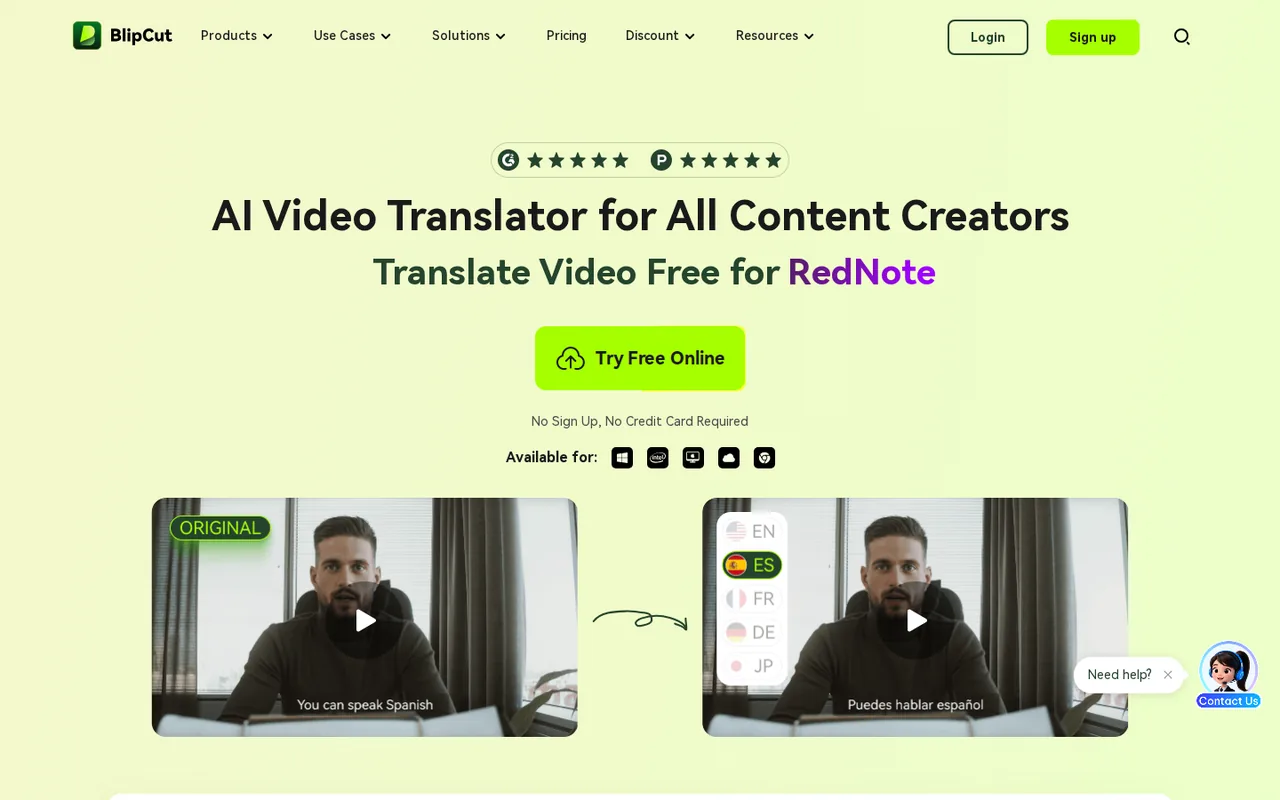
| Video and audio translation into 140+ languages | Transcribes, translates and dubs a video with a stock or cloned voice, with an editable transcript and translation. | Free accounts translate only the first minute and export with a BlipCut logo. |
| Subtitle generation and translation in 70+ languages | — | |
| Voice cloning in 29 languages from a 5 to 30 second sample | Builds a custom voice from a 5 to 30 second recording of one speaker and uses it in 29 languages. | A custom clone costs 3 credits, is not available on Free and needs the speaker's permission. |
| AI lip-sync, including videos with several speakers | Adjusts mouth movements to the translated audio and can handle several speakers in one scene. | At 5 credits per minute it is the most expensive item on the credit list. |
| AI voiceover with 1,500+ voices | — | |
| AI clipping of long videos into short clips | — | |
| Editable transcript, translation and timestamps | — | |
| URL upload and SRT or VTT import | — |
What can 2 free credits show you?
Every account starts with 2 free credits. The support page lists the limits: only the first minute of a video is translated, batch processing and premium voices are unavailable, exports carry a BlipCut logo, AI Voiceover cannot be exported and custom voice cloning is off. That is enough to judge transcript accuracy and timing on one clip.
The refund policy describes the free version more loosely, as a trial with no feature limits and only a watermark. Plan around the stricter support-page list. A one-minute, logo-marked export is a preview of the workflow, not a file you can publish for a client.
How are credits counted for each task?
BlipCut prices every feature in credits, so the same plan stretches very differently depending on the job. The pricing FAQ sets these rates, and the translator page says editing the transcript and translation afterwards is free:
- 1 credit per minute of translation with a stock voice; 2 credits per minute with a cloned voice.
- 0.25 credits per minute of subtitle generation or subtitle translation.
- 0.1 credits per minute of AI clipping.
- 0.5 credits per 1,000 characters of AI voiceover.
- 3 credits for each custom cloned voice; 5 credits per minute of lip-syncing.
Which plan fits the minutes you translate?
Editorial assessment
Pick by how regularly you translate. Weekly at $16.99 for 30 credits suits a single project; Yearly at $299.99 for 900 credits has the lowest listed rate at $0.33 per credit; and Pay As You Go at $189.99 for 300 credits costs the most per credit but never expires, which fits irregular work.
Top-up packs are sold only to paying members and expire with the membership, so a pack bought near the end of a monthly plan can be lost. If the plan is about to end, the support page recommends buying a new plan or Pay As You Go credits instead. Enterprise plans set custom credit limits.
What does voice cloning need, and whose voice may you clone?
The cloning page asks for a 5 to 30 second recording of one person speaking clearly in a quiet room, uploaded or recorded in the browser. The clone can then speak 29 languages, compared with 140+ for translation. BlipCut says cloned voices stay in your own library, are not made public and that uploaded audio is not used to train AI models.
BlipCut’s own FAQ says cloning your own voice or one you have permission to use is generally lawful, while using someone else’s voice without consent can breach privacy or publicity rights. Clone only your own voice or that of a speaker who has agreed in writing, and do not take a voice from someone else’s video or from a public figure.
Who owns the dubbed video, and what must you disclose?
Under the terms, generated content made only from your own or fully licensed input belongs to you from delivery. If it contains BlipCut library elements such as templates, sound effects or fonts, use is limited to non-commercial purposes unless BlipCut says otherwise, and third-party clips or music need written permission from the rights holder.
Generated content may carry invisible watermarks, metadata or visible AI-generated tags that you may not remove, and public distribution on social media or in ads must disclose its AI-generated nature. The terms also note that AI output may not qualify for copyright in some jurisdictions and that other users can receive similar output.
When can you get a refund?
BlipCut advertises a 30-day money-back guarantee, but the refund policy limits it to specific cases: buying the wrong product or a duplicate within 48 hours, a renewal charged after a confirmed cancellation, or a technical problem support could not solve. Requests are handled through support@blipcut.com and paid within 7 working days once approved.
Refunds are refused after more than 10 credits of video translation have been used, for a change of mind, for a renewal that was not cancelled before its date and for taxes or promotional price differences. Test with the 2 free credits first, and cancel auto-renewal in Account Center right after buying a short plan if you need only one cycle.
Can the free credits translate the first minute of a talk into Spanish accurately?
Proposed evaluation · not performed yet
On a free account, upload a 3-minute video of yourself, or of a colleague who has agreed in writing, speaking from a known English script. Translate into Spanish with a stock voice, not a clone, since only the first minute is processed on Free.
- Note the credit balance and the video length before starting.
- Upload the file and choose English to Spanish with a stock voice.
- Compare the generated English transcript of the first minute with the script and correct errors in the editor.
- Export the translated clip and check subtitle timing, voice pacing and the BlipCut logo.
- Record how many credits the minute used.
Accept a first-minute export whose transcript matches the script apart from minor punctuation and whose Spanish audio stays in sync with the speaker. Reject missing sentences, invented content or audio that drifts out of time. No transcript, audio or credit result is reported until the exercise is run.
For dubbing with lip-sync as a main job, compare Perso AI and HeyGen. For voice generation on its own, see ElevenLabs, and for editing a recording by its transcript, Descript.
Is BlipCut worth it?
Documentation review plus dated public user reports. Documentation review, not tested hands-on. Not scored.
Worth it if
- You translate finished videos into a few languages and can budget stock-voice dubbing by the minute, because the credit list prices each task separately.
- You mainly need subtitles in other languages, since subtitle work is priced at a fraction of a credit per minute compared with dubbing.
- Your projects are irregular and you want credits that survive between jobs, which the non-expiring Pay As You Go pack provides.
Probably not if
- You need to judge the product on a full video before paying, because Free translates only the first minute and exports with a logo.
- You expect to cancel and recover money after real use, since the refund policy excludes accounts that have used more than 10 credits of translation.
- You plan to lean on cloned voices with lip-sync for every video, as those rates multiply the credits per minute and can drain a small plan quickly.
BlipCut alternatives
Other video & editing tools checked with the same method. Pick by the job, not by a score.

Developers and small teams who want a conversational video avatar for support, sales or tutoring and need to budget by minutes

Short animated stories from a script or prompt

Teachers, students and math YouTubers who want 3Blue1Brown-style explainer clips from a description, with an editable Manim code playground when they want control

Relighting or changing the background of short video clips

Marketers, ecommerce teams and short-film creators who want one credit-based workspace for AI video, images and avatars

Browser video editing with auto subtitles for social clips

Creators who want to plan scenes with an agent and render with several video models on one credit balance

YouTube keyword research and AI-assisted video planning
Used BlipCut? Write the first review. Visitor opinions are moderated and kept separate from our source checks.
What has changed recently?
- Price Listed prices updated after a pricing check: now includes $77, $113, $147. Source
Release entries use the vendor's own announcement date. Price entries show the day we updated the listed prices after checking the vendor's pricing page.
Frequently asked questions
Is BlipCut made by HitPaw?
The BlipCut terms and privacy policy name HITPAW CO., LIMITED as the licensor and operator, with disputes governed by Hong Kong law and arbitration. The product has its own site, account and pricing. Billing, refund and account questions go to support@blipcut.com rather than to other products from the same company.
Do I need to install BlipCut?
No. The translator runs in the browser on computers, phones and tablets, according to the translator page. The product menu also lists Windows and Mac apps and a Chrome extension. The voice cloning page accepts audio or video files up to 300 MB, so compress long recordings before uploading.
How long does BlipCut keep my uploaded videos?
The plan comparison lists unlimited cloud storage with a video storage time of 30 days on every paid plan. Download finished translations and subtitle files within that window instead of treating BlipCut as an archive. The privacy policy explains how to request deletion of personal information separately.
Which languages work with voice cloning compared with translation?
Translation covers 140+ languages for video and audio and subtitles cover 70+, but voice cloning supports 29 languages. BlipCut also lists 100+ normal voices and 300+ premium voices. Check that your target language is among the 29 before planning a cloned-voice dub; otherwise a stock voice will be used.
How do I turn off auto-renewal?
The help center says to open Account Center, choose Manage Subscription and My Subscriptions, click Cancel Subscription and confirm with an emailed verification code. You can resume during the paid period. Under the refund policy, a renewal charged because you did not cancel before the renewal date is not refunded.
Sources and method9 official sources · 7 details checked · Sep 29, 2026
How we checked this profile
7 details on this page were checked against BlipCut's own pages and help documentation (Sep 29, 2026).
See the checks by section7 documented
| Section | Checks | Last checked | Sources |
|---|---|---|---|
| Plans and prices | 2 documented | videotranslator.blipcut.com/pricing-plans.htmlvideotranslator.blipcut.com/pricing.html | |
| Article text | 3 documented | videotranslator.blipcut.com/pricing.htmlvideotranslator.blipcut.com/ai-voice-cloning.htmlblipcut.com/terms-and-conditions.html | |
| Strengths and limits | 1 documented | videotranslator.blipcut.com/refund-policy.html | |
| Features | 1 documented | videotranslator.blipcut.com/ai-voice-cloning.html |
Sources for this profile
- Plans and credit rulesvideotranslator.blipcut.com
- Product overviewblipcut.com
- AI video translatorvideotranslator.blipcut.com
- Pricing plans and free version limitsvideotranslator.blipcut.com
All 9 sources
The support page lists free-version limits (2 credits, first minute only, logo on export, no custom voice cloning), while the refund policy describes a free trial with no feature limits and only a watermark; the more specific support page is used. The homepage says generated voices can be used in any commercial project, while the terms restrict content containing built-in library elements to non-commercial use unless stated otherwise. Monthly tiers above 90 credits are priced at $77, $113 and $147; yearly and business tiers also exist and are not listed here. The terms name HITPAW CO., LIMITED as licensor under Hong Kong law. A 4.9 quality rating on the pricing page is a provider claim and was not used.
Sources checked Sep 29, 2026. Found something out of date? See how we correct profiles.