

Photoroom: Free is personal use only with 100 exports a month; Batch starts on Pro at $7.50 per month, billed yearly
Updated October 4, 2026 · By Elias Brandt · Documentation review, not tested hands-on
Pros
- Batch and API both exist
- Core cutout tools cost no credits
- Uncertainty score on the API
Cons
- Free is personal use only
- Batch exports use the same allowance
- Resolution statements disagree
Bottom line
Personal, non-commercial use only; 100 exports per month; the export guide says Free resets monthly; low AI generation limit; web export up to 2000 x 2000 pixels; no Batch Mode or API.
You sell online and save a few hundred listing images a month, because Pro's 1,000 monthly exports leave room for revisions at the entry paid price.
You intend to sell products edited on the free account, because Photoroom's terms restrict it to personal, non-commercial use.
Best forSellers editing a few dozen listings a monthShopify stores syncing catalogsDevelopers adding cutouts to their own app
Strengths, limits and who it suits, in full
Strengths
- Batch and API both exist Photoroom offers app Batch of up to 250 images and an API for catalog-scale jobs.
- Core cutout tools cost no credits Background Remover and AI Shadows presets carry no credit cost on paid plans.
- Uncertainty score on the API The background-removal API returns an uncertainty score that can flag cutouts for human review.
Limits
- Free is personal use only Photoroom's terms limit free accounts to personal, non-commercial purposes, so sellers need a paid plan.
- Batch exports use the same allowance Each batch image counts as one export, so large catalogs hit the monthly cap quickly.
- Resolution statements disagree The pricing page says Pro and Max are 2K-capped; the help center lists 4096 pixels on the web app.
Who it suits
- Sellers editing a few dozen listings a month Pro's 1,000 exports cover that volume if 2K output suffices and Shopify sync is not needed.
- Shopify stores syncing catalogs Shopify integration is listed from Max, so Pro does not cover that workflow.
- Developers adding cutouts to their own app the API is billed separately by image, so app plan limits do not apply.
How much does Photoroom cost?
Some prices not published · checked
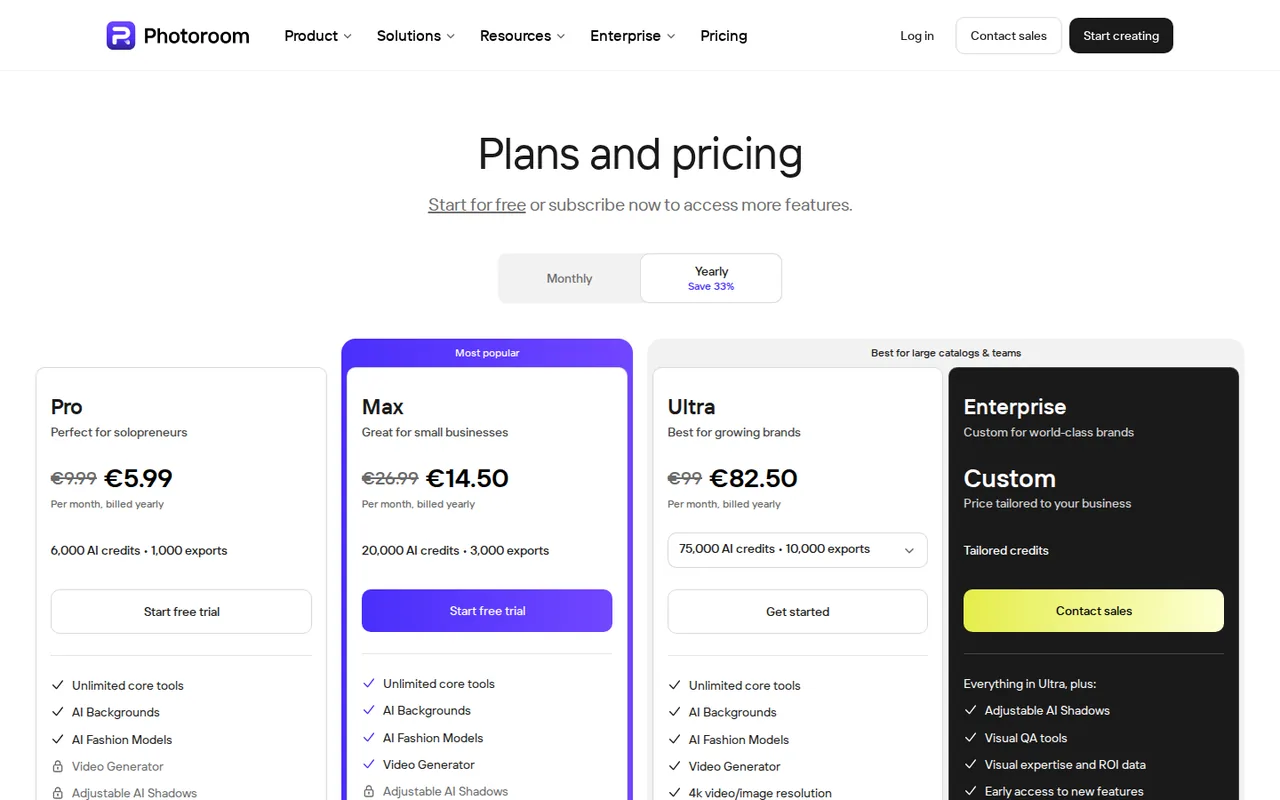
Regional prices: Pro $7.50, Max $20.99 and Ultra $82.50 are shown per month with yearly billing; monthly-billing prices are not listed here, and yearly totals are not derived.
Credits and exports renew monthly even on yearly billing. Ultra comes in x1, x2, x5 and x10 export tiers per the help center (the pricing page shows one Ultra card). The monthly credit amount may vary by country or region. API subscriptions are separate from the app plans and their per-volume prices are chosen with a slider on the API pricing page, so no API dollar amount is stated here.
| Plan | Price | What you get |
|---|---|---|
| Free | $0 sourceFrom photoroom.com/pricing, checked Oct 4, 2026 (opens in a new tab) | Personal, non-commercial use only; 100 exports per month; the export guide says Free resets monthly; low AI generation limit; web export up to 2000 x 2000 pixels; no Batch Mode or API. |
| Pro | $7.50 per monthbilled yearly sourceFrom photoroom.com/pricing, checked Oct 4, 2026 (opens in a new tab) | 8,000 AI credits and 1,000 exports a month; core tools, AI Backgrounds, AI Fashion Models; Batch; up to 50 seats; no Shopify integration, Video Generator ; adjustable-shadow access conflicts between the card and comparison table. |
| Max | $20.99 per monthbilled yearly sourceFrom photoroom.com/pricing, checked Oct 4, 2026 (opens in a new tab) | 25,000 AI credits and 3,000 exports a month; adds Video Generator and Shopify integration; 4K export and adjustable-shadow access need confirmation because provider sections disagree. |
| Ultra | $82.50 per monthbilled yearly sourceFrom photoroom.com/pricing, checked Oct 4, 2026 (opens in a new tab) | 75,000 AI credits and 10,000 exports a month; adds 4K video and image resolution; x2, x5 and x10 export tiers per the help center. |
| Enterprise | Custom pricing | Everything in Ultra plus adjustable AI shadows, Visual QA, SLA, SSO and dedicated onboarding. |
| API Basic and Plus | Volume-basedamount not shown in page text | Basic is the Remove Background API; Plus is the Image Editing API with AI Backgrounds, Product Staging and AI Shadows; Sandbox mode gives 1,000 free watermarked images. |
How far does it go?
- Budget revisions as exportsIllustrative catalog: 10 products with three saved image versions require 30 exports. If each receives one more corrected export, the total is 40. An export allowance counts saved images, not unique products; generation credits remain a separate meter.
Arithmetic from the published allowances above, not a usage test.
Taxes, currency and promotions can change the price you see at checkout.
Try Photoroom free (opens in a new tab)
Key features
| Feature | What it does | Watch out |
|---|---|---|
| AI Background Remover and AI Backgrounds Studio for product scenes | — | |
| Batch editing of up to 250 images at once on paid plans | — | |
| Product Staging, AI Shadows, AI Expand and Image Enhancer | — | |
| AI Fashion Models, Ghost Mannequin and Flat Lay for apparel | — | |
| Shopify sync, Brand Kit and shared Spaces with up to 50 seats | — | |
| Separate REST API with uncertainty scoring on background removal | The Remove Background API and Image Editing API are bought as their own subscription, billed by images processed; one Image Editing call equals 5 Remove Background images. | API usage does not draw on app exports, and the app subscription does not include API access. |
| Batch counts per image | Batch edits up to 250 images at once, and every image saved from a batch counts as one export against the monthly allowance. | Downloading 10 images uses 10 exports, so Pro's 1,000 exports cover 100 batches of 10 images, not 1,000 batches. |
| Export size limits | Free web exports are capped at 2000 x 2000 pixels, and the help center lists 4096 x 4096 for paid web exports but 2048 x 2048 in Batch. | The pricing page instead says Pro and Max are capped at 2K and 4K is Ultra only, so check a test export before committing. |
| App credits versus core tools | Background Remover, Retouch, AI Shadows presets, AI Fill and Image Enhancer carry no credit cost on paid plans, while AI Backgrounds Studio, Virtual Model and Edit with AI draw from a monthly AI credit pool. | Pro's 8,000 credits allow up to 4,000 basic AI Backgrounds Studio generations but only 1,000 with relight or HD. |
Budget saved images, not product listings
Build a small export ledger before editing a catalog. One product can produce several saved images: a marketplace crop, a storefront crop and a corrected version. Each export uses the Space’s allowance, including exports by teammates. Ten products with three saved versions therefore need 30 exports, not ten. This is an illustrative workload, not a measured result. The export rules distinguish this shared allowance from AI generation credits.
Decide the delivery route first
For an app workflow, write down the destination’s exact pixel requirements before selecting Batch. The pricing page and resolution help disagree about some paid export sizes; do not treat a larger plan name as proof that your chosen Batch workflow delivers 4K. For an integration, use the separate API billing documentation. An API Sandbox trial does not unlock Batch in the app.
Check ten difficult cutouts before scaling
Proposed evaluation · not performed yet
Use ten product photographs you own, including translucent packaging, a handle opening and a pale object on a pale background. Use an active paid app plan, or an offered trial that explicitly enables Batch in your account; Free is not a commercial delivery route.
- Record the Space’s export balance and the required file dimensions. Stop if Batch access is unavailable.
- Apply background removal to the ten photographs in one batch. Inspect label text, holes and object edges at full size before saving.
- Export each image once. Record dimensions and the balance change; repeat one corrected image as a separate export.
- Compare the saved files with the originals. Reject any version that alters packaging claims, closes a real opening or misses the required dimensions.
Proceed with the catalog only if the files meet those checks and the export budget includes revisions. No cutout-quality result is claimed here. If the job is placing the product into a generated scene rather than cutting it out, Pebblely takes an uploaded product photo and generates scenes around it.
Keep the API budget separate from the app plan
Developers should plan API spending as its own line item. The API billing documentation treats the API subscription as independent of any app plan, so upgrading the app does not add API images and cancelling the app does not touch API credits. If an API subscription is cancelled, its remaining credits stay available for six months. Before choosing a volume, estimate how many calls use the Image Editing endpoint, because each one is billed like five background removals.
Is Photoroom worth it?
Documentation review plus dated public user reports. Documentation review, not tested hands-on. Not scored.
Worth it if
- You sell online and save a few hundred listing images a month, because Pro's 1,000 monthly exports leave room for revisions at the entry paid price.
- You edit catalogs in bulk, since paid plans run Batch on up to 250 images at once and core cutout tools draw no AI credits.
- You build your own app and want cutouts through code, because the API is a separate subscription billed per processed image with a watermarked Sandbox to try first.
Probably not if
- You intend to sell products edited on the free account, because Photoroom's terms restrict it to personal, non-commercial use.
- You need Shopify catalog sync on the cheapest paid plan, because that integration is listed only from Max upward.
- You need 4K files from Pro or Max, because Batch output is capped at 2048 x 2048 pixels and the provider's pages disagree on paid single-export size.
Photoroom alternatives
Other images & design tools checked with the same method. Pick by the job, not by a score.

AI images, video and audio inside an Adobe workflow

Rigged 3D avatars from a selfie for games and apps

AI images placed straight into templated designs

Turning a written story into a character-consistent comic series, and optionally a short film

Designers and sellers who need editable vector or brand-style image output

One-off lettering for posters, cards and social graphics

Photorealistic renders from architectural model screenshots and sketches

Turning a reference image or prompt into a textured 3D model
Used Photoroom? Write the first review. Visitor opinions are moderated and kept separate from our source checks.
Frequently asked questions
Can I use Photoroom's free plan for commercial work?
No. Photoroom's terms limit free accounts to personal, non-commercial purposes, so images for a shop or client need a paid plan. The free account also allows 100 exports a month, caps web exports at 2000 x 2000 pixels and excludes Batch Mode and the API, which both require a subscription.
How many exports does Photoroom Pro include?
Pro includes 1,000 exports and 8,000 AI credits a month for $7.50 per month, billed yearly. Saves from the editor, Batch and Shopify sync draw from that single allowance, and every picture downloaded from a batch is counted on its own. The allowance renews monthly even when the subscription itself is paid annually.
Is the Photoroom API included in the app subscription?
No. The API is a separate subscription billed by the number of images processed, and API calls do not use the app's monthly exports. One Image Editing call costs as much as five Remove Background calls, failed calls are not charged, and Sandbox mode offers 1,000 free images with a watermark for trying it.
Which Photoroom plan connects to Shopify?
Shopify integration is listed from Max, at $20.99 per month billed yearly, and is also included on Ultra and Enterprise; Pro does not include it. Images pushed through the Shopify sync count against the same monthly export allowance as editor and Batch saves, which is 3,000 a month on Max.
Sources and method9 official sources · 14 details checked · Oct 4, 2026
How we checked this profile
14 details on this page were checked against Photoroom's own pages and help documentation (Oct 4, 2026).
See the checks by section14 documented
| Section | Checks | Last checked | Sources |
|---|---|---|---|
| Plans and prices | 4 documented | photoroom.com/pricinghelp.photoroom.com/11828992-export-limitsdocs.photoroom.com/pricing | |
| Strengths and limits | 2 documented | help.photoroom.com/12523455-free-accounts-and…photoroom.com/pricing | |
| Features | 6 documented | help.photoroom.com/11828992-export-limitshelp.photoroom.com/4566301-image-resolution-l…docs.photoroom.com/pricingphotoroom.com/pricingphotoroom.com/pricing | |
| Other details | 1 documented | photoroom.com/pricing | |
| Questions | 1 documented | photoroom.com/pricing |
Sources for this profile
- App pricing and plan comparisonphotoroom.com
- Product overviewphotoroom.com
- Export limitshelp.photoroom.com
- Image resolution limits for exportshelp.photoroom.com
All 9 sources
App prices, credits and export limits come from the pricing page (fetched as plain text without a proxy); limits, free-account terms and resolution come from help-center articles. The monthly-billing toggle prices were not readable, so yearly totals are not derived. The pricing page and the resolution article disagree on Pro and Max export size, and the older plans article says paid plans have unlimited exports while the newer export-limit article gives numeric caps; we use the newer numbers. The help center does not state whether Free app exports carry a watermark, so we make no watermark claim for the app; only API Sandbox output is stated as watermarked. API per-volume prices were not in the page text. Customer statistics on the batch page are marketing claims and are not repeated. No rebrand of Photoroom was found. No hands-on test was run; the Google questions tool returned an access error, so the FAQ follows official pages, not search data. Second reading: the export guide says Free resets monthly despite also showing a weekly table value. Adjustable AI Shadows are excluded by plan cards but priced in the comparison table; confirm access rather than treating a listed credit cost as entitlement.
Sources checked Oct 4, 2026. Found something out of date? See how we correct profiles.