


LTX Studio: script-to-video in one project, but commercial use starts on Standard at $28 a month billed yearly
Updated October 1, 2026 · By Elias Brandt · Documentation review, not tested hands-on
Pros
- Whole pipeline in one project
- Clear license boundary
- Published refund rule
Cons
- Personal use only below Standard
- Training license on content
- Regional limits
Bottom line
800 one-time credits that do not renew; LTX-2.5 and LTX-2.3 video and Z-Image models; camera controls, audio-to-video and blank storyboards; personal use license only.
You want to turn a script into a storyboard and short clips for a personal project, since the 800 free credits cover a trial run of the workflow.
You need a monthly free allowance, because the free credits are granted once and never renew.
Best forFilmmakers pitching projectsAgencies producing client adsHobbyists trying AI videoTeams with data restrictions
Strengths, limits and who it suits, in full
Strengths
- Whole pipeline in one project Script, storyboard, generation and timeline editing share one workspace.
- Clear license boundary The pricing page and help center state which tiers allow commercial use.
- Published refund rule Refunds are typically granted within 14 days if usage stays within 1,200 credits.
Limits
- Personal use only below Standard Free and Lite outputs cannot be used for clients, sponsors or business promotion.
- Training license on content The terms let Lightricks use inputs and outputs to train models; enhanced data privacy is an Enterprise feature.
- Regional limits LTX Studio operates in over 70 countries, and free credits are not offered in every region.
Who it suits
- Filmmakers pitching projects storyboards, Elements and pitch decks suit pre-visualization, and all three start on Standard.
- Agencies producing client ads Standard is the minimum for client work; Pro adds Veo models and project collaborators.
- Hobbyists trying AI video Free and Lite suit personal clips; 800 one-time credits are a trial, not a monthly allowance.
- Teams with data restrictions only Enterprise lists keeping inputs and outputs out of model training.
How much does LTX Studio cost?
Prices confirmed · checked
- $15Lite
- $35Standard
- $125Pro
Regional prices: Prices are the US-dollar amounts the pricing page showed to a US connection; a server in Germany saw the same figures in euros, and nothing is converted.
The yearly view, labelled 20% off, is the default, and the Studio FAQ says paid plans start at $15 a month. The terms say fees are stated in US dollars unless indicated otherwise, and fees paid for commercial use are non-refundable.
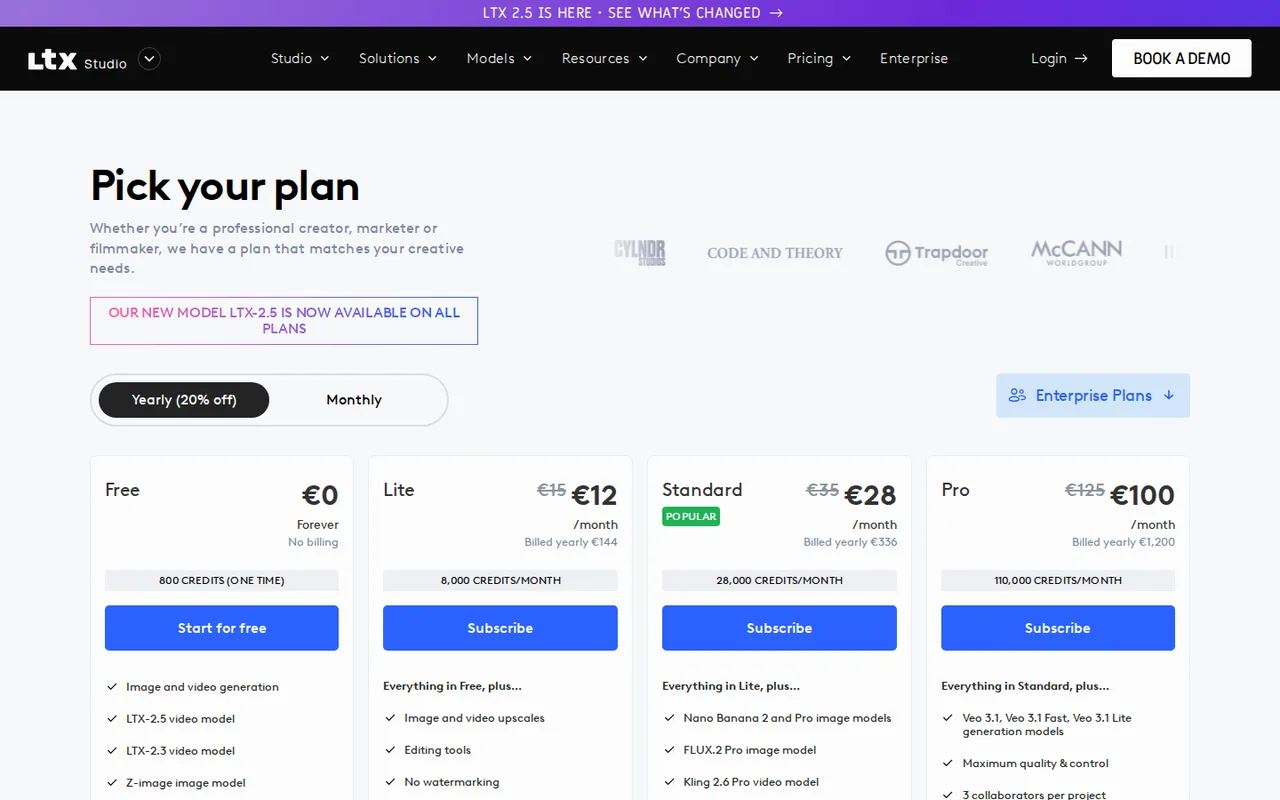
| Plan | Price | What you get |
|---|---|---|
| Free | $0 sourceFrom ltx.io/studio/pricing, checked Oct 1, 2026 (opens in a new tab) | 800 one-time credits that do not renew; LTX-2.5 and LTX-2.3 video and Z-Image models; camera controls, audio-to-video and blank storyboards; personal use license only. |
| Lite | $12 per month$144 billed yearly · or $15 billed monthly sourceFrom ltx.io/studio/pricing, checked Oct 1, 2026 (opens in a new tab) | 8,000 credits a month; image and video upscales; editing tools; no watermarking; personal use only. |
| Standard | $28 per month$336 billed yearly · or $35 billed monthly sourceFrom ltx.io/studio/pricing, checked Oct 1, 2026 (opens in a new tab) | 28,000 credits a month; Nano Banana 2 and Pro, FLUX.2 Pro, Kling 2.6 and 3.0 Pro, Seedance 2.0 and ChatGPT Images 2.0; Elements; AI storyboards; pitch decks; commercial use license. |
| Pro | $100 per month$1,200 billed yearly · or $125 billed monthly sourceFrom ltx.io/studio/pricing, checked Oct 1, 2026 (opens in a new tab) | 110,000 credits a month; Veo 3.1, Veo 3.1 Fast and Veo 3.1 Lite; 3 collaborators per project; on-demand credit top-ups. |
| Enterprise | Custom pricing | Custom credit volume, custom LTX-2.3 model training, SSO, org-wide credit allocation and enhanced data privacy. |
Which plan fits?
Smallest plan whose monthly credits cover your number with 15% spare for regenerations. Arithmetic from the plan table above, not a usage test.
How far does it go?
- Refund threshold in creditsThe pricing FAQ allows refunds within 14 days if usage does not exceed 1,200 credits. The refund policy sets the same limit as 20 minutes of computing time: 20 × 60 = 1,200 seconds, and LTX says credits are renamed computing seconds. On Lite, 1,200 ÷ 8,000 = 15% of one month’s credits.
Arithmetic from the published allowances above, not a usage test.
Taxes, currency and promotions can change the price you see at checkout.
Try LTX Studio free (opens in a new tab)
Key features
| Feature | What it does | Watch out |
|---|---|---|
| Start from a script, concept, image or video | — | |
| AI storyboards that break a script into shots | — | |
| Elements for consistent characters, objects and locations | Saves characters, objects and locations so they stay consistent across shots. | Saving and reusing Elements is listed from Standard, so lower tiers cannot keep a cast. |
| Text-to-video, image-to-video and video-to-video generation | — | |
| Camera controls, keyframes and visual references | — | |
| Third-party models such as Veo, Kling, Seedance and Nano Banana on higher tiers | — | |
| Timeline editor with sound design | — | |
| Flows node-based automation | — | |
| Pitch deck generation | — | |
| Storyboard from script | Turns an uploaded script into scenes and a storyboard to refine shot by shot. | AI storyboards are listed from Standard; Free and Lite get blank storyboards. |
| Model choice | Runs LTX-2.5 and LTX-2.3 on every plan and adds third-party models by tier. | Lightricks may replace or remove any model, so a plan bought for one model is not a guarantee. |
What can the 800 free credits cover?
New accounts without a subscription get 800 credits once. They do not expire, but they never reset or renew, and they are replaced by the monthly allowance if you subscribe. The help center adds that free credits are not offered in every region and that availability varies by account.
Credits measure processing, and different actions cost different amounts: rendering a video, changing a character’s appearance or creating a new shot. The public pages give no fixed cost per clip, so the number of shots 800 credits buy depends on model, length and resolution. Individual shots run from 3 to 20 seconds depending on the model.
Where does commercial use start?
Standard, Pro and Enterprise include a commercial use license; Free and Lite are personal use only. Personal use covers posts on your own social profiles and personal website. Anything that promotes a business, product or service, sponsored content, client work or any content you are paid for counts as commercial.
The help center says you own your inputs and outputs, but ownership is separate from the right to use them commercially. The terms tie commercial use of output to your current tier and do not say whether an upgrade covers clips made earlier, so start client projects on Standard or higher.
Which models come with each tier?
LTX’s own models run on every plan, and third-party models are added by tier. Lightricks reserves the right to update, replace or remove models at any time without guaranteeing continued access, so check the list on the day you subscribe.
- Free and Lite: LTX-2.5 and LTX-2.3 video models and the Z-Image image model.
- Standard: adds Nano Banana 2 and Pro, FLUX.2 Pro, Kling 2.6 Pro and 3.0 Pro, Seedance 2.0 and ChatGPT Images 2.0.
- Pro: adds Veo 3.1, Veo 3.1 Fast and Veo 3.1 Lite.
- Enterprise: adds custom LTX-2.3 model training.
How do credits renew, roll over and top up?
Paid allowances reset on a fixed renewal date each month, even on yearly billing, and unused credits expire rather than carrying over. Editorial assessment: pick the tier whose monthly allowance you expect to use, because extra credits on a higher tier cannot be banked for a later production month.
The routes to more credits are not described consistently. The pricing page lists purchasing additional credits under Standard, while a help article says top-ups are available on Pro++ only and suggests the Standard+ and Standard++ subtiers for more monthly credits. Confirm the option in the app before planning a large render.
What rights does Lightricks keep over your inputs and outputs?
By generating content you grant Lightricks and its affiliates a worldwide, irrevocable and sublicensable license to your inputs and outputs, including any name, voice, image or likeness in them. The purposes include research and training AI models, with an exception for the personal data of individual users unless they consent. Enhanced data privacy, which keeps inputs and outputs out of training, is an Enterprise feature.
The terms grant no rights to use any real person’s name, image, likeness or voice, and prohibit generating output that contains them without permission. Use your own face or voice, or those of people who have signed a release, and keep public figures out of prompts and reference images.
Can you get a refund or cancel mid-cycle?
The pricing FAQ says refunds are typically granted for requests made within 14 days of payment if usage does not exceed 1,200 credits. The terms add a condition: if you use the platform for commercial use, all fees are non-refundable and non-cancellable. Test with a small number of generations before starting client work in the first two weeks.
Cancelling from Manage account keeps the plan active until the end of the billing period. An upgrade takes effect immediately at a prorated price, while a downgrade waits until the end of the current cycle.
Can the free credits storyboard and render a 15-second personal teaser?
Proposed evaluation · not performed yet
On a Free account, for a personal project, write a fictional 60-word script with three shots of about five seconds each and one recurring character. Use only LTX models and a blank storyboard, since AI storyboards and Elements need Standard.
- Record the starting credit balance and the model chosen.
- Add three shots to a blank storyboard with camera directions.
- Generate each shot once, noting the credits used per shot.
- Arrange the shots on the timeline and export, stopping if export needs a paid plan.
- Compare the character’s face and clothing across the three shots.
Accept three shots that follow the script, with the same recognizable character and a playable export of about 15 seconds. Reject shots that ignore the camera direction or a character that changes between shots. No credit or quality result is reported until the task is run.
For single-clip generation and editing, compare Runway. For presenter-led explainer video, see Synthesia or HeyGen.
Is LTX Studio worth it?
Documentation review plus dated public user reports. Documentation review, not tested hands-on. Not scored.
Worth it if
- You want to turn a script into a storyboard and short clips for a personal project, since the 800 free credits cover a trial run of the workflow.
- You make client or sponsored video and can start on Standard, the lowest tier whose license covers commercial use.
Probably not if
- You need a monthly free allowance, because the free credits are granted once and never renew.
- You must keep prompts and footage out of model training on a standard plan, because the terms reserve that right and only Enterprise lists enhanced privacy.
LTX Studio alternatives
Other video & editing tools checked with the same method. Pick by the job, not by a score.

Local image-to-video on an NVIDIA RTX GPU

Generated video and footage editing

Developers and small teams who want a conversational video avatar for support, sales or tutoring and need to budget by minutes

Short animated stories from a script or prompt

Creators and small teams who want video, image and audio generation under one credit balance

Small businesses that want social posts and clips generated and scheduled

Turning long recordings into short vertical clips

Mac editors who want Claude, Codex or Cursor to cut video
Used LTX Studio? Write the first review. Visitor opinions are moderated and kept separate from our source checks.
Frequently asked questions
How much does LTX Studio cost?
Free costs $0 and includes 800 one-time credits. Lite is $12 a month billed yearly or $15 monthly, Standard is $28 or $35, and Pro is $100 or $125. Enterprise is custom. These are the dollar prices a US connection saw on the pricing page; other regions may see different currencies, and nothing is converted here.
Is LTX Studio completely free?
No. The Free plan is a one-time grant of 800 credits that never renews, and it carries a personal use license only. Lite is also personal use only. Commercial use starts on Standard, at $35 a month or $28 a month billed yearly, so client or sponsored work needs a paid plan.
Can LTX Desktop be run locally?
Lightricks describes LTX Desktop as an open-source editor for running its models locally, separate from the hosted LTX Studio web platform. The plans and credits above cover the hosted Studio only, not LTX Desktop. Hardware requirements and licensing for the local editor were not checked, so confirm them with Lightricks before relying on it.
Can I use LTX Studio on a phone or tablet?
LTX Studio is built for desktop browsers, and the FAQ recommends opening app.ltx.studio on a computer. The web platform runs in the browser. Lightricks separately offers LTX Desktop, an open-source editor for running models locally, which is a different product from the hosted Studio with its own setup requirements.
What is the difference between LTX-2 and LTX Studio?
LTX-2 is Lightricks’ own video generation model family, while LTX Studio is the hosted production platform that runs LTX models alongside third-party ones. The help center treats the platform, the LTX-2 API and self-hosting the open model as separate routes, each with its own documentation and pricing.
Does LTX Studio offer discount codes?
The FAQ says Lightricks runs discounts and promotion codes around new features, model releases and certain times of year, including on yearly plans. None was shown on the pricing page checked here. The yearly view already applies a standing 20% reduction, so compare any promotion against the yearly price rather than the monthly one.
Why does LTX Studio say it is unavailable in my country?
The help center says LTX Studio operates in over 70 countries and that restrictions vary by region: account creation may be blocked, the app may not load, or plan purchases and free trials may be unavailable while other pages work. It cites infrastructure, local regulation and payment processing as the reasons.
How long does LTX keep credit usage records?
The refund policy says Lightricks keeps data about computing consumption for three months. If you need usage history for client billing or an internal budget, record it yourself before that window passes. The app shows the live balance at the top of the screen and updates it after each action.
Sources and method11 official sources · 7 details checked · Sep 29 – Oct 1, 2026
How we checked this profile
7 details on this page were checked against LTX Studio's own pages and help documentation (Sep 29 – Oct 1, 2026).
See the checks by section7 documented
| Section | Checks | Last checked | Sources |
|---|---|---|---|
| Plans and prices | 4 documented | ltx.io/pricinghelp.ltx.io/33214214939922-Will-my-unu… | |
| Strengths and limits | 2 documented | help.ltx.io/32046651702290-Which-LTX-S…static.lightricks.com/ltxstudio-terms-of-use.pdf | |
| Other details | 1 documented | static.lightricks.com/ltxstudio-terms-of-use.pdf |
Sources for this profile
- Plans, credits and model accessltx.io
- Product overviewltx.io
- Studio FAQltx.io
- Terms of use index (current online terms updated May 13, 2026)static.lightricks.com
All 11 sources
The online terms, last updated May 13, 2026, contract with Lightricks Ltd., or with Lightricks US Inc. for customers incorporated in a US state. The pricing page lists purchasing additional credits under Standard, while a help article limits top-ups to Pro++. The refund policy, dated August 20, 2024, still uses the older term computing hours. The model list changes often and is dated to this check.
Sources checked Sep 29 – Oct 1, 2026. Found something out of date? See how we correct profiles.

