

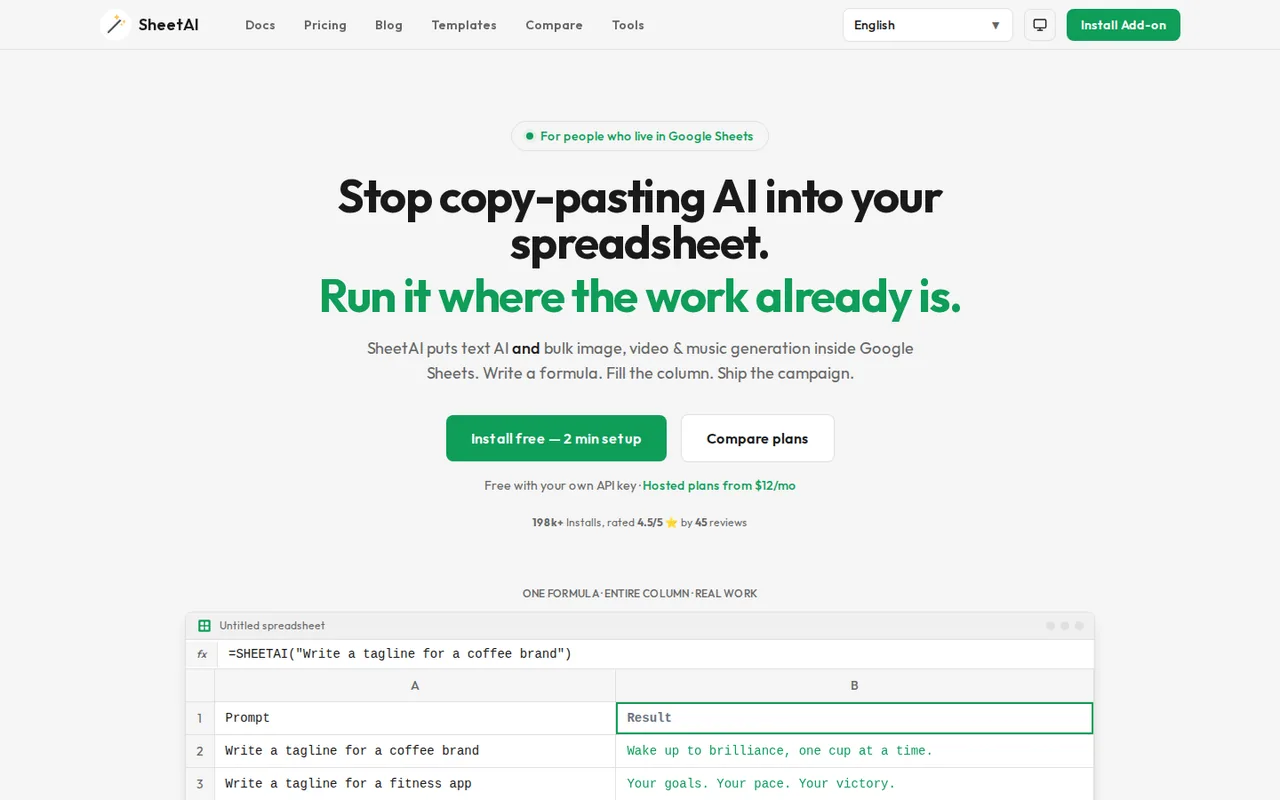
What is SheetAI, in short?
Updated October 24, 2026 · By Elias Brandt · Documentation review, not tested hands-on
Pros
- Free plan without a SheetAI fee
- Several AI providers in one add-on
- Key stays in your Google account
- Thirty-day money-back window
Cons
- Google Sheets only
- Hosted usage is loosely defined
- Long calls fail
- Recalculation repeats calls
- Pricing pages disagree
Best forMarketers filling a sheet of product or ad copyAnalysts tagging survey answers or support ticketsUsers who already pay for an AI APINot for Excel usersNot for unattended runs over thousands of rows
Strengths, limits and who it suits, in full
Strengths
- Free plan without a SheetAI fee With your own key, SHEETAI calls and formula generation are unlimited on SheetAI's side; only the AI provider bills you.
- Several AI providers in one add-on OpenAI, Anthropic, Google Gemini, xAI and DeepSeek keys are supported.
- Key stays in your Google account The setup guide says the key is stored in Apps Script properties and never sent to SheetAI servers.
- Thirty-day money-back window First-time subscriptions can be refunded in full within 30 days of purchase.
Limits
- Google Sheets only The Marketplace listing covers Google Sheets; there is no Excel version.
- Hosted usage is loosely defined Starter allows about 500 runs a month, and Pro has no published limit beyond soft unlimited.
- Long calls fail A Google Sheets custom function stops after 30 seconds, so slow models can return an execution-time error.
- Recalculation repeats calls Sheets may rerun AI formulas when a file is reopened or edited unless results are pasted as values.
- Pricing pages disagree The FAQ still describes a 50-call free plan and an $8 Unlimited plan that the pricing page no longer lists.
Who it suits
- Marketers filling a sheet of product or ad copy LIST and TABLE formulas generate variations row by row next to the source data.
- Analysts tagging survey answers or support tickets CLASSIFY, EXTRACT and SUMMARIZE work on a text column without leaving Sheets.
- Users who already pay for an AI API The free plan adds no SheetAI fee on top of the provider bill.
- Not for Excel users anyone working in Excel desktop needs a different add-in, since SheetAI runs only in Google Sheets.
- Not for unattended runs over thousands of rows Daily Google quotas, per-minute provider limits and the 30-second cap call for batches of 10 to 20 rows.
How much does SheetAI cost?
Prices confirmed · checked
Regional prices: Prices are in US dollars; the pricing page also offers an INR view with UPI payment.
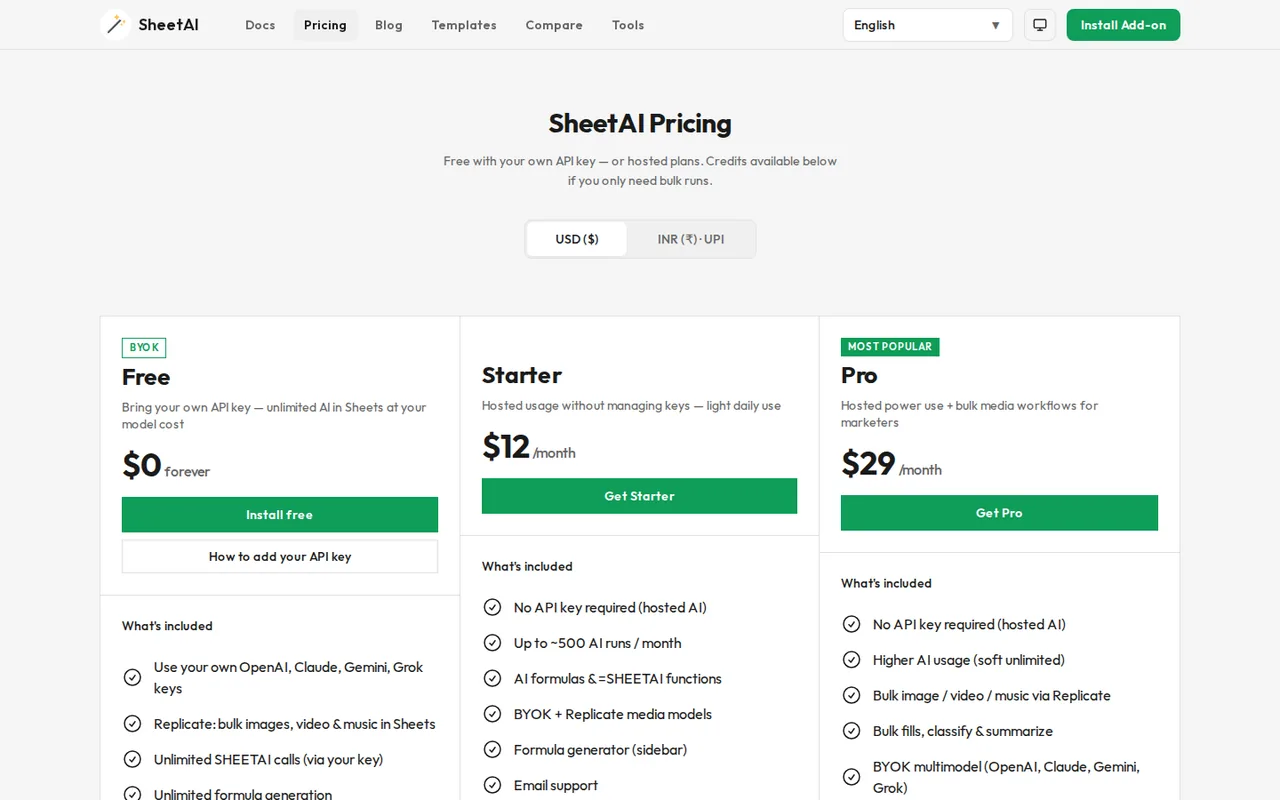
Pro Yearly at $290 is billed once a year and is described as saving about two months against twelve monthly payments. Team or domain licenses are arranged by email with support. A user is one Google account email address, and a paid license follows that account on any computer. Subscriptions are managed through a Stripe billing portal. On the free plan your AI provider charges you for tokens; a ChatGPT Plus subscription does not include API access.
| Plan | Price | What you get |
|---|---|---|
| BYOK Free | $0 sourceFrom sheetai.app/pricing, checked Oct 24, 2026 (opens in a new tab) | Bring your own OpenAI, Claude, Gemini or Grok API key; unlimited SHEETAI calls and formula generation through your key; Replicate image, video and music models; you pay the AI or Replicate bill. |
| Starter | $12 per month sourceFrom sheetai.app/pricing, checked Oct 24, 2026 (opens in a new tab) | Hosted AI without an API key; up to about 500 AI runs a month; AI formulas and =SHEETAI functions; BYOK and Replicate models; sidebar formula generator; email support. |
| Pro | $29 per monthor $290 per year sourceFrom sheetai.app/pricing, checked Oct 24, 2026 (opens in a new tab) | Hosted AI with higher usage described as soft unlimited; bulk image, video and music jobs via Replicate; bulk fill, classify and summarize; BYOK multimodel; priority support. |
| Credit packs | $29$79, $139 or $299 one-time sourceFrom sheetai.app/pricing, checked Oct 24, 2026 (opens in a new tab) | Up to 97M, 260M, 460M or 1B tokens respectively, for bulk jobs without a subscription. |
How far does it go?
- Tagging 2,000 support tickets, one formula per rowStarter: about 500 runs a month at $12 is about $0.024 per run, so 2,000 rows need four monthly allowances, or $48 over four months, assuming each row uses one run. Pro at $29 has no published run count. Free with your own key: no SheetAI fee; the 2,000 calls fit a personal Gmail account's quota of 20,000 external calls a day, and the guide's batches of 10 to 20 rows mean 100 to 200 batches. A recalculated sheet repeats every call. Arithmetic on published figures, not a statement by SheetAI.
Arithmetic from the published allowances above, not a usage test.
Taxes, currency and promotions can change the price you see at checkout.
Try SheetAI free (opens in a new tab)
Key features
| Feature | What it does | Watch out |
|---|---|---|
| =SHEETAI(prompt) returns an AI answer in a cell; the prompt can reference other cells, so one formula filled down a column processes every row (documentation) | — | |
| Structured outputs: =SHEETAI_LIST spills several answers down a column and =SHEETAI_TABLE returns a set number of rows split into columns (documentation) | — | |
| Data helpers: SHEETAI_FILL completes missing values from a pattern range, with CLASSIFY, EXTRACT, SUMMARIZE and TAG functions for text columns (documentation) | — | |
| Model choice per formula: a short code such as "4o", "4o-m", "c3s" or "grok-3" picks OpenAI, Anthropic, xAI or DeepSeek models, and =SHEETAI_MODELS() lists them (AI models page) | The free plan sends every call through the API key you paste into the sidebar, so the AI provider bills you per token; Starter and Pro use SheetAI's hosted AI without a key. | Hosted Starter is capped at about 500 runs a month and Pro is described only as soft unlimited, with no number. |
| SHEETAI_API sends GET, POST, PUT, PATCH or DELETE requests from a cell and can pull one field out of the JSON response (documentation) | — | |
| A sidebar formula generator turns a plain-English request into a Google Sheets formula, and Replicate keys allow bulk image, video and music jobs (pricing page) | — | |
| Model codes | The model is the fourth formula argument, for example =SHEETAI("Write a poem", 1000, 0.7, "4o"); GPT-3.5 Turbo is marked as the default. | The model list still names older models such as Claude 3 and Gemini 2.0 Flash, so check =SHEETAI_MODELS() in your sheet for what is available. |
| Credit packs | One-time packs cost $29, $79, $139 or $299 and are listed as up to 97 million, 260 million, 460 million and 1 billion tokens, with no subscription. | The page does not say which models the tokens cover or whether packs expire. |
Do you need a paid plan if you already have an AI API key?
Usually not. The pricing page lists a BYOK Free plan at $0 with unlimited SHEETAI calls through your own OpenAI, Claude, Gemini or Grok key; you pay only the provider’s token bill. The setup guide has you paste the key into the sidebar settings and says it is stored in your Google account and never sent to SheetAI servers. A ChatGPT Plus subscription is not an API key: the error guide says it does not cover API usage, so a paid API account is a separate step.
Starter at $12 a month makes sense when you do not want a provider account at all: it runs on hosted AI for up to about 500 runs a month. Pro at $29 drops that number for a soft unlimited allowance and adds bulk media jobs.
How do the formulas fit into a sheet?
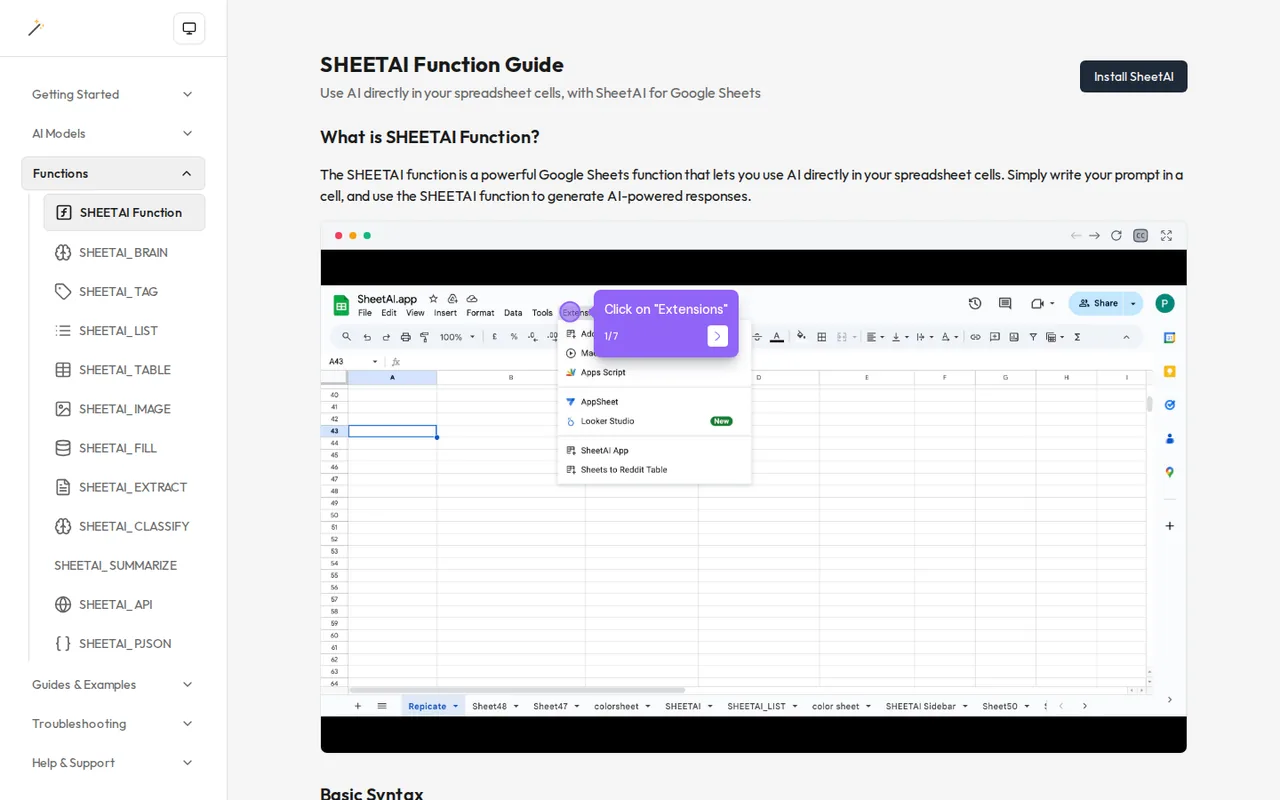
Each function works like any other spreadsheet formula. The SHEETAI guide shows =SHEETAI(B13) reading a prompt from another cell, so filling the formula down a column sends one request per row. =SHEETAI_LIST(prompt, 3) spills three answers into the cells below, and SHEETAI_TABLE returns a fixed number of rows split into columns. SHEETAI_FILL looks at a range with examples and fills a missing value from the pattern.
Optional arguments set the response length, temperature and model. The models page marks GPT-3.5 Turbo as the default and lists codes such as “4o-m” for GPT-4o Mini or “c3s” for Claude 3 Sonnet. For data from other services, SHEETAI_API calls a URL from a cell and can return a single JSON field.
What stops a large sheet from finishing?
Limits come from three places. Google Sheets stops a custom function after 30 seconds, and the error guide says slow responses then fail with an execution-time error. Google also caps external calls at 20,000 a day for gmail.com accounts and 100,000 for Workspace accounts. Your AI provider adds its own per-minute and per-day quotas; the rate-limit guide gives typical ranges of 3 to 60 requests a minute.
- Work in batches of 10 to 20 rows, as the guide suggests.
- Paste finished results as values, because Sheets can recalculate AI formulas when the file is reopened or edited.
- Raise the max_tokens argument, up to 4,000, if answers come back cut off.
Who pays when colleagues edit your sheet?
The owner does. According to the FAQ, anyone with edit access can use the SheetAI functions in a shared spreadsheet, but every call is charged to the API key of the spreadsheet owner. On a sheet shared with many editors, that makes a spending limit at the provider worth setting; the FAQ suggests $5 to $10 a month as a starting point.
Which details do the official pages leave unclear?
Several. The FAQ still describes a free plan with 50 AI calls a month and an $8 Unlimited plan, while the pricing page lists BYOK Free, Starter and Pro; the plan figures here follow the pricing page. The rate-limit guide mentions a built-in key shared by free users, which the BYOK plan does not describe. The Terms of Service name no company address or governing law; the company name, IndianAppGuy Tech Pvt Ltd, appears in the site footer and the Marketplace listing.
How could you check SheetAI before paying?
Proposed evaluation · not performed yet
Check whether the free plan tags a column of text reliably with your own key and what a recalculation does to your provider bill.
- Install the add-on from the Google Workspace Marketplace and paste an API key with a low spending limit.
- Put 20 short customer comments you are allowed to use in column A.
- In B1 enter =SHEETAI(“Label this comment as praise, complaint or question: ” & A1) and fill it down to B20.
- Note the token use in the sidebar’s Show Activity panel and in the provider dashboard.
- Close and reopen the file, then check whether the provider records new calls.
Accept if all 20 rows return one of the three labels and reopening adds no unexpected calls. Reject if rows time out or labels drift outside the three options. No result is recorded here.
SheetAI alternatives
Other data & spreadsheets tools checked with the same method. Pick by the job, not by a score.

Turning an Excel or CSV file into formulas, charts and a dashboard through an AI agent

Recurring reports and dashboards from spreadsheets and analytics data

Cash-flow and sales forecasts from accounting data

Asking questions of spreadsheets and databases in chat and exporting the charts

Competitor sales, pricing and assortment research for ecommerce brands

Spreadsheet analysis that mixes formulas with Python or SQL

People reviewing spreadsheet exports before sharing a report

Building formula-linked models and charts from plain-language requests
Used SheetAI? Write the first review. Visitor opinions are moderated and kept separate from our source checks.
Frequently asked questions
Does SheetAI work in Microsoft Excel?
No. SheetAI is distributed as a Google Workspace Marketplace add-on, and the listing says it works with Google Sheets. The documentation and setup guides cover the Extensions menu in Sheets only. If your data lives in Excel, you would have to move it into a Google Sheet first or use a different add-in built for Excel.
Can I get a refund from SheetAI?
Yes, within limits. The refund policy offers a full refund for first-time subscriptions requested within 30 days of purchase, by email to support with the account address. Renewals after the first 30 days, enterprise or custom plans and usage fees for API calls are excluded. Refunds are usually processed within 5 to 7 business days.
Who makes SheetAI?
SheetAI is built by Sanskar Tiwari and the team at IndianAppGuy Tech Pvt Ltd, the developer named on the Marketplace listing. The same company also makes MagicSlides, MagicForm and BananaSlides. The Terms of Service, last updated January 1, 2025, give only email contacts and do not state a governing law or postal address.
Which AI models can SheetAI use?
The models page lists OpenAI models such as GPT-4o, GPT-4o Mini and GPT-3.5 Turbo, Anthropic Claude 3 models, Google Gemini 2.0 Flash, xAI Grok 3 and DeepSeek. You pick one with a short code in the formula, and =SHEETAI_MODELS() shows the current list. Your API key must have access to the model you choose.
Does SheetAI reuse earlier answers?
Partly. The release notes describe a cache parameter on the SHEETAI function: with caching on, repeating the same prompt reads the stored answer instead of calling the AI provider again, which saves tokens. A Show Activity panel lists each prompt, response and the tokens it used. Pasting results as values still prevents later recalculation.
Sources and method16 official sources · 30 details checked · Oct 24, 2026
How we checked this profile
30 details on this page were checked against SheetAI's own pages and help documentation (Oct 24, 2026). 2 are still open and listed below.
See the checks by section27 documented1 editorial assessment2 open
| Section | Checks | Last checked | Sources |
|---|---|---|---|
| Plans and prices | 8 documented 1 editorial | sheetai.app/pricingsheetai.app/errors | |
| Article text | 5 documented 2 open | sheetai.app/faqsheetai.app/errorssheetai.app/rate-limitssheetai.app/terms-of-use | |
| Strengths and limits | 3 documented | sheetai.app/faqsheetai.app/errorsworkspace.google.com/789651835706 | |
| Questions | 3 documented | sheetai.app/faqsheetai.app/refund-policyheadwayapp.co/sheetai-updates | |
| Features | 6 documented | sheetai.app/sheetaisheetai.app/sheetai-listsheetai.app/sheetai-tablesheetai.app/sheetai-fillsheetai.app/sheetai-apisheetai.app/ai-models | |
| Platforms and integrations | 1 documented | sheetai.app/how-to-set-up-api-key | |
| Official channels and media | 1 documented | sheetai.app |
Still open
- The help FAQ describes a Free plan with 50 AI function calls per month and an Unlimited plan at $8 a month.Not confirmed · checked · Source (opens in a new tab)
- The rate-limit guide says SheetAI's built-in API key is shared across free-tier users.Not confirmed · checked · Source (opens in a new tab)
Sources for this profile
- Pricing page with plans and credit packssheetai.app
- Homepagesheetai.app
- Help center FAQsheetai.app
- Documentation: SHEETAI functionsheetai.app
All 16 sources
- Documentation: supported AI modelssheetai.app
- Documentation: SHEETAI_LIST functionsheetai.app
- Documentation: SHEETAI_TABLE functionsheetai.app
- Documentation: SHEETAI_FILL functionsheetai.app
- Documentation: SHEETAI_API functionsheetai.app
- Setup guide: how to set up your API keysheetai.app
- Troubleshooting: rate limitssheetai.app
- Troubleshooting: common errorssheetai.app
- Refund policy, last updated January 1, 2025sheetai.app
- Terms of Service, last updated January 1, 2025sheetai.app
- Google Workspace Marketplace listingworkspace.google.com
- Release notes (Headway)headwayapp.co
Official pages read on 24 Oct 2026 with plain HTTP requests: homepage, pricing page, help FAQ, function documentation (SHEETAI, LIST, TABLE, FILL, API and others), AI models page, API key setup guide, rate-limit and common-error guides, refund policy, Terms of Service, the Google Workspace Marketplace listing and the Headway release notes. We did not install the add-on or run a formula. Marketplace ratings, install counts and user quotes were not used, and neither were third-party directory prices, which show an older $8 plan.
Sources checked Oct 24, 2026. Found something out of date? See how we correct profiles.