

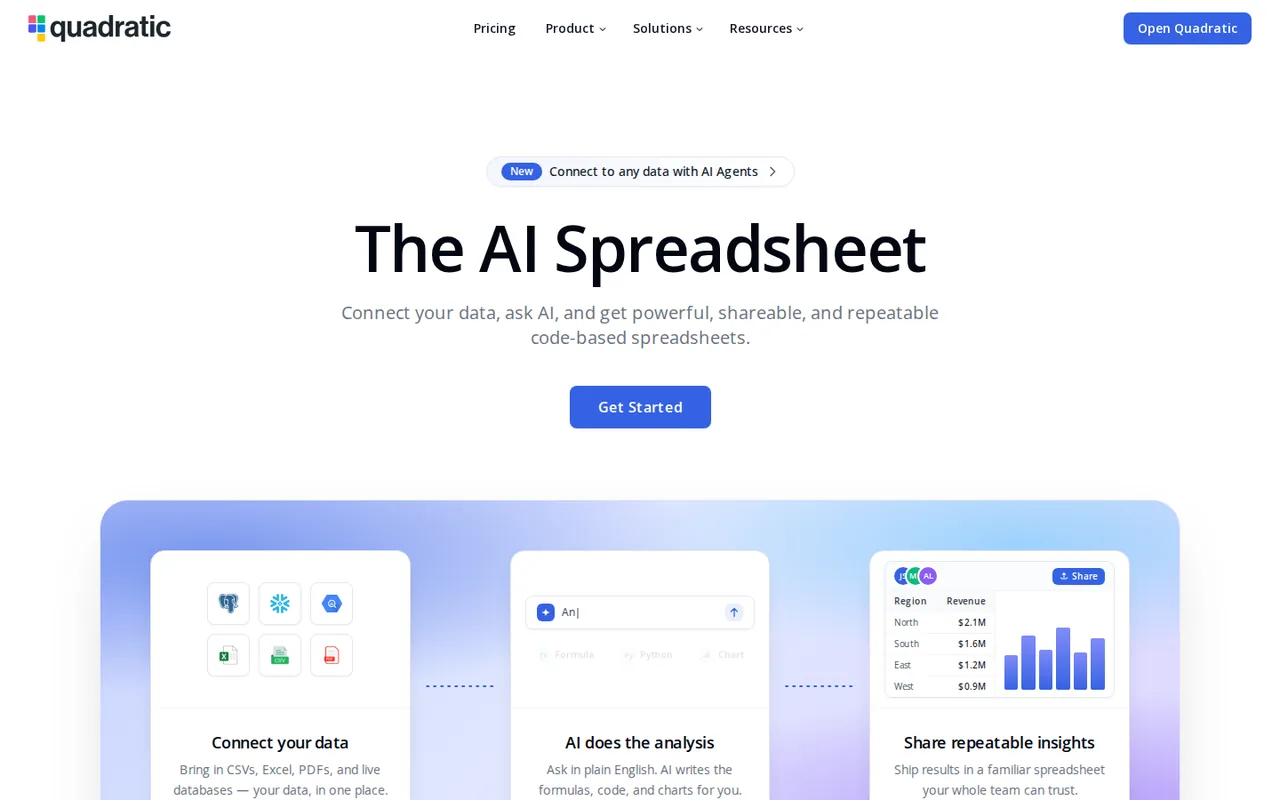
What is Quadratic, in short?
Updated October 24, 2026 · By Elias Brandt · Documentation review, not tested hands-on
Pros
- Code and formulas in one grid
- Published model list
- API and MCP access
- Free education plan
Cons
- No export on Personal
- Free AI limit not published
- Purchases are non-refundable
- Hourly schedule floor
- Source repository not reachable
Best forAnalysts who write Python or SQLTeams querying Postgres, Snowflake or BigQuery from a sheetStudents, teachers and researchersNot for spreadsheet users who never codeNot for free users who must hand over .xlsx files
Strengths, limits and who it suits, in full
Strengths
- Code and formulas in one grid Cells can run Python, SQL, JavaScript or formulas and reference each other.
- Published model list The documentation names the default model and which models need a paid plan.
- API and MCP access A Developer API and a hosted MCP server expose the same file operations to scripts and AI agents.
- Free education plan Eligible school emails get unlimited sheets, code, connections and teammates at no cost.
Limits
- No export on Personal The plan table lists Excel, CSV and .grid export only on Pro and Business.
- Free AI limit not published Personal has a monthly AI message limit with no number stated.
- Purchases are non-refundable The terms say all purchases are non-refundable.
- Hourly schedule floor Scheduled tasks run at most once an hour.
- Source repository not reachable The self-hosting documentation points to a source-available GitHub repository that returned a not found page.
Who it suits
- Analysts who write Python or SQL Code cells sit next to formulas, and the AI can draft the code.
- Teams querying Postgres, Snowflake or BigQuery from a sheet Connections are unlimited on Pro and Business.
- Students, teachers and researchers The Education plan is free with an eligible institution email.
- Not for spreadsheet users who never code much of the product is built around code cells, so formula-only work uses a small part of it.
- Not for free users who must hand over .xlsx files File export to Excel or CSV needs a paid plan.
How much does Quadratic cost?
Prices confirmed · checked
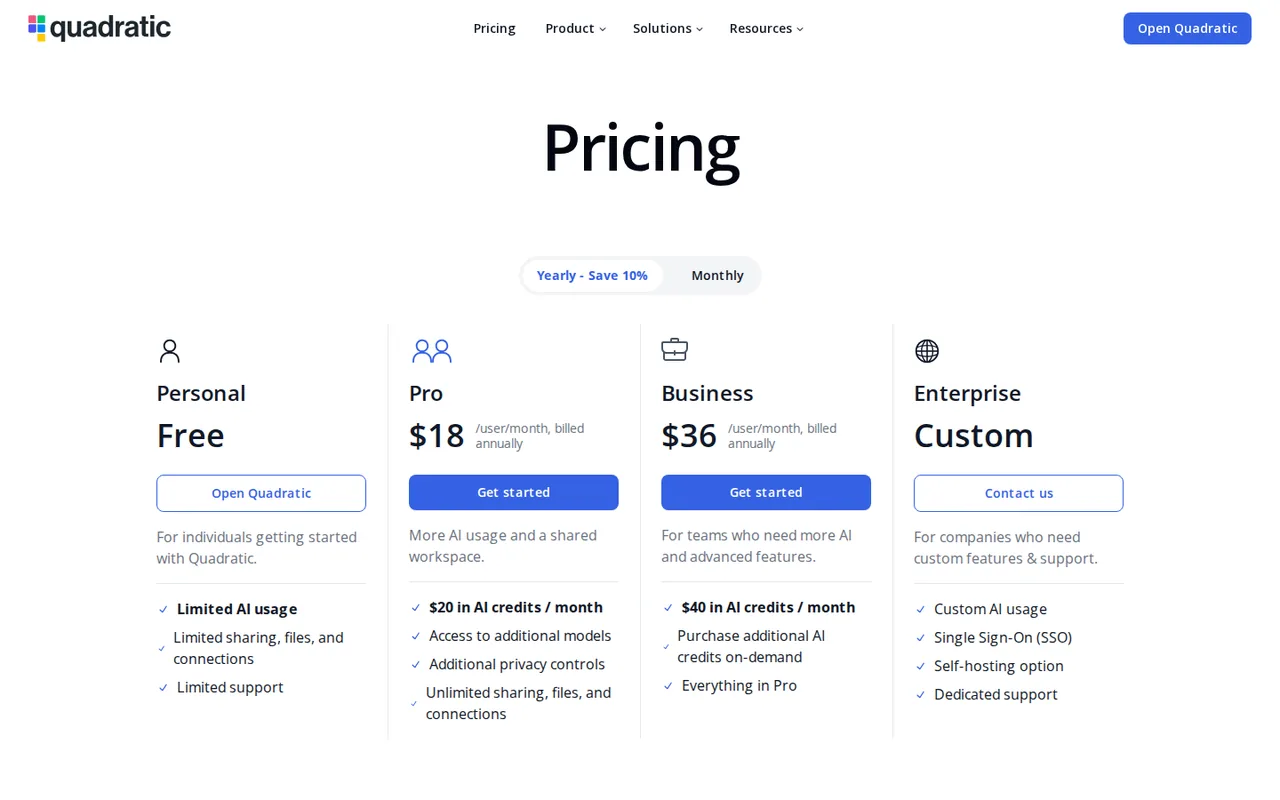
Regional prices: Prices are per user, and the pricing page lists annual billing as a 10% saving.
Pro bills every team member at the Pro price; members added mid-period are charged pro rata. Upgrades take effect immediately with a prorated invoice, downgrades at the end of the period. AI credits are used only by AI work you start: chat messages, code assistant conversations, PDF imports and web searches; autocomplete, chat naming and connection setup are free. Payment is by card, Stripe Link, Google Pay or Apple Pay. The terms say subscriptions renew automatically and all purchases are non-refundable.
| Plan | Price | What you get |
|---|---|---|
| Personal | Free sourceFrom quadratichq.com/pricing, checked Oct 24, 2026 (opens in a new tab) | Monthly AI message limit with no number published; default model only (Claude Sonnet 5); limited editable files, sharing and connections; no Excel, CSV or .grid file export in the plan table. |
| Pro | $20 per user per month billed monthlyor $18 per user per month billed annually sourceFrom quadratichq.com/pricing, checked Oct 24, 2026 (opens in a new tab) | $20 in AI credits per user each month; all AI models; unlimited files, sharing and connections; Excel, CSV and .grid export; additional privacy controls. |
| Business | $40 per user per month billed monthlyor $36 per user per month billed annually sourceFrom quadratichq.com/pricing, checked Oct 24, 2026 (opens in a new tab) | $40 in AI credits per user each month; on-demand AI usage past the allowance, billed at cost; everything in Pro. |
| Enterprise | Custom pricing | Custom AI usage, single sign-on, a self-hosting option and dedicated support. |
| Education | Free with an eligible institution email sourceFrom quadratichq.com/pricing, checked Oct 24, 2026 (opens in a new tab) | Unlimited sheets, code, connections and teammates; AI usage limited to the free plan's allowance; no billing details requested. |
How far does it go?
- Four analysts on Pro or BusinessAnnual Pro: 4 x $18 = $72 a month for 4 x $20 = $80 of AI credits. Annual Business: 4 x $36 = $144 a month for 4 x $40 = $160 of credits. On monthly billing both plans charge exactly the AI credit they include ($20 and $40 per user), so Business does not buy cheaper AI: on annual billing the extra $72 a month adds $80 of allowance plus on-demand usage past it. Editorial arithmetic on listed prices; how many prompts $1 of credit covers is not published.
Arithmetic from the published allowances above, not a usage test.
Taxes, currency and promotions can change the price you see at checkout.
Try Quadratic free (opens in a new tab)
Key features
| Feature | What it does | Watch out |
|---|---|---|
| Python, SQL, JavaScript and formula cells that reference other cells and return tables or charts to the sheet (documentation) | A cell can run Python, JavaScript, SQL or a spreadsheet formula, read other cells and return a value, table or chart to the grid. | The AI can write the code, but the result is ordinary code in the sheet that you read and edit yourself. |
| AI chat that writes code, inserts data and imports PDFs and images into the grid (AI documentation) | — | |
| Connections to PostgreSQL, MySQL, SQL Server, Supabase, BigQuery, Snowflake, CockroachDB, MariaDB, Neon, Google Analytics and Mixpanel (documentation) | — | |
| Scheduled tasks that run a file, sheet or selection on cloud runners hourly, daily or by cron (Scheduled tasks documentation) | Cloud runners execute a whole file, one sheet or a selection without your browser open, on an hourly, daily or custom cron schedule, and the AI can create or pause schedules. | Tasks run at most once an hour; more frequent cron expressions are rejected. |
| Developer API with team-scoped tokens and typed TypeScript and Python clients (Developer API documentation) | — | |
| Excel import that keeps formatting and frozen panes and converts supported formulas (Import Excel documentation) | — | |
| AI models | Claude Sonnet 5 is the default on every plan; Claude Opus 4.8, Claude Haiku 4.5, Gemini 3.5 Flash and Gemini 3.1 Pro need a paid plan, and a gauge shows how much of the context window a chat uses. | Some background work, such as PDF imports, is routed to other models automatically. |
What can the free Personal plan deliver?
The plans and billing documentation gives Personal a monthly AI message limit without stating a number, the default model only, a limited number of editable files and limited connections. The row that matters for a handover is file export: Excel, CSV and .grid export are listed for Pro and Business, not Personal. The Excel import guide says the same thing from the other side: Excel files import on any plan, and exporting back to Excel needs a paid plan.
One page leaves a question open. The Files documentation describes a “Download local copy” option in the File menu without naming a plan. Whether that works on Personal is worth checking before relying on it. Background AI such as autocomplete, chat naming and connection setup does not count against any plan’s AI usage.
How do the code cells and AI work together?
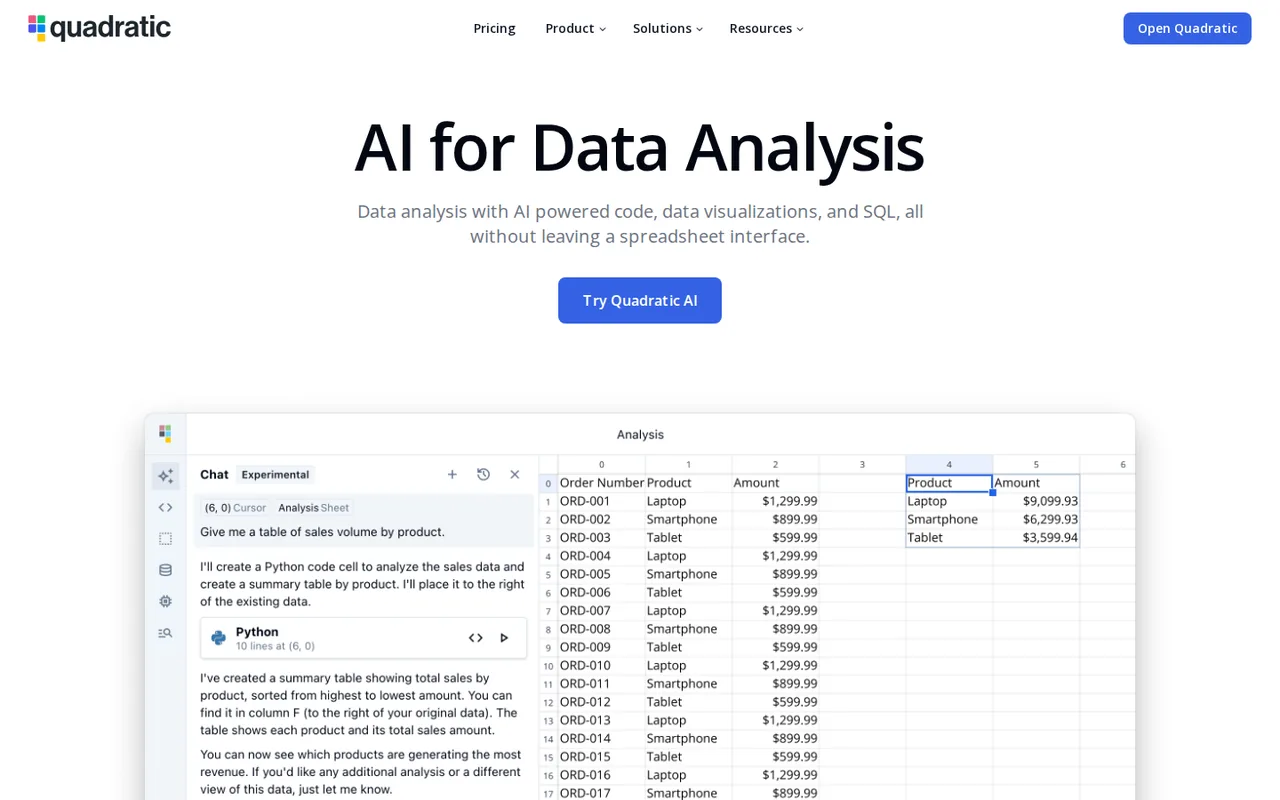
A Quadratic cell can hold Python, JavaScript, SQL or a spreadsheet formula. Code reads other cells and returns a value, a table or a chart to the grid, and formulas support arrays, LET and LAMBDA. The AI chat writes or edits that code, inserts generated data, and takes PDFs and images dropped into the chat, as the PDF import guide shows, so you ask in plain language what to extract.
According to the AI models page, Claude Sonnet 5 is the default on all plans, while Claude Opus 4.8, Claude Haiku 4.5, Gemini 3.5 Flash and Gemini 3.1 Pro require a paid plan. A small gauge next to the model menu shows how much of the context window the chat is using, and the documentation suggests a fresh chat when a long one approaches the limit.
Which databases and services can a sheet query?
The documentation lists connections for PostgreSQL, MySQL, SQL Server, Supabase, BigQuery, Snowflake, CockroachDB, MariaDB and Neon, plus Google Analytics and Mixpanel; the homepage menu also shows QuickBooks and Plaid. SQL cells can take parameters from the sheet, and Python or JavaScript cells can call web APIs. Connections are limited on Personal and unlimited on paid plans.
For automation from your own code, the Developer API creates and edits files, sheets, cells, code cells, tables and formats with a team-scoped token, and lists connections with their schemas. Generated TypeScript and Python clients are available. Files cannot be deleted through the API; deletion stays in the app.
Can a sheet refresh itself on a schedule?
Yes. The scheduled tasks guide describes cloud runners that execute a whole file, one sheet or a selection without the browser open, on an hourly, daily or custom cron schedule set in your time zone. Each task keeps a run history, and the AI can create, edit, pause or delete schedules from a plain request.
Two limits apply. Tasks run at most once an hour, and cron expressions more frequent than that are rejected. The documentation does not say which plans include scheduled tasks, so check the task panel on your plan before building a report around it.
Where does your data go, and can you self-host?
The AI security page says every model provider Quadratic uses has a zero-day data retention policy with Quadratic, that Quadratic is SOC 2 and HIPAA certified, and that prompt storage can be turned off in the team settings. Files live in the Quadratic cloud; when you go offline, changes are saved in browser storage and synced on reconnect.
The self-hosting guide offers Docker and AWS deployments, free licence keys for individuals and per-user pricing for business and enterprise users; the pricing page lists self-hosting under Enterprise. The guide says the deployed code matches a source-available GitHub repository, but that repository link returned a not found page, so the code cannot be inspected from there.
What do the terms commit you to?
The Terms and Conditions, last updated April 9, 2025, are with Quadratic Growth Inc., registered in Colorado with an address in Boulder. Users must be 18 or older. Subscriptions renew automatically until cancelled, cancellation takes effect at the end of the paid term, and all purchases are non-refundable.
Disputes go first to informal negotiation and then to binding individual arbitration with a class action waiver, under Delaware law. Claims must be brought within one year of the cause of action.
How could you check Quadratic on the free plan?
Proposed evaluation · not performed yet
Check whether the free plan can carry one real analysis from import to a file you can hand over.
- Prepare an Excel workbook you may share with a sales table and a few SUMIFS formulas, and note the results.
- Import it and confirm that the formulas, formatting and frozen panes came through.
- Ask the AI to write a Python cell that totals sales by month and charts them, then compare the totals with the Excel formulas.
- Look for File, Download local copy and any Excel or CSV export, and record which options Personal offers.
- Count the AI messages used and note any message that the monthly limit has been reached.
Accept if the totals match and the result can leave Quadratic in a usable format on your plan. Reject if formulas break on import or the free plan offers no way to take the file out. No result is recorded here.
Quadratic alternatives
Other data & spreadsheets tools checked with the same method. Pick by the job, not by a score.

Turning an Excel or CSV file into formulas, charts and a dashboard through an AI agent

Recurring reports and dashboards from spreadsheets and analytics data

Cash-flow and sales forecasts from accounting data

Asking questions of spreadsheets and databases in chat and exporting the charts

Competitor sales, pricing and assortment research for ecommerce brands

People reviewing spreadsheet exports before sharing a report

Running the same AI prompt down a column of a Google Sheet

Building formula-linked models and charts from plain-language requests
Used Quadratic? Write the first review. Visitor opinions are moderated and kept separate from our source checks.
Frequently asked questions
Is Quadratic free for students and teachers?
Yes, with a school email. The Education FAQ says the Education Plan is free for teachers, students and researchers with eligible institution emails and includes unlimited sheets, code, connections and teammates. AI use has the same limits as the free plan, personal email addresses are not accepted, and education accounts are never asked for billing details.
Can I use Quadratic offline?
Partly. When the connection to the Quadratic cloud drops, you can keep working and changes are saved in browser storage, then synced once you reconnect. Quadratic warns that offline changes can overwrite newer online edits made on another machine, so it asks whether to sync or undo them. Everything else, including AI and connections, needs the cloud service.
Does Quadratic work with Claude or Cursor?
Yes, through a hosted MCP server at mcp.quadratichq.com. After a browser sign-in, an MCP client can list and create files, read cells and schemas, write values and code cells, and import CSV, Excel or Parquet files. The server has the same access to files and connections as your account, and logging out revokes the session.
Is there a desktop app?
Yes. The desktop app wraps the full product in a native window, opens quadratic:// links straight into files and updates itself. It also has built-in cross-origin support, so API requests from Python or JavaScript cells that a browser would block under CORS rules work there. Files, teams, connections and AI behave as in the web app and stay in sync.
Sources and method16 official sources · 23 details checked · Oct 24, 2026
How we checked this profile
23 details on this page were checked against Quadratic's own pages and help documentation (Oct 24, 2026). 1 is still open and listed below.
See the checks by section21 documented1 editorial assessment1 open
| Section | Checks | Last checked | Sources |
|---|---|---|---|
| Plans and prices | 7 documented 1 editorial | quadratichq.com/pricingdocs.quadratichq.com/plans-and-billingdocs.quadratichq.com/education-faq | |
| Features | 4 documented | docs.quadratichq.com/ai-modelsdocs.quadratichq.com/import-pdfsdocs.quadratichq.com/import-excel-filesdocs.quadratichq.com/scheduled-tasks | |
| Article text | 5 documented | docs.quadratichq.com/securitydocs.quadratichq.com/developer-apidocs.quadratichq.com/getting-startedquadratichq.com/terms | |
| Questions | 3 documented | docs.quadratichq.com/filesdocs.quadratichq.com/connect-via-mcpdocs.quadratichq.com/desktop-app | |
| Strengths and limits | 1 open | docs.quadratichq.com/getting-started | |
| Other details | 1 documented | quadratichq.com/changelog | |
| Official channels and media | 1 documented | quadratichq.com |
Still open
- The self-hosting page links to a source-available GitHub repository (github.com/quadratichq/quadratic) that returned a not found page.Not confirmed · checked · Source (opens in a new tab)
Sources for this profile
- Pricing page with monthly and yearly views and FAQquadratichq.com
- Quadratic homepagequadratichq.com
- Documentation: Plans and billingdocs.quadratichq.com
- Documentation: AI modelsdocs.quadratichq.com
All 16 sources
- Documentation: AI securitydocs.quadratichq.com
- Documentation: Import PDFsdocs.quadratichq.com
- Documentation: Import Excel filesdocs.quadratichq.com
- Documentation: Files (cloud and local saving)docs.quadratichq.com
- Documentation: Scheduled tasksdocs.quadratichq.com
- Documentation: Developer APIdocs.quadratichq.com
- Documentation: Connect via MCPdocs.quadratichq.com
- Documentation: Desktop appdocs.quadratichq.com
- Documentation: Self-hosting, getting starteddocs.quadratichq.com
- Documentation: Education FAQdocs.quadratichq.com
- Terms and Conditions (Termly), last updated April 9, 2025quadratichq.com
- Changelog (latest entry v0.26.16, October 6, 2026)quadratichq.com
Official pages read on 24 Oct 2026: the homepage and pricing page (monthly and yearly views in a local headless browser), the Terms and Conditions (rendered from the embedded Termly policy) and the changelog, plus the documentation in its Markdown versions: plans and billing, AI models, AI security, PDF and Excel import, files, scheduled tasks, Developer API, MCP, desktop app, self-hosting and the Education FAQ. The GitHub repository linked from the self-hosting page returned a not found page. We did not create an account. Customer quotes and third-party pricing or review pages were not used.
Sources checked Oct 24, 2026. Found something out of date? See how we correct profiles.