

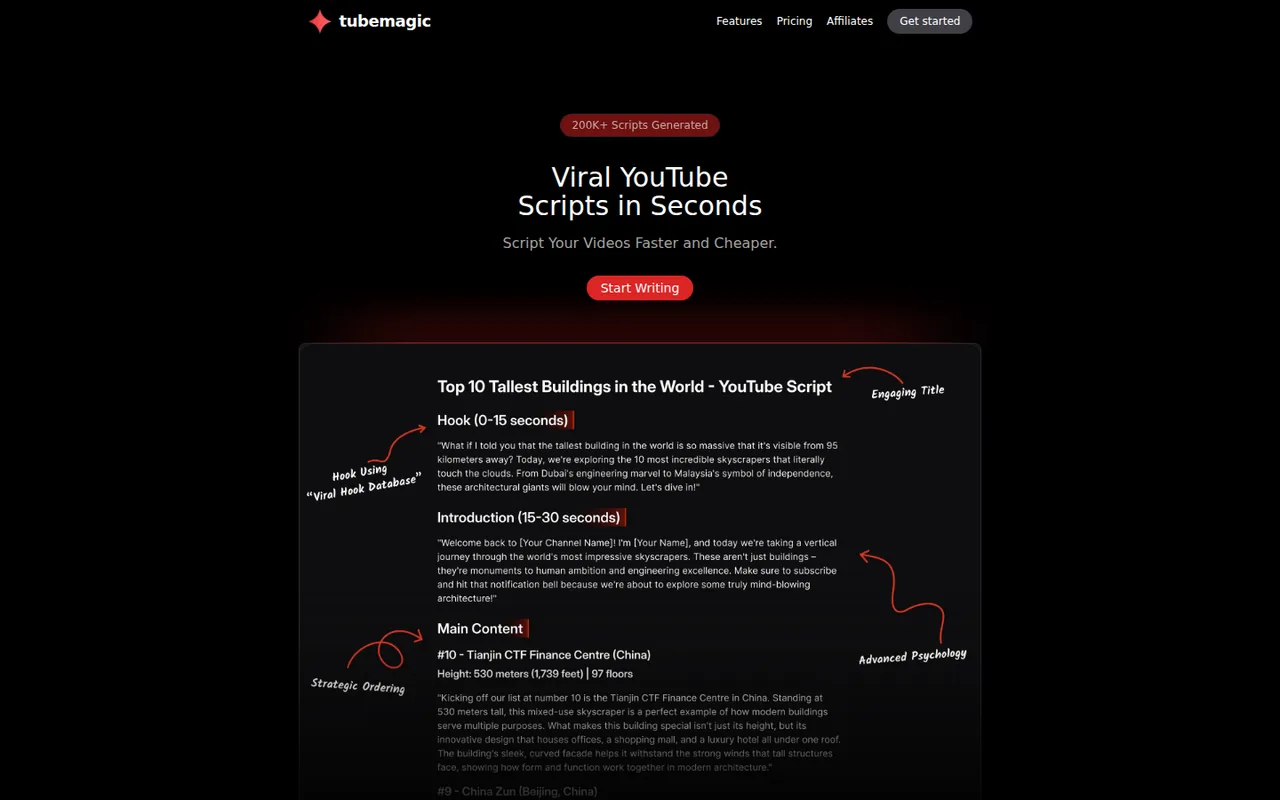
TubeMagic: one paid plan for YouTube scripts and metadata, $47 a month, with no free trial
Updated September 30, 2026 · By Elias Brandt · Documentation review, not tested hands-on
Pros
- One plan covers every tool
- Stated refund route
- Channel-aware drafting
Cons
- No free plan or trial
- Model names differ between pages
- Thin company disclosure
Bottom line
You publish YouTube videos often and want scripts, titles, descriptions and tags under one subscription instead of several single-purpose tools.
You want to try the tool before paying, because there is no free plan or trial and any test starts with a payment.
Best forYouTube creators who script every videoChannels that batch titles and tagsMulti-channel operatorsPeople who want to try before paying
Strengths, limits and who it suits, in full
Strengths
- One plan covers every tool Scripts, ideas, keywords, titles, descriptions and tags sit under a single Premium price with no tool-by-tool add-ons.
- Stated refund route The terms and the pricing FAQ both give a 30-day refund window, which substitutes for the disabled trial.
- Channel-aware drafting The script writer accepts a channel link and inspiration videos so drafts can follow an existing tone.
Limits
- No free plan or trial The pricing FAQ says trials are disabled due to spam, so any test starts with a payment.
- Model names differ between pages The pricing page names Claude Opus 5, Sonnet 4.6 and Gemini Flash, while the features and about pages still say Claude 4.0 and GPT-4o.
- Thin company disclosure The pages name Tube Magic LLC but give no state, address or terms date, and the footer reads 2025.
Who it suits
- YouTube creators who script every video the script writer is the product’s focus and its channel-link and inspiration-video inputs suit repeat uploads.
- Channels that batch titles and tags the title, description, tag and Warp Upload tools fit creators who publish often and want one subscription.
- Multi-channel operators one Premium plan covering all tools is easier to budget than several single-purpose subscriptions, but the pages do not state a channel limit.
- People who want to try before paying not a match, since there is no trial and the refund route needs a payment first.
How much does TubeMagic cost?
Prices confirmed · checked
Regional prices: Prices are shown in USD on the pricing page.
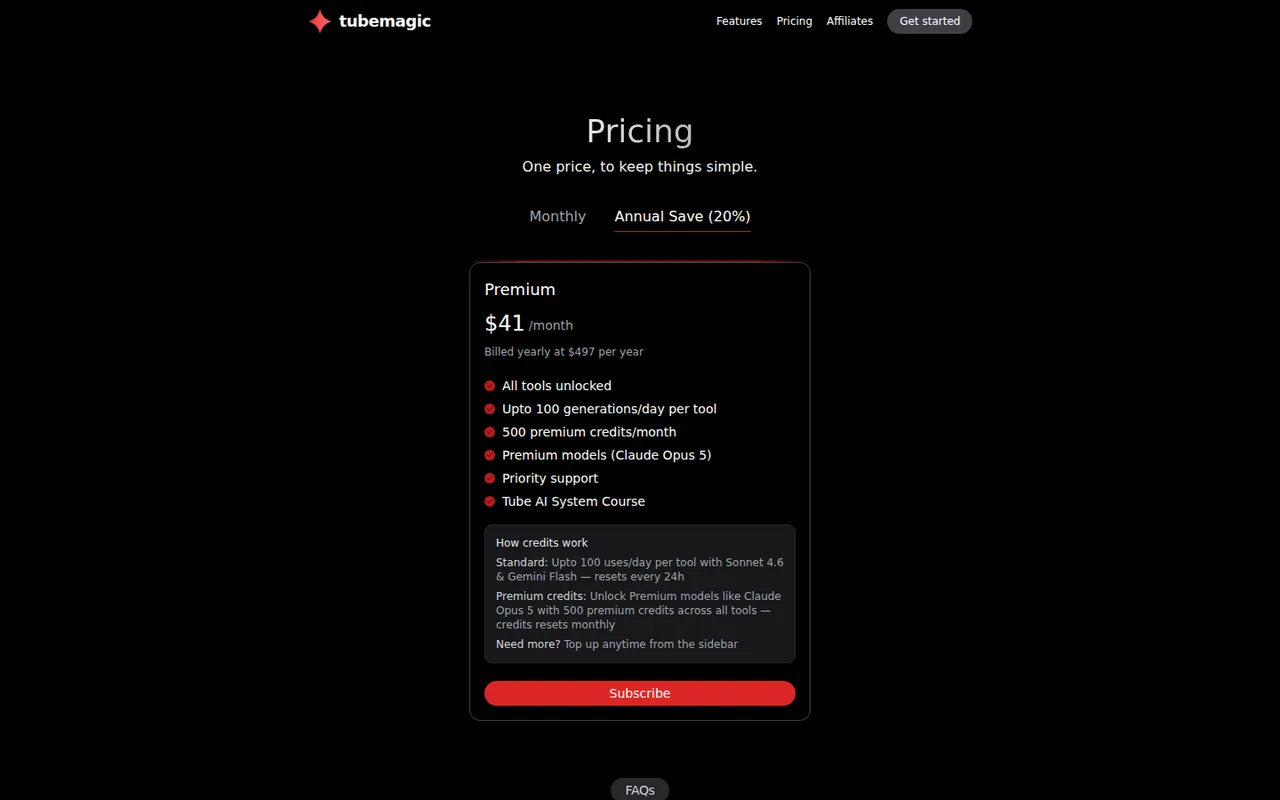
There is one plan, Premium, with a monthly and a yearly billing view. The yearly toggle is labelled Save (20%), but $497 is about 12% below 12 x $47 = $564, so compare the billed totals. The Tube AI System Course appears in the yearly list and not in the monthly one. Premium credits reset monthly; the pricing page says more can be topped up from the sidebar but prints no top-up price. There is no free plan: the FAQ says free trials are disabled, and the terms and the FAQ give a 30-day refund window instead.
| Plan | Price | What you get |
|---|---|---|
| Premium, billed monthly | $47 per monthbilled monthly sourceFrom tubemagic.com/pricing, checked Sep 30, 2026 (opens in a new tab) | All tools unlocked; up to 100 uses a day per tool on Standard models (Sonnet 4.6 and Gemini Flash), reset every 24 hours; 500 premium credits a month for premium models such as Claude Opus 5; priority support. |
| Premium, billed yearly | $41 per month shownbilled yearly at $497 per year sourceFrom tubemagic.com/pricing, checked Sep 30, 2026 (opens in a new tab) | Same tools and limits as monthly; the yearly view also lists the Tube AI System Course. |
How far does it go?
- Monthly against yearly billingMonthly: 12 x $47 = $564 a year. Yearly: $497 a year, which is $564 - $497 = $67 less, or about $41.42 a month before rounding. The page shows $41. Taxes and any checkout adjustment are not shown on the pricing page, so confirm the total at checkout.
Arithmetic from the published allowances above, not a usage test.
Taxes, currency and promotions can change the price you see at checkout.
Visit TubeMagic (opens in a new tab)
Key features
| Feature | What it does | Watch out |
|---|---|---|
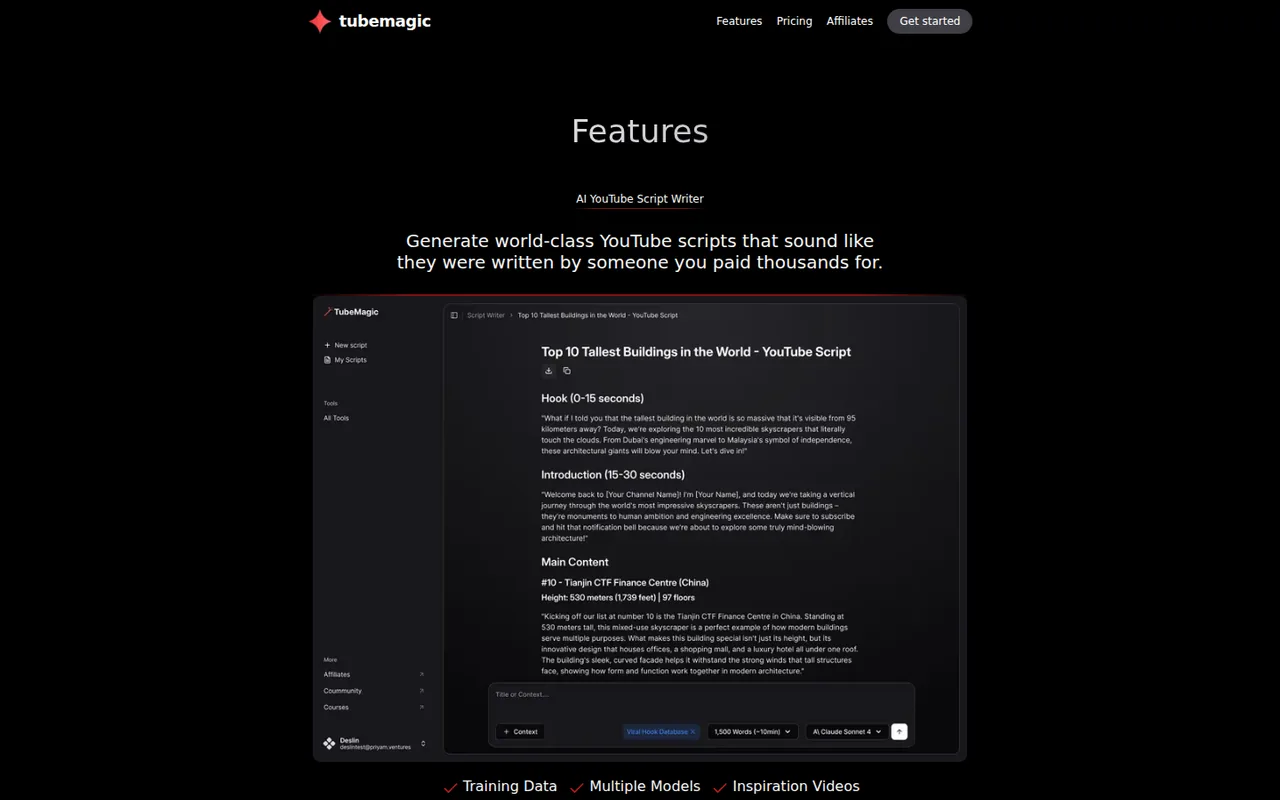
| AI script writer with channel-style matching and inspiration videos | Takes a channel link for tone, optional inspiration videos and a target length, then drafts a script you can edit, regenerate or chat with. | The pages give a length guide of 100 words per minute, 800 for 5 minutes and 3,000 for 20 minutes, but do not document quality or accuracy of the output. |
| Script length set from about 1 to 20 minutes | — | |
| Edit, regenerate or chat with a script | — | |
| Video idea generator, niche explorer and ideas manager | — | |
| Keyword research with provider-estimated volume and competition | — | |
| Title, description and tag generators with a tag organizer | — | |
| Warp Upload optimizer for an unlisted video | You upload a video to YouTube as unlisted, paste its URL, and TubeMagic returns titles, tags and a description. | It needs a video already on YouTube, so it helps at the upload stage rather than at scripting. |
| Article to script, YouTube to transcript and Video to Script | Turn a video or an article URL into a script draft; the features page calls the video result a brand-new original script. | Both start from someone else’s material when it is not yours, so rights and factual checks stay with you. |
| Chrome extension for optimizing videos on YouTube | — |
Is there any free way to try TubeMagic?
No. The pricing FAQ says free trials are disabled for now because of spam, and there is no free plan on the pricing page. What it offers is a 30-day money-back guarantee: the FAQ says a full refund is available by emailing support within 30 days of payment, and the terms say refunds are given within 30 days of purchase.
The old landing page at tubemagic.com/free-trial still shows a line about a 7-day free trial at $67 a month, then $47, yet the FAQ on that same page says trials are disabled. Treat the pricing page as current. A test therefore means paying $47 first and asking for the refund inside the window if the tool does not fit, so decide what you will check in week one.
What does the single Premium plan limit?
There is one plan, and every tool is unlocked on it. The limits are per tool and per day rather than per project. Standard use runs on Sonnet 4.6 and Gemini Flash, up to 100 uses a day per tool, and the count resets every 24 hours. Premium models such as Claude Opus 5 draw on 500 premium credits a month, shared across all tools and reset monthly.
The page does not say how many credits one script or one title batch costs, and top-ups from the sidebar have no listed price. The features page and the about page still name Claude 4.0 and GPT-4o, so use the pricing page for current model access and check the model list inside the app after subscribing.
How does the script writer work, and what do you give it?
The script writer takes a YouTube channel link so it can match tone and structure, optional links to top-performing videos as inspiration, and a target length. The features page maps length to words: 100 words is about 1 minute, 800 about 5, 1,500 about 10 and 3,000 about 20. Drafts can be edited, regenerated or refined by chat.
Article to Script and Video to Script start from existing material. The features page describes the video result as a brand-new original script, but you remain responsible for facts and rights in whatever you feed it, and the terms state that TubeMagic is not responsible for legal problems arising from AI-generated content. Rewrite claims you cannot source, and do not reuse another creator’s work as your own.
What do the idea, title and upload tools add?
Beyond scripts, the toolkit covers planning and publishing. The tools listed on the features page are:
- Ideas: a video idea generator from your channel link, niche explorer, top video finder, ideas manager and channel name generator.
- Research: keyword research with search volume, competition and a Magic Score, all provider estimates.
- Content: thumbnail generator, YouTube-to-transcript, article to script and video to script.
- Upload: title generator (3 titles per request), description generator with timestamps, tag generator and organizer, and Warp Upload.
- Chrome extension for optimizing videos directly on YouTube.
TubeMagic has no free plan, so a channel that only wants to try keyword research and competitor tracking first can look at vidIQ, which offers a Free plan with capped research results.
Should you pay monthly or yearly?
Monthly is $47. Yearly is shown as $41 a month, billed once at $497. Twelve monthly payments would be $564, so yearly saves $67, about 12%, even though the toggle is labelled Save (20%). The yearly list also includes the Tube AI System Course, which the monthly list does not show. The pages do not say whether the refund window applies the same way to a yearly payment.
Because a trial is not offered, paying monthly first keeps the exposure at $47 while you decide. If you do choose yearly, note the payment date and email support inside 30 days if you want the refund. Confirm the payment processor at checkout, since the pricing FAQ, the privacy policy and the terms name different ones.
Who runs TubeMagic, and what does the small print say?
The terms are an agreement with Tube Magic LLC, and the footer says it was previously Morise.ai. The about page says Morise began in 2023 as an idea generator and was acquired and renamed in January 2024. The terms carry no date, the footer reads 2025 and no state or address is given, so the pages leave the legal entity thinly documented.
The terms allow commercial use of the service and forbid transferring accounts. The privacy policy says information may be shared with payment providers, is kept while the account is active, and can be deleted on request to support@tubemagic.com. It does not say which AI model providers receive your prompts or channel links, so keep unreleased scripts to what you are comfortable sending.
Can it produce a usable 5-minute script from one of your own videos?
Proposed evaluation · not performed yet
On a paid monthly account, pick one video you own and know well. Paste the channel link, add two inspiration videos from your niche, set the length to 5 minutes (about 800 words) and generate a script on the Standard models. Before you start, write your own three-point outline and note the exact facts and numbers the video contains.
- Record the plan, the model used and the date, and note the daily use count before and after.
- Generate the script, then regenerate once and compare the two drafts.
- Check every factual claim and number against your notes and mark each as correct, wrong or invented.
- Run the title, description and tag tools on the same video and compare them with your published versions.
- Decide within 30 days of payment, and email support for a refund if it fails your accept rule.
Accept a script that covers your three points, contains no invented facts you cannot source and needs edits mainly for style. Reject one that invents claims, ignores the target length or copies phrases from the inspiration videos. No output quality result is reported until the exercise is run.
For general-purpose drafting without a YouTube-specific workflow, compare ChatGPT, Claude and Jasper. To edit a finished recording by its transcript, see Descript.
Is TubeMagic worth it?
Documentation review plus dated public user reports. Documentation review, not tested hands-on. Not scored.
Worth it if
- You publish YouTube videos often and want scripts, titles, descriptions and tags under one subscription instead of several single-purpose tools.
- You are comfortable paying first, since the 30-day money-back window stands in for the disabled trial.
- You want drafts that follow an existing channel's tone, because the script writer accepts a channel link and inspiration videos.
Probably not if
- You want to try the tool before paying, because there is no free plan or trial and any test starts with a payment.
- You need documented script quality or keyword accuracy, because the pages give no output results and the keyword numbers are provider estimates.
- You need clear company and model details up front, since the pages name different AI models and give no address for Tube Magic LLC.
TubeMagic alternatives
Other writing & content tools checked with the same method. Pick by the job, not by a score.

Self-publishing authors, ghostwriters and non-fiction writers who want one place to outline, draft in their own style, edit and prepare a book for Amazon KDP

General drafting, files and everyday research

Drafting, document work and coding

Brand-consistent sales and marketing content for teams

Chat and research that needs live X and web context

On-brand marketing copy with stored brand context

Switching between several chat models under one subscription

Trying several AI models from one account, mainly through a browser extension
Used TubeMagic? Write the first review. Visitor opinions are moderated and kept separate from our source checks.
Frequently asked questions
Does TubeMagic write scripts in languages other than English?
The pricing FAQ says it supports over 95 languages, but it lists descriptions, titles, tags, community posts and video ideas, and does not name scripts. If you publish in another language, generate a short sample script on the monthly plan and have a native speaker read it before the 30-day refund window closes.
Is the keyword research data reliable?
The features page says Keyword Research shows search volume, competition and a proprietary Magic Score. The pages do not say where the numbers come from or how the score is calculated, so treat them as provider estimates. Cross-check a shortlist against YouTube search suggestions and your own channel analytics before committing to a topic.
Will TubeMagic use my company logo if I sign up with a work email?
The terms say signing up with a work email address gives TubeMagic permission to show your company’s logo and name on its landing page or in its advertisements as a user of the service, for as long as you keep using it. If that is a concern, sign up with a personal address or ask support first.
Where do the tools run: in the app or on YouTube?
Most tools run in the TubeMagic web app, with the login at app.tubemagic.com. A Chrome extension is listed for optimizing videos directly on YouTube. Warp Upload needs the video uploaded to YouTube as unlisted first, because you paste that link in. Nothing on the pages says a mobile app exists.
How fast is support, and does paying change it?
The pricing FAQ says support is at support@tubemagic.com and that most replies arrive within 12 hours on weekdays. Paying customers are prioritized and get live chat, and the Premium plan lists priority support. The same address handles refund requests and deletion of your account data, per the terms and the privacy policy.
Sources and method7 official sources · 9 details checked · Sep 30, 2026
How we checked this profile
9 details on this page were checked against TubeMagic's own pages and help documentation (Sep 30, 2026).
See the checks by section9 documented
| Section | Checks | Last checked | Sources |
|---|---|---|---|
| Article text | 1 documented | tubemagic.com/pricing | |
| Plans and prices | 4 documented | tubemagic.com/pricingtubemagic.com/terms-and-conditions | |
| Who it suits | 1 documented | tubemagic.com/terms-and-conditions | |
| Features | 1 documented | tubemagic.com/features | |
| Questions | 1 documented | tubemagic.com/terms-and-conditions | |
| Other details | 1 documented | tubemagic.com/about |
Sources for this profile
All 7 sources
Conflict on free trials: the pricing page, features page and FAQ say free trials are disabled due to spam, but the legacy page tubemagic.com/free-trial still shows a hero line of $67/Month (7 Day Free Trial) then $47/Month, while carrying the same FAQ answer that trials are disabled. The current pricing page and FAQ are treated as authoritative, and third-party pages that repeat a trial are not used. Model names differ: the pricing page lists Claude Opus 5, Sonnet 4.6 and Gemini Flash, while the features, home and about pages name Claude 4.0 and GPT-4o; the pricing page is used. Payment processor differs: the pricing FAQ names Paddle, another answer names Stripe, and the privacy policy names Stripe and Digistore24, so confirm the processor at checkout. The terms are undated and the footer reads 2025; no state or address is given for Tube Magic LLC. A similarly named site, tubemagic.com.au, is a separate site and is not covered here.
Sources checked Sep 30, 2026. Found something out of date? See how we correct profiles.