

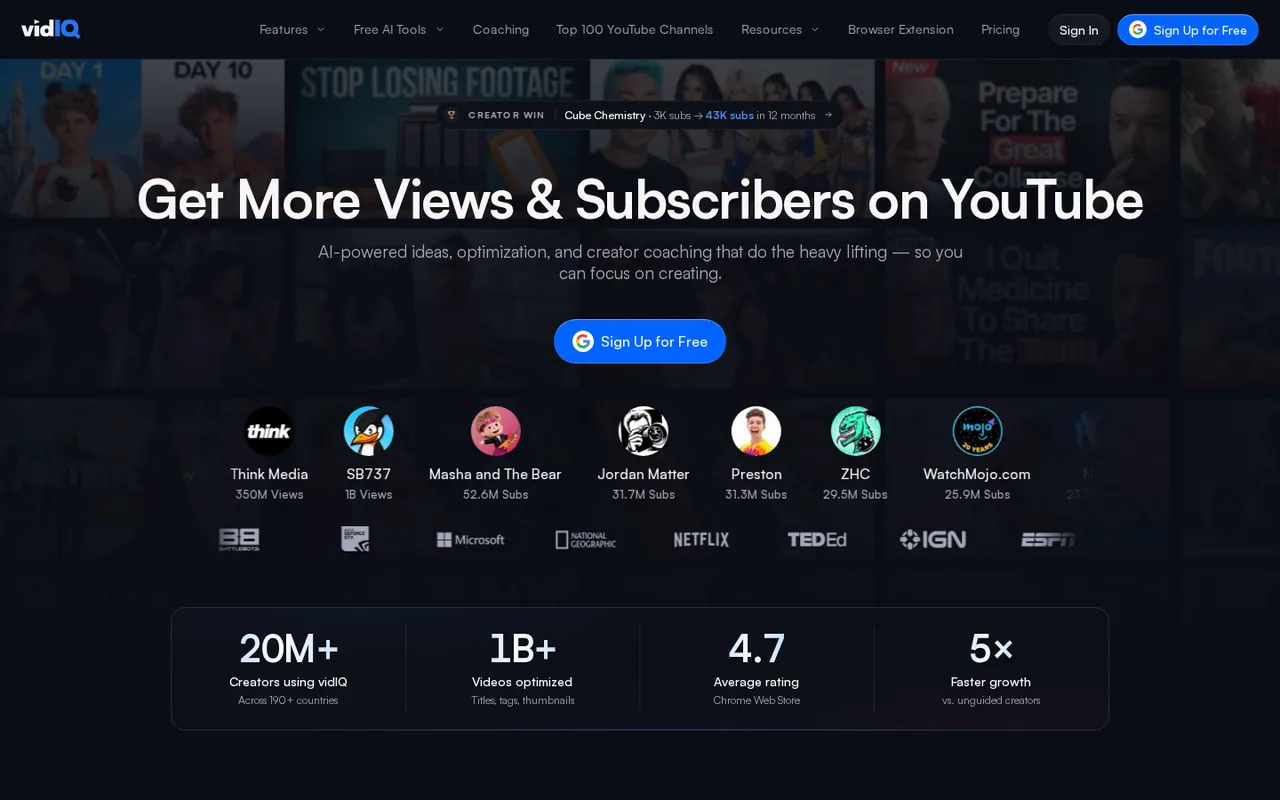
vidIQ: Free gives 150 AI credits but only 3 keyword results per search; Boost at €19 a month lifts that cap
Updated September 29, 2026 · By Elias Brandt · Documentation review, not tested hands-on
Pros
- Usable free research tier
- Published per-action credit costs
- Works inside AI assistants
Cons
- No refunds for unused days
- Regional price display
- Top-ups limited to higher plans
Bottom line
150 AI credits a month; 3 keyword results and 8 outliers per search; 3 personalized ideas a day; up to 3 tracked competitors; extension scorecards.
Your small channel mainly needs keyword research, because Boost removes the 3-result cap and adds 2,000 monthly credits for thumbnails and AI Coach.
You plan to stay on Free for a full upload schedule, as 3 keyword results and 3 personalized ideas a day run out quickly.
Best forNew or small YouTube channelsWeekly uploadersClip and Shorts producersEnglish-language channels wanting a coach
Strengths, limits and who it suits, in full
Strengths
- Usable free research tier Free includes 150 AI credits, the extension scorecards and limited keyword research.
- Published per-action credit costs The help center lists the credit price of each AI action.
- Works inside AI assistants The MCP connection is included on every plan during its launch period.
Limits
- No refunds for unused days Cancelling keeps access until the period ends, with no partial refund.
- Regional price display The plans page showed euros from our EU check; the US dollar price was not visible to us.
- Top-ups limited to higher plans Extra credits can be bought only on eligible Max and Coaching plans.
Who it suits
- New or small YouTube channels Free covers the extension scorecards and a first look at keywords before paying.
- Weekly uploaders Boost suits channels that need unlimited keyword research and a few thumbnails a week.
- Clip and Shorts producers heavy clipping or Shorts generation points to Max, because those actions are credit-hungry.
- English-language channels wanting a coach 1-on-1 coaching is limited to English-language channels.
How much does vidIQ cost?
Prices confirmed · checked
- EUR 19Boost
- EUR 39Max
Regional prices: The plans page was captured from a server in Germany and showed euros; the same result came with a US English browser locale, and the page data reported the country as DE.
US dollar prices were not visible to us, and no conversion is made here. The coaching page showed US dollars. Promo rates renew at the full price. The help center offers no refund or credit for unused days.
| Plan | Price | What you get |
|---|---|---|
| Free | €0 sourceFrom vidiq.com/plans, checked Sep 29, 2026 (opens in a new tab) | 150 AI credits a month; 3 keyword results and 8 outliers per search; 3 personalized ideas a day; up to 3 tracked competitors; extension scorecards. |
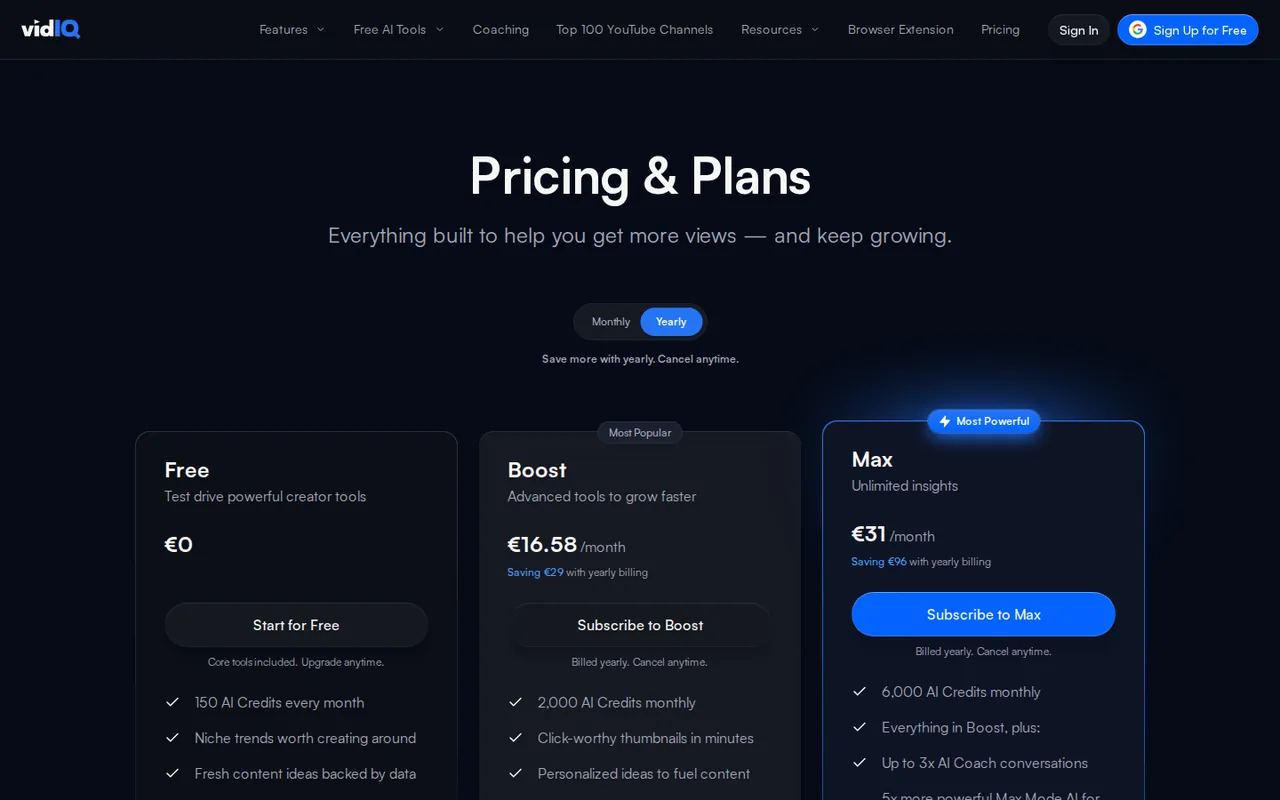
| Boost | €19 per monthbilled monthly · or €16.58 per month billed yearly; the page says yearly saves €29 sourceFrom vidiq.com/plans, checked Sep 29, 2026 (opens in a new tab) | 2,000 AI credits a month for 1 channel; unlimited keyword research and trends; thumbnails; AI Coach with deep thinking; up to 20 competitors. |
| Max | €39 per monthbilled monthly · or €31 per month billed yearly; the page says yearly saves €96 sourceFrom vidiq.com/plans, checked Sep 29, 2026 (opens in a new tab) | 6,000 AI credits a month; Max Mode AI Coach; up to 3x AI Coach conversations; up to 11 hours of short clipping and generations; up to 50 competitors. |
| Enterprise | Custom pricing | Access for every channel, roles and permissions, priority onboarding and support, cross-channel reporting. |
| VIP Coaching | $319 per month equivalent$3,830 billed once per year · coaching page sourceFrom vidiq.com/plans, checked Sep 29, 2026 (opens in a new tab) | Dedicated 1-on-1 coach with recurring live calls; English-language channels only; annual coaching is paid upfront and non-refundable. |
Which plan fits?
Smallest plan whose monthly credits cover your number with 15% spare for regenerations. Arithmetic from the plan table above, not a usage test.
How far does it go?
- What 150 free credits coverAt the published rates: 150 / 10 = 15 regular AI Coach messages, or 150 / 22 = 6 thumbnail generations, or 150 / 5 = 30 standard MCP calls. On Boost, 2,000 / 22 = 90 thumbnails, while one 30-second Short costs 30 x 20 = 600 credits. Unused plan credits do not roll over. Arithmetic on published rates, not observed usage.
Arithmetic from the published allowances above, not a usage test.
Taxes, currency and promotions can change the price you see at checkout.
Try vidIQ free (opens in a new tab)
Key features
| Feature | What it does | Watch out |
|---|---|---|
| YouTube keyword research and outlier search | — | |
| Daily personalized video ideas and trend research | — | |
| AI Coach for channel strategy | — | |
| Thumbnail, title, description and script generators | — | |
| Clipping and Shorts generation from long videos | — | |
| Competitor tracking and subscriber insights | — | |
| Chrome extension with video scorecards | — | |
| MCP connection for Claude, ChatGPT, Cursor and Codex | — | |
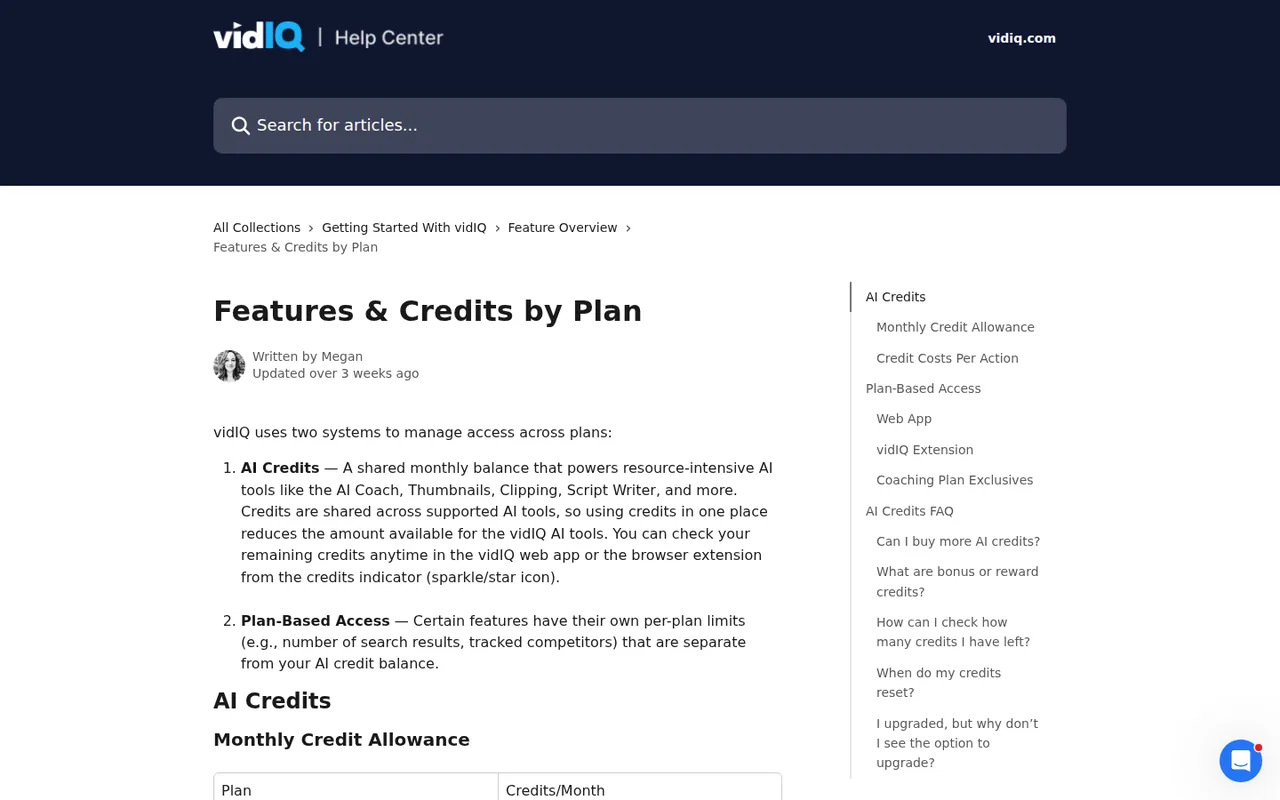
| AI credit balance | One monthly pool pays for AI Coach, thumbnails, scripts, clipping, Shorts and MCP calls, at rates from 1 to 35 credits per action. | Shorts cost 20 credits per second of output, so a single 30-second Short uses 600. |
| Research limits by plan | Keyword research, outliers, daily ideas and competitor tracking have their own caps outside the credit pool. | Free returns 3 keyword results per search and 3 daily ideas, which limits real research. |
| vidIQ MCP | Connects Claude, ChatGPT, Cursor or Codex to vidIQ data through one MCP address with OAuth sign-in. | Most calls cost 5 credits and video analysis 10, drawn from the same monthly pool. |
What does the Free plan include, and where does it stop?
Free gives 150 AI credits a month plus features that do not use credits, with their own caps. Keyword research returns 3 results per search, outlier search 8, personalized ideas are limited to 3 a day, customized ideas to 3 in total, and you can track up to 3 competitors. The browser extension scorecards and real-time stats are available on every plan.
Those research caps, not the credits, are what most small channels hit first. Three keyword results per search is enough to test the tool on a topic, but not to plan a month of uploads. Boost removes the keyword and outlier caps and raises daily ideas to 50.
How are AI credits spent?
Credits are one shared monthly pool. Plan credits refresh on the sign-up date for Free or the upgrade date for paid plans, unused ones do not roll over, and plan credits are spent before any purchased add-on credits. The help center lists these costs per action:
- AI Coach: 10 credits per message, 25 with deep thinking, 35 in Max Mode.
- Thumbnails: 22 per generation, regeneration or edit.
- Title generator: 3 per generation of up to 3 titles; descriptions: 1.
- Script writer: 1 per minute of script length; clipping: 9 per minute of input video.
- Shorts generator: 20 per second of output video.
Is Boost or Max worth it for a small channel?
Boost is the step most small channels need: it removes the research caps, adds 2,000 credits, thumbnails and deep-thinking AI Coach, and tracks up to 20 competitors. Max triples the credits to 6,000, adds Max Mode, up to 3x AI Coach conversations and up to 11 hours of short clipping, and allows top-up credit packs.
Editorial assessment
A channel publishing one long video a week and making a few thumbnails fits Boost; one that turns every upload into several Shorts will spend credits fast, since a 30-second Short costs 600, and is the case for Max. Free and Boost users cannot buy top-ups, only upgrade or wait for the refresh.
Why are the prices on this page in euros?
The plans page chooses a currency by location. From our server in Germany it showed Boost at €19 a month billed monthly or €16.58 a month billed yearly, and Max at €39 or €31, with the same result under a US English browser setting. We did not see the US dollar prices and have not converted them.
The coaching page, by contrast, showed VIP Coaching in US dollars: $319 a month equivalent, billed as $3,830 once a year. The billing help says a promotional rate renews at the full plan price, and taxes can be added at renewal under the terms. Check the currency and total on the checkout page itself.
How does vidIQ connect to Claude, ChatGPT or Cursor?
vidIQ MCP lets an AI assistant query vidIQ data on YouTube and Instagram channels, videos, trends and comments. ChatGPT uses an app listing; Claude, Cursor, Codex and other clients add the server address and sign in through OAuth. Connections can be revoked in the account settings.
The help center says MCP is available on Free, Boost and Max during a launch period with no published end date. Most tool calls cost 5 credits, video and reel analysis 10, and a few utility calls 0, all from the same monthly pool as the web tools.
How do cancellation and refunds work, and what can vidIQ show about your channel?
Plans renew automatically. Card and PayPal subscribers cancel under Account Settings, Manage Plan, while App Store and Google Play subscriptions are cancelled through those stores. Access continues to the end of the paid period, and the help center states there are no refunds or credits for unused days; an upgrade applies unused time as credit.
The terms also let vidIQ name you as a customer and use your channel name, logo, avatar and public channel statistics in its promotion, excluding your photo, voice or endorsements. You can revoke that permission by emailing privacy@vidiq.com.
Can 150 free credits plan one video from idea to thumbnail?
Proposed evaluation · not performed yet
On a Free account connected to a channel you own, plan one upcoming video on a topic you already cover. Use only the monthly 150 credits and no paid trial.
- Record the starting credit balance and the date it refreshes.
- Run keyword research on the topic and note the 3 results returned.
- Ask AI Coach three questions about angle and hook (about 30 credits).
- Generate titles twice (about 6 credits) and one thumbnail (22 credits).
- Compare the remaining balance with the expected 150 – 58 = 92 credits.
Accept a plan with a keyword, a title you would publish and a usable thumbnail, with a balance that matches the published rates. Reject invented statistics about your channel or a balance that differs without explanation. Leave the observed result blank until the exercise is run.
To edit the video itself after planning, see Descript. For turning a script into a narrated short without filming, compare Cliptalk and HeyGen.
Is vidIQ worth it?
Documentation review plus dated public user reports. Documentation review, not tested hands-on. Not scored.
Worth it if
- Your small channel mainly needs keyword research, because Boost removes the 3-result cap and adds 2,000 monthly credits for thumbnails and AI Coach.
- You want to ask Claude, ChatGPT or Cursor about YouTube data, since MCP works on every plan during its launch period and spends the same credit pool.
- You turn long uploads into clips and Shorts, which is where Max's 6,000 credits matter when a 30-second Short alone uses 600.
Probably not if
- You plan to stay on Free for a full upload schedule, as 3 keyword results and 3 personalized ideas a day run out quickly.
- You need a US dollar plan price before buying, because the plans page showed us euros only and coaching is priced separately in dollars.
- You may cancel mid-period and expect money back, since vidIQ gives no refund or credit for unused days.
vidIQ alternatives
Other video & editing tools checked with the same method. Pick by the job, not by a score.

Developers and small teams who want a conversational video avatar for support, sales or tutoring and need to budget by minutes

Short animated stories from a script or prompt

Teachers, students and math YouTubers who want 3Blue1Brown-style explainer clips from a description, with an editable Manim code playground when they want control

Relighting or changing the background of short video clips

Short vertical videos from a script, product or URL

Teams and creators who want short talking-avatar videos or an embedded avatar agent, and who accept metered minutes and a watermark on lower plans

YouTube editing with color and audio in one app

Podcasts and talking-head video
Used vidIQ? Write the first review. Visitor opinions are moderated and kept separate from our source checks.
Frequently asked questions
Do I have to connect my YouTube channel to use vidIQ?
No for research, yes for personal insights. Keyword research, trends and competitor tracking work on public data, while subscriber insights and MCP questions about your own analytics need a connected channel. The privacy policy says vidIQ collects channel data as permitted by YouTube and TikTok terms when you use those features.
Can I manage several channels on one vidIQ plan?
Partly. The help center lists Boost in 1, 2 or 3 channel versions with 2,000, 2,500 or 3,000 credits, and Max with 6,000, 8,000 or 10,000. The public plans page shows the one-channel versions. The FAQ points anyone managing more than three channels, or several team members, to Enterprise plans.
Is vidIQ Coaching available for channels in other languages?
No. The coaching page says coaching is currently available to English-speaking channels, with coaches working weekdays from 9 a.m. to 5 p.m. Pacific time and replying within 24 to 48 hours. Annual coaching plans are discounted but paid upfront and non-refundable, so a monthly start is the safer test.
What happens to purchased top-up credits when the month resets?
They stay. Top-up, bonus and reward credits sit in a separate add-on balance that the monthly refresh does not reset, and they are only spent after the plan credits run out. Top-ups are sold on eligible Max and Coaching plans and are not available in every region or through app store billing.
Does the vidIQ Chrome extension use AI credits?
Mostly not yet. Scorecards, real-time stats, views per hour and the outlier score are available on every plan. The help center says the extension is moving to the credit system, so some users still see older feature limits, and extension AI features will later draw on the same shared balance as the web tools.
How can I get vidIQ Pro for free?
We found no free route to a paid vidIQ plan, but the Free plan costs €0. The plans page we checked lists Free, Boost, Max and Enterprise, with no plan named Pro. Free includes 150 AI credits a month, 3 keyword results per search and the extension scorecards. Boost, at €19 a month in the EU view, removes the keyword cap and adds 2,000 credits.
Sources and method10 official sources · 8 details checked · Sep 29, 2026
How we checked this profile
8 details on this page were checked against vidIQ's own pages and help documentation (Sep 29, 2026).
See the checks by section8 documented
| Section | Checks | Last checked | Sources |
|---|---|---|---|
| Plans and prices | 4 documented | vidiq.com/planssupport.vidiq.com/13928456-features-credits-… | |
| Features | 2 documented | support.vidiq.com/13928456-features-credits-…support.vidiq.com/15082430-vidiq-mcp | |
| Strengths and limits | 1 documented | support.vidiq.com/442414-why-was-i-charged-w… | |
| Who it suits | 1 documented | vidiq.com/coaching |
Sources for this profile
- Plans and pricing (EU view, EUR)vidiq.com
- Product overviewvidiq.com
- Features and credits by plansupport.vidiq.com
- AI credit top-upssupport.vidiq.com
All 10 sources
Plan prices are the EU view in euros; US dollar prices were not shown to us and are not converted. The page data also lists Boost variants for 2 or 3 channels, but the plans page shows only the one-channel Boost; the help center gives them 2,500 and 3,000 credits. The coaching page shows VIP prices in US dollars. Coaching success stories on the plans page were not used. The terms name vidIQ, Inc., San Francisco, under California law.
Sources checked Sep 29, 2026. Found something out of date? See how we correct profiles.