

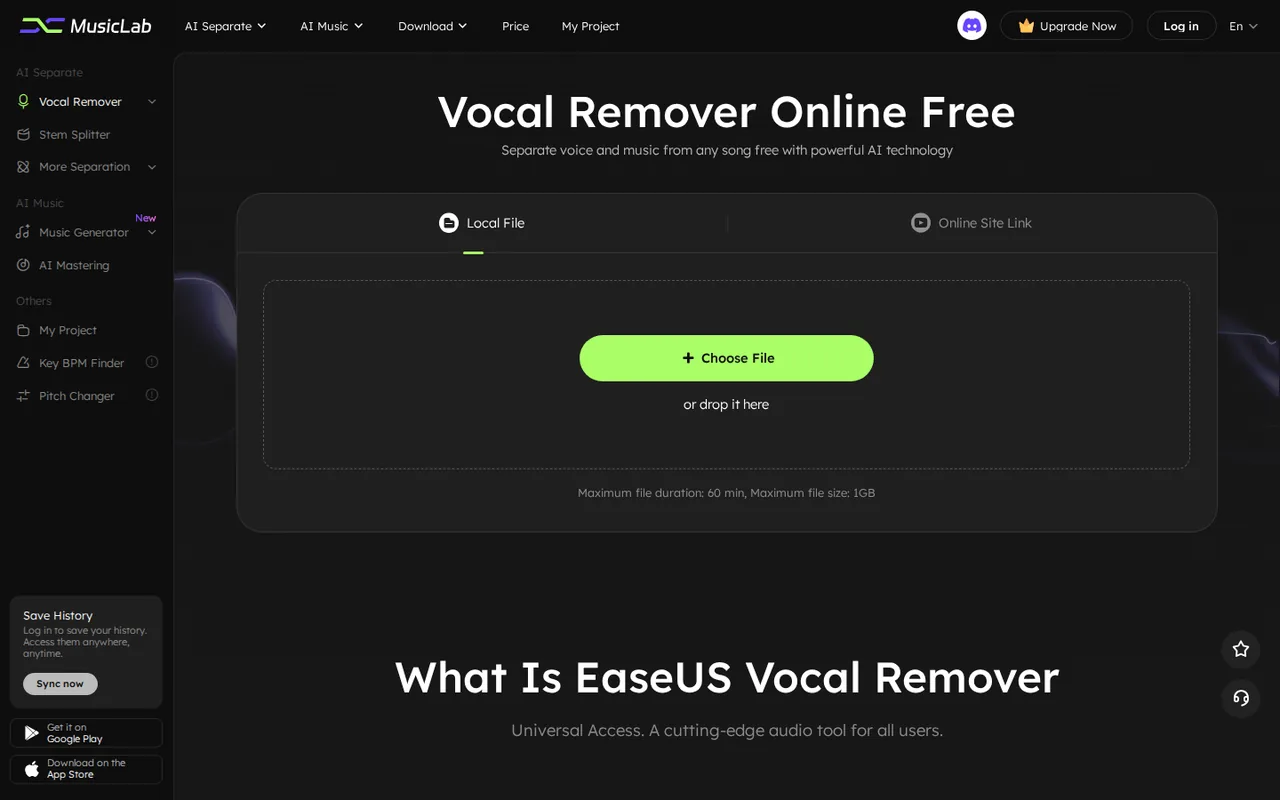
EaseUS Vocal Remover: free uploads end at a preview with 0 downloads, and paid plans start at $14.95 a month
Updated September 29, 2026 · By Elias Brandt · Documentation review, not tested hands-on
Pros
- Free processing without installing software
- Three ways to pay
- Several separation modes in one account
Cons
- No downloads on Free
- Money-back guarantee is conditional
- Mixed export information
Bottom line
3 uploads a day, files up to 6 minutes, YouTube and SoundCloud link import; the plan table lists 0 downloads a day and no WAV, video export or enhanced processing.
You want to hear how well the separation handles your own song before paying, because Free allows 3 uploads a day of files up to 6 minutes.
You need to keep a result without paying, because the Free column lists 0 downloads a day and records are kept only 7 days.
Best forKaraoke and practice singersMusicians making practice stemsOccasional usersVideo creators needing a backing track
Strengths, limits and who it suits, in full
Strengths
- Free processing without installing software Separation runs in the browser, and the Free column allows 3 uploads a day.
- Three ways to pay A monthly plan, a single yearly payment or a 500-minute pack suit different volumes.
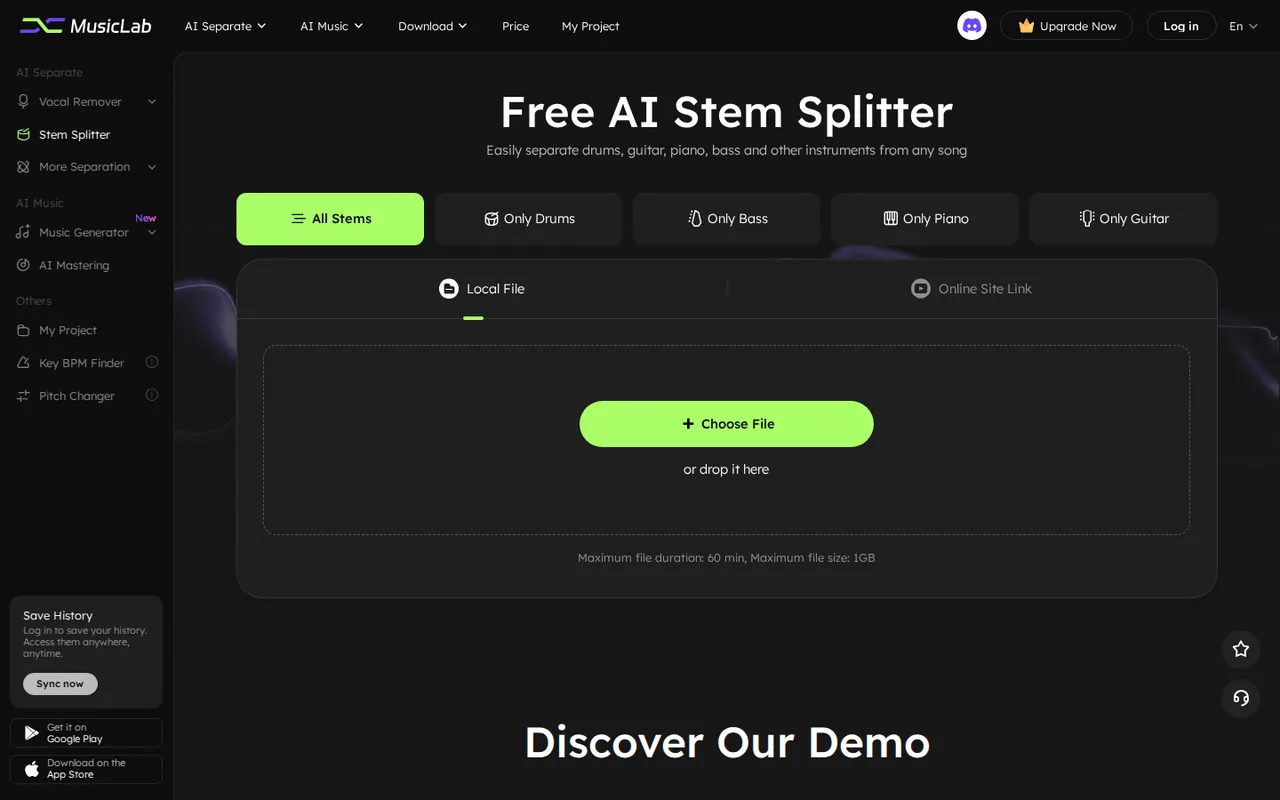
- Several separation modes in one account Vocals, instrumentals, four instrument stems, lead and backing vocals, echo, reverb and noise.
Limits
- No downloads on Free The official Free vs Pro table lists 0 downloads a day, so free use ends at a preview.
- Money-back guarantee is conditional The refund policy limits refunds to technical problems that support cannot fix and excludes products already used successfully.
- Mixed export information The homepage FAQ says only MP3 export is supported, while paid plan cards list WAV and video export.
Who it suits
- Karaoke and practice singers a monthly plan fits a burst of songs; Free only lets you hear whether separation works.
- Musicians making practice stems stem modes suit drum or bass practice tracks from recordings you own or have licensed.
- Occasional users the 500-minute pack avoids a subscription if you process a few dozen songs a year.
- Video creators needing a backing track removing vocals does not clear the music copyright, so check the licence before publishing.
How much does EaseUS Vocal Remover cost?
Prices confirmed · checked
Regional prices: Prices are in USD and were the same from a German server and a US-English browser at the 2026-09-29 price check.
Each paid plan is shown at half of a struck-through price and the product pages call this a limited-time 50% off deal; the table uses the amounts charged at checkout, not the struck-through figures. VAT can be added at checkout, and an exemption ID can be entered there. The refund policy offers a price-adjustment refund within 7 days if the official price drops.
| Plan | Price | What you get |
|---|---|---|
| Free | $0 sourceFrom easeus.com/shopping/new/buy/evr.html, checked Sep 29, 2026 (opens in a new tab) | 3 uploads a day, files up to 6 minutes, YouTube and SoundCloud link import; the plan table lists 0 downloads a day and no WAV, video export or enhanced processing. |
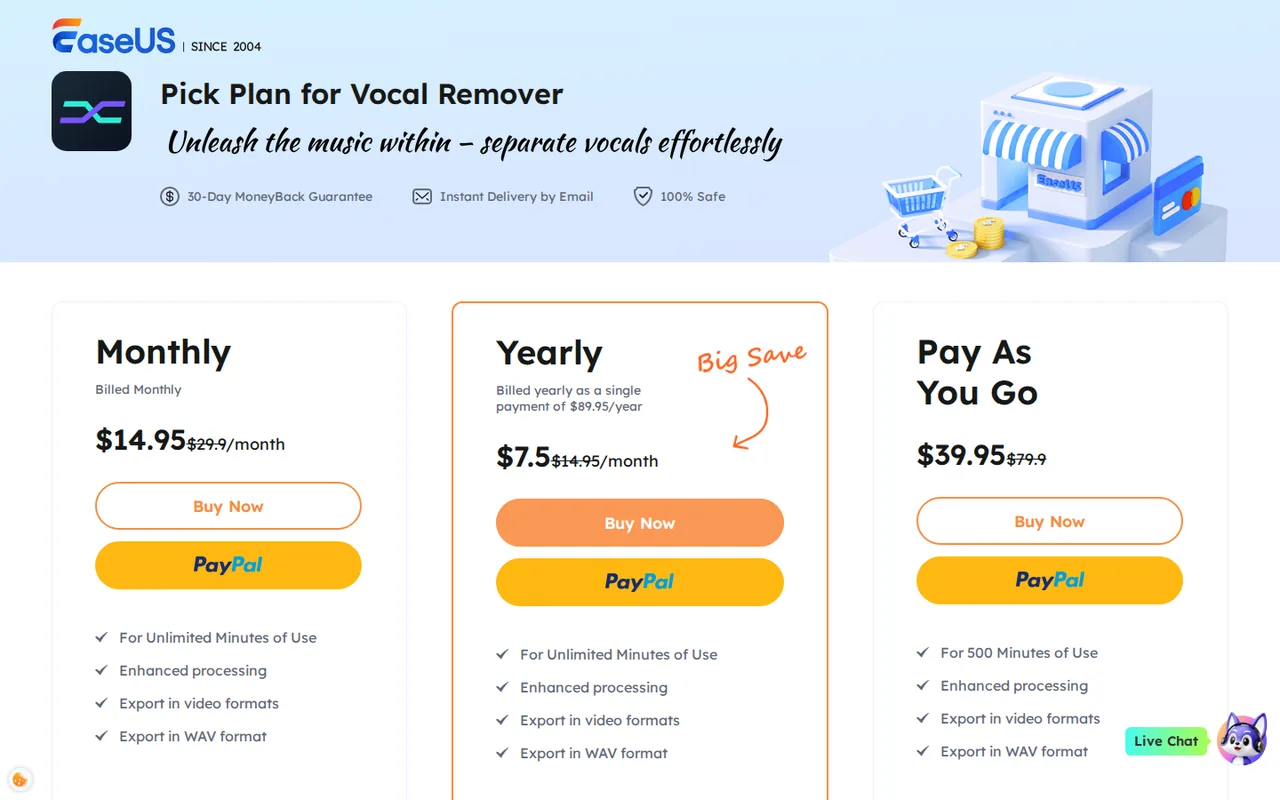
| Monthly | $14.95 per monthbilled monthly · shown next to a struck-through $29.90 sourceFrom easeus.com/shopping/new/buy/evr.html, checked Sep 29, 2026 (opens in a new tab) | Unlimited minutes of use; enhanced processing; export in video formats and WAV; files up to 60 minutes. |
| Yearly | $89.95 per yearbilled as a single payment · shown as $7.5 per month sourceFrom easeus.com/shopping/new/buy/evr.html, checked Sep 29, 2026 (opens in a new tab) | Unlimited minutes of use; enhanced processing; export in video formats and WAV; files up to 60 minutes. |
| Pay As You Go | $39.95 for 500 minutesshown next to a struck-through $79.90 sourceFrom easeus.com/shopping/new/buy/evr.html, checked Sep 29, 2026 (opens in a new tab) | 500 minutes deducted by file length at upload; enhanced processing; export in video formats and WAV. |
How far does it go?
- Pay As You Go per song500 minutes ÷ 4-minute songs = 125 uploads, and $39.95 ÷ 125 = about $0.32 per upload. Uploading the same song again for a second mode deducts another 4 minutes, so two modes per song give 62 songs. This is arithmetic on published figures, not observed usage.
Arithmetic from the published allowances above, not a usage test.
Taxes, currency and promotions can change the price you see at checkout.
Try EaseUS Vocal Remover free (opens in a new tab)
Key features
| Feature | What it does | Watch out |
|---|---|---|
| Vocal and instrumental separation from audio or video files | — | |
| Stem splitting into drums, bass, piano, guitar and other parts | — | |
| Lead and backing vocal splitting | — | |
| Echo, reverb and background noise removal | — | |
| Audio import from YouTube and SoundCloud links | — | |
| AI Song Cover with stock singer voices | — | |
| Key, BPM and pitch tools | — | |
| Web, Android and iOS access | — | |
| Vocal remover | Uploads a song or video and returns a vocal track and an instrumental or karaoke track. | On Free the plan table lists 3 uploads a day, files up to 6 minutes and 0 downloads. |
| Stem splitter | Separates drums, bass, piano, guitar and other parts, either all at once or one instrument at a time. | Each upload of the same file is charged again against a minute pack, so choose the stem mode before uploading. |
| Link import | Pulls the source audio from a pasted YouTube or SoundCloud address instead of a local file. | Having a link does not give you rights to the recording; use it only for tracks you may process. |
What can you do on the Free plan without paying?
The Free vs Pro table on the homepage lists 3 uploads a day and files up to 6 minutes on Free, against unlimited uploads and 60-minute files on Pro. The same table lists 0 downloads a day on Free and unlimited downloads on Pro. In practice Free lets you upload, run the separation and listen to the result in the browser, but not keep the file.
Free also lacks WAV export, video export and the enhanced processing model. Link import from YouTube and SoundCloud is marked as available on both columns. The My Project page keeps the last 7 days of records for free users and keeps them for life for members, so a free result is not a lasting archive either.
How are minutes counted on the 500-minute pack?
The Pay As You Go product page says the length of each uploaded audio or video file is subtracted from your purchased minutes at upload. Uploading the same file again is counted again. A four-minute song run once as a vocal split and once as a stem split therefore uses eight minutes.
The Monthly and Yearly cards list unlimited minutes of use, so the pack only makes sense for low or irregular volume. The checkout page does not say whether unused pack minutes expire; treat that as not confirmed and ask support before buying a pack for a long project.
What does the 50% off label mean for the price you pay?
Every paid option is shown beside a struck-through price twice as high: $14.95 against $29.90 a month, $39.95 against $79.90 for 500 minutes, and the yearly plan as $7.5 a month against $14.95. The product pages label this a limited-time 50% off deal. We list the amounts the checkout actually charges, not the struck-through figures.
The yearly option is billed as one payment of $89.95. Divide that by 12 and you get just under $7.50 a month, which matches the card. Twelve monthly payments of $14.95 come to $179.40, so the single payment costs about half as much if you expect to use the tool across a whole year.
Which separation modes and file formats are included?
Beyond removing vocals, the tool lists an instrumental remover, an acapella extractor, a lead and backing vocal splitter and an AI stem splitter for drums, bass, piano and guitar. The stem page accepts MP3, WAV, MP4, MKV, MOV, M4A, FLAC, AC3, M4B, M4R, MKA, OGG and MP2. The upload box states a maximum of 60 minutes and 1 GB per file.
Output formats are less clear. The homepage FAQ says only MP3 export is supported for now, while the paid plan cards list export in WAV and video formats. If you need WAV stems for a digital audio workstation, confirm the export option on one paid file before relying on it for a project.
- Vocal remover and acapella extractor for karaoke or a cappella tracks.
- Stem splitter for all stems or a single instrument.
- Echo, reverb and noise removal for cleaning a recording.
Can you pull audio from a YouTube or SoundCloud link?
Yes. The homepage says you can paste a YouTube or SoundCloud address and the tool downloads the source audio from the site before separating it, and the Free column marks this as available. That saves a separate download step, but it does not give you any rights in the recording.
Extracting audio from someone else’s upload can breach the platform’s terms and the copyright in the song, so use links only for recordings you own, have licensed or may lawfully process. The EaseUS terms make you responsible for using the product lawfully where you live. The AI Song Cover page says its voices come from models trained on real, non-celebrity singers without copyright concerns; that is a vendor statement about the voices, not a licence for the song being covered.
When does the 30-day money-back guarantee apply?
The checkout page promises a 30-day money-back guarantee. The refund policy narrows it: refunds are for technical problems that support cannot solve, requested within 30 days, and not for a product that has already done its intended task. You are expected to let support try to fix the issue before a refund is approved.
For a vocal remover this matters, because a finished separation counts as successful use even if you dislike the result. Use the free preview to judge separation quality on your own material before you pay, and keep the order ID in case the price drops within 7 days, when a price-adjustment refund is offered.
Who runs the service and which law applies?
The EaseUS legal notice names CHENGDU Yiwo Tech Development Co., Ltd. as the company that provides the site and products, and says matters relating to the site are governed by the laws of the People’s Republic of China. The same terms leave it to each user to make sure their use is lawful in their own country.
The linked privacy policy is a general EaseUS policy and does not say how long files uploaded to the vocal remover are stored. Do not upload unreleased client masters or confidential recordings until you have confirmed retention with support.
Can the Free plan tell you whether a paid plan is worth it?
Proposed evaluation · not performed yet
Use a 4-minute song you recorded yourself, or one you hold a licence for, with a clear lead vocal, backing vocals and drums. On Free, upload it once in vocal remover mode and once in stem splitter mode, which uses 2 of the 3 daily uploads.
- Record the date, browser and plan shown in the account.
- Listen to the instrumental for vocal bleed in the chorus and the quietest verse.
- Check whether the stem split keeps cymbals out of the vocal track.
- Try to download each result and note what the Free plan allows.
- Only then decide between the monthly plan and the minute pack, using your expected number of songs.
Accept the tool if the chorus instrumental has no audible lead vocal and the stems stay separate. Reject it if vocals remain audible or cymbals smear into the vocal track. No separation result is reported until the test is run.
To clean speech recordings rather than split music, compare Adobe Podcast and Auphonic. For removing noise from live calls, see Krisp.
Is EaseUS Vocal Remover worth it?
Documentation review plus dated public user reports. Documentation review, not tested hands-on. Not scored.
Worth it if
- You want to hear how well the separation handles your own song before paying, because Free allows 3 uploads a day of files up to 6 minutes.
- You process a few dozen songs a year, because the $39.95 pack of 500 minutes avoids a subscription.
- You need a steady stream of karaoke or practice tracks, because the monthly and yearly plans list unlimited minutes of use.
Probably not if
- You need to keep a result without paying, because the Free column lists 0 downloads a day and records are kept only 7 days.
- You expect to re-run each song in several modes on the minute pack, because every upload of the same file is deducted again.
- You handle confidential or unreleased masters, because the page could not confirm how long uploaded audio is stored.
EaseUS Vocal Remover alternatives
Other audio & voice tools checked with the same method. Pick by the job, not by a score.

Browser cleanup and text editing of speech

Turning instrumental recordings into editable sheet music or MIDI

Free local voice conversion and voice model training

Producers, editors and developers who need stems, dialogue or lyric timing from existing audio

Short scripted voiceovers and pronunciation checks

Short MP3 voice clips with SSML control on a small budget

Transcribing recorded audio and video files into text or subtitles

Low-cost voiceovers for videos and courses
Used EaseUS Vocal Remover? Write the first review. Visitor opinions are moderated and kept separate from our source checks.
Frequently asked questions
Can I use EaseUS Vocal Remover on a phone?
Yes. The site links to an Android app on Google Play and an iOS app on the App Store, and the web version runs in a mobile browser. The store product pages still describe the platform as Windows and macOS, which reflects the wider EaseUS store rather than a desktop download, so check the plan applies to the app you install.
Why does the site header say MusicLab instead of EaseUS?
The vocal remover pages now carry the MusicLab name in the header, while the footer, checkout and legal notice remain EaseUS. Purchases go through the EaseUS store and the terms are issued by CHENGDU Yiwo Tech Development Co., Ltd., so contact EaseUS support for billing, refunds or licence questions.
Which payment methods does EaseUS accept for the vocal remover?
The checkout FAQ lists credit card, PayPal and wire transfer, and recommends a credit card for the fastest delivery. VAT may be added depending on your location; if your organisation is exempt, enter the VAT exemption ID at checkout rather than asking for a refund of the tax afterwards.
Are the AI Song Cover voices copies of famous singers?
EaseUS says the song cover voices come from AI models trained on the vocal styles of real, non-celebrity singers and lists named stock voices such as tenor, alto and soprano presets. That describes the voice source only. Publishing a cover of a copyrighted song still needs the usual permission for the composition.
Do results stay in my account after I process a song?
The My Project page says EaseUS keeps the last 7 days of records for free users and keeps records for life for members. If you rely on a free preview to compare separations, finish within a week. Paid members should still download important results, because the page does not describe file backups or export limits.
Sources and method10 official sources · 9 details checked · Sep 29, 2026
How we checked this profile
9 details on this page were checked against EaseUS Vocal Remover's own pages and help documentation (Sep 29, 2026).
See the checks by section9 documented
| Section | Checks | Last checked | Sources |
|---|---|---|---|
| Plans and prices | 5 documented | vocalremover.easeus.comeaseus.com/evr.htmleaseus.com/evr-payg.html | |
| Article text | 2 documented | vocalremover.easeus.comeaseus.com/legal-counsel.htm | |
| Strengths and limits | 1 documented | easeus.com/refund-policy.html | |
| Questions | 1 documented | vocalremover.easeus.com/version-history |
Sources for this profile
- Plan checkout page (Monthly, Yearly, Pay As You Go)easeus.com
- Vocal Remover homepage and Free vs Pro tablevocalremover.easeus.com
- Pay As You Go product page and minute counting FAQeaseus.com
- Monthly plan product pageeaseus.com
All 10 sources
The Free vs Pro table on the homepage renders its limits with JavaScript: the raw HTML shows 0 file/day for both rows, while the rendered page shows 3 uploads and 0 downloads a day for Free. The homepage FAQ says export is MP3 only, but paid plan cards list WAV and video export. Product pages describe the platform as Windows and macOS, while the service runs in a browser and through Android and iOS apps. The site header uses the MusicLab name. The general EaseUS privacy policy does not describe how long uploaded audio is kept; the My Project page says records are kept 7 days for free users and for life for members. A free file allowance reported by third-party sites was not used.
Sources checked Sep 29, 2026. Found something out of date? See how we correct profiles.