TTSMaker: free MP3 downloads and commercial use on 20,000 characters a week, but API access starts above Lite
Updated September 27, 2026 · By Elias Brandt · Documentation review, not tested hands-on
Pros
- Free file delivery
- Commercial route
- Character-based planning
Cons
- Per-request limit varies
- Temporary downloads
- API upgrade required
Bottom line
20,000 characters per week; selected unlimited voices have separate conditions. The per-conversion limit must be checked in the chosen voice. Downloads and commercial use are documented; no API.
You need a short owned script turned into a downloadable voiceover and can work within the 20,000-character weekly free allowance.
You need unattended speech generation inside an application, because Free and Lite are excluded from the documented API route.
Best forShort-video creatorsTraining authorsDevelopersEditors with long scripts
Strengths, limits and who it suits, in full
Strengths
- Free file delivery The web converter allows speech downloads without buying a paid export tier.
- Commercial route The provider permits commercial use of generated speech subject to its terms.
- Character-based planning The quota is expressed in characters, so script length can be checked before conversion.
Limits
- Per-request limit varies The Free comparison and live converter show different per-conversion values; inspect the chosen voice.
- Temporary downloads Free history is short-lived, so files need a local handoff.
- API upgrade required Free and Lite are excluded from the documented API route.
Who it suits
- Short-video creators suitable for a brief owned script that fits the selected free voice limit.
- Training authors useful for separate lesson passages with a pronunciation checklist.
- Developers consider an API-eligible paid plan when speech generation must run inside an application.
- Editors with long scripts compare per-conversion limits before splitting a long narration into many files.
How much does TTSMaker cost?
Some prices not published · checked
Regional prices: The pricing page displays dollar amounts under a monthly/annual switch.
A single billing selection and currency could not be confirmed together in the live browser, so exact paid totals are left to checkout. Free is explicitly zero cost. Free per-conversion figures differ between the comparison and converter; the selected voice controls the practical limit.
| Plan | Price | What you get |
|---|---|---|
| Free | USD 0 sourceFrom pro.ttsmaker.com/pricing, checked Sep 27, 2026 (opens in a new tab) | 20,000 characters per week; selected unlimited voices have separate conditions. The per-conversion limit must be checked in the chosen voice. Downloads and commercial use are documented; no API. |
| Lite | Paid subscription; confirm checkout total | 300,000 characters per month and up to 10,000 per conversion. No API; paid web capacity is separate from developer access. |
| PRO Mini | Paid subscription; confirm checkout total | 600,000 characters per month, up to 20,000 per conversion, dialogue and API support listed in the plan comparison. |
How far does it go?
- Reserve one correction passA 250-character script generated twice uses 500 characters if that voice charges the full script each time. Against a 20,000-character weekly allowance, 20,000 / 500 = 40 such pairs before other usage; per-conversion limits and voice exemptions remain separate.
Arithmetic from the published allowances above, not a usage test.
Taxes, currency and promotions can change the price you see at checkout.
Try TTSMaker free (opens in a new tab)
Key features
| Feature | What it does | Watch out |
|---|---|---|
| Text-to-speech conversion in the browser | — | |
| Language and stock-voice selection | Choose a language and audition a stock voice. | Pronunciation must still be checked on names and abbreviations. |
| Downloadable MP3 speech files | — | |
| Speech speed, volume and pitch controls | — | |
| Pause insertion in a script | — | |
| API access on eligible paid plans | — | |
| Script controls | Adjust pacing and insert pauses. | Some advanced controls require a paid plan; availability depends on the voice. |
| API delivery | Create speech through a documented API and retrieve a temporary file URL. | Free and Lite web allowances do not provide API access. |
How much text can the free converter handle?
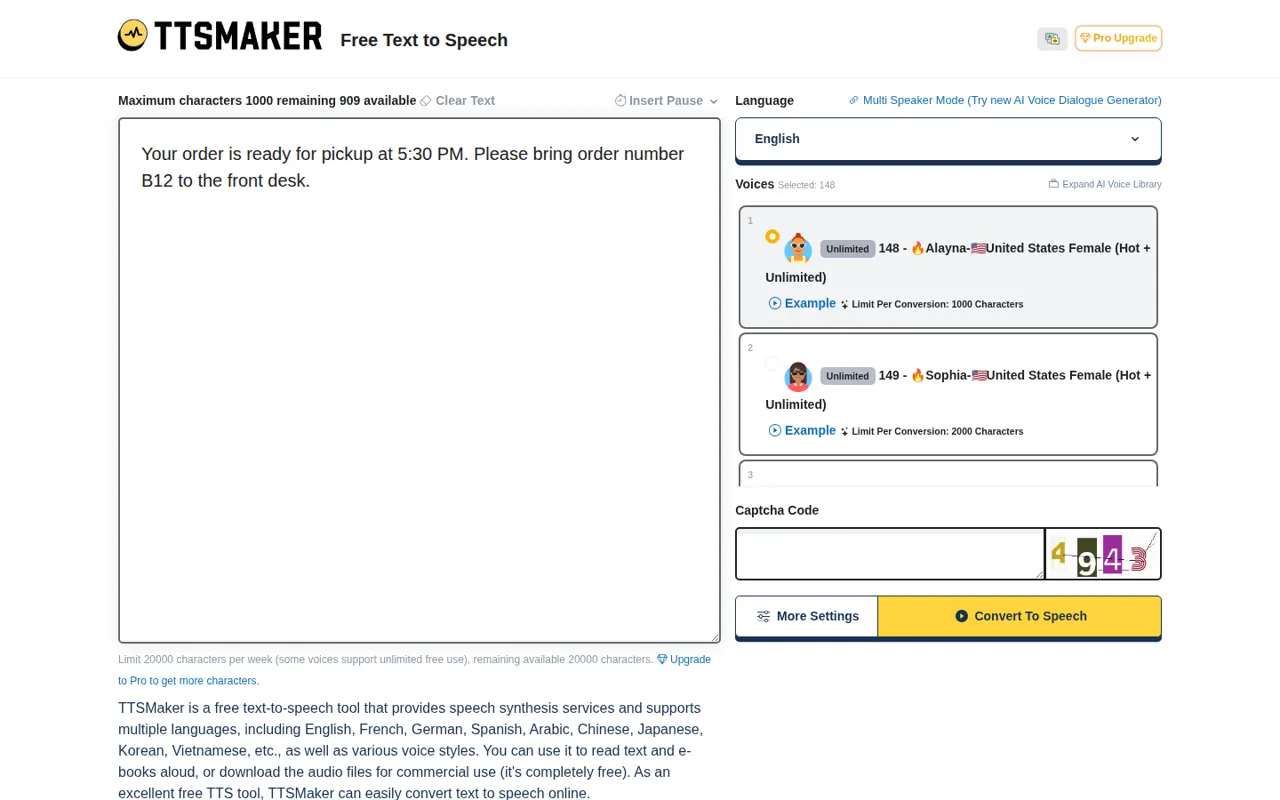
The free web converter lists a weekly allowance of 20,000 characters, with some voices treated separately as unlimited. This is a character budget, not a promise of a fixed number of minutes. Two scripts of identical length can have different playback durations after voice, speed and pause choices change.
The pricing comparison lists 500 characters per Free conversion, while the live converter can display a different maximum for the selected voice. Keep those values separate from the weekly allowance. Paste a short passage first, read the remaining-character indicator and stop if the requested conversion exceeds the visible limit; a large weekly balance cannot override a smaller request limit.
Can you deliver the downloaded audio commercially?
TTSMaker permits lawful commercial use of synthesized speech and says source attribution is optional. The practical deliverable is a downloaded audio file, rather than an audition that can only be played inside the service. Save the final script with the generation date and the terms link so the recipient knows which version was produced.
Use text and other material you have permission to process. A speech-generation licence does not supply permission for a borrowed script, music track or a third party’s identity. Before adding background music, check that material separately and keep an unaccompanied voice file available for editing; do not turn the provider’s commercial-use statement into a blanket clearance of the entire production.
Which access level fits a short clip or an automated service?
Editorial assessment
Begin with Free for a short, individually downloaded voiceover that fits the chosen voice. Lite addresses longer web conversions but remains outside the documented API route. A developer who needs unattended requests should evaluate the eligible PRO or Studio subscription instead of assuming that a paid web plan always includes programming access.
The API returns a temporary audio URL rather than an audio stream, and the documentation gives that URL a 24-hour lifetime. Store the downloaded result in your own authorized destination before passing it to downstream work. The API charges voices in regular character mode, so an unlimited voice badge in the website must not be used to predict unlimited API usage.
How do you keep separate narration clips consistent?
Choose the language and voice before adjusting speed, pitch, volume and pauses. Record the visible settings with each saved script. For a multi-part narration, split at complete sentences and keep a short repeated calibration sentence outside the final deliverable; listening to it across files helps reveal an accidental voice or speed change.
The user guide describes the text-to-MP3 workflow, but it is older than the current controls. Use the options actually available in the account rather than expecting every screenshot to match. When a name sounds wrong, revise one spelling or punctuation choice at a time, retain the previous audio, and compare the entire sentence for a change in meaning.
What should you keep after the download expires?
The Free interface describes a 30-minute history window, while the privacy page refers to text deletion after 60 minutes based on settings and service terms describe storage up to 24 hours. These statements cover different surfaces and are not a precise retention guarantee for every request. Download promptly and avoid confidential material until the applicable handling is clear.
Keep a local folder with the approved script, voice identifier, chosen settings, final audio and correction notes. A temporary history link is not the project archive. Reopen the actual downloaded MP3 in another player and inspect the start and end; a successful generation message alone cannot confirm that the file your recipient receives is intact.
A task to evaluate before choosing
Proposed evaluation · not performed yet
Use TTSMaker Free with a stock English voice and this original fictional pickup message: “Your order is ready after four, not before. Collect the blue Q7 box at desk B12. Ask for Mara.” Record the displayed character limit and balance before generation. The exercise requires a local MP3; do not substitute a paid feature if a payment screen appears.
- Keep the sentence unchanged for the first conversion and choose MP3 if offered.
- Download immediately, then open the saved file in a separate player.
- Listen for the negation, collection time, Q7, B12 and the name Mara.
- If one item is unclear, change only that pronunciation cue and generate one correction.
- Record both character deductions and keep the two files for comparison.
Accept this brief only if the saved audio can be reopened and preserves all five meaning-sensitive items. Fail on truncation, a lost negation, an unavailable download or an unwanted paid step. Leave actual observations blank until the exercise is run; the quota calculation above is planning arithmetic, not an observed production yield.
Compare the access conditions in ElevenLabs and Murf, then use the free-output selection guide to distinguish an audition from a deliverable file.
Is TTSMaker worth it?
Documentation review plus dated public user reports. Documentation review, not tested hands-on. Not scored.
Worth it if
- You need a short owned script turned into a downloadable voiceover and can work within the 20,000-character weekly free allowance.
- You want to audition stock voices and check pronunciation before deciding whether a paid web plan is needed.
Probably not if
- You need unattended speech generation inside an application, because Free and Lite are excluded from the documented API route.
- You rely on a single per-conversion figure for long scripts, since the comparison and the live converter can show different limits for the chosen voice.
TTSMaker alternatives
Other audio & voice tools checked with the same method. Pick by the job, not by a score.

Narration and voice work

Budget MP3 narration and cloned-voice clips with a monthly quota

Narrated e-learning and presentation voiceovers

Browser cleanup and text editing of speech

Low-cost voiceovers for videos and courses

Turning instrumental recordings into editable sheet music or MIDI

Free local voice conversion and voice model training

Producers, editors and developers who need stems, dialogue or lyric timing from existing audio
Used TTSMaker? Write the first review. Visitor opinions are moderated and kept separate from our source checks.
Frequently asked questions
Can I test a voice without converting my full script?
The Free interface offers a listen mode for a short opening segment. Use it for a first audition, then check the displayed character treatment before running the complete text. A short preview can miss a difficult name or a late sentence, so it cannot replace review of the downloaded final file.
Does commercial permission guarantee platform monetization?
No. TTSMaker’s service terms distinguish permission to use generated speech from decisions made by publishing platforms. A platform may apply its own rules to synthetic narration, repeated content or audiobooks. Check the destination’s current requirements before building a production schedule around revenue from the voiceover.
Can I rely on the advertised voice count for my language?
A catalogue-wide voice count does not tell you how many voices are offered for a particular language or which controls each one supports. Open the required language, inspect its actual choices and record the voice identifier. Evaluate an available voice on your own script before committing to a series.
What happens if my API requests arrive too quickly?
The API documentation specifies one request per second for each key and describes a 429 response when that frequency is exceeded. Queue requests instead of sending an uncontrolled burst. Keep a record of completed jobs before retrying so a network error does not turn into duplicate generation work.
Is there a free trial of the Pro workspace?
The Pro homepage says it does not offer a try-before-purchase Pro trial and points to TTSMaker Free instead. Use Free to assess the basic voice workflow, while treating Pro-only controls as a separate access decision. A successful Free sample cannot demonstrate access to a paid dialogue editor.
Sources and method7 official sources · 7 details checked · Sep 27, 2026
How we checked this profile
7 details on this page were checked against TTSMaker's own pages and help documentation (Sep 27, 2026).
See the checks by section7 documented
| Section | Checks | Last checked | Sources |
|---|---|---|---|
| Plans and prices | 2 documented | ttsmaker.compro.ttsmaker.com/pricing | |
| Article text | 2 documented | pro.ttsmaker.com/terms-of-servicepro.ttsmaker.com/api-docs-v2 | |
| Other details | 2 documented | pro.ttsmaker.com/pricingpro.ttsmaker.com/privacy-policy | |
| Questions | 1 documented | pro.ttsmaker.com |
Sources for this profile
- Plan comparisonpro.ttsmaker.com
- Free web converterttsmaker.com
- User guidettsmaker.com
- API documentationpro.ttsmaker.com
All 7 sources
The current free converter and pricing comparison agree on a weekly character allowance but show different per-conversion limits. The older user guide explains the download workflow; current controls take precedence. Retention wording differs across history, privacy and service terms.
Sources checked Sep 27, 2026. Found something out of date? See how we correct profiles.