OpusClip: charged per source minute imported; Free exports carry a watermark and Starter costs $15 per month
Updated October 4, 2026 · By Elias Brandt · Documentation review, not tested hands-on
Pros
- Meter is easy to predict
- Long inputs accepted
- Free plan is permanent
Cons
- Watermark on Free exports
- Short export window on Free
- Extra credits need a pack
Bottom line
60 processing minutes per month; AI captions with watermark; YouTube and local import up to 10GB; export up to 1080p with a 3-day limit; storage expires after 3 days; 1 brand template.
You want to know the cost before importing: each minute of source video uses one credit, so recording length sets the price however many clips you keep.
You need clean clips without paying: Free output is watermarked and has to be downloaded within 3 days.
Best forPodcasters with weekly recordingsOccasional creatorsTeams sharing one workspace
Strengths, limits and who it suits, in full
Strengths
- Meter is easy to predict Credits equal source minutes, so cost can be estimated before importing.
- Long inputs accepted The help center states support for videos up to 10 hours.
- Free plan is permanent The Free plan is described as free forever, with 60 minutes a month.
Limits
- Watermark on Free exports The pricing page lists animated captions with a watermark and no watermark-free export on Free.
- Short export window on Free Free exports are limited to 3 days and media storage expires after 3 days.
- Extra credits need a pack You cannot buy credits alone; a pack adds 300 credits and 2 seats.
Who it suits
- Podcasters with weekly recordings a 60-minute weekly episode uses about 240 minutes a month, which exceeds Starter's 150.
- Occasional creators Free's 60 minutes covers one hour of footage a month if a watermark is acceptable.
- Teams sharing one workspace Pro lists a team workspace with up to 4 users across two packs.
How much does OpusClip cost?
Prices confirmed · checked
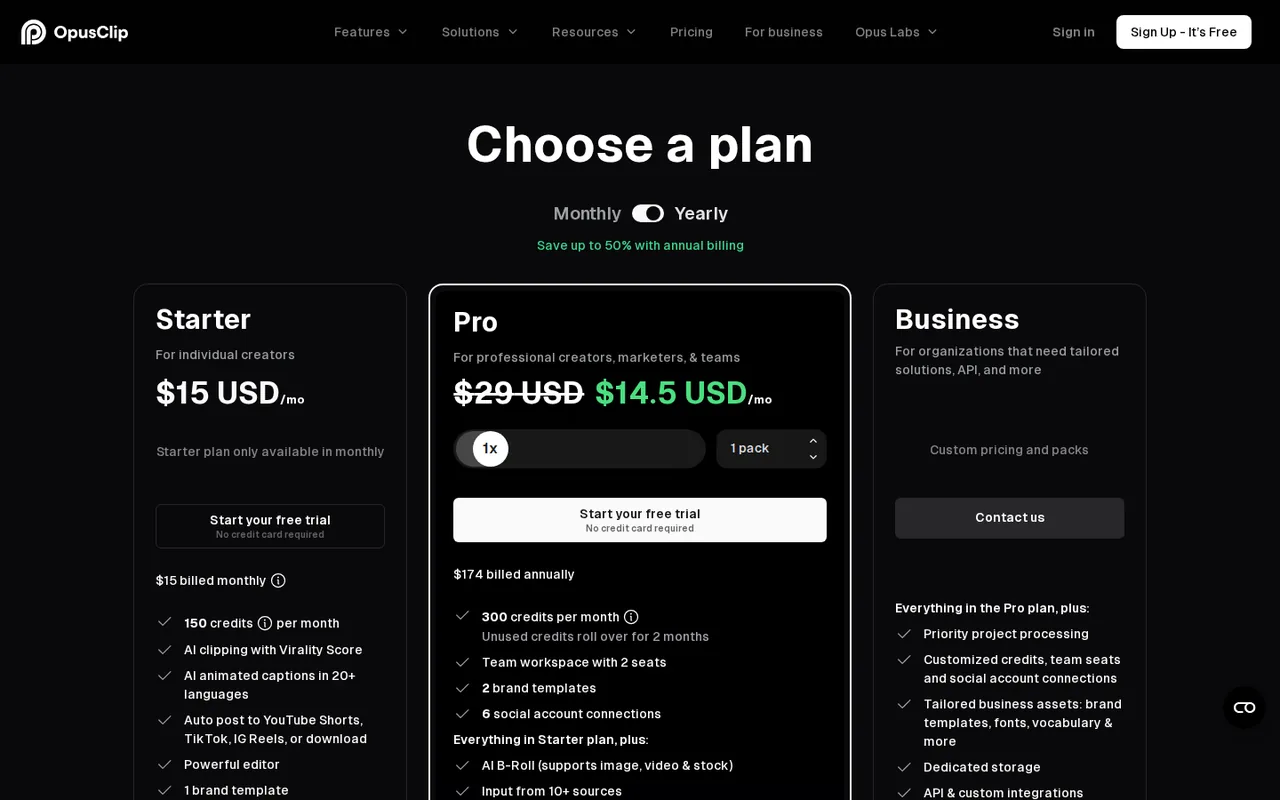
Regional prices: Starter $15 and Pro $29 are shown as per month on the pricing page text we read; whether those figures are for monthly or yearly billing, and the yearly totals, were not stated there, so we do not estimate them.
Pro credits are per pack: each extra pack adds 300 credits a month and 2 team seats, up to 4 seats. Monthly-plan credits expire after 60 days; yearly-plan credits last 12 months. Downgrading to Free is blocked while more than 30 minutes of credits remain.
| Plan | Price | What you get |
|---|---|---|
| Free | $0 sourceFrom opus.pro/pricing, checked Oct 4, 2026 (opens in a new tab) | 60 processing minutes per month; AI captions with watermark; YouTube and local import up to 10GB; export up to 1080p with a 3-day limit; storage expires after 3 days; 1 brand template. |
| Starter | $15 per month sourceFrom opus.pro/pricing, checked Oct 4, 2026 (opens in a new tab) | 150 processing minutes per month; watermark-free export; editing; faster than Free; Google Drive, Vimeo, Zoom, Rumble and StreamYard imports; export available 30 days. Billing period not stated on the page we read. |
| Pro | $29 per month sourceFrom opus.pro/pricing, checked Oct 4, 2026 (opens in a new tab) | 300 processing minutes per month per pack (3,600 a year on annual); local files up to 30GB per the pricing page; 16:9, 1:1 and 9:16; bulk export; Premiere Pro and DaVinci Resolve export; 100GB storage; team workspace up to 4 users. Billing period not stated on the page we read. |
| Business | Custom pricing | Dedicated enterprise queue, unlimited storage and members, 4K scheduling and download, API and integrations, priority support. |
Taxes, currency and promotions can change the price you see at checkout.
Try OpusClip free (opens in a new tab)
Key features
| Feature | What it does | Watch out |
|---|---|---|
| AI clipping of long videos into short clips with Copilot clip-length and timeframe selection | — | |
| Animated AI captions with multi-language transcription | — | |
| AI reframe to 9:16 (Pro adds 1:1 and 16:9) | — | |
| Text and timeline-based editing on paid plans | — | |
| Brand templates | — | |
| Export to Adobe Premiere Pro and DaVinci Resolve on Pro | Pro adds 16:9 and 1:1 ratios, bulk export and export to Adobe Premiere Pro and DaVinci Resolve. | Free and Starter list 9:16 only. |
| Credits per source minute | Processing costs 1 credit per minute of the original video you import, rounded to whole minutes. | The meter follows source length, so a 60-minute recording costs 60 credits however many clips you export. |
| Input length and size | Videos up to 10 hours are supported; local files are capped at 10GB and 10 hours in the upload article. | The pricing page lists 30GB for Pro and Business, which the upload article does not mention. |
Count the recording calendar, not the expected clip count
For four 60-minute episodes, budget 240 processing minutes; a five-episode month needs 300. That difference can decide whether a plan fits a weekly schedule. The credit rules meter processed source duration, rather than the number of useful clips returned. Reprocessing and optional actions need their own allowance; predicting ten good clips tells you nothing about their cost.
Plan the edit and download before importing
Keep the source recording outside OpusClip and schedule review before your plan’s export window closes. Free is useful for evaluating clip selection with a watermark, but its plan column does not include timeline editing or clean exports. If a selected clip drops an essential qualification, an attractive caption style does not make it ready to publish.
Evaluate one complete thought
Proposed evaluation · not performed yet
Use an exactly 30:00 recording that you own and have permission to upload. Mark three self-contained passages in your own notes, including one where the speaker qualifies an earlier statement. Start on Free only with at least 30 processing credits available.
- Process the full 30:00 duration and record the balance before and after. If a shorter processing range is selected, calculate against that range instead.
- Inspect proposed clips against the original, checking the opening context, complete final sentence and retained qualification.
- Download one watermarked evaluation clip within the Free export window. Check caption names, resolution and whether the crop hides relevant on-screen material.
- If clean delivery or correction requires Starter or above, record that as a separate paid requirement; do not treat the Free exercise as meeting it.
Accept the shortlist only when a clip preserves its source meaning. A clip score is not evidence of future views or sales. Results remain unobserved until the exercise is performed.
Match the delivery format to the plan
If clips go only to vertical feeds, the 9:16 ratio listed for Free and Starter may be all you need. Horizontal clips for a website player or square posts need Pro, as does handing a rough cut to an editor working in Premiere Pro or DaVinci Resolve. Teams publishing directly to X, LinkedIn or Threads also land on Pro, because Starter’s posting stops at YouTube, TikTok and Instagram.
Is OpusClip worth it?
Documentation review plus dated public user reports. Documentation review, not tested hands-on. Not scored.
Worth it if
- You want to know the cost before importing: each minute of source video uses one credit, so recording length sets the price however many clips you keep.
- You need wide or square formats or want to finish clips in Premiere Pro or DaVinci Resolve: those export options start on Pro, not Starter.
- You are judging whether automatic clip picks suit your recordings: Free renews 60 minutes every month, enough for a trial without paying.
Probably not if
- You need clean clips without paying: Free output is watermarked and has to be downloaded within 3 days.
- You publish a weekly hour-long show and plan to stay on Starter: four episodes need more than its 150 monthly minutes, so budget for Pro.
- You only need a few extra minutes now and then: credits are not sold on their own, only as a 300-credit pack that also adds seats.
OpusClip alternatives
Other video & editing tools checked with the same method. Pick by the job, not by a score.

Developers and small teams who want a conversational video avatar for support, sales or tutoring and need to budget by minutes

Short animated stories from a script or prompt

Teachers, students and math YouTubers who want 3Blue1Brown-style explainer clips from a description, with an editable Manim code playground when they want control

Relighting or changing the background of short video clips

YouTube editing with color and audio in one app

Podcasts and talking-head video

Creators combining permitted images and audio

Publishers, marketers and faceless-channel creators who turn existing articles or product pages into vertical, square or wide videos, one at a time or through automation
Used OpusClip? Write the first review. Visitor opinions are moderated and kept separate from our source checks.
Frequently asked questions
Does OpusClip free have a watermark?
Yes. On the Free plan, animated captions carry a watermark and there is no watermark-free export; clips must be downloaded within 3 days, and stored media expires after 3 days. Clean exports start on Starter, listed at $15 per month with 150 processing minutes and a 30-day export window.
How are OpusClip credits counted?
OpusClip charges 1 credit per minute of the original video you process, not per clip produced. A video under 1 minute rounds up to one credit and partial minutes round down. A 45-minute webinar therefore uses 45 credits whether you keep two clips or twenty, and sources up to 10 hours are accepted.
Do OpusClip credits expire?
Yes. Credits on a monthly plan expire after 60 days, so unused minutes do not pile up indefinitely. Yearly-plan credits arrive upfront and stay valid for 12 months. Extra credits cannot be bought alone; a pack adds 300 credits and 2 seats. You also cannot move back to Free while over 30 minutes of credit are left.
Which social platforms can OpusClip post to?
Starter posts clips directly to YouTube, TikTok and Instagram. Pro adds X, Facebook, LinkedIn, Pinterest, Threads and Bluesky, along with scheduling. Posting to X uses 3 credits per clip for each connected X account, on top of the processing minutes, so frequent X posting draws down the same monthly allowance.
Sources and method7 official sources · 11 details checked · Oct 4, 2026
How we checked this profile
11 details on this page were checked against OpusClip's own pages and help documentation (Oct 4, 2026).
See the checks by section11 documented
| Section | Checks | Last checked | Sources |
|---|---|---|---|
| Plans and prices | 4 documented | help.opus.pro/plans-and-creditsopus.pro/pricinghelp.opus.pro/how-are-credits-consumed | |
| Features | 4 documented | help.opus.pro/how-are-credits-consumedhelp.opus.pro/video-lengthhelp.opus.pro/local-file-uploadsopus.pro/pricing | |
| Strengths and limits | 2 documented | opus.pro/pricinghelp.opus.pro/how-are-credits-consumed | |
| Questions | 1 documented | help.opus.pro/plans-and-credits |
Sources for this profile
- Pricing page and plan comparisonopus.pro
- Product overviewopus.pro
- Plans help articlehelp.opus.pro
- How credits workhelp.opus.pro
All 7 sources
Prices and limits come from the pricing page (fetched through the official-page reader, text only) and help-center articles. The pricing page does not say whether $15 and $29 are monthly-billing or yearly-billing prices, and its Free column is incomplete in the extracted text, so Free limits also come from the plans article. The home page headline claims about viral clips and user growth are marketing claims and are not repeated as results. Maximum local upload size differs between the pricing page (10GB Free and Starter, 30GB Pro) and the local-upload article (10GB). Agent Opus is a separate product line from the same company; no rebrand of OpusClip was found. No hands-on test was run.
Sources checked Oct 4, 2026. Found something out of date? See how we correct profiles.