

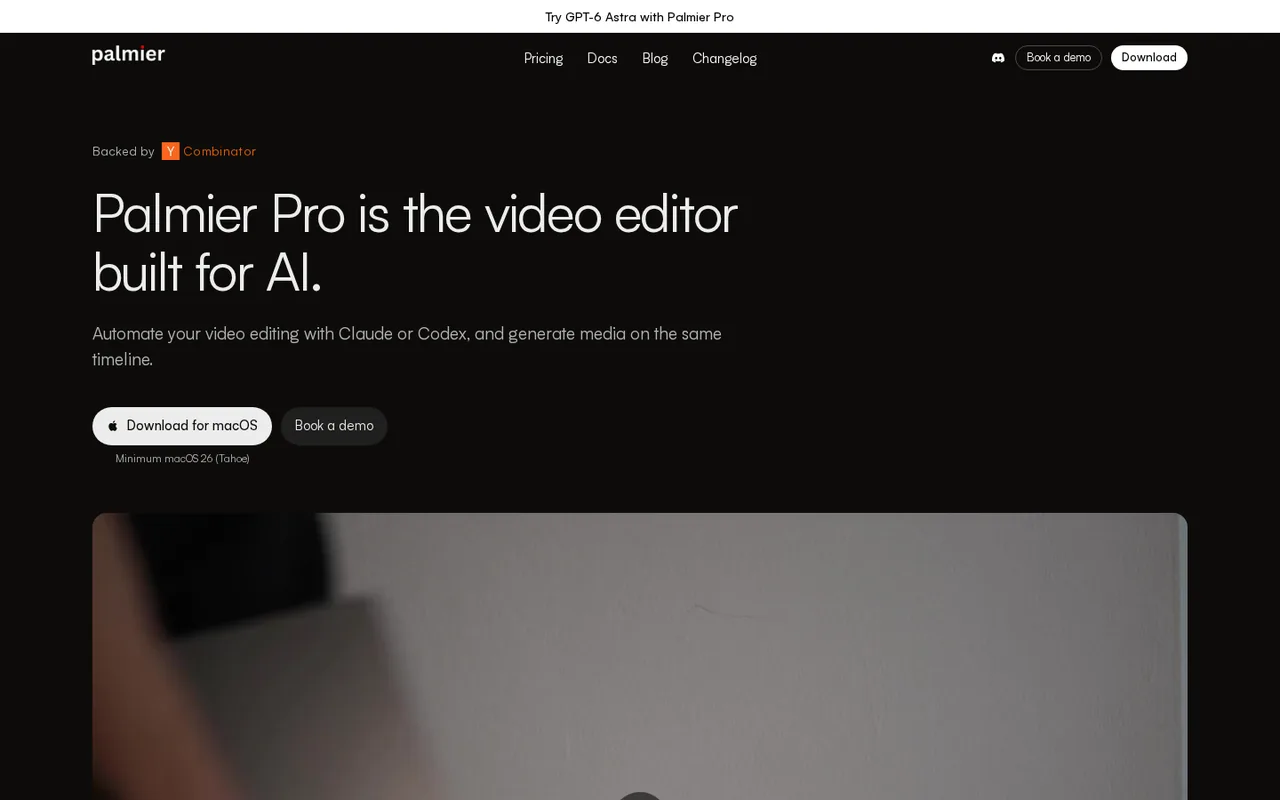
Palmier Pro: free Mac editor with agent access over MCP, but macOS 26 on Apple Silicon only; Pro is $29 a month
Updated September 29, 2026 · By Elias Brandt · Documentation review, not tested hands-on
Pros
- Editing needs no account
- Uses the agent you already pay for
- Stated local-first handling
Cons
- Apple Silicon and macOS 26 only
- Promotional prices without an end date
- Credits may expire and fees are non-refundable
Bottom line
Full multi-track editor; Claude, Codex or Cursor through MCP; no account required; local transcription and footage search; video render or NLE XML export. First sign-up grants 250 generation credits.
You already pay for Claude Code or Codex: the free MCP connection lets that agent drive the timeline without spending Palmier credits.
You edit on Windows, Linux or an Intel Mac: the current release installs only on Apple Silicon Macs running macOS 26 or later.
Best forMac creators already using Claude Code or CodexTeams producing a recurring formatEditors who finish elsewhereWindows or Linux users
Strengths, limits and who it suits, in full
Strengths
- Editing needs no account The editor, local transcription and MCP work without signing in or paying.
- Uses the agent you already pay for Claude Code and Codex connect with an existing subscription or API key.
- Stated local-first handling Projects and media stay on the Mac, and the terms say content is not used to train Palmier models.
Limits
- Apple Silicon and macOS 26 only No Windows, Linux or Intel Mac build is offered.
- Promotional prices without an end date Pro and Max show limited-time rates beside higher list prices.
- Credits may expire and fees are non-refundable The terms say unused credits may lapse at the next billing date.
Who it suits
- Mac creators already using Claude Code or Codex the free MCP route lets an existing agent subscription do the first cut.
- Teams producing a recurring format Skills suit weekly clips or ads where the same rules repeat.
- Editors who finish elsewhere rough cuts can move to Premiere Pro, Resolve or Final Cut, minus the fields XML drops.
- Windows or Linux users not a fit, because the app installs only on Apple Silicon Macs running macOS 26.
How much does Palmier Pro cost?
Prices confirmed · checked
Regional prices: Prices are shown in USD per month; the page shows no yearly option and no tax detail.
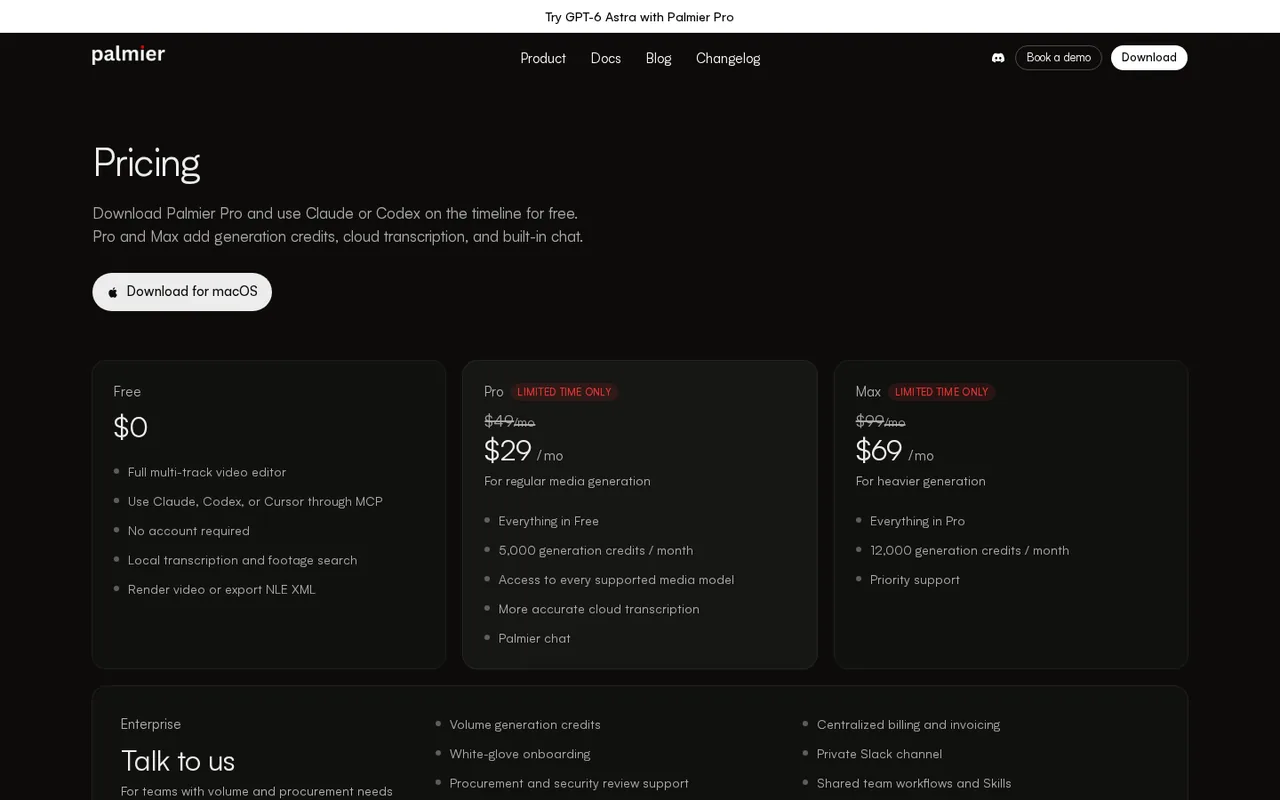
The Pro and Max rates are marked limited time only beside the list prices, with no end date stated, so check the rate at checkout. The terms say paid plans may renew automatically, fees are non-refundable except as required by law, and unused credits may expire at the next billing date.
| Plan | Price | What you get |
|---|---|---|
| Free | $0 sourceFrom palmier.io/pricing, checked Sep 29, 2026 (opens in a new tab) | Full multi-track editor; Claude, Codex or Cursor through MCP; no account required; local transcription and footage search; video render or NLE XML export. First sign-up grants 250 generation credits. |
| Pro | $29 per monthlimited-time rate · list price $49 per month sourceFrom palmier.io/pricing, checked Sep 29, 2026 (opens in a new tab) | Everything in Free; 5,000 generation credits a month; every supported media model; more accurate cloud transcription; Palmier chat. |
| Max | $69 per monthlimited-time rate · list price $99 per month sourceFrom palmier.io/pricing, checked Sep 29, 2026 (opens in a new tab) | Everything in Pro; 12,000 generation credits a month; priority support. |
| Enterprise | Custom pricingtalk to sales | Volume generation credits, centralized billing and invoicing, onboarding, private Slack channel, procurement and security review support, shared team workflows and Skills. |
How far does it go?
- What 5,000 credits buy by the provider guidePro: 5,000 credits for about 333 images is 5,000 / 333 = about 15 credits per image. The same pool for 2 to 7 minutes of video is about 2,500 to 714 credits per generated minute. At those rates the 250 sign-up credits cover about 250 / 15 = 16 images. This is arithmetic on a published rough guide, not an observed yield.
Arithmetic from the published allowances above, not a usage test.
Taxes, currency and promotions can change the price you see at checkout.
Try Palmier Pro free (opens in a new tab)
Key features
| Feature | What it does | Watch out |
|---|---|---|
| Multi-track timeline editor with keyframes, text and color | — | |
| Local MCP server for Claude, Codex, Cursor and other clients | — | |
| In-app agent: Claude Code, Codex or the Palmier agent | — | |
| Image, video, music, speech and upscale models on the timeline | — | |
| Reusable editing Skills stored as Markdown | — | |
| Local transcription and footage search | — | |
| H.264, H.265, ProRes and 10-bit HDR export | — | |
| XML and FCPXML handoff to Premiere Pro, Resolve and Final Cut | — | |
| MCP editing | While the app is open, a local server lets Claude Code, Codex, Cursor or Claude Desktop list projects, read the timeline and make edits you can undo. | Nothing runs when the app is closed, and the agent subscription or API key is paid separately. |
| Generation on the timeline | Text-to-video, image-to-video, lip sync, dubbing, music and upscaling land in the project media library. | Every generation draws on credits; after the 250 sign-up credits a Pro or Max plan is required. |
| NLE handoff | Exports Premiere XML or FCPXML so a cut can continue in Premiere Pro, DaVinci Resolve or Final Cut Pro. | Text overlays, Palmier color and effects, and some keyframe detail do not carry over. |
Is there a Windows version of Palmier Pro?
No. The download link serves a macOS disk image, and the README answers the platform question directly: macOS 26 (Tahoe) or later on Apple Silicon (M series) only. That also rules out Intel Macs and Macs that cannot move to macOS 26. No Windows or Linux build is listed, and the site does not announce one.
A Windows machine therefore needs either a different editor or a Mac somewhere in the workflow. A teammate on a Mac can make the agent-driven rough cut in Palmier and hand the timeline over as FCPXML or Premiere XML. For browser-based generation or transcript-led editing, compare Runway and Descript instead.
What does the free download include before you pay?
The pricing page puts the whole editor in the free plan: multi-track editing, MCP access for Claude, Codex or Cursor, local transcription, footage search, video render and NLE XML export, with no account. Paid plans do not unlock a different editor; they add generation credits, cloud transcription and the built-in Palmier chat.
Generation is where the free route ends. The docs say a first sign-up grants 250 credits and that a subscription is required after that. Credits cover image, video and audio generation, upscaling, cloud transcription and Palmier chat, so an agent that only trims and captions your own footage can run without them.
How far do Pro and Max credits go?
Pro includes 5,000 credits a month and Max 12,000. The only published conversion is a rough guide: 5,000 credits for about 333 images or 2 to 7 minutes of generated video, depending on model, resolution and duration. The wide video range means a model choice can change the monthly output by more than three times.
Editorial assessment
Pro fits occasional B-roll, transitions or music beds inside mostly real footage, while Max fits channels generating several minutes of video a month. Both show limited-time prices of $29 and $69 against list prices of $49 and $99, and the page gives no end date for the offer.
How do Claude, Codex or Cursor edit the timeline?
While Palmier Pro is open, it runs a local MCP server at 127.0.0.1 port 19789. Claude Code and Codex add it with one terminal command, Cursor and Claude Desktop install it from the Help menu, and other clients that support Streamable HTTP can use the same address. The agent can list projects, read the timeline, render frames to check its work and apply edits.
This route uses your own Claude or Codex subscription or API key, not Palmier credits, and edits can be reviewed or undone in the app. Claude Desktop shows a red warning when the connector is installed; the docs say it can access Palmier project files, not everything on the computer.
- Palmier agent: built in, needs sign-in and a subscription, and spends credits.
- Claude Code or Codex inside the app: bring an API key or sign in with an existing subscription.
- Skills: reusable Markdown instructions, stored in ~/.palmier/skills for the Palmier agent.
What survives a handoff to Premiere Pro, Resolve or Final Cut?
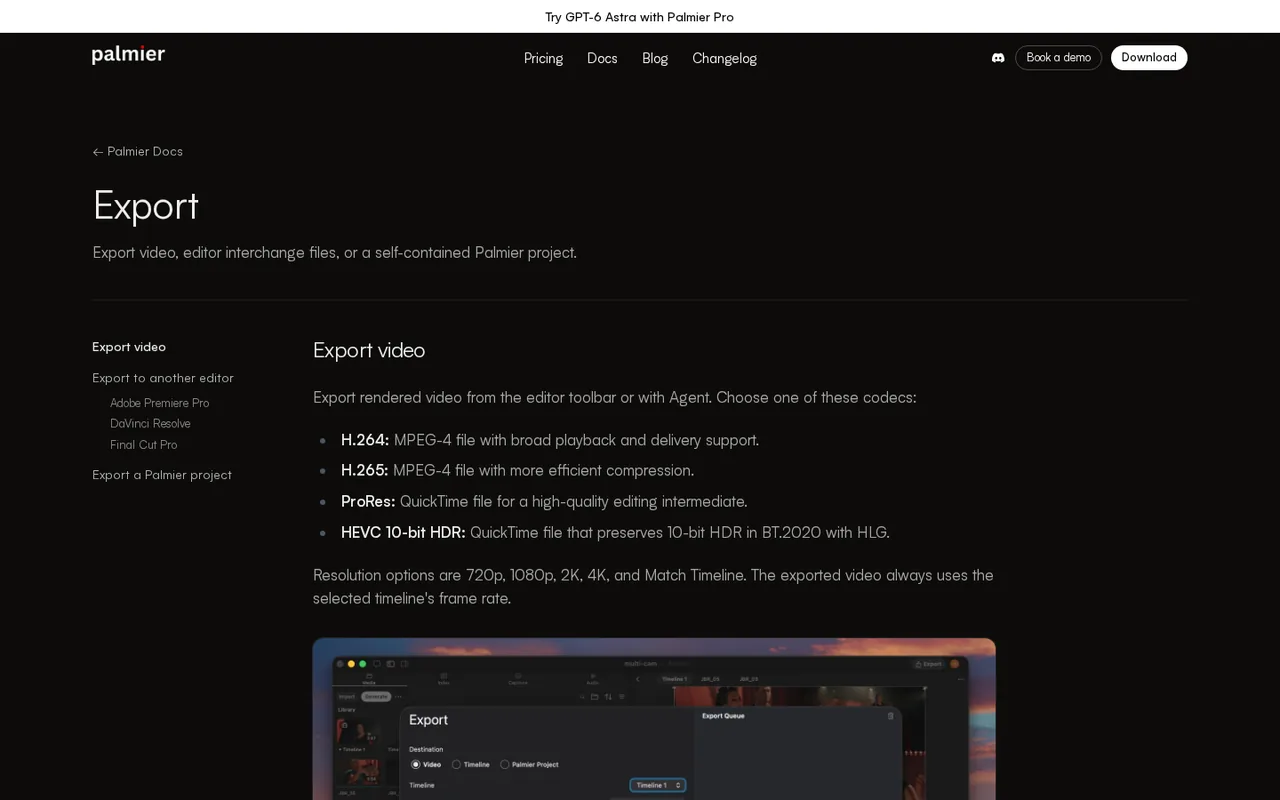
Rendered video can be exported as H.264, H.265, ProRes or HEVC 10-bit HDR, at 720p, 1080p, 2K, 4K or timeline resolution. For another editor, Palmier writes Premiere XML (Final Cut Pro 7 XML) or FCPXML for Resolve and Final Cut Pro, with the target selected because Resolve reads position and crop differently.
XML keeps placement, trims, speed, transforms, crop and keyframes, but drops text overlays, flips, Palmier color and effects. FCPXML keeps text styling and flips, but drops audio volume keyframes, audio fades and Palmier color. FCPXML 1.10 opens in Resolve 18 and later; versions 1.11 to 1.14 need Resolve 21 or later.
Where do footage, prompts and generated media go?
The privacy policy says projects, media, prompts and edits stay on the device and are not stored on Palmier servers. When you use generation or the Palmier assistant, prompts and reference media are forwarded to external providers: Anthropic for the assistant, and providers including OpenAI, Google and ByteDance for generation. Provider retention policies differ by model.
Optional crash and error reports go to Sentry and can be turned off in Settings, Privacy. The terms allow commercial use of generated content but ban deepfakes intended to deceive. Lip sync, dubbing and speech models should be used only with voices and faces of people who have agreed to that use.
Can the free editor turn raw footage into a captioned cut with Claude Code?
Proposed evaluation · not performed yet
On an Apple Silicon Mac with macOS 26 and the free download, no Palmier account, connect Claude Code over MCP. Use a five-minute talking-head clip you recorded yourself. Ask for a 60-second cut with silences removed and captions from local transcription, without any generation credits.
- Record the Palmier version, the Claude plan and the clip length.
- Ask the agent to list the project and describe the timeline before editing.
- Request the cut, then undo one edit and redo it by hand.
- Export H.264 at 1080p and an FCPXML file for DaVinci Resolve.
- Open the FCPXML in Resolve and note which captions, fades or color changes are missing.
Accept a playable file near 60 seconds with readable captions and no credit use. Reject a cut that removes speech mid-sentence or asks for a paid plan. Leave the observed result blank until the exercise is run.
Is Palmier Pro worth it?
Documentation review plus dated public user reports. Documentation review, not tested hands-on. Not scored.
Worth it if
- You already pay for Claude Code or Codex: the free MCP connection lets that agent drive the timeline without spending Palmier credits.
- You want to try before paying: the editor, local transcription and NLE XML export need no account, and a first sign-up adds 250 generation credits.
- You finish cuts in Premiere Pro, Resolve or Final Cut: Premiere XML and FCPXML hand the timeline over, minus the fields each format drops.
Probably not if
- You edit on Windows, Linux or an Intel Mac: the current release installs only on Apple Silicon Macs running macOS 26 or later.
- You plan steady AI generation on a tight budget: Pro's $29 is a limited-time rate against $49 list with no end date, and unused credits may lapse.
- You need open-source software: releases after v0.7.6 are proprietary, and only earlier versions stay under GPLv3.
Palmier Pro alternatives
Other video & editing tools checked with the same method. Pick by the job, not by a score.

Developers and small teams who want a conversational video avatar for support, sales or tutoring and need to budget by minutes

Short animated stories from a script or prompt

Teachers, students and math YouTubers who want 3Blue1Brown-style explainer clips from a description, with an editable Manim code playground when they want control

Relighting or changing the background of short video clips

Local image-to-video on an NVIDIA RTX GPU

Turning a finished track into a vertical or widescreen music video

Avatar-presented videos and lip-synced video translation

Teams assembling short explainers
Used Palmier Pro? Write the first review. Visitor opinions are moderated and kept separate from our source checks.
Frequently asked questions
Which Windows alternative can continue a Palmier Pro edit?
DaVinci Resolve is the closest match, because Blackmagic lists it for Mac, Windows and Linux, and Palmier names Resolve as an FCPXML export target. A Mac user cuts in Palmier, exports FCPXML with Resolve selected, and the Windows editor opens it in Resolve 18 or later. Premiere Pro users need the separate XML export.
Will Palmier Pro run on an Intel Mac or an older macOS version?
No. The README lists macOS 26 (Tahoe) or later on Apple Silicon (M series) only, and the homepage shows the macOS 26 minimum beside its download buttons. An Intel Mac, or an Apple Silicon Mac that cannot update to macOS 26, cannot run the current release.
Is Palmier Pro open source?
Only in part. Releases through v0.7.6 and the source tagged last-gpl-source remain available under GPLv3 on GitHub. Later binary releases, including the current download, are proprietary under a separate binary license that forbids copying, modifying or reverse engineering. The repository now hosts releases and no longer accepts code contributions.
Do I need an account to edit or to connect an agent?
No. The terms say the video editor and MCP work without an account. An account is needed only for paid AI features and billing, such as generation credits, cloud transcription or the built-in Palmier agent. Signing up once also adds the 250 first-time credits described in the generative AI docs.
Do unused credits roll over to the next month?
Not reliably. The terms say unused credits may expire at the next billing date and that fees are non-refundable except where the law requires otherwise. Plan heavy generation work early in the billing cycle, and check the credit balance before renewing rather than expecting leftover credits to carry forward.
What is Palmier Service, and is it part of a plan?
Palmier Service is a separate managed option: the Palmier team builds the workflow and delivers finished videos, and you review the cuts and pay per video. The homepage aims it at weekly social ads, clips and series. No per-video price is published; the form asks you to describe the format first.
Sources and method10 official sources · 9 details checked · Sep 29, 2026
How we checked this profile
9 details on this page were checked against Palmier Pro's own pages and help documentation (Sep 29, 2026).
See the checks by section9 documented
| Section | Checks | Last checked | Sources |
|---|---|---|---|
| Other details | 1 documented | github.com/palmier-pro | |
| Plans and prices | 4 documented | palmier.io/pricingpalmier.io/terms | |
| Article text | 1 documented | palmier.io/generative-ai | |
| Features | 1 documented | palmier.io/export | |
| Questions | 2 documented | blackmagicdesign.com/davinciresolvegithub.com/palmier-pro |
Sources for this profile
- Plans and creditspalmier.io
- Product overview and FAQpalmier.io
- Generative AI docs (credits and models)palmier.io
- Agent and MCP docspalmier.io
All 10 sources
Platform support comes from the official download, which serves a macOS disk image from the GitHub releases page (v0.10.1, September 26, 2026), and from the README FAQ: macOS 26 or later on Apple Silicon only. The site states the macOS minimum but not the chip requirement. The terms name Palmier, Inc. without a state of incorporation. The 250 sign-up credits appear in the docs, not on the pricing page. Homepage testimonials were not used.
Sources checked Sep 29, 2026. Found something out of date? See how we correct profiles.