

Immersity AI: the free mobile app is watermarked, and web plans start at $4.99 a month with credits that expire
Updated September 28, 2026 · By Elias Brandt · Documentation review, not tested hands-on
Pros
- Documented rename
- Preview before a full conversion
- Broad stereo output list
Cons
- Conflicting free-web statements
- Credits expire monthly
- Commercial wording differs
- Special viewing hardware for 3D files
Bottom line
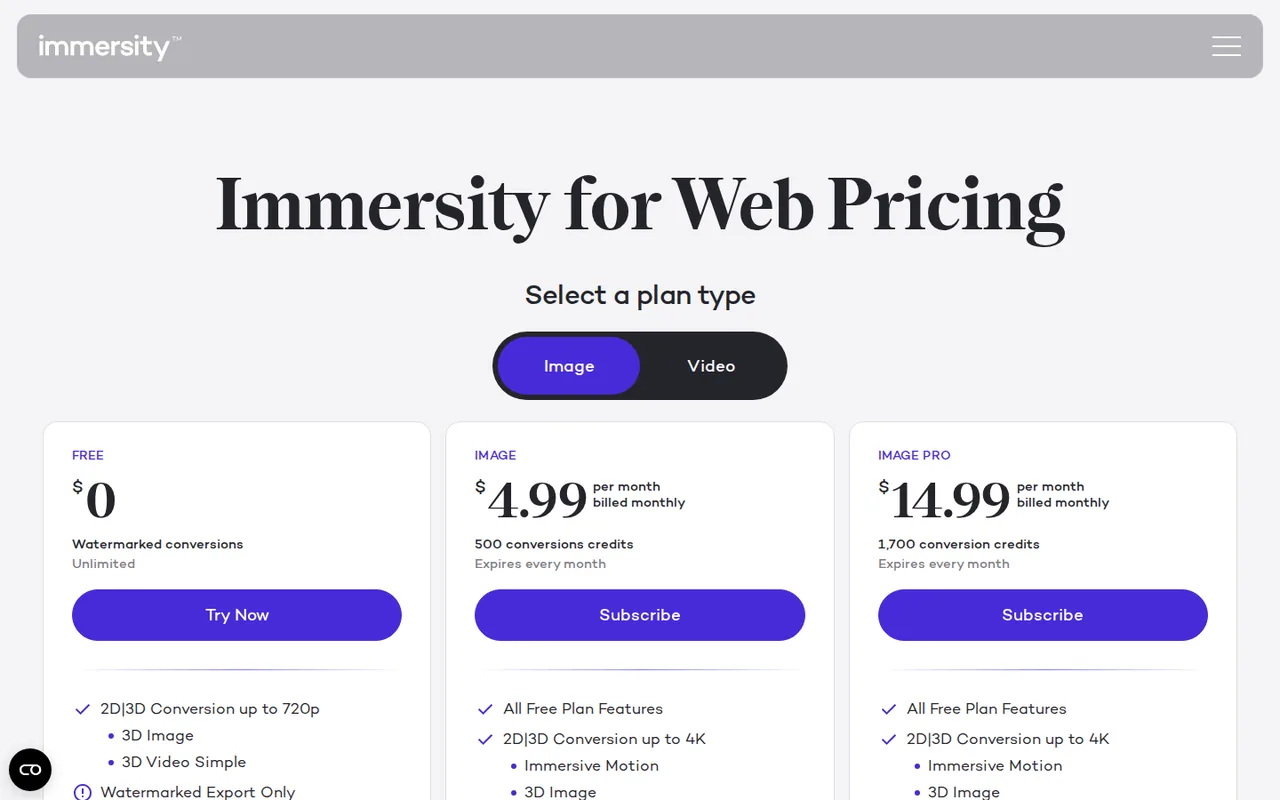
Watermarked conversions up to 720p, 3D Image and simple 3D Video; no commercial use. The FAQ points free users to the mobile app.
You want to add depth motion to photos you already own, because the $4.99 Image plan lists 4K output without a watermark.
You need dependable free web access, because the pricing card and the FAQ disagree about whether a free web tier exists.
Best forSocial creators with existing photosMusicians and labelsHeadset and 3D display ownersFormer LeiaPix users
Strengths, limits and who it suits, in full
Strengths
- Documented rename leiapix.com redirects to immersity.ai and the LeiaPix Converter history sits in the provider newsroom.
- Preview before a full conversion The 20-second video sample uses the same format and codec as the finished file.
- Broad stereo output list SBS, anaglyph, top-bottom, LIF, spatial HEIC and MV-HEVC cover several headsets and 3D displays.
Limits
- Conflicting free-web statements The pricing card lists a Free web tier while the FAQ says Immersity for Web has no free version.
- Credits expire monthly Allowances reset each month and separate credit packs have been discontinued.
- Commercial wording differs Paid cards list commercial use, but the terms restrict commercial use to what Leia approves in writing.
- Special viewing hardware for 3D files 3D Image and 3D Video need a stereo display or headset; only Immersive Motion plays on ordinary screens.
Who it suits
- Social creators with existing photos the free mobile app covers watermarked motion reels built from up to five images.
- Musicians and labels the Album Motion export targets the 1:1 and 3:4 artwork formats Apple Music uses.
- Headset and 3D display owners useful for turning your own 2D footage into SBS or MV-HEVC files for playback.
- Former LeiaPix users update bookmarks and tutorials to immersity.ai instead of look-alike LeiaPix domains.
How much does Immersity AI cost?
Prices confirmed · checked
- $4.99Image
- $14.99Image Pro
- $24.99Video
- $49.99Video Pro
- $99.99Video Max
Regional prices: The pricing page showed US dollar amounts to a server in Germany; tax and checkout currency were not confirmed.
Subscriptions renew monthly from the purchase date, and a cancelled plan stays valid until one month after that date. Separate credit packs are discontinued; the documented route to more credits is upgrading and later downgrading. Immersity 4.0 uses more credits than the selectable Immersity 3.0 engine.
| Plan | Price | What you get |
|---|---|---|
| Free | USD 0 sourceFrom immersity.ai/pricing, checked Sep 28, 2026 (opens in a new tab) | Watermarked conversions up to 720p, 3D Image and simple 3D Video; no commercial use. The FAQ points free users to the mobile app. |
| Image | $4.99 per monthbilled monthly sourceFrom immersity.ai/pricing, checked Sep 28, 2026 (opens in a new tab) | 500 conversion credits that expire monthly; up to 4K, no watermark, commercial use listed. |
| Image Pro | $14.99 per monthbilled monthly sourceFrom immersity.ai/pricing, checked Sep 28, 2026 (opens in a new tab) | 1,700 conversion credits that expire monthly; same export list as Image. |
| Video | $24.99 per monthbilled monthly sourceFrom immersity.ai/pricing, checked Sep 28, 2026 (opens in a new tab) | 3,300 conversion credits that expire monthly. |
| Video Pro | $49.99 per monthbilled monthly sourceFrom immersity.ai/pricing, checked Sep 28, 2026 (opens in a new tab) | 7,500 conversion credits that expire monthly. |
| Video Max | $99.99 per monthbilled monthly sourceFrom immersity.ai/pricing, checked Sep 28, 2026 (opens in a new tab) | 20,000 conversion credits that expire monthly. |
How far does it go?
- What 500 Image-plan credits cover3D images: 500 / 20 credits (the lower listed per-image rate) = 25, matching the provider estimate. Video at the 720p rate: 500 / 100 credits per minute = 5 minutes. At the 4K rate of 300 credits per minute: 500 / 300 = about 1 minute 40 seconds, and 60 fps doubles the rate. Planning arithmetic from the published table, not a measured conversion.
Arithmetic from the published allowances above, not a usage test.
Taxes, currency and promotions can change the price you see at checkout.
Try Immersity AI free (opens in a new tab)
Key features
| Feature | What it does | Watch out |
|---|---|---|
| Immersive Motion clips from a single photo (MP4 up to 4K, GIF up to 360p) | Adds depth-aware camera movement to a still image and exports MP4 or GIF. | Zoom settings can crop the frame, edges may stretch, and GIF output stops at 360p. |
| 3D image exports: side-by-side, anaglyph, LIF and HEIC spatial photos | — | |
| 2D-to-3D video conversion for headsets and 3D displays | Converts H.264 or H.265 MP4, MKV and MOV files into stereo formats for headsets and 3D screens. | Frames are processed independently, so some temporal jumps can remain; uploads are capped at 2 GB. |
| 16-bit PNG depth maps and imported depth maps | Exports 16-bit PNG depth maps and accepts an imported disparity map. | Editing the generated depth map requires switching to the older Immersity 3.0 engine. |
| Apple Music Album Motion export (MOV, 1:1 and 3:4) | — | |
| Free mobile app for watermarked reels of up to five photos | — | |
| Free 20-second watermarked sample before a full video conversion | — |
Is LeiaPix still available under its old name?
LeiaPix Converter continues as Immersity AI, run by the same company, Leia Inc. Typing leiapix.com now lands on immersity.ai, and the provider newsroom still hosts the LeiaPix Converter 1.2 announcement that introduced the Dolly Zoom animation style, MP4 and GIF export and Leia Image Format uploads. Old tutorials that describe convert.leiapix.com therefore describe an earlier version of the same service.
The legacy 3d.leiapix.com page is a closing notice from 2023: it says the public upload and animation space is no longer offered there. Search results for the old name also include look-alike sites such as leiapix-ai.com and leiapixai.github.io, which are not linked from Leia pages. Create an account and pay only through immersity.ai or its app.immersity.ai web app.
Which output do you need: a motion clip, a stereo file or a depth map?
Immersive Motion adds camera movement with depth to a still image and plays on any ordinary screen, which suits social posts. 3D Image and 3D Video produce stereo files: side-by-side, anaglyph, top-bottom, LIF, HEIC spatial photos or MV-HEVC video. Those need a headset, a 3D TV, an Immersity-enabled display or cross-eyed viewing to show depth.
A depth map is a 16-bit grayscale PNG in which lighter areas are closer. It serves editing and 3D work rather than viewing. Decide the destination first, because each output is charged separately and a stereo file will look like two side-by-side pictures on a normal phone.
- Social feed: Immersive Motion MP4 (or GIF up to 360p).
- Apple Music artwork: Album Motion MOV in 1:1 and 3:4.
- Headset or 3D TV: SBS, top-bottom or MV-HEVC video.
- Editing pipeline: 16-bit PNG depth map.
What does the free route actually give you?
The pricing page shows a Free card with unlimited watermarked conversions up to 720p and no commercial use. The same page FAQ says there is no trial or free version of Immersity for Web and directs people to the mobile apps, which are free with a minor watermark. Treat the mobile app as the dependable free route and confirm what the web app offers when you sign in.
The terms describe the free services as non-commercial with limited-quality downloads, and they prohibit removing or cropping the watermark. For video, a 20-second sample at up to 720p shows the chosen format and codec before you spend credits on the full conversion. That sample is a preview, not a free finished deliverable.
How far does a monthly credit allowance go?
Credits are charged per output. A 3D image costs 20 or 35 credits, Immersive Motion MP4 costs 30 to 160, and Album Motion costs 500. Video is priced per minute by input resolution: 100 credits at 720p, 200 at 1080p, 250 at 1440p, 300 at 4K and 600 at 8K for most formats, with spatial video higher.
Frame rates between 30 and 60 fps double the per-minute charge, and 360-degree video adds 300 credits. Allowances expire each month and extra credit packs are no longer sold, so a single long 4K job may require a temporary upgrade. Check the resolution of your source file before choosing a plan, because the table charges by input quality.
Can a paid export go into client work?
Paid plan cards list Commercial Use Included and no watermark. The terms, last revised in September 2025, still grant a personal, non-commercial license and say commercial use needs Leia approval in writing. For paid client work, keep your subscription receipt and ask Leia support to confirm that the plan covers the intended use.
You must own the source image or video or have permission from its owner. The terms also grant Leia a broad license over uploaded content, including training and research use for website users, while the FAQ says images are not stored and reused after conversion. Avoid uploading confidential or third-party material until that difference is clarified.
Can one portrait become a clean 4K motion clip?
Proposed evaluation · not performed yet
Use a photo you own with a clear subject, a separated background and no reflective glass. Run the watermarked version in the free mobile app first, then repeat on an active Image plan for a 4K MP4 without watermark. Keep the same motion style both times.
- Record the plan, engine version (3.0 or 4.0), motion style and credits shown before export.
- Export the MP4 and open it outside the browser at full size.
- Inspect hair, hands and object edges for stretching, plus any crop caused by zoom.
- Record the credit balance after export and compare it with the listed range.
- Repeat once with added dilation if edges tear.
Accept a clip with stable edges, no unexpected crop and a charge inside the published range. Reject visible tearing, a watermark on the paid export or an output below the selected resolution. No result or credit figure is recorded until the exercise is carried out.
If you need new footage generated from a prompt rather than depth added to an existing photo, see Runway. For creating or editing the still image first, see Leonardo AI.
Is Immersity AI worth it?
Documentation review plus dated public user reports. Documentation review, not tested hands-on. Not scored.
Worth it if
- You want to add depth motion to photos you already own, because the $4.99 Image plan lists 4K output without a watermark.
- You want a stereo file for a headset or 3D display, since the plan and feature lists cover several stereo formats and MV-HEVC video.
- You are a former LeiaPix user, because the service continues under the new name at immersity.ai.
Probably not if
- You need dependable free web access, because the pricing card and the FAQ disagree about whether a free web tier exists.
- You need paid client work cleared without a question, since the terms ask for written approval from Leia for commercial use.
- You want unused credits to carry over, because monthly allowances expire and separate credit packs are discontinued.
Immersity AI alternatives
Other images & design tools checked with the same method. Pick by the job, not by a score.

AI images, video and audio inside an Adobe workflow

Rigged 3D avatars from a selfie for games and apps

AI images placed straight into templated designs

Turning a written story into a character-consistent comic series, and optionally a short film

Small businesses making on-brand product photos and social posts

Turning photos or video of a real scene into a 3D splat

Finding prompts for a specific image model before generating

Designers and sellers who need editable vector or brand-style image output
Used Immersity AI? Write the first review. Visitor opinions are moderated and kept separate from our source checks.
Frequently asked questions
Which image files can I upload for conversion?
The FAQ lists PNG, JPG, JPEG, HEIC and WEBP, with a 20 MB file limit. Each edge must be between 90 and 8,000 pixels, and images above 10 megapixels are downsized automatically. Very wide or tall images are accepted up to a 32:5 ratio, but semi-transparent or reflective surfaces often produce less accurate depth.
Will the audio and subtitles survive a 3D video conversion?
Audio passes through unchanged when possible; if the track uses the PCM codec, upload the source as MKV. Separate subtitle tracks are preserved where possible, but subtitles burned into the picture are converted with the image and may show artifacts. The output keeps the input container, except MV-HEVC exports, which are always MOV.
Which browser setup does the web app expect?
The provider recommends the latest Google Chrome with ad blockers disabled and all cookies allowed for the site. Processing and finalization happen on Immersity servers, but the preview renders on your own device, so an older laptop can make the preview sluggish even when the final export is unaffected.
Is deleting my account the same as cancelling a subscription?
No. Deleting the account from Manage Account is permanent and cannot be restored. Cancelling a subscription keeps it valid until one month after the original purchase date and stops the automatic monthly renewal. Cancel first if you only want billing to stop, and download finished exports before deleting anything.
Can I bring my own depth map instead of the generated one?
Yes. Imported depth maps must be PNG files that encode disparity rather than absolute distance; maps exported by Immersity already meet that requirement. The map does not need the same dimensions or aspect ratio as the photo, because it is resized automatically. Hand editing of generated maps currently requires the Immersity 3.0 engine.
Sources and method9 official sources · 5 details checked · Sep 28, 2026
How we checked this profile
5 details on this page were checked against Immersity AI's own pages and help documentation (Sep 28, 2026).
See the checks by section5 documented
| Section | Checks | Last checked | Sources |
|---|---|---|---|
| Article text | 1 documented | leiapix.com | |
| Plans and prices | 2 documented | immersity.ai/pricing | |
| Strengths and limits | 2 documented | immersity.ai/faqsimmersity.ai/terms-conditions |
Sources for this profile
- Immersity for Web pricing and credit tableimmersity.ai
- Immersity AI homepageimmersity.ai
- Immersity FAQsimmersity.ai
- Immersity for Web featuresimmersity.ai
All 9 sources
Pricing, FAQ, For Web, For Mobile and the terms last revised in September 2025 are the basis. Two conflicts remain: the Free web card versus the FAQ statement that Immersity for Web has no free version, and paid Commercial Use Included versus the written-approval clause in the terms. The FAQ says uploads are not stored for later use, while the terms grant a license that includes training use for website users.
Sources checked Sep 28, 2026. Found something out of date? See how we correct profiles.