

What is Power Automate, in short?
Updated October 24, 2026 · By Elias Brandt · Documentation review, not tested hands-on
Pros
- Included with Microsoft 365
- Desktop and cloud in one product
- Volume is rarely the limit
- Dated documentation
Cons
- Premium connectors cost extra
- AI credits are changing
- Licensing is layered
- Idle and failing flows switch off
- Trial length differs by page
Best forMicrosoft 365 teamsIT teams automating legacy desktop softwareHigh-volume business processesAdmins who need tenant-level controlNot for teams without Microsoft work accounts
Strengths, limits and who it suits, in full
Strengths
- Included with Microsoft 365 Office 365 business and enterprise plans already include cloud flows with standard connectors, so many teams can start without a new purchase.
- Desktop and cloud in one product The same licence family covers app-to-app flows and RPA on Windows desktops, including Microsoft-hosted machines.
- Volume is rarely the limit A Premium user gets 40,000 requests a day and a Process licence 250,000, which ordinary office flows stay far below.
- Dated documentation Limits, licensing and AI credit rules sit on Microsoft Learn pages that show a last-updated date.
Limits
- Premium connectors cost extra Salesforce and HubSpot are not on the standard connector list, so flows that touch them need Premium or a Process licence.
- AI credits are changing Premium's 5,000 seeded AI Builder credits end on 1 November 2026, and new customers must buy Copilot Credits for AI steps.
- Licensing is layered Which limit applies depends on flow type, owner, app context and any Process licence, and limits from different licences do not add up.
- Idle and failing flows switch off A flow that fails continuously for 14 days is turned off, and one not triggered for 90 days may be turned off on non-premium licences.
- Trial length differs by page The pricing page offers a 30-day free trial, while Microsoft Learn describes a 90-day self-assisted trial licence.
Who it suits
- Microsoft 365 teams Approvals, file moves and notifications across Outlook, SharePoint, Teams and Excel run on standard connectors at no extra cost.
- IT teams automating legacy desktop software Desktop flows can operate Windows applications that have no API, attended or unattended.
- High-volume business processes A Process licence gives one flow 250,000 requests a day, independent of who triggers it.
- Admins who need tenant-level control Licences, capacity and AI credits are allocated per environment in the Power Platform admin center.
- Not for teams without Microsoft work accounts the free use rights are tied to work or school accounts in a Microsoft Entra tenant, so a team outside Microsoft 365 starts at a paid licence.
How much does Power Automate cost?
Some prices not published · checked
Regional prices: Prices are the US list prices on Microsoft's pricing page, per user or per bot per month with yearly payment.
The per-flow plan and the unattended RPA add-on were removed from the price list on 1 February 2024 and replaced by Process; Premium replaced the former per-user plan with attended RPA ($40 per user a month) at $15. AI Builder actions use AI Builder credits: Premium has carried 5,000 seeded credits per licence, which Microsoft removes on 1 November 2026, and new customers cannot buy the AI Builder add-on and must buy Copilot Credits instead. Copilot Studio sells Copilot Credit packs of 25,000 at $200 per pack per month, plus a pay-as-you-go meter.
| Plan | Price | What you get |
|---|---|---|
| Power Automate Free | $0 sourceFrom microsoft.com/en-us/power-platform/products/power-automate/pricing, checked Oct 24, 2026 (opens in a new tab) | For work or school accounts in a Microsoft Entra tenant: create and run cloud flows without sharing, and attended desktop flows locally; standard connectors only; 6,000 requests per user per 24 hours. |
| Microsoft 365 / Office 365 (included) | Included in eligible plans | Automated, scheduled and button cloud flows with standard connectors; premium connectors only in Dataverse for Teams environments; no custom connectors or AI Builder capacity; 6,000 requests per user per 24 hours. |
| Free trial | Free trial sourceFrom microsoft.com/en-us/power-platform/products/power-automate/pricing, checked Oct 24, 2026 (opens in a new tab) | The pricing page lists a 30-day trial of UI-based cloud flows and standard connectors; Microsoft Learn describes a 90-day self-assisted trial with Premium capabilities except AI Builder credits and storage. |
| Power Automate Premium | $15/user/monthpaid yearly sourceFrom microsoft.com/en-us/power-platform/products/power-automate/pricing, checked Oct 24, 2026 (opens in a new tab) | Cloud flows with premium and custom connectors, attended desktop flows, process and task mining with 50 MB stored, 250 MB Dataverse database and 2 GB file; 40,000 requests per user per 24 hours. |
| Power Automate Process | $150/bot/monthpaid yearly sourceFrom microsoft.com/en-us/power-platform/products/power-automate/pricing, checked Oct 24, 2026 (opens in a new tab) | Unattended desktop flows on your machine and cloud flows for one process; 250,000 requests per 24 hours per licence, stackable up to 10 per flow. |
| Power Automate Hosted Process | $215/bot/monthpaid yearly sourceFrom microsoft.com/en-us/power-platform/products/power-automate/pricing, checked Oct 24, 2026 (opens in a new tab) | Process capabilities plus a Microsoft-hosted virtual machine on Azure for unattended RPA. |
| Process Mining add-on | $5,000/tenant/monthpaid yearly sourceFrom microsoft.com/en-us/power-platform/products/power-automate/pricing, checked Oct 24, 2026 (opens in a new tab) | Add-on for Premium only: 100 GB data stored, 2 GB Dataverse database and 1 TB file. |
How far does it go?
- One lead-routing flow, one monthAssume 40 form leads a day, each run going trigger, an AI prompt that classifies the lead, an Excel row and a Teams message: 4 requests a run, 160 a day and 4,800 in a 30-day month. That is 2.7% of the 6,000-a-day limit on the Free or Microsoft 365 licence and 0.4% of Premium's 40,000, so volume does not decide the plan. The licence does: swap the Excel row for a Salesforce record and the owner needs Premium at $15 a month, and the AI prompt needs AI Builder or Copilot Credits, which Microsoft 365 licences do not include. Editorial arithmetic on published limits and an assumed workload, not a Microsoft figure.
Arithmetic from the published allowances above, not a usage test.
Taxes, currency and promotions can change the price you see at checkout.
Try Power Automate free (opens in a new tab)
Key features
| Feature | What it does | Watch out |
|---|---|---|
| Cloud flows: automated (event), scheduled and instant (button) flows that run triggers and actions across Microsoft 365 and third-party connectors (licensing FAQ) | — | |
| Desktop flows: robotic process automation that drives Windows applications with keyboard and mouse, attended on Premium and unattended on a Process licence (pricing page) | For automated and scheduled flows only the flow owner needs Premium to use a premium connector. | For instant flows every user who runs the flow needs Premium, unless the flow itself is given a Process licence. |
| Hosted Process: unattended RPA on a Microsoft-managed virtual machine on Azure, so no machine of your own is needed (pricing page) | — | |
| Process and task mining on Premium, with a Process Mining add-on for larger analysis at the tenant level (pricing page) | — | |
| AI Builder actions, including prompts, inside flows; they draw AI Builder credits or Copilot Credits rather than the flow licence (AI Builder credit docs) | — | |
| Admin capacity tools: Process licences assigned to a single flow or a flow group of up to 25 flows, stacked up to 10 per flow (request limits docs) | — | |
| Request counting | Every trigger and action execution is one Power Platform request, including built-in steps such as variables and compose, failed actions, retries and pagination. | Loops run their actions once per item, so a 20-item loop with two actions adds 40 requests to that run. |
| Transition period limits | Microsoft currently applies Premium and seeded limits per cloud flow (for example 200,000 a day for Premium) instead of per user. | When the transition ends, enforcement moves to the per-user limits (40,000 for Premium), and Microsoft says to design flows for those. |
What can you automate without paying extra?
More than many teams expect, as long as the apps are on the standard list. The license types page says basic Power Automate use is included at no cost for work or school accounts in a Microsoft Entra tenant: you can create and run cloud flows without sharing them and run desktop flows locally. Office 365 business and enterprise plans include automated, scheduled and button flows. Both are limited to standard connectors. The standard connector list includes Teams, SharePoint, Excel Online, Outlook.com, Gmail, Google Sheets, Slack, Trello and Asana; Salesforce and HubSpot are not on it.
Windows 11 users can also try attended desktop flows for personal use in the default environment, but that right does not include cloud flows. If most of your apps sit outside Microsoft 365, the Zapier profile shows how a task-based service prices the same kind of trigger and action.
Who needs the $15 Premium licence?
Anyone whose flow uses a premium or custom connector, but how many people depends on the flow type. The licensing FAQ says automated and scheduled flows run in the owner’s context, so only the owner needs Premium. Instant flows run as the person who presses the button, so every user needs Premium, unless you give the flow a Process licence instead.
Process ($150 per bot a month on the pricing page) is the licence for unattended RPA on a machine and for business processes that should not depend on a person’s licence. Hosted Process ($215) adds a Microsoft-managed virtual machine. The old per-flow plan left the price list in February 2024; existing per-flow licences keep working but cannot be stacked.
How are Power Platform requests counted?
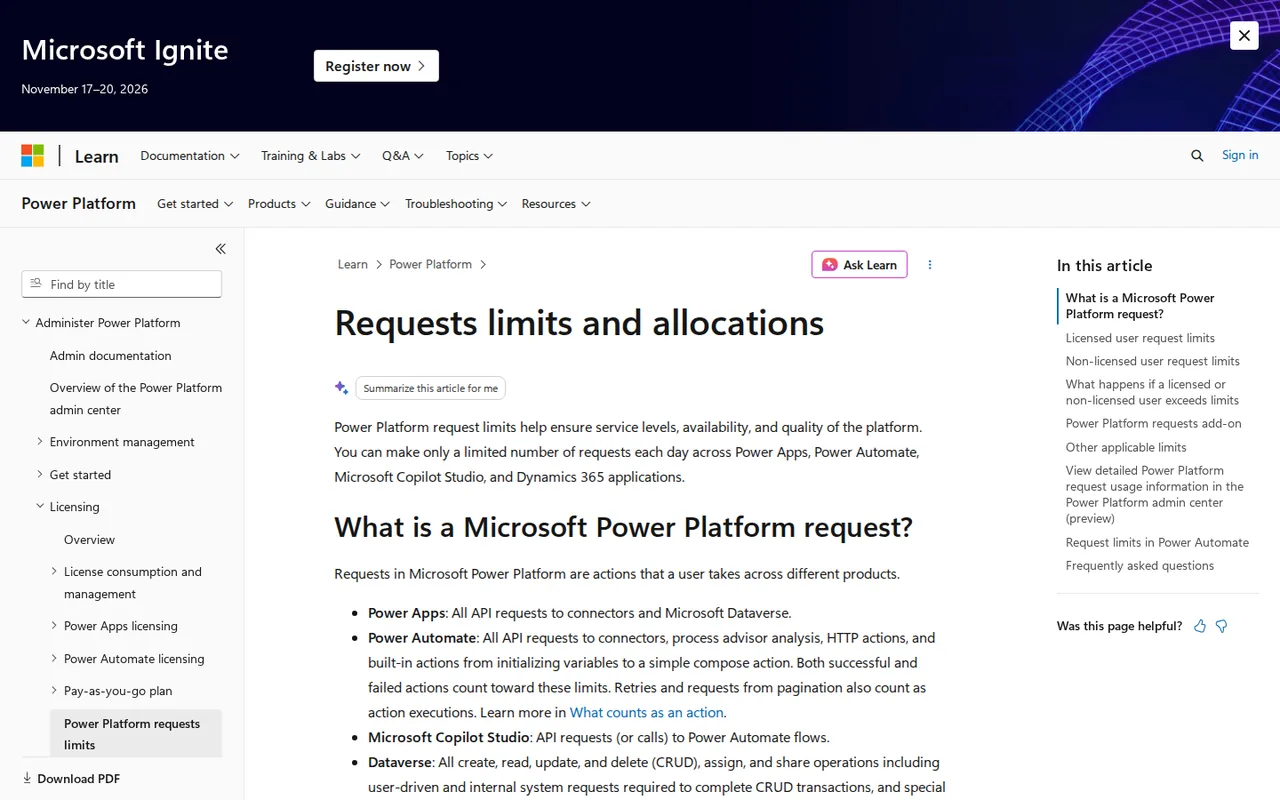
Every trigger and every action that runs is one request, and the request limits page includes built-in steps such as initialising a variable or a compose action, failed actions, retries and pagination. A flow with one trigger and one action uses two requests per run, and actions inside a loop count once per item. Desktop flow executions do not consume requests.
The 24-hour limits are 6,000 per user on Free and Microsoft 365, 40,000 per user on Premium and 250,000 per Process licence, with a separate ceiling of 100,000 requests in any five minutes. All tenants are in a transition period in which Premium and seeded limits apply per flow (200,000 for Premium, 10,000 for Microsoft 365); Microsoft says to design for the per-user limits that follow. A flow that is throttled continuously is turned off, and the fix Microsoft recommends is a Process licence on that flow.
What do AI steps in a flow draw on?
Not the request allowance. The AI Builder credit page says AI Builder actions, including prompts, consume AI Builder credits, and adding one does not make a flow premium. Microsoft 365 licences include no AI Builder capacity. Premium has carried 5,000 seeded credits per licence, but Microsoft removes seeded credits on 1 November 2026, and new customers can no longer buy the AI Builder add-on: they buy Copilot Credits. When AI Builder credits run out, flows fall back to Copilot Credits, and if none are available the AI actions fail.
Prompt cost depends on input and output tokens and the model. The prompt tokens page notes a hidden Microsoft system prompt of roughly 1,200 tokens on each run, and testing a prompt in the builder is free.
Which run limits catch flows out?
The limits page caps a run at 30 days, including time waiting for an approval, and keeps run history for 30 days. A flow whose trigger or actions fail continuously for 14 days is turned off. A flow not triggered for 90 days may be turned off too, unless its owner has a premium or capacity licence, with a warning 30 days before. On the Low performance profile used by Free and Microsoft 365, an Apply to each loop handles at most 5,000 items and failed actions get up to two retries.
How could you check Power Automate before buying Premium?
Proposed evaluation · not performed yet
Build the lead-routing flow on the licence you already have and read its request count before adding premium connectors or AI.
- Sign in with a work account, create an automated flow triggered by a new Microsoft Forms response, add a condition that sends empty messages to a review sheet, then an Excel row and a Teams message.
- Submit ten test responses, including two with an empty message, and open each run in the run history.
- Open the flow’s Analytics, Actions tab, and confirm the requests per run match the trigger, condition and actions that ran.
- Add a Salesforce action and note whether the designer asks for a Premium licence.
- Ask your admin how many AI Builder or Copilot Credits the environment has before adding an AI prompt step.
Accept if the request count matches the steps, empty responses follow the branch you set and the licence prompt appears only at the premium step. Reject if the flow needs Premium for apps you thought were standard, or no AI credits are allocated to the environment. No result is recorded here.
Power Automate alternatives
Other automation tools checked with the same method. Pick by the job, not by a score.

Teams that want Zapier-style flows and AI agents with the option to self-host the open source core

Building and enriching lead lists from websites

Meeting owners who verify commitments

Agent tasks that need an inspectable file handoff

Inbox triage and draft replies for busy professionals

Teams drafting work from shared context

Visual automation for app workflows

Adults with ADHD who want a talk-to-it daily planning and check-in companion on their phone
Used Power Automate? Write the first review. Visitor opinions are moderated and kept separate from our source checks.
Frequently asked questions
How long is the Power Automate free trial?
It depends on the page. The pricing page offers a 30-day trial of cloud flows with standard connectors, while Microsoft Learn describes a 90-day self-assisted trial with Premium capabilities except AI Builder credits and storage, including unattended desktop flows. Separately, an admin can start a 30-day Process trial, extendable once, for a throttled flow.
What is the difference between Premium and Process?
Premium is a user licence: one person gets premium and custom connectors, attended desktop flows and 40,000 requests a day across their flows. Process is assigned to a flow or a machine: it covers unattended RPA, can be used by unlimited users, gives the flow 250,000 requests a day and can be stacked up to ten times on one flow.
Do desktop flows count against the request limit?
Desktop flow executions do not consume Power Platform requests, and actions inside a desktop flow do not count. Only the desktop flow actions that you invoke from a cloud flow count against the cloud flow's daily limit. Unattended runs still need a Process or Hosted Process licence for each machine session.
Can I combine several licences to raise a flow's limit?
Only Process licences stack, up to ten on one cloud flow in a solution, each adding 250,000 requests a day. A user who holds both Premium and a Dynamics 365 licence does not get 80,000 requests; each flow runs under one licence context. Power Platform request add-ons cannot be assigned during the current transition period.
What are agent flows and how are they billed?
Agent flows are flows run from Microsoft Copilot Studio. They are metered in Copilot Credits instead of Power Platform requests, at 13 credits per 100 actions on the Copilot Studio rate card. Copilot Credits are sold in packs of 25,000 for $200 a month or on a pay-as-you-go meter. Ordinary cloud flows stay on Power Automate licensing.
Sources and method11 official sources · 18 details checked · Oct 24, 2026
How we checked this profile
18 details on this page were checked against Power Automate's own pages and help documentation (Oct 24, 2026).
See the checks by section17 documented1 editorial assessment
| Section | Checks | Last checked | Sources |
|---|---|---|---|
| Plans and prices | 6 documented 1 editorial | microsoft.com/pricinglearn.microsoft.com/typeslearn.microsoft.com/faqslearn.microsoft.com/api-request-limits-allocat…microsoft.com/copilot-studio | |
| Features | 3 documented | learn.microsoft.com/faqslearn.microsoft.com/api-request-limits-allocat… | |
| Article text | 5 documented | learn.microsoft.com/api-request-limits-allocat…learn.microsoft.com/connector-reference-standa…learn.microsoft.com/limits-and-configlearn.microsoft.com/credit-managementlearn.microsoft.com/licensing-prompt-tokens | |
| Questions | 3 documented | learn.microsoft.com/faqslearn.microsoft.com/requirements-messages-mana… |
Sources for this profile
- Power Automate pricing pagemicrosoft.com
- Power Automate product pagemicrosoft.com
- Copilot Studio pricing (Copilot Credit packs)microsoft.com
- Microsoft Learn: requests limits and allocations (updated 14 Oct 2026)learn.microsoft.com
All 11 sources
- Microsoft Learn: Power Automate licensing FAQ (updated 22 Sep 2026)learn.microsoft.com
- Microsoft Learn: Power Automate license types (updated 22 Sep 2026)learn.microsoft.com
- Microsoft Learn: limits and configuration (updated 17 Jul 2026)learn.microsoft.com
- Microsoft Learn: standard connectors list (updated 11 Jul 2026)learn.microsoft.com
- Microsoft Learn: AI Builder credit management (updated 8 Oct 2026)learn.microsoft.com
- Microsoft Learn: prompt tokens (updated 14 Jan 2026)learn.microsoft.com
- Microsoft Learn: Copilot Studio billing rates (updated 1 Oct 2026)learn.microsoft.com
Official pages read on 24 Oct 2026 with plain HTTP requests: the Power Automate product and pricing pages, the Copilot Studio pricing page, and Microsoft Learn articles on request limits and allocations (last updated 14 Oct 2026), the Power Automate licensing FAQ and license types (22 Sep 2026), limits and configuration (17 Jul 2026), the standard connector list (11 Jul 2026), AI Builder credit management (8 Oct 2026), prompt tokens (14 Jan 2026) and Copilot Studio billing rates (1 Oct 2026). The pricing page and Learn give different trial lengths. The per-token AI Builder credit rate sits in the licensing guide PDF, which was not read, so AI step cost is not calculated. Regional prices and taxes were not checked. We did not build or run a flow. Third-party pricing articles were not used.
Sources checked Oct 24, 2026. Found something out of date? See how we correct profiles.