

Superhuman: Mail starts at $25 a member a month billed annually, and the $0 Free plan does not include the email app
Updated October 6, 2026 · By Elias Brandt · Documentation review, not tested hands-on
Pros
- Mail is built around speed on Gmail and Outlook
- A real free entry point
- Business adds CRM views
- Published per-seat list prices
Cons
- Free does not include Mail
- Two pages describe the Business price differently
- Mail trial terms were not found
- AI usage limits are not numbered
Bottom line
Per the plans page: chat with AI across applications, writing help in 20+ languages, collaborative Docs, and Go with limited chat access. Mail is not marked on this plan. No card requirement is stated on the page.
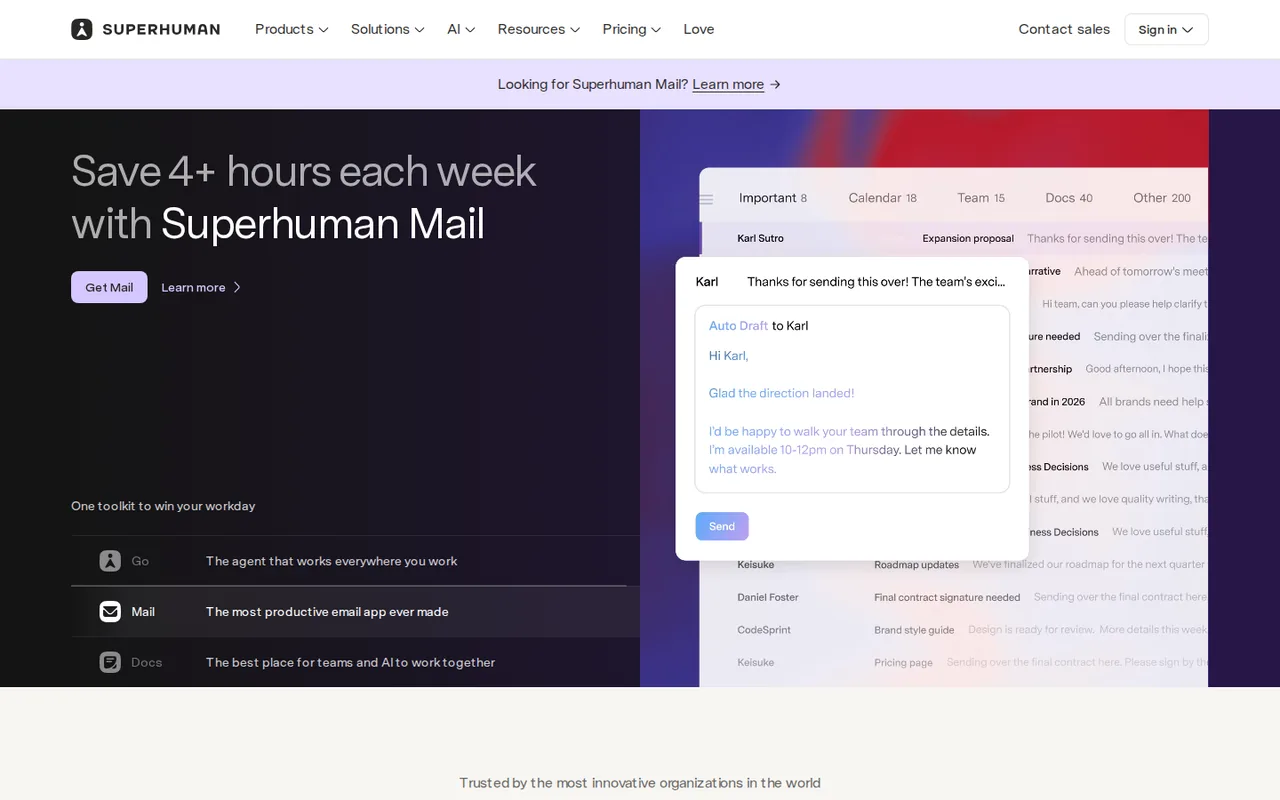
If your team lives in Gmail or Outlook and replies drive revenue, Mail's Split Inbox, follow-up reminders and CRM views on Business are aimed at that work.
If you only need the email app on a free plan, this is not it: Mail is marked on Business and Enterprise only.
Best forSales and customer-facing teams on Gmail or OutlookIndividuals who want a free assistant across appsTeams that want one vendor for writing, docs and email
Strengths, limits and who it suits, in full
Strengths
- Mail is built around speed on Gmail and Outlook The Mail page lists triage, follow-up reminders, Snippets, shortcuts and team comments in one app rather than as add-ons.
- A real free entry point The plans page lists Free at $0 with chat across apps, writing help in 20+ languages and collaborative Docs.
- Business adds CRM views The plans page says Business shows and updates HubSpot, Salesforce and Pipedrive records from the inbox.
- Published per-seat list prices The plans and Mail pricing pages show dollar prices for Free, Pro, Mail Starter and Business.
Limits
- Free does not include Mail On the plans page Mail is marked on Business and Enterprise only, so the email app is not part of the $0 or Pro plans.
- Two pages describe the Business price differently The Mail pricing page says Business is $33 with 15% off for teams of 5+; the plans page shows $33 billed annually and $40 monthly without that note.
- Mail trial terms were not found The pages read do not state whether Mail has a free trial, its length or what happens after it.
- AI usage limits are not numbered The plans table says Limited, Expanded or Full for custom agents and a limited trial for proactive agents, without quotas.
Who it suits
- Sales and customer-facing teams on Gmail or Outlook Split Inbox, follow-up reminders, shared email comments and CRM views target people whose revenue depends on reply speed, which is the case the Mail page makes.
- Individuals who want a free assistant across apps the Free plan gives chat and writing help without a card requirement stated on the page, but not the Mail app, so it suits writing and research more than inbox work.
- Teams that want one vendor for writing, docs and email the Business plan bundles Mail, Grammarly, Docs and Go under one seat price, though an admin should confirm what a seat includes for each product.
How much does Superhuman cost?
Prices confirmed · checked
Regional prices: Prices are USD list prices read from the plans page and the Mail pricing page on 6 Oct 2026, both as rendered text fetched from the United States.
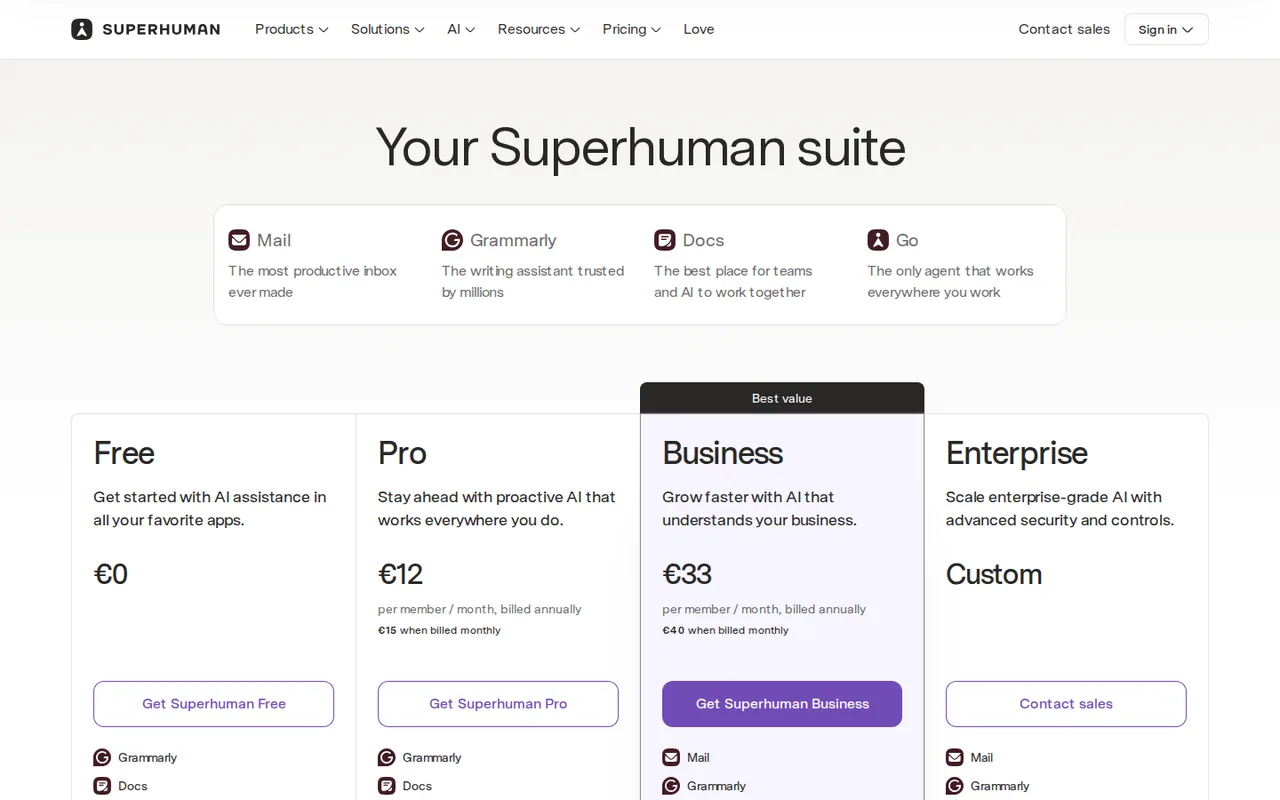
The two pages overlap: the Mail pricing page names Starter ($25) and Business ($33, with a note of 15% off for teams of 5+), while the plans page names Free, Pro, Business ($33 billed annually, $40 billed monthly) and Enterprise. The pages do not say whether $33 already includes the 15% team discount, so no discount is applied to the prices shown here. Taxes, regional pricing, minimum seats and any Mail free trial were not found. The plans page shows Pro and Business per member, not per user across several products.
| Plan | Price | What you get |
|---|---|---|
| Free | $0 sourceFrom superhuman.com/plans, checked Oct 6, 2026 (opens in a new tab) | Per the plans page: chat with AI across applications, writing help in 20+ languages, collaborative Docs, and Go with limited chat access. Mail is not marked on this plan. No card requirement is stated on the page. |
| Pro | $12 per member a month billed annually; $15 billed monthly sourceFrom superhuman.com/plans, checked Oct 6, 2026 (opens in a new tab) | Per the plans page: unlimited paragraph rewrites and translations in 15+ languages, AI-text and plagiarism checks, brand tone, Docs publishing to custom domains, and a limited trial of proactive writing agents. Mail is not marked on this plan. |
| Mail Starter | $25 per member a month billed annually sourceFrom superhuman.com/plans, checked Oct 6, 2026 (opens in a new tab) | Per the Mail pricing page: email productivity, Superhuman AI, team collaboration, calendar and scheduling, and unified admin and billing. A monthly price was not shown for this plan. |
| Business | $33 per member a month billed annually; $40 billed monthly sourceFrom superhuman.com/plans, checked Oct 6, 2026 (opens in a new tab) | The plans page includes Mail, Grammarly, Docs and Go and adds CRM views and unlimited Docs automations. The Mail pricing page lists Business at $33 a member a month billed annually with 15% off for teams of 5+ and adds Auto Drafts, Ask AI, Superhuman Mail MCP and custom auto labels. |
| Enterprise | Custom; contact sales | Adds analytics, SAML single sign-on, data loss prevention, BYOK encryption, custom roles and dedicated support, according to the plans page. No price is published. |
How far does it go?
- Five Business seats for a yearAt the plans page list prices, 5 members on Business cost $33 x 5 x 12 = $1,980 a year billed annually, or $40 x 5 x 12 = $2,400 billed monthly, a difference of $420. This assumes 5 full-price seats and that the 15% team discount on the Mail pricing page is not already in the $33. Arithmetic on published list prices; taxes, seat minimums and any discount at checkout were not checked.
Arithmetic from the published allowances above, not a usage test.
Taxes, currency and promotions can change the price you see at checkout.
Try Superhuman free (opens in a new tab)
Key features
| Feature | What it does | Watch out |
|---|---|---|
| Mail: Split Inbox, follow-up reminders, Snippets, Send Later, read statuses and team comments for Gmail or Outlook (Mail page) | The Mail page describes an AI-native email app for teams that use Gmail or Outlook, with Split Inbox, follow-up reminders, Snippets, Send Later, Instant Reply, shared live views of an email, and read statuses that show when and on which device a message was opened. | The 'saves 4 hours a week' and '20 million hours a year' figures are Superhuman's own claims, not independent measurements. Read statuses tell the sender about the recipient's opens, so check your own policy before using them with clients or candidates. |
| Superhuman AI in Mail: triage, drafting and, if enabled, sending replies; Business adds Auto Drafts, Ask AI and custom auto labels (Mail pricing page) | — | |
| Go: proactive suggestions in the apps you already use, with custom agents, an Agent Store and pre-built or custom MCP connectors (Go page) | The Go page describes an assistant that offers suggestions as you type, a side chat, cursor actions, a Slack bot and a Go app, with custom agents, an Agent Store and connectors to your apps. It says it can help across 1 million+ apps and websites. | The coverage figure is Superhuman's own. The plans page limits chat, inline suggestions and proactive agents to a limited trial on paid plans, and custom agents to Limited, Expanded or Full by plan, without publishing numbers. |
| One Free, Pro, Business and Enterprise plan ladder across Mail, Grammarly, Docs and Go (plans page) | — | |
| Mail MCP, CRM views for HubSpot, Salesforce and Pipedrive, and calendar scheduling from an email (Mail pricing and plans pages) | — | |
| Plans bundle four products | The plans page lists Free, Pro, Business and Enterprise, with Mail marked only on Business and Enterprise, while Grammarly, Docs and Go appear on every plan. | A separate Mail pricing page lists Starter at $25 and Business at $33 for Mail alone. The pages do not say how a Starter seat relates to the suite Pro or Business plans. |
| AI training and data controls | The Go page says you control whether your content is used to train Go's AI models and that AI training is off by default for Enterprise users. | That statement is about Go. Mail's own data-use terms, retention and how email content reaches the AI were not found on the pages read, so check the Privacy Policy and Trust pages before connecting a work mailbox. |
Which Superhuman product are you buying?
The name now covers four products, and the plan you pick decides which you get. According to the plans page, the Free and Pro plans include Grammarly, Docs and Go but not Mail; Mail appears on Business and Enterprise. If you searched for the email app, the Mail pricing page also sells it on its own, from $25 a member a month billed annually. If you want a free assistant for writing and research across apps, Free at $0 is the relevant plan, and it is not the email product.
What the two price pages disagree on
The pages overlap but are not identical. The Mail pricing page names Starter and Business, and says Business gets 15% off for teams of 5 or more. The plans page names Free, Pro, Business and Enterprise and shows Business at $33 billed annually or $40 billed monthly, with no team discount. Neither page says whether the 15% is already inside the $33, or how a Mail Starter seat relates to the suite’s Pro plan. For a team purchase, take the quote at checkout or from sales rather than multiplying list prices; the five-seat estimate on this page is only a ceiling for five full-price seats.
What Business adds beyond Starter
On the Mail pricing page, Business adds the following over Starter:
- Auto Drafts and Ask AI
- Superhuman Mail MCP
- Custom auto labels
- CRM integrations: the plans page describes viewing and updating HubSpot, Salesforce and Pipedrive records from the inbox
Those are the features that matter for sales and customer-success work; if your team only needs faster triage and follow-up reminders, the Starter list is the smaller purchase, though a Starter seat’s AI limits are not published.
Before you connect a work mailbox
Two checks are worth doing first. The Go page says you control whether your content trains Go’s models and that training is off by default for Enterprise, but it speaks about Go, not Mail. And the read statuses on the Mail page show senders when and on which device a message was opened, which may need disclosing under your own policies. Proposed evaluation, not performed: connect a test Gmail or Outlook account on whatever access Superhuman gives you, send ten messages to a colleague, and record what the sender sees, what the AI drafts from and where the settings page lets you turn data use off.
Is Superhuman worth it?
Documentation review plus dated public user reports. Documentation review, not tested hands-on. Not scored.
Worth it if
- If your team lives in Gmail or Outlook and replies drive revenue, Mail's Split Inbox, follow-up reminders and CRM views on Business are aimed at that work.
- If you want a free assistant for writing and research across apps, the $0 Free plan covers chat, writing help and Docs.
- If one vendor for email, writing and docs matters, Business bundles all four products under one seat price.
Probably not if
- If you only need the email app on a free plan, this is not it: Mail is marked on Business and Enterprise only.
- If you must budget a team purchase exactly, list prices are not enough, because two official pages describe the Business discount differently.
- If you plan to connect a work mailbox, the pages read do not state Mail's own data-use terms, so they are not enough to settle that question.
Superhuman alternatives
Other writing & content tools checked with the same method. Pick by the job, not by a score.

Self-publishing authors, ghostwriters and non-fiction writers who want one place to outline, draft in their own style, edit and prepare a book for Amazon KDP

General drafting, files and everyday research

Drafting, document work and coding

Brand-consistent sales and marketing content for teams

Turning plain or AI-drafted text into templated Word and PDF documents

Correcting and polishing everyday writing

Small nonprofits drafting and tracking grant applications

Chat and research that needs live X and web context
Used Superhuman? Write the first review. Visitor opinions are moderated and kept separate from our source checks.
Frequently asked questions
Is Superhuman free?
Partly. The plans page lists a Free plan at $0 with AI chat across apps, writing help in 20+ languages and collaborative Docs, but Mail is marked only on Business and Enterprise. If you want the email app, the Mail pricing page starts at $25 a member a month billed annually. A Mail free trial was not found on the pages read, so check at sign-up.
How much does Superhuman Mail cost?
The Mail pricing page lists Starter at $25 and Business at $33 per member a month, both billed annually, and Enterprise on request. The plans page lists Business at $33 billed annually or $40 billed monthly. The Mail page also says 15% off for teams of 5 or more, without saying whether that is already in the $33, so confirm the final price at checkout.
Is Superhuman the same company as Grammarly?
Superhuman's site now presents Grammarly as one of its products, alongside Mail, Docs and Go, and the Go page says Superhuman maintains Grammarly's track record. The plans page sells them together in one suite, while Grammarly's own plans and limits are covered in a separate profile.
Does Superhuman use my email to train AI?
The pages read answer only for Go: you control whether content is used to train Go's models, and training is off by default for Enterprise. Mail's own training and retention terms were not found, so read the Privacy Policy and Trust pages before connecting a work mailbox.
Sources and method5 official sources · 5 details checked · Oct 6, 2026
How we checked this profile
5 details on this page were checked against Superhuman's own pages and help documentation (Oct 6, 2026).
See the checks by section5 documented
| Section | Checks | Last checked | Sources |
|---|---|---|---|
| Article text | 1 documented | superhuman.com | |
| Plans and prices | 2 documented | superhuman.com/pricingsuperhuman.com/plans | |
| Questions | 1 documented | superhuman.com/go | |
| Features | 1 documented | superhuman.com/mail |
Sources for this profile
- Superhuman Suite plans and pricing pagesuperhuman.com
- Superhuman homepagesuperhuman.com
- Superhuman Mail product pagesuperhuman.com
- Superhuman Mail pricing pagesuperhuman.com
All 5 sources
Official Superhuman pages were read on 6 Oct 2026; the Mail pricing and plans pages were fetched as rendered text. Not tested or not found: Mail's free trial, whether the 15% team discount is included in $33, how a Mail Starter seat relates to suite plans, AI usage quotas, Mail's data-use and retention terms, regional prices and taxes, and any of the provider's speed or time-saving claims. Third-party reviews and directories were not used as sources. The proposed evaluation has not been performed.
Sources checked Oct 6, 2026. Found something out of date? See how we correct profiles.

