

Google Flow Music: free plan runs on daily credits of unstated size, and paid plans start at $8 a month
Updated September 29, 2026 · By Elias Brandt · Documentation review, not tested hands-on
Pros
- Downloads on the free plan
- Plain ownership wording
- Included with Google AI plans
- Every tier gets the core features
Cons
- Free credit amount not published
- Strict eligibility
- No commercial licence text on the plan pages
- Easy to confuse with other products
Bottom line
Daily top-up credits (amount not stated on the pricing page); 2 concurrent generations; all core features, including Lyria models, Producer, Projects, mp3, wav and m4a downloads, stem downloads, publishing and image and video generation.
You want to try AI song generation before paying: the Free plan ticks mp3, wav, m4a and stem downloads, though its daily credit amount is not published.
You need to budget exact free output: the pricing page gives no daily top-up number, and edit or cover credit costs are not stated either.
Best forHobbyists and songwriters sketching ideasVideo creators who need backing tracksProducers who want stems to finish elsewhereExisting Google AI subscribers
Strengths, limits and who it suits, in full
Strengths
- Downloads on the free plan The comparison table ticks mp3, wav, m4a and stem downloads for Free as well as for the paid tiers.
- Plain ownership wording Google Terms say Google will not claim ownership of content you generate, and the Believe announcement repeats this for Flow Music.
- Included with Google AI plans Google AI Plus, Pro and Ultra members get the Starter, Plus and Member benefits without a separate Flow Music subscription.
- Every tier gets the core features Lyria models, Producer, Projects, publishing and image and video generation are ticked for all four plans.
Limits
- Free credit amount not published The pricing page lists daily top-up credits for Free but gives no number, so the free allowance cannot be planned in advance.
- Strict eligibility Users must be 18 or older, pass age verification, sign in with a Google Account and be in a supported region.
- No commercial licence text on the plan pages The pricing page and help articles read do not describe distribution or commercial licence terms; only the general Google Terms apply.
- Easy to confuse with other products Google Flow is a separate video tool, and several unrelated sites use the Flow Music or Producer AI names.
Who it suits
- Hobbyists and songwriters sketching ideas the free tier suits a few songs at a time, since downloads and stems are ticked but the daily credit amount is unknown.
- Video creators who need backing tracks fits when you want an original track and, optionally, a generated music video in the same place; check the rules of the platform you publish on.
- Producers who want stems to finish elsewhere stem downloads let you move parts into your own DAW for mixing after generation.
- Existing Google AI subscribers check your Google AI tier before paying, because Plus, Pro and Ultra already map to Starter, Plus and Member.
How much does Google Flow Music cost?
Prices confirmed · checked
- $8Starter
- $24Plus
- $64Member
Regional prices: Prices were shown in USD when the page was opened from a server in Germany; taxes are not stated.
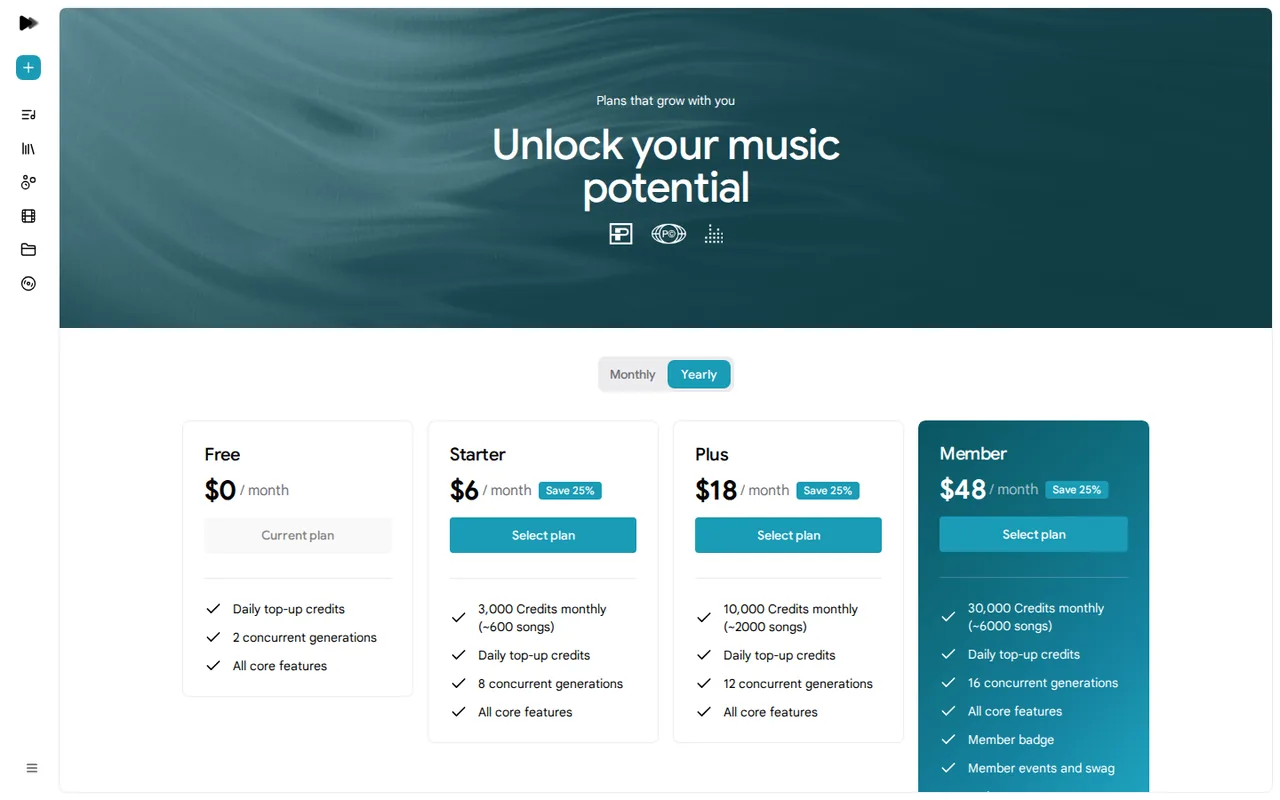
The yearly view is labelled Save 25% and shows a monthly equivalent, not the yearly invoice total. Extra credits can be bought only on a paid plan while the subscription is active. Google AI Plus, Pro and Ultra members receive the Starter, Plus and Member benefits; the help center says to tick the Google One benefits box at first sign-in.
| Plan | Price | What you get |
|---|---|---|
| Free | $0 sourceFrom flowmusic.app/pricing, checked Oct 21, 2026 (opens in a new tab) | Daily top-up credits (amount not stated on the pricing page); 2 concurrent generations; all core features, including Lyria models, Producer, Projects, mp3, wav and m4a downloads, stem downloads, publishing and image and video generation. |
| Starter | $8 per monthbilled monthly · or $6 per month billed yearly sourceFrom flowmusic.app/pricing, checked Oct 21, 2026 (opens in a new tab) | 3,000 credits a month, about 600 songs by the provider's estimate, plus daily top-ups; 8 concurrent generations; extra credits can be bought while subscribed. |
| Plus | $24 per monthbilled monthly · or $18 per month billed yearly sourceFrom flowmusic.app/pricing, checked Oct 21, 2026 (opens in a new tab) | 10,000 credits a month, about 2,000 songs by the provider's estimate, plus daily top-ups; 12 concurrent generations. |
| Member | $64 per monthbilled monthly · or $48 per month billed yearly sourceFrom flowmusic.app/pricing, checked Oct 21, 2026 (opens in a new tab) | 30,000 credits a month, about 6,000 songs by the provider's estimate, plus daily top-ups; 16 concurrent generations; member badge, member events and merch, early access to new features. |
Which plan fits?
Smallest plan whose monthly credits cover your number with 15% spare for regenerations. Arithmetic from the plan table above, not a usage test.
How far does it go?
- Credits per song behind the plan estimatesStarter: 3,000 credits / about 600 songs = about 5 credits per song. Plus: 10,000 / about 2,000 = 5. Member: 30,000 / about 6,000 = 5. The page marks the song counts as approximate and does not state song length or the cost of edits, covers or music videos, so this is arithmetic on provider estimates, not observed usage.
Arithmetic from the published allowances above, not a usage test.
Taxes, currency and promotions can change the price you see at checkout.
Try Google Flow Music free (opens in a new tab)
Key features
| Feature | What it does | Watch out |
|---|---|---|
| Chat-based Producer that writes and arranges full songs with vocals from text, image or audio prompts | — | |
| Lyria 3.5 music model, added on July 29, 2026 | — | |
| Section editing to rewrite or translate lyrics or restyle one part of a song | Highlight part of a finished song to rewrite or translate its lyrics, restyle a beat drop or extend a sample in a new direction without regenerating the rest. | The public pages do not say how many credits an edit, cover or extension uses, so track the balance yourself. |
| Remix a song with Extend, Cover or Replace | — | |
| Downloads in mp3, wav and m4a, plus stem downloads | — | |
| Music videos generated from a track | The Music videos area turns a track into a video, with a choice of video model in settings and optional image or audio references. | Google says music videos made with Gemini Omni are for Google AI subscribers; other video models are not listed per plan. |
| Spaces: instruments, sequencers and games built from a text description | Describe an instrument, step sequencer, game or plugin and Flow Music builds a mini app you can use in a session, publish or let others remix. | Spaces run on web and PC only, so they are not available in the iOS app. |
| Publishing, playlists and share links with community remix controls | — | |
| iOS app by Google LLC; the web version has every feature | — |
Is ProducerAI the same product as Google Flow Music?
Yes. Google announced on February 24, 2026 that ProducerAI was joining Google Labs, and a May 6, 2026 Google post describes Google Flow Music as formerly ProducerAI. On September 29, 2026, producer.ai, riffusion.com and flowmusic.google all redirected to flowmusic.app, which is the address to bookmark. Songs are still made by chatting with an agent called Producer.
The name is easy to mix up. Google Flow is a separate Google Labs tool for video, with its own help pages. Search results for the old name also include unrelated sites such as producerai.tech, producerai.art, flow-music.app and flowmusic.io, which sell their own plans at different prices. Check the domain before signing in or paying.
What does the free plan give you, and what is not stated?
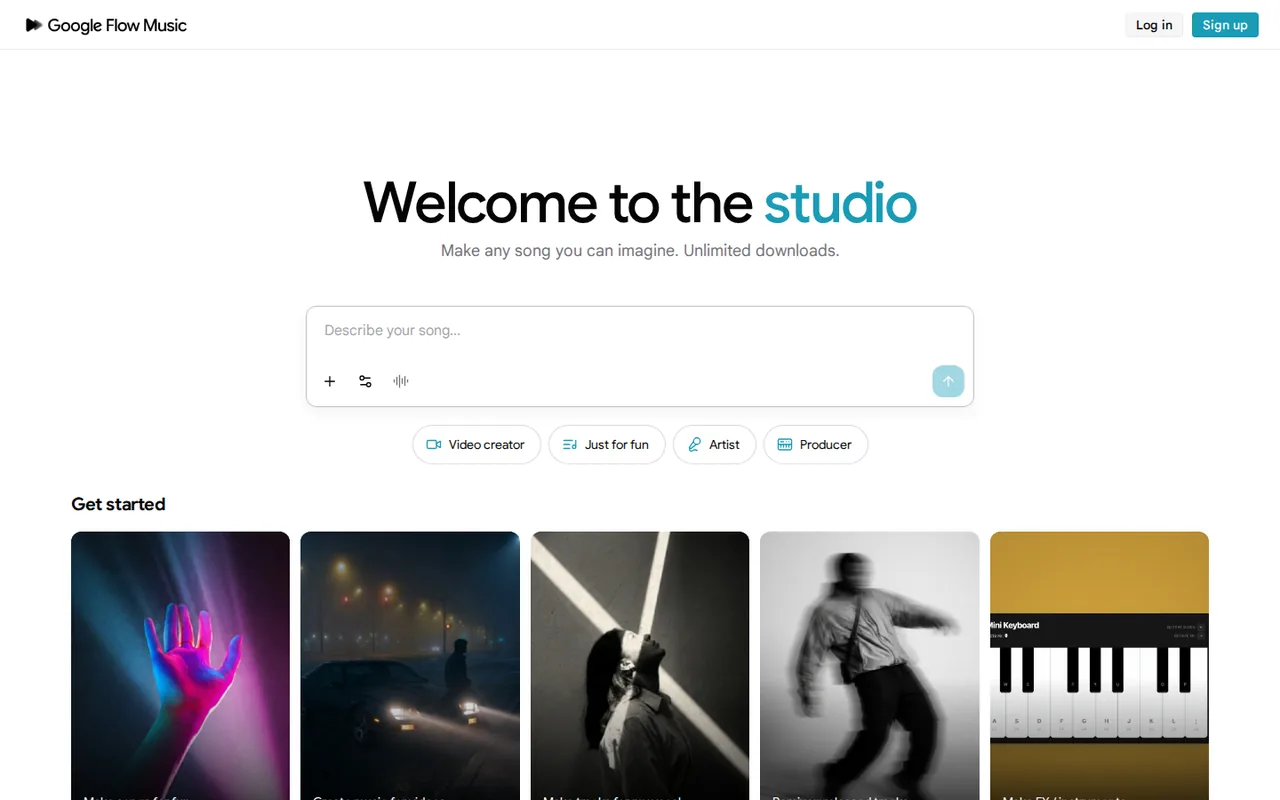
The Free plan is $0 and runs on daily top-up credits with 2 concurrent generations. In the plan comparison table, every feature row under Features is ticked for Free: Lyria models, Producer, Projects, downloads in mp3, wav and m4a, stem downloads, publishing, image and video generation, and Progress. The homepage adds that no credit card is required to start.
What the page does not state is how many credits the daily top-up adds. Unofficial articles quote specific daily numbers, but none appears on the pricing page or in the help center, so treat any such figure as unverified. Credit packs cannot be bought on Free; a free account that runs dry waits for the next top-up or earns extra credits by voting in Turntable.
Which plan fits how many songs you make?
Editorial assessment
The useful thresholds are the provider song estimates, the concurrency limit and whether you already pay Google. Paid credits are added on top of the daily top-ups, and higher tiers mainly buy volume and parallel generations rather than extra features.
- Free: a few songs at a time, with 2 generations running in parallel and no way to buy more credits.
- Starter, $8 monthly or $6 a month billed yearly: 3,000 credits, which the provider puts at about 600 songs, and 8 parallel generations.
- Plus, $24 monthly or $18 a month billed yearly: about 2,000 songs and 12 parallel generations, useful for batch work such as covers of a whole playlist.
- Member, $64 monthly or $48 a month billed yearly: about 6,000 songs, 16 parallel generations, early feature access and member events.
- Google AI Plus, Pro or Ultra: these memberships already carry Starter, Plus or Member benefits, so paying for Flow Music separately may duplicate them.
Who owns the songs, and what rules apply when you publish them?
Flow Music does not have its own terms page: its Terms of Service link leads to the Google Terms of Service, effective July 30, 2026. They say that some services let you generate original content and that Google will not claim ownership of it, and a May 6, 2026 Google post repeats this for Flow Music. Not claiming ownership is different from granting a licence or guaranteeing that a song is clear to release.
The same terms prohibit misleading people into thinking AI-generated content was made by a human, using the services to violate intellectual property rights, and using generated content to develop machine learning models. Google also says ProducerAI outputs carry SynthID, an imperceptible watermark that identifies Google AI-generated content. Label AI involvement where your distributor or platform asks for it.
Can you use your own vocals or ask for a different voice?
You can add your own material to a session: the help center describes recording audio with your microphone, uploading your music and adding images for lyrics or cover art. The homepage offers a Make tracks for my vocal starting point, and the App Store listing gives prompts such as asking the Producer to sing lyrics in a deeper voice.
The public pages read do not describe recreating a specific person’s voice, so a vocal prompt is not a voice-cloning feature. Upload only recordings you made or have permission to use, and avoid prompts that imitate a named singer, since the Google Terms bar using the services to violate other people’s rights.
What does sign-up require, and what does Flow Music remember?
The help center lists four conditions: a verified age, being 18 or older, being in a supported region and signing up with a Google Account. It asks for authorization each time you log back in. The linked availability page redirected to the same getting-started article with no country list on September 29, so confirm access in your own country before relying on it.
Producer can be personalized with standing instructions, custom slash commands and Memories, a setting that decides whether it learns from your conversation history; the homepage says Flow Music learns your style as you create. You can review or remove Flow Music access under Third-party apps and services in your Google Account settings.
Can the free plan deliver a 60-second instrumental with stems?
Proposed evaluation · not performed yet
On a Free account in a supported region, prompt for a 60-second instrumental for a product video, for example a warm lo-fi beat at 85 BPM with no vocals and a clean ending. Use no uploaded audio, so no third-party rights are involved. Stop if a step asks for a paid plan.
- Note the credit balance before the first prompt.
- Generate once, then ask the Producer to shorten the intro to 4 bars.
- Download the song as wav and download its stems.
- Open the files outside Flow Music and check length, tempo, the ending and the number of stems.
- Record the credits used by the first generation and by the edit.
Accept a wav file close to 60 seconds with no vocals and stems that sum to the same arrangement. Reject a track with vocals, a cut-off ending or a download that needs a paid plan. No audio, stem count or credit figure is reported until the test is run.
If you need music as part of a wider voice and sound toolkit, compare ElevenLabs and Adobe Firefly, which both list music generation. To cut a finished track into edited video, see Descript.
Is Google Flow Music worth it?
Documentation review plus dated public user reports. Documentation review, not tested hands-on. Not scored.
Worth it if
- You want to try AI song generation before paying: the Free plan ticks mp3, wav, m4a and stem downloads, though its daily credit amount is not published.
- You already subscribe to Google AI Plus, Pro or Ultra: the help center maps them to Starter, Plus and Member benefits, so a separate plan may duplicate what you have.
- You plan to edit songs section by section: lyric rewrites, restyling and extensions are described in the help center, so a lighter plan can cover small experiments.
Probably not if
- You need to budget exact free output: the pricing page gives no daily top-up number, and edit or cover credit costs are not stated either.
- You are under 18, cannot verify your age, or live outside a supported region: the help center makes these sign-up conditions, and no country list is given.
- You need a documented commercial licence: the plan pages describe none, and only the general Google Terms on ownership apply.
Google Flow Music alternatives
Other audio & voice tools checked with the same method. Pick by the job, not by a score.

Producers and singers who want to turn their own vocals into other voices or clone their own voice for demos

Quick AI songs and instrumentals for personal or licensed creator use

Royalty-free background music for videos and ads

Original songs with vocals from prompts

Karaoke tracks and stems from songs you have the right to use

Narration and voice work

Quick AI masters for independent releases and demos

Separating vocals, drums, bass and melodies from songs you may use
Used Google Flow Music? Write the first review. Visitor opinions are moderated and kept separate from our source checks.
Frequently asked questions
Is Google Flow Music the same as Google Flow?
No. Google Flow is the Google Labs tool for generating and editing video, while Google Flow Music, at flowmusic.app, is for songs, playlists, music videos and Spaces. They share a product family and a help center, but plans, credits and apps are separate. Pricing articles about Flow video credits do not apply to Flow Music.
Can I use my Google AI subscription instead of a Flow Music plan?
Yes. The help center maps Google AI Plus to Starter benefits, Google AI Pro to Plus and Google AI Ultra to Member. When you log in to Flow Music for the first time, tick the checkbox for Google One benefits on the authorization screen; otherwise the membership is not applied to your account.
How can I earn extra credits without paying?
Open Turntable, listen to both samples for at least 10 seconds each and vote for the one that better matches the prompt; you can add a reason. The help center says this earns extra AI credits but does not say how many per vote, so it supplements rather than replaces the daily top-ups.
Can other people remix or download a song I publish?
Publishing makes a song public, and share settings let you choose Anyone with the link or Only me. Turning off Allow community remix stops other users from remixing, making vibes from or downloading the song. Check that setting before sharing a track you plan to release elsewhere.
Is there a mobile app for Google Flow Music?
Yes, on iOS. The App Store lists Google LLC as seller, requires iOS 18 or later and showed version 1.2.622 from September 21. Google announced Android as coming soon in May. The web version keeps the full feature set, and Spaces are available on web and PC only.
Sources and method13 official sources · 8 details checked · Sep 29, 2026
How we checked this profile
8 details on this page were checked against Google Flow Music's own pages and help documentation (Sep 29, 2026).
See the checks by section8 documented
| Section | Checks | Last checked | Sources |
|---|---|---|---|
| Article text | 1 documented | blog.google/believe-flow-music-partner… | |
| Plans and prices | 3 documented | flowmusic.app/pricingsupport.google.com/17083870 | |
| Strengths and limits | 3 documented | flowmusic.app/pricingsupport.google.com/17083868policies.google.com/terms | |
| Features | 1 documented | support.google.com/17083802 |
Sources for this profile
- Plans and credits, monthly and yearly viewsflowmusic.app
- Google Flow Music homepageflowmusic.app
- ProducerAI joins Google Labs (February 24, 2026)blog.google
- Google Flow Music and Believe partnership (May 6, 2026)blog.google
All 13 sources
- New agents, mobile apps and Gemini Omni for Flow and Flow Music (May 19, 2026)blog.google
- Lyria 3.5 launch in Google Flow Music (July 29, 2026)blog.google
- Get started with Google Flow Musicsupport.google.com
- Manage AI credits and Flow Music subscription planssupport.google.com
- Create and manage songssupport.google.com
- Create and manage music videossupport.google.com
- Create and manage spacessupport.google.com
- Google Terms of Service (effective July 30, 2026)policies.google.com
- Google Flow Music iOS app listingapps.apple.com
The name chain is documented by Google: ProducerAI joined Google Labs on February 24, 2026, and a May 6, 2026 Google post calls the product Google Flow Music (formerly ProducerAI). On September 29, 2026, producer.ai, riffusion.com and flowmusic.google all redirected to flowmusic.app. The availability link in the help center redirected to the getting-started article, which names no country list. The iOS App Store lists a 13+ age rating, while the help center requires users to be 18 or older with verified age; the stricter help-center rule is followed. The May 19 post names Lyria 3 Pro and the July 29 post adds Lyria 3.5. The site links no social accounts, so none are listed. Lookalike domains using the Flow Music or Producer AI names were not used as sources.
Sources checked Sep 29, 2026. Found something out of date? See how we correct profiles.
