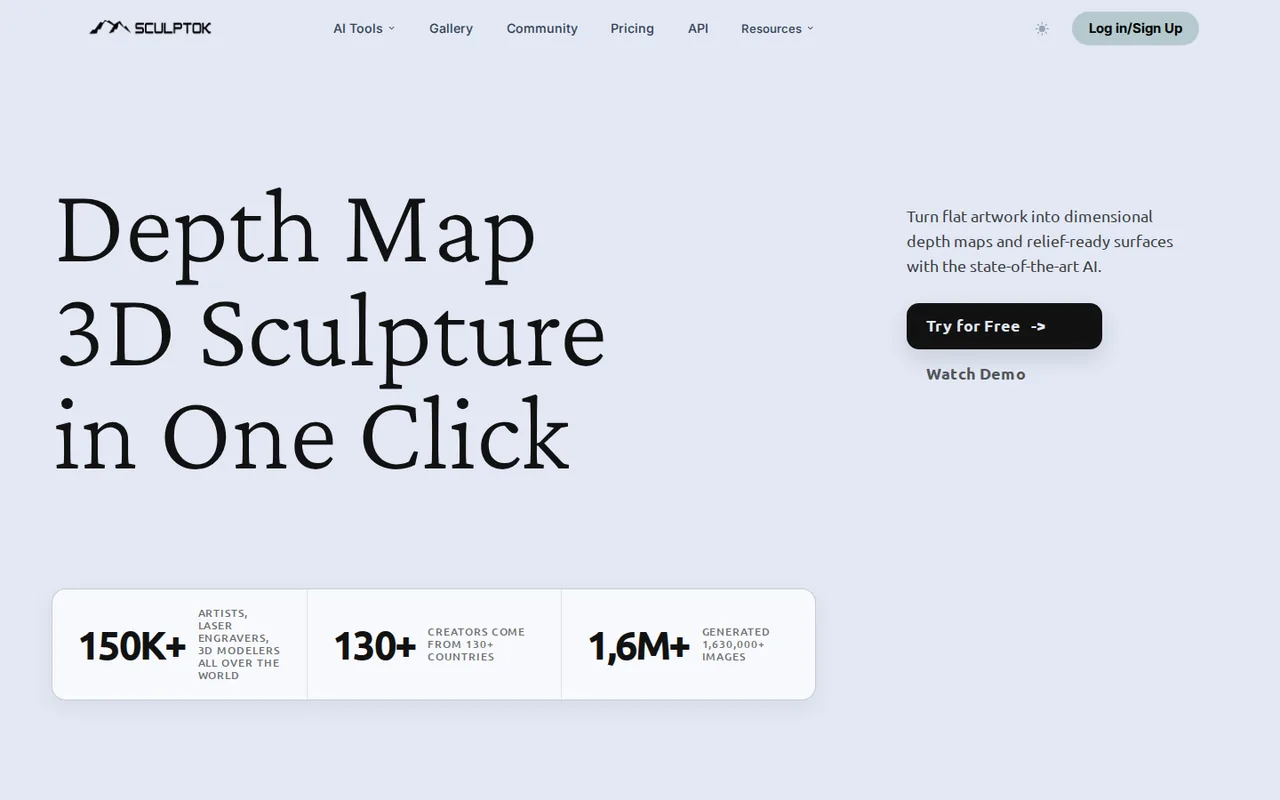
Sculptok: 100 free credits cover about four finished HD files, and 16-bit depth maps need the $75 Ultimate plan
Updated September 29, 2026 · By Elias Brandt · Documentation review, not tested hands-on
Pros
- No card to start
- Credits carry over while subscribed
- Fits existing 3D tools
Cons
- 16-bit output sits on the top plan
- No refunds for AI services
- Short file retention
Bottom line
100 credits for new accounts, no card required; about 50 draws or 5 HD downloads by the provider estimate; background removal and HD restoration listed.
You are testing one or two designs for laser or CNC work, because the free credits cover a few complete draw-and-download attempts without a card.
You need a refund if the output disappoints, because the terms treat payments as final and AI services as non-refundable.
Best forLaser engravers testing a designCNC woodcarvers making reliefsJewelry, coin and medal makersBlender or ZBrush modellers
Strengths, limits and who it suits, in full
Strengths
- No card to start New accounts receive 100 credits without payment details.
- Credits carry over while subscribed Unused plan credits roll into the next period, and extra credit packs never expire.
- Fits existing 3D tools Blender and ZBrush plugins plus STL export connect to modelling and CAM workflows.
Limits
- 16-bit output sits on the top plan Large-resolution 16-bit depth maps are listed only on Ultimate.
- No refunds for AI services The terms treat payments as final, and AI services as non-refundable.
- Short file retention The FAQ says generated images are deleted automatically after one month.
Who it suits
- Laser engravers testing a design the 100 free credits cover a few complete draw-and-download attempts before paying.
- CNC woodcarvers making reliefs STL export and depth-map adjustment suit carving panels and plaques from line art.
- Jewelry, coin and medal makers fine relief work may need the 16-bit maps that only Ultimate lists.
- Blender or ZBrush modellers the plugins keep generation inside the modelling tool, at a lower Blender credit rate.
How much does Sculptok cost?
Prices confirmed · checked
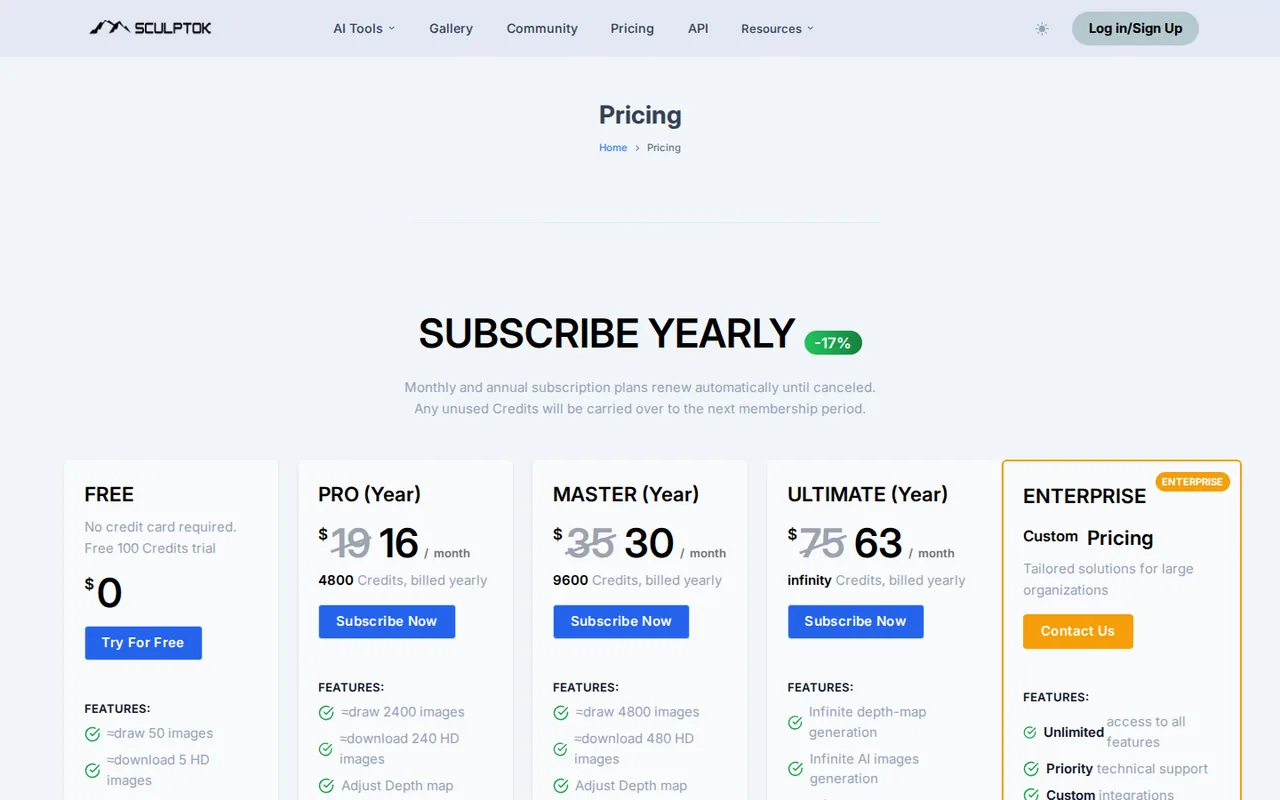
- $19Pro
- $35Master
- $75Ultimate
Regional prices: Plan prices are shown in USD; the yearly view prints a monthly rate and total credits but not the annual charge.
Beside each plan the page also prints an Original price in pounds, such as 30 pounds next to the $19 Pro plan, without explaining it, so it is not treated here as a discount. The terms say payments are final and AI services are non-refundable, and plans renew automatically until cancelled.
| Plan | Price | What you get |
|---|---|---|
| Free | $0 sourceFrom sculptok.com/pricing, checked Sep 29, 2026 (opens in a new tab) | 100 credits for new accounts, no card required; about 50 draws or 5 HD downloads by the provider estimate; background removal and HD restoration listed. |
| Pro | $19 per monthbilled monthly · or $16 per month on yearly billing, 4,800 credits billed yearly sourceFrom sculptok.com/pricing, checked Sep 29, 2026 (opens in a new tab) | 400 credits a month, about 200 draws or 20 HD downloads; depth-map adjustment and pixel upscale. |
| Master | $35 per monthbilled monthly · or $30 per month on yearly billing, 9,600 credits billed yearly sourceFrom sculptok.com/pricing, checked Sep 29, 2026 (opens in a new tab) | 800 credits a month, about 400 draws or 40 HD downloads; same tools as Pro. |
| Ultimate | $75 per monthbilled monthly · or $63 per month on yearly billing sourceFrom sculptok.com/pricing, checked Sep 29, 2026 (opens in a new tab) | No credit deduction for depth maps, AI images or HD downloads; large-resolution 16-bit depth maps and text-to-image; watermark-free 3D preview; basic 3D model generation. |
| Enterprise | Custom pricing | All features, API access, SSO, custom integrations, usage analytics and a dedicated account manager. |
| Extra credits | $15 for 200$35 for 400 or $90 for 1,600 credits, one-time sourceFrom sculptok.com/pricing, checked Sep 29, 2026 (opens in a new tab) | Purchased credits never expire; no subscription needed. |
How far does it go?
- Free credits against the provider estimates100 credits for about 50 draws is about 2 credits per draw, and 100 credits for about 5 HD downloads is about 20 credits per download. One image drawn once and downloaded in HD uses about 2 + 20 = 22 credits, so the free balance covers about 100 / 22 = 4 finished files. Redraws cost more. This is arithmetic on published estimates, not an observed yield.
Arithmetic from the published allowances above, not a usage test.
Taxes, currency and promotions can change the price you see at checkout.
Try Sculptok free (opens in a new tab)
Key features
| Feature | What it does | Watch out |
|---|---|---|
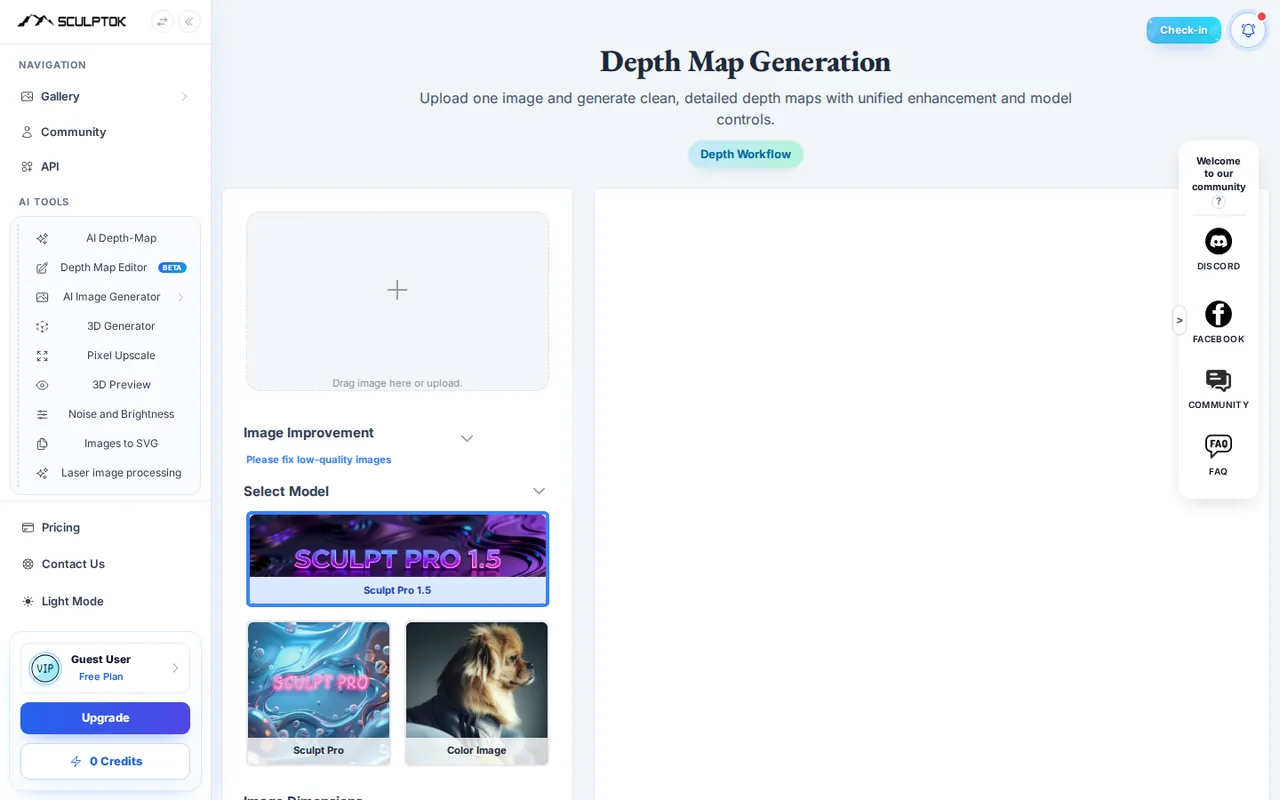
| Image to grayscale depth map with several models | Each draw runs several models; the generator offers Sculpt Pro 1.5, Sculpt Pro and Sculpt Basic at 1K to 4K. | The FAQ says portraits or low-detail images may need adjusting in engraving software and full detail is not guaranteed. |
| 3D relief preview and STL download | Previews a depth map as a 3D relief and downloads an STL, with a no-watermark option described in the FAQ. | The pricing page lists a credit-free watermark-free 3D preview only on Ultimate. |
| Image to GLB 3D model generator | — | |
| Depth map editor (beta) | — | |
| HD restoration, background removal and pixel upscale | — | |
| Images to SVG conversion | — | |
| Blender and ZBrush plugins | — | |
| API for depth-map generation | — | |
| Blender plugin | Generates relief models inside Blender through the API at 10 credits per model. | It needs a personal API key and takes 2 to 3 minutes per model on the cloud server. |
How far do the 100 free credits go?
The pricing page equates the 100 free credits to about 50 draws or about 5 HD downloads. That implies roughly 2 credits to generate a depth map and 20 to download it in HD, so the download, not the draw, is what empties the balance. A realistic free run is four finished files, or fewer if a design needs several draws.
The FAQ lists two ways to add free credits: inviting new users and posting promotional updates on social media, then asking support. Neither has a published rate. If you work in Blender, the plugin page lists 10 credits per model through the API, which it describes as half the web rate.
Which plan do you need for 16-bit, watermark-free files?
Large-resolution 16-bit depth maps appear only in the Ultimate plan list, alongside large-resolution text-to-image and a watermark-free 3D preview that uses no credits. Pro and Master list depth-map adjustment and pixel upscale but not 16-bit output. In the generator, Basic output is marked 2K and the Pro or VIP option 4K.
For STL files, the FAQ describes choosing the no-watermark preview option and then Download STL, or downloading a watermark-free depth map and loading it into the 3D sculpture panel. It does not say which plans can use that route or what it costs in credits.
Editorial assessment
A standard map on Pro is usually enough to judge a design for wood or acrylic, while coins, medals and jewelry with shallow detail are where the 16-bit maps on Ultimate matter. Confirm the bit depth of a downloaded file in your engraving software before committing to a year.
Can a Sculptok depth map go straight to the machine?
The FAQ says most grayscale or STL files can be used directly for machine engraving, but portraits and images with thin detail may need adjusting in the engraving software, and it does not promise full reproduction. Treat every map as a first pass that still needs a relief height, base and toolpath decision.
Input quality matters more than model choice. The FAQ suggests running HD restoration on low-resolution images, cropping empty margins, and splitting very detailed artwork into sections that are generated separately and joined in sculpting software.
- Sculpt Pro 1.5: marked for portraits and precise structure, 4K.
- Sculpt Pro: automatic background removal and stronger depth, 4K.
- Sculpt Basic: color images and speed, 1K.
Do credits roll over, and can you get your money back?
While a subscription stays active, unused plan credits roll into the next period; the pricing FAQ says they are zeroed when the membership expires. Extra credit packs of $15, $35 or $90 never expire, which suits occasional users better than a plan they might cancel.
Changing plans adds the new credits immediately and moves the billing date to the latest subscription. Monthly plans can be cancelled from the Payment/Cancel tab, taking effect at the next billing cycle. The terms state that payments are final and that AI services are non-refundable except where the law requires otherwise.
What do the dollar prices and pound figures mean?
Plans are priced in US dollars, but each card also prints an Original price in pounds, for example 30 pounds beside the $19 Pro plan and 300 pounds beside the yearly Pro rate. The page does not explain these figures, so read them as unexplained labels, not as a saving you receive.
The yearly toggle is labelled 17% off, while the printed monthly rates are 14% to 16% below the monthly plans. The yearly view shows credits billed yearly but no annual charge, and the homepage table says $19 buys 800 images, which does not match the 400-credit Pro plan. Check the total at checkout.
Who can use the output, and how long is it kept?
The FAQ allows commercial use of generated models, but you remain liable for the copyright of any image you upload. The terms let MODERNFOX LTD use prompts and output to run and improve the service and support research, including through human reviewers, and they prohibit uploading photos of other people without consent.
Generated images are deleted automatically after one month, so download finished maps and STL files promptly. The privacy policy says personal data is stored on servers in the United States and that uploaded images and prompts are not passed to its analytics partners. Access or erasure requests go to official@sculptok.com.
Can the free credits produce an engraving-ready relief from line art?
Proposed evaluation · not performed yet
On a free account, upload a 2000-pixel black-and-white line drawing you made yourself, such as a leaf or a logo you own, with a plain white background. Use Sculpt Pro 1.5 and spend no purchased credits.
- Note the credit balance before starting.
- Generate one depth map and inspect it in the 3D preview.
- Download the HD depth map and an STL using the no-watermark route from the FAQ.
- Open both files in your engraving or CAM software and check bit depth, resolution and any visible watermark.
- Record the credits used by the draw and by each download.
Accept a map whose raised areas follow the drawn lines, with no watermark and a relief usable at your planned depth. Reject inverted depth, broken outlines or a download that requires a paid plan. Leave the observed result blank until the exercise is run.
To turn a photo into a moving 3D parallax clip rather than a carving file, see Immersity AI. To create the source artwork first, compare Leonardo.Ai and Midjourney, then check their image rights before relief work.
Is Sculptok worth it?
Documentation review plus dated public user reports. Documentation review, not tested hands-on. Not scored.
Worth it if
- You are testing one or two designs for laser or CNC work, because the free credits cover a few complete draw-and-download attempts without a card.
- You make coins, medals or jewelry with shallow relief and can justify the $75 Ultimate plan, since that is the only plan listing large-resolution 16-bit depth maps.
- You work inside Blender, because the plugin lists 10 credits per model through the API.
Probably not if
- You need a refund if the output disappoints, because the terms treat payments as final and AI services as non-refundable.
- You want to keep files in the tool for months, because generated images are deleted automatically after one month.
- You expect portraits or thin-detail art to engrave untouched, because the FAQ says they may need adjusting in engraving software.
Sculptok alternatives
Other images & design tools checked with the same method. Pick by the job, not by a score.

AI images, video and audio inside an Adobe workflow

Rigged 3D avatars from a selfie for games and apps

AI images placed straight into templated designs

Turning a written story into a character-consistent comic series, and optionally a short film

Homeowners, stagers, short-term rental hosts and designers who want quick room redesign concepts from a real photo before spending on furniture or paint

Lifestyle scenes from existing product photos

Product-photo background replacement and batch exports

YouTube thumbnails and titles from prompts or references
Used Sculptok? Write the first review. Visitor opinions are moderated and kept separate from our source checks.
Frequently asked questions
Is Sculptok the same service as SculptOK?
Yes. Searches use both spellings, and the site itself writes SculptOK. The service at sculptok.com is operated by MODERNFOX LTD, a company incorporated in the United Kingdom with a registered office in Manchester, according to its terms. Check that address bar domain before paying, because similar depth-map tools use comparable names.
Does Sculptok have an API or plugins for 3D software?
Yes. The site offers an API for depth-map generation, a Blender plugin that works through a personal API key, and a free ZBrush plugin that blends several depth maps and polishes the surface. Keep the API key private, because the plugin page warns that a leaked key can spend your credits.
Can I switch between Pro, Master and Ultimate mid-subscription?
Yes. The pricing FAQ says a new plan can replace the current one at any time; its credits are added immediately and the billing period syncs to the time of the change. The next renewal is billed at the new plan price. Ultimate does not add credits because it does not deduct them.
Where does Sculptok store my account data?
The privacy policy says personal data is stored and processed on servers in the United States, with an exception for users in mainland China. Analytics through Google is consent-based, and the policy says uploaded images, prompts and project files are never sent to those analytics partners. Requests to access or erase data go by email.
Is the 3D model generator the same as the depth map tool?
No. The depth map tool produces grayscale relief data and STL files for engraving or carving. The separate 3D generator creates GLB models from an image and, according to the FAQ, gives the most accurate structure from images that already look like 3D renders. Basic 3D model generation is listed as credit-free only on Ultimate.
Sources and method8 official sources · 8 details checked · Sep 29, 2026
How we checked this profile
8 details on this page were checked against Sculptok's own pages and help documentation (Sep 29, 2026).
See the checks by section8 documented
| Section | Checks | Last checked | Sources |
|---|---|---|---|
| Plans and prices | 3 documented | sculptok.com/pricingsculptok.com/terms_of_service.html | |
| Article text | 1 documented | sculptok.com/pricing | |
| Strengths and limits | 2 documented | sculptok.com/pricingsculptok.com/faq | |
| Features | 1 documented | sculptok.com/blender | |
| Other details | 1 documented | sculptok.com/terms_of_service.html |
Sources for this profile
- Plans, credits and pricing FAQsculptok.com
- Product overviewsculptok.com
- Help FAQ (watermarks, commercial use, storage)sculptok.com
- Depth map generator (models and resolutions)sculptok.com
All 8 sources
The terms and privacy policy carry no date, and the footer reads 2025; both were read on the check date. The terms name MODERNFOX LTD, incorporated in the United Kingdom with a registered office in Manchester. The homepage table says $19 buys 800 images, while the pricing page gives Pro 400 credits, about 200 draws. The Free card lists background removal and HD restoration, while the FAQ ties unlimited use of them to subscribers. Homepage star-rated stories were not used.
Sources checked Sep 29, 2026. Found something out of date? See how we correct profiles.