VEED: browser editing with auto subtitles, but Free exports 720p with a watermark and Creator is $12 per user
Updated October 4, 2026 · By Elias Brandt · Documentation review, not tested hands-on
Pros
- Clear resolution ladder by plan
- Captions without credits
- Editing and generation in one account
Cons
- Watermark on every free export
- Free subtitle allowance not published
- Per-seat pricing
Bottom line
Exports in 720p with a VEED.IO watermark; AI credits only in some regions, with Gen-AI Studio files up to 12 seconds. The Free subtitle allowance is not published on the pages we read.
You cut social clips and need clean captioned exports: Creator drops the watermark, raises export to 1080p and keeps auto subtitles outside the credit pool.
You need a client-ready video without paying: every Free export is capped at 720p and carries a VEED.IO watermark.
Best forSocial video editorsTeams subtitling at volumePublishers needing 4K
Strengths, limits and who it suits, in full
Strengths
- Clear resolution ladder by plan The help center states 720p, 1080p and 4K limits per plan.
- Captions without credits Creator lists unlimited auto subtitles outside the credit pool.
- Editing and generation in one account The same browser app covers captions, translation and prompt-to-video.
Limits
- Watermark on every free export Removing it needs a paid plan.
- Free subtitle allowance not published The pages we read do not state the Free subtitle minutes.
- Per-seat pricing Every paid price is per user, and credit pooling across seats is not stated.
Who it suits
- Social video editors Creator covers captions and 1080p export without a watermark.
- Teams subtitling at volume per-seat pricing means team cost scales with editors; confirm credit sharing first.
- Publishers needing 4K 4K export starts at Pro.
How much does VEED cost?
Prices confirmed · checked
Regional prices: Dollar prices are the US view from the pricing page, shown for yearly billing.
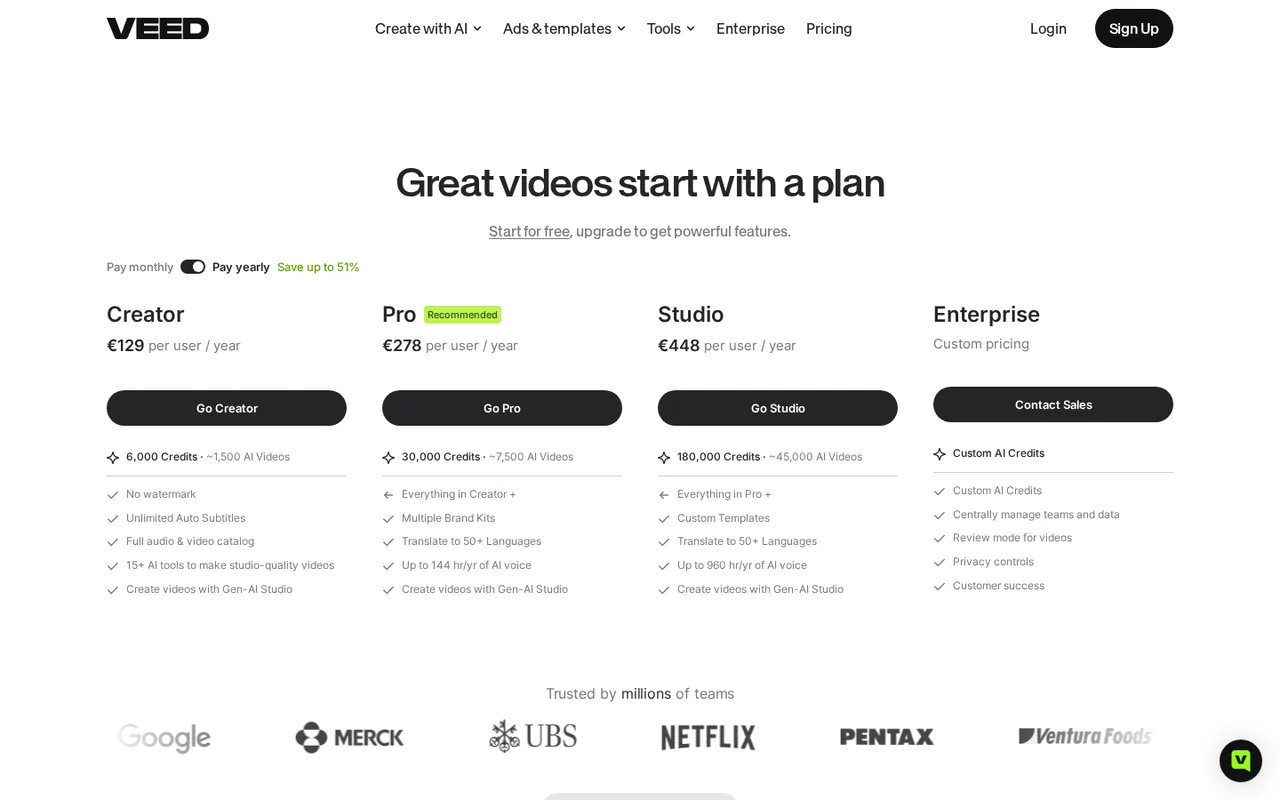
A browser capture from our server in Germany on the same page showed euro yearly totals per user instead: Creator €129, Pro €278 and Studio €448. We do not convert between them, so the price you pay depends on your region. The monthly-billing price was not visible to us and is not estimated. AI credits on Free exist only in some regions. The watermark help article uses the older plan name Lite.
| Plan | Price | What you get |
|---|---|---|
| Free | $0 sourceFrom veed.io/pricing, checked Oct 4, 2026 (opens in a new tab) | Exports in 720p with a VEED.IO watermark; AI credits only in some regions, with Gen-AI Studio files up to 12 seconds. The Free subtitle allowance is not published on the pages we read. |
| Creator | $12 per user per monthbilled yearly as $147 sourceFrom veed.io/pricing, checked Oct 4, 2026 (opens in a new tab) | 6,000 credits; no watermark; export up to 1080p; unlimited auto subtitles; Gen-AI Studio files up to 1 minute. |
| Pro | $22 per user per monthbilled yearly as $265 sourceFrom veed.io/pricing, checked Oct 4, 2026 (opens in a new tab) | 30,000 credits; everything in Creator; export up to 4K; multiple Brand Kits; translation to 50+ languages; up to 144 hours a year of AI voice; Gen-AI Studio files up to 5 minutes. |
| Studio | $39 per user per monthbilled yearly as $465 sourceFrom veed.io/pricing, checked Oct 4, 2026 (opens in a new tab) | 180,000 credits; everything in Pro; custom templates; up to 960 hours a year of AI voice; Gen-AI Studio files up to 30 minutes. |
| Enterprise | Custom pricing | Custom AI credits, central team and data management, review mode, privacy controls, export up to 4K. |
Taxes, currency and promotions can change the price you see at checkout.
Try VEED free (opens in a new tab)
Key features
| Feature | What it does | Watch out |
|---|---|---|
| Browser video editor with cut, join, compress and background removal | — | |
| Auto subtitles with SRT, VTT and TXT download on paid plans | Generate captions in the editor, style them, then burn them in or download SRT, VTT or TXT on paid plans. | Creator lists unlimited auto subtitles, while Gen-AI Studio subtitles count against the subtitle allowance. |
| Video translation and AI dubbing | — | |
| Gen-AI Studio: prompt to short social video from stock clips | Turns a prompt into a short social video with script, voiceover, stock visuals, avatar, subtitles and music. | File length is capped at 12 seconds on Free, then 1, 5 and 30 minutes on Creator, Pro and Studio; it uses stock clips, not generated video. |
| AI avatars, voice and text-to-speech | — | |
| Brand Kits for colors, fonts, logos and voices | — | |
| Export resolution | Free exports 720p, Creator up to 1080p, and Pro, Studio and Enterprise up to 4K. | Exports are never upscaled beyond the source resolution. |
Choose the caption deliverable before the plan
A burned-in caption and an editable subtitle file are different handoffs. The subtitle documentation puts SRT, VTT and TXT downloads on paid plans. Free can be used to evaluate a captioned video, subject to the account’s current subtitle allowance, watermark and resolution limits. If a client needs a separate subtitle file, deciding this at the start avoids completing the edit before discovering an export requirement.
Keep generation outside the caption estimate
Do not infer the cost of a caption job from the size of an AI credit pool. Check the selected editing feature and its allowance in the account. Gen-AI Studio is a separate prompt-to-video workflow, with plan-specific duration limits and generation charges; its subtitles can also consume a subtitle allowance on export. A 30-second generation is outside the documented Free duration limit.
Evaluate a short caption handoff
Proposed evaluation · not performed yet
Start with a 60-second recording you own that includes a proper name, a date and a sentence containing “not.” Keep a correct transcript beside it. Use Free only if the current account allowance accepts the clip; stop if it does not.
- Generate captions and compare those three details against the transcript. Correct any changed name, date or negation.
- Check the first and last caption timing and whether text covers the speaker’s face in the intended aspect ratio.
- Export the watermarked Free video and inspect the saved file. This is an evaluation copy, not a promised clean client deliverable.
- If you already have an entitled paid plan, separately verify the required resolution, watermark removal and SRT download. Do not assume a paid trial is available.
Accept only a delivery route that preserves the words, timing and required file format. No measured transcription accuracy or product test is claimed.
Budget team seats before adding editors
Every paid VEED price is charged per user, so a team bill grows with each editor rather than with output. The pricing page we read showed yearly billing only and does not say whether credits pool across seats. Before adding a second editor, ask VEED whether the credit allowance is shared, and compare the regional price shown in your own account, since the US and German views differed in currency.
Is VEED worth it?
Documentation review plus dated public user reports. Documentation review, not tested hands-on. Not scored.
Worth it if
- You cut social clips and need clean captioned exports: Creator drops the watermark, raises export to 1080p and keeps auto subtitles outside the credit pool.
- Clients expect a separate subtitle file: SRT, VTT and TXT downloads come with paid plans, so the handoff format is settled once you upgrade.
- You publish in 4K or localize into many languages: Pro adds 4K export and translation to 50+ languages at $22 per user per month, billed yearly.
Probably not if
- You need a client-ready video without paying: every Free export is capped at 720p and carries a VEED.IO watermark.
- You want newly generated AI footage: Gen-AI Studio assembles prompt-based videos from stock clips rather than generating video.
- You need a firm team budget or monthly billing upfront: prices are per seat, only yearly billing was visible, and credit sharing across seats is not stated.
VEED alternatives
Other video & editing tools checked with the same method. Pick by the job, not by a score.

Developers and small teams who want a conversational video avatar for support, sales or tutoring and need to budget by minutes

Short animated stories from a script or prompt

Teachers, students and math YouTubers who want 3Blue1Brown-style explainer clips from a description, with an editable Manim code playground when they want control

Relighting or changing the background of short video clips

YouTube keyword research and AI-assisted video planning

Dubbing and subtitling existing videos into other languages

Editing and polishing 3D character animation with AI assist

Short vertical videos from a script, product or URL
Used VEED? Write the first review. Visitor opinions are moderated and kept separate from our source checks.
Frequently asked questions
Does VEED's free plan add a watermark?
Yes. Every export from a free account, and any export made without logging in, carries a VEED.IO watermark and is limited to 720p. Removing the watermark needs a paid plan; Creator is the first tier without it and raises export to 1080p. Use Free to check captions and timing, not to produce a clean client deliverable.
Can I download SRT subtitle files from VEED for free?
No. SRT, VTT and TXT subtitle downloads are listed for paid plans, so the Free plan suits burned-in captions on a watermarked 720p video. How many subtitle minutes Free includes is not stated in the help pages we read. If a client needs a separate subtitle file, plan for at least Creator from the start of the job.
How much does VEED Creator cost?
Creator is shown at $12 per user per month, billed yearly as $147, with 6,000 credits, 1080p export and no watermark. The monthly-billing price was not visible on the pricing page and is not estimated here. A view from Germany showed €129 per user per year instead, so check the price your own region displays.
Does VEED Gen-AI Studio generate AI video?
No. Gen-AI Studio turns a prompt into a short social video with a script, voiceover, avatar, subtitles and music, but the visuals are stock clips rather than generated footage. File length is capped at 12 seconds on Free where credits exist, then 1, 5 and 30 minutes on Creator, Pro and Studio.
Which VEED plan exports in 4K?
Pro is the first plan with 4K export, at $22 per user per month billed yearly as $265; Studio and Enterprise also export up to 4K. Creator stops at 1080p and Free at 720p. VEED does not upscale, so a 4K export only helps when the source footage is already recorded in 4K.
Is VEED free or paid?
Both. VEED has a Free plan at $0 that exports in 720p with a VEED.IO watermark, and paid plans that remove it: Creator at $12 per user per month billed yearly as $147, Pro at $22 and Studio at $39, both also billed yearly, plus custom Enterprise pricing. Free suits checking captions and timing; clean 1080p or 4K deliverables need a paid plan.
How much does a 2-minute video cost on VEED?
VEED does not list a price per video on the pages we read; you pay a per-user plan, from $12 a month billed yearly on Creator. For Gen-AI Studio, a 2-minute file is over Creator's 1-minute cap and needs Pro, at $22 per user per month billed yearly, whose cap is 5 minutes. Credits used per generation are not stated, so no per-video cost is estimated.
Sources and method6 official sources · 9 details checked · Oct 4, 2026
How we checked this profile
9 details on this page were checked against VEED's own pages and help documentation (Oct 4, 2026).
See the checks by section9 documented
| Section | Checks | Last checked | Sources |
|---|---|---|---|
| Plans and prices | 5 documented | support.veed.io/10531327-how-to-export-you…veed.io/pricing | |
| Strengths and limits | 2 documented | support.veed.io/7056370-will-the-videos-i-…support.veed.io/12303063-how-to-use-veeds-… | |
| Features | 2 documented | support.veed.io/12303063-how-to-use-veeds-…veed.io/pricing |
Sources for this profile
- Pricing page (US view, USD, yearly billing shown)veed.io
- Product overviewveed.io
- Exporting a project: resolution by plansupport.veed.io
- Watermark policysupport.veed.io
Dollar prices come from the pricing page read through a US connection and show yearly billing only. The screenshot, captured from a server in Germany, shows euro yearly totals (Creator €129, Pro €278, Studio €448 per user per year); the two views are not converted or reconciled. The Free plan row is not on that page; its limits come from help articles. Monthly-billing prices from search snippets conflicted with the page and were not used. The watermark article names the older Lite plan. No hands-on test was run.
Sources checked Oct 4, 2026. Found something out of date? See how we correct profiles.